


UltraCache – Cache and Speed Optimization
WordPress page and Redis/APCu/SQLite object caching, AVIF/WebP, CSS/font and JavaScript optimization, warm-up and major Varnish support.

Solid choice
UltraCache is a solid plugin choice in 2026, with a few things worth checking first. It runs on 10+ sites, is rated 5/5 and was last updated 2 months ago, and scores 69/100 on our health check.
- Tested with the latest WordPress (7.1)
- Small user base (10+ active installs)
- Very few reviews so far
- Needs PHP 8.1 or newer
How does it stack up?
Side-by-side on installs, updates, ratings & support



Daily downloads
Download spikes usually follow a new release — each site that auto-updates counts as a download.
Rankings
Where UltraCache stands todayWordPress.org search rankings
Live position in the plugin search, top 100| Keyword | Position |
|---|---|
| AVIF | >100 |
| cache | >100 |
| redis | #75 |
| varnish | #27 |
| webp | >100 |
Version adoption
Share of active sites per release.
Rating breakdown
★★★★★★★★★★ 5 from 3 reviews
About UltraCache
From the official readme · v3.05.04Description
UltraCache is a WordPress performance plugin for site owners who want fast public page delivery.
It provides WordPress page caching, Redis/APCu/SQLite object caching, AVIF/WebP media tools, CSS/font optimization, smart JavaScript error fixing, warm-up, major Varnish support, image conversion and diagnostics from one dashboard.
Main features
- HTML page cache for eligible anonymous public requests, with Apache Static HTML Delivery on compatible servers.
- Object-cache drop-in with Redis, APCu, SQLite, and Disk backends plus a runtime-only fallback.
- Media Rewrite for AVIF/WebP URLs using a primary output format, fallback format, and shared image compression level.
- Batch media conversion, generation on upload, background generation of missing variants, and opt-in regeneration of existing optimized images.
- Media Library Replacement for promoting verified AVIF/WebP rewrite files into WordPress attachment originals and generated sizes, with Prepare-discovered grouped blocker decisions, metadata, database-reference, and Theme CSS updates.
- Dashboard image conversion comparison tests for reviewing original, WebP, and AVIF output before larger media operations.
- Google Fonts localization and self-hosted font CSS optimization.
- Delayed icon-font loading.
- CSS bundling with visible exclusions and bundle summaries.
- LCP priority with exact manual CSS selectors or timed frontend discovery.
- Lazy image loading, CLS image dimensions.
- Smart JavaScript Error Fixer with browser runtime scans and pasted console-error analysis.
- Scheduled and manual warm-up for the homepage, menu URLs, selected URLs, and full-site queues.
- Varnish and Litespeed pre warm, purge helpers, deterministic HTML-only BAN or entire-host PURGE scope selection.
- Dashboard diagnostics for page cache, object cache, media, CSS, storage, OPcache/APCu, Varnish, and STORE profiles.
Object cache
Recommended backend order:
- Redis
- APCu
- SQLite for persistent local storage on single-server sites
Media Rewrite and image conversion
Media Rewrite changes frontend image URLs to AVIF/WebP variants when those files exist and match the selected output policy. The Image Output Format selects the primary format, the Fallback Format controls the secondary compatible output, and the shared Image compression level is used by AVIF/WebP media optimization, upload generation, and Media Library Replacement.
WebP is the default output for fresh installations. AVIF generation and delivery are enabled only after UltraCache successfully encodes, decodes, and validates both its bundled opaque JPEG and transparent RGBA test images.
Actual media files are generated by batch conversion, generation on upload, or the missing-media queue. Normal frontend requests stay lookup-only and do not encode images. The dashboard also provides a sample conversion comparison and an opt-in Regen. existing control for recompressing already optimized media with the current quality setting.
Media Library Replacement
Media Library Replacement can promote verified UltraCache-generated AVIF/WebP rewrite files into the WordPress Media Library by replacing existing JPG/PNG attachment originals and registered intermediate sizes. Prepare discovers and freezes conversion blockers and destination collisions; Decide Blockers applies one persisted decision per blocker group before Apply is enabled. The workflow then updates attachment metadata and can replace matched media references in current-install WordPress database tables and active parent/child theme CSS files.
CSS, JavaScript, and fonts
UltraCache includes CSS bundling, async CSS controls, JavaScript defer/delay tools, Google Fonts localization, self-hosted font CSS optimization, optional delayed icon-font loading, and an advanced runtime font CSS rewrite switch.
The Smart JavaScript Error Fixer can scan a selected frontend URL for browser runtime errors or analyze console errors pasted by an administrator.
Warm-up and diagnostics
Warm-up tools can build cache for the homepage, menu URLs, selected URLs, or full-site queues.
WP-CLI
UltraCache includes WP-CLI commands for status, purge, warm-up, object-cache flush, media queue work, CSS diagnostics, Google Fonts rebuilds, Varnish helpers, settings, stats, cleanup, and STORE profiles.
Examples:
wp ultracache status --format=jsonwp ultracache purge --allwp ultracache warm_frontpage_html_csswp ultracache media status --media-format=both --format=jsonwp ultracache flush_object_cache
External services
UltraCache does not require an external SaaS account and does not send visitor data to an UltraCache-owned service.
Google Fonts
When Local Google Fonts Optimization is enabled by an administrator, UltraCache may request CSS and font files from Google Fonts in order to build local copies in ultracache/google-fonts/ below the active WordPress uploads directory.
This may contact:
fonts.googleapis.comfonts.gstatic.com
Data sent: the server makes HTTP requests for the configured Google Fonts CSS/font files.
Service provider: Google LLC
Terms: https://policies.google.com/terms
Privacy: https://policies.google.com/privacy
Google Fonts privacy FAQ: https://developers.google.com/fonts/faq/privacy
Optional support and donation links
The dashboard includes optional support/donation links shown only to administrators. If an administrator opens a PayPal link, PayPal receives the normal browser request for that visit.
Service provider: PayPal
Terms: https://www.paypal.com/us/legalhub/paypal/useragreement-full
Privacy: https://www.paypal.com/us/legalhub/paypal/privacy-full
Privacy
UltraCache stores cache files, generated assets, settings, queue records, and diagnostics locally on the WordPress installation.
Installation
- Install the ZIP from the WordPress Plugins screen, or place the
ultracachefolder in the active WordPress plugins directory. - Activate UltraCache and open its dashboard from the WordPress admin menu or the admin bar. The Setup Wizard never opens automatically; launch it explicitly from Overview. If an interrupted Wizard checkpoint exists, Overview shows Resume Wizard plus Restart Wizard; Resume continues from the checkpoint, while Restart discards it and begins again from Analyze.
- Run the Setup Wizard. It analyzes the environment, applies the recommended configuration, lets you select the Object Cache backend and warm-up scope through the existing subsystems, validates HTML compression and image conversion, and applies detected WooCommerce/MailerLite/WPBakery compatibility integrations.
- UltraCache prepares the website through the existing engines. The selected warm-up scope can be Homepage, Homepage + Menu, or Full Site; homepage AVIF/WebP conversion runs live through the shared batch-conversion mechanism.
- Setup runs hidden same-origin Browser Runtime Error checks on the public homepage and up to three selected navigation URLs. If no runtime errors are captured, no additional JavaScript safeguard is added. When real runtime errors are detected, UltraCache applies only exact recommended Error Fixer actions with a resolved Defer Instead or Do Not Defer or Delay target, then purges/rewarm and verifies again. Analyze HTML JS Dependencies remains a fallback when Error Fixer has no deterministic automatic action. Automatic repair is bounded to six runtime scans and stops early when zero runtime errors remain.
- If multiple assigned menus have no clear primary/main/header signal, UltraCache preserves the existing Warm Cache menu selection rather than guessing. Configure Varnish separately when present.
- Existing installations can use Overview → Start Wizard at any time to repeat the same analyzed configuration, preparation, and error-first JavaScript runtime check without changing JavaScript safeguard lists when the runtime is already clean.
The Wizard orchestrates the normal UltraCache subsystems rather than maintaining duplicate setup workers or settings, so the existing dashboard status and controls remain authoritative after setup.
Must-do post-install check
The automated setup cannot prove visible browser behavior. Open the public website and verify the menu/mobile navigation, sliders or popups, forms and search, and cart/checkout/account interactions when applicable.
If an interaction remains broken, use the visible Browser Runtime Errors / Runtime Scan or Console Error Handler in JS Defer / Delay Safeguards & Diagnostics for the exact affected page. Residual runtime errors that do not map to a deterministic automatic safeguard remain for manual review instead of triggering speculative exclusions.
The fixed Help for the installed version button in the lower-right corner of the UltraCache dashboard opens the detailed setup, post-install guide, complete FAQ, and a Manual Setup checklist with the current Overview / Cache / Javascript / Fonts & CSS / Media / Server / Automation / Advanced locations for every major setup step.
Screenshots
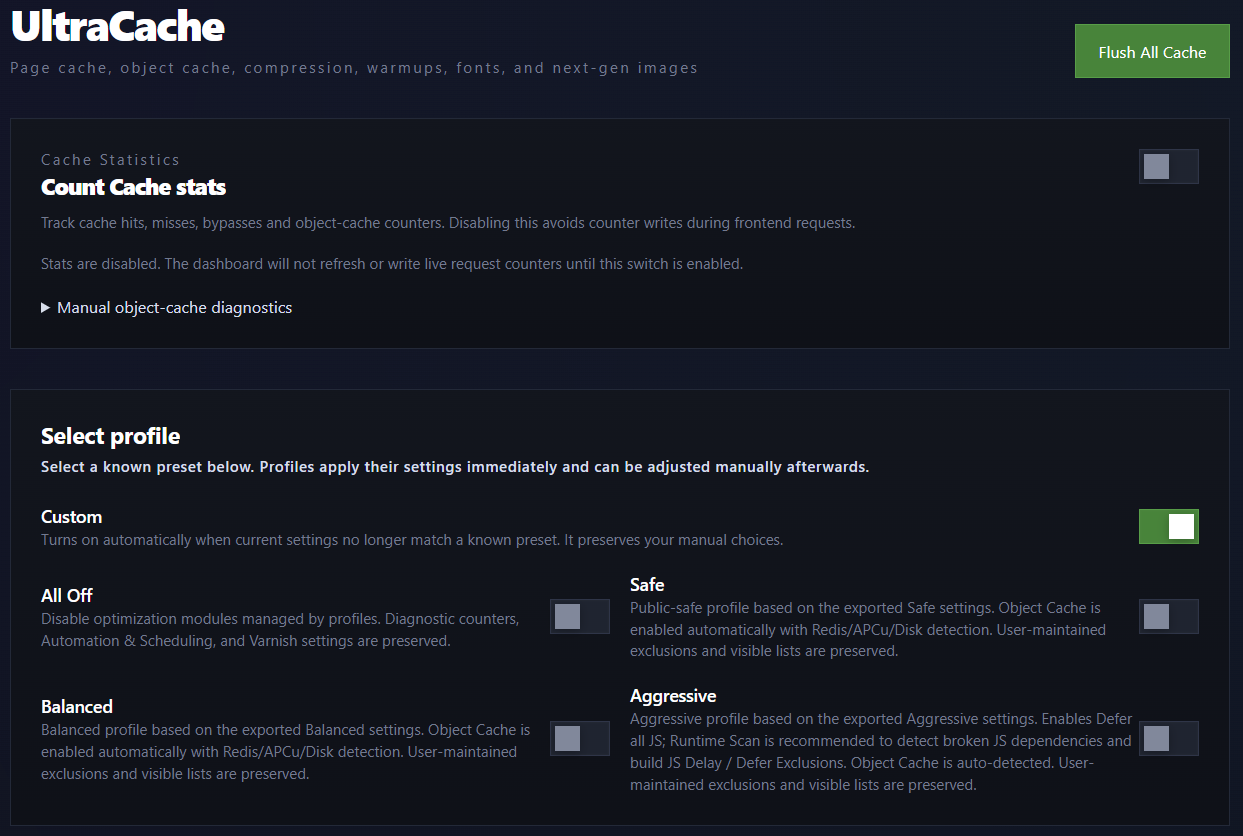
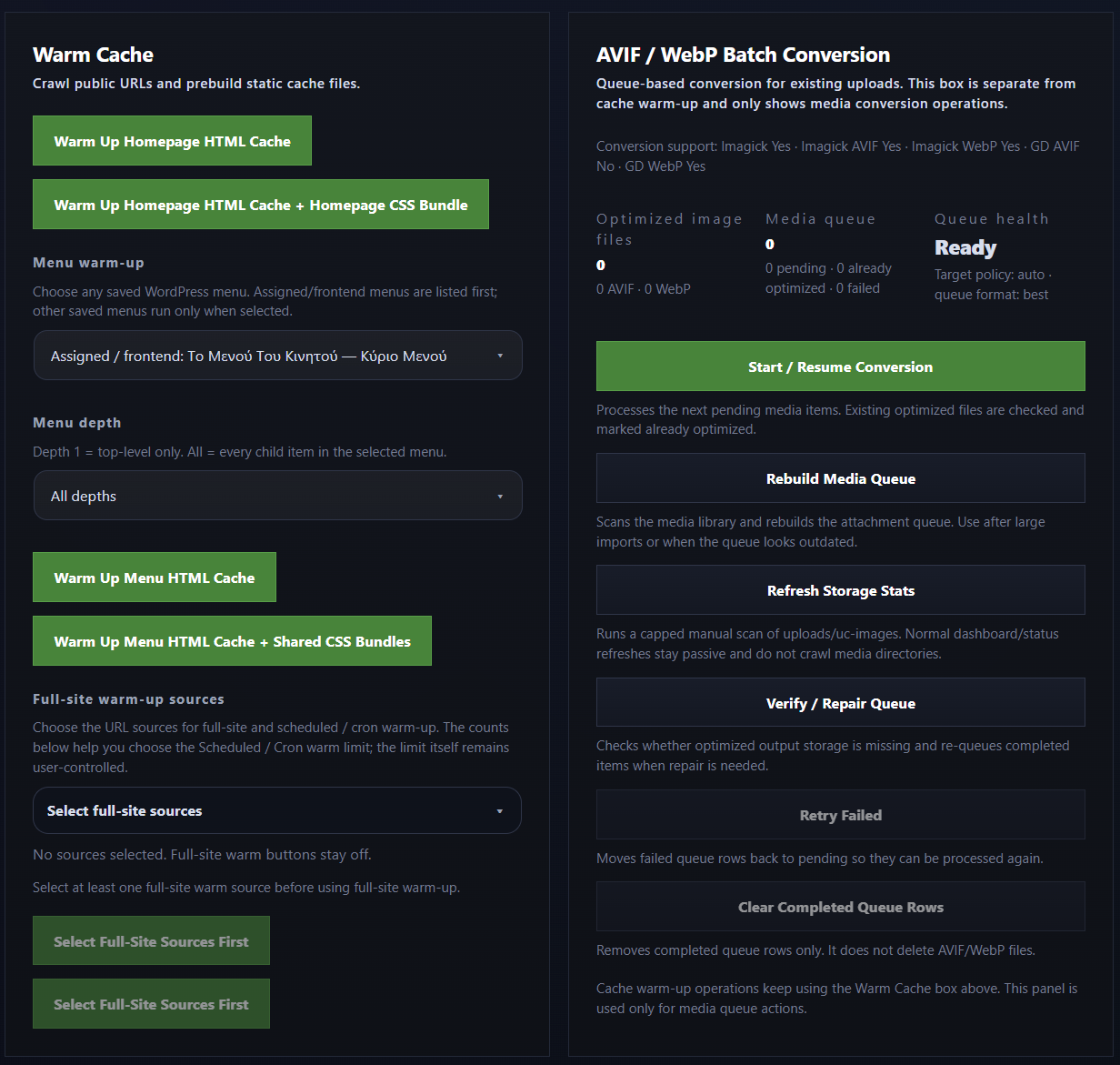
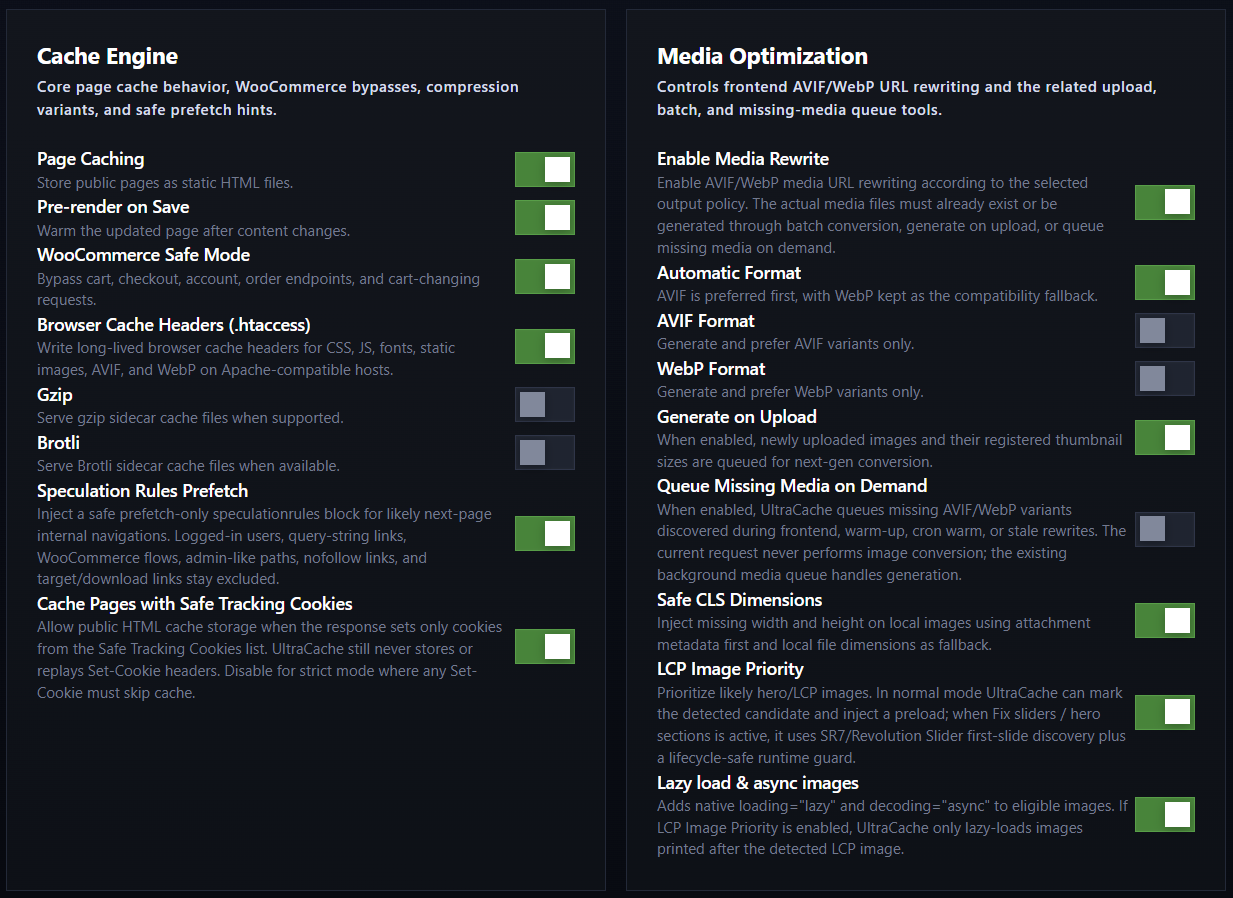
For developers
Is this your plugin? Show off the numbers.
Add a live badge to your site, docs or GitHub README. It updates on its own — no account needed.
Best UltraCache alternatives
All AVIF plugins →





FAQ
UltraCache: quick answers
Straight answers, pulled from live WordPress.org data.
Live data from WordPress.org · checked Oct 16, 2026
Is UltraCache free?
Yes. UltraCache is free to download and use from the official WordPress.org plugin directory.
Is UltraCache safe to use in 2026?
UltraCache is a solid plugin choice in 2026, with a few things worth checking first. It runs on 10+ sites, is rated 5/5 and was last updated 2 months ago, and scores 69/100 on our health check.
How many websites use UltraCache?
UltraCache is active on 10+ WordPress websites and has been downloaded 1,356 times since it launched in June 2026. It was downloaded 90 times in the last 30 days.
Does UltraCache work with WordPress 7.1?
Yes. The developer has tested UltraCache up to WordPress 7.1.3, the latest release. It requires WordPress 6.9 or newer.
What PHP version does UltraCache need?
UltraCache requires PHP 8.1 or higher. Most hosts run PHP 8.x today, so it works on any modern WordPress hosting.
When was UltraCache last updated?
The latest version, 3.05.04, was released on August 21, 2026 (2 months ago).
Who makes UltraCache?
UltraCache is developed and maintained by Byron Iniotakis.
What are the best alternatives to UltraCache?
The most popular alternatives to UltraCache are Optimole (200K+ installs), Modern Image Formats (100K+ installs) and Robin Image Optimizer (100K+ installs).
Powered by PageForge
Want thousands of pages that rank like these? Build them in an afternoon.
This directory runs on the same engine as PageForge. Turn any spreadsheet, CSV or API into thousands of fast, SEO-ready WordPress pages — with schema, internal links and AI-written copy baked in.
- CSV, Google Sheets & API data sources
- AI content, schema & internal links per page
- Works with Elementor, Gutenberg, Yoast & Rank Math
- Free on WordPress.org — no credit card


