


Slider Ultimate
Add a responsive slider to any page with a block shortcode. Multiple slide effects. WooCommerce slider integration.

Solid choice
Slider Ultimate is a solid plugin choice in 2026, with a few things worth checking first. It runs on 500+ sites, is rated 3.9/5 and was last updated 1 month ago, and scores 78/100 on our health check.
- Tested with the latest WordPress (7.1)
- Small user base (500+ active installs)
How does it stack up?
Side-by-side on installs, updates, ratings & support



Daily downloads
Download spikes usually follow a new release — each site that auto-updates counts as a download.
Rankings
Where Slider Ultimate stands todayWordPress.org search rankings
Live position in the plugin search, top 100| Keyword | Position |
|---|---|
| carousel | >100 |
| responsive slider | #64 |
| Slide | #65 |
| slide show | #9 |
| slider | #73 |
Version adoption
Share of active sites per release.
Rating breakdown
★★★★★★★★★★ 3.9 from 20 reviews
About Slider Ultimate
From the official readme · v2.2.10Description
Ultimate Slider is an easy-to-use responsive slider plugin that lets you add a clean, modern, image slider to any page on your WordPress site using a simple Gutenberg block or slider shortcode. Create a high-resolution full-width slider that looks great and that transitions well into a beautiful mobile slider.
Key Slider Features
- Responsive full-width slider layout that adapts to any page setup and size
- Includes a Gutenberg block, so you can add the slider to any page, post, sidebar or widget area on your site
- Simple slider shortcode for adding the slider to any page
- Create an unlimited number of slides for display in your slider
- Create different slideshows using the built-in slider categories
- Ultimate Product Catalog slider integration
- Drag and drop slides to re-arrange slider order
There are various slider customization options, including slider autoplay and the ability to set the slider delay and slide interval times. There is also a custom CSS input that lets you further modify the slider styling, so you can get it looking and working exactly as you need.
[ultimate-slider]
Simply insert the shortcode above into any page to display your slider.
Alternatively you can use the Display Slider block, which you can find by searching for it or directly in the Ultimate Slider block section.
The Ultimate Slider plugin also fully integrates with the Ultimate Product Catalog plugin. This means that you can choose to have a slide’s content and image pulled directly from a specific product from the Ultimate Product Catalog. Alternatively, you can choose to just type in the slide content and set either the featured image or the first image in your post as the slide image.
Each slide has a customizable title and text area. You can also add custom links to each slide in the form of buttons, offering your visitors an easy and upfront way of accessing the most important pages on your site.
Additional Features
- Custom post type for easy integration with other WordPress functionality
- Customizable slider options, including autoplay, and slide interval and slide delay time
- Custom CSS input to modify slider styling
- Add YouTube videos to your slider
- Carousel mode
- Choose the aspect ratio for your slider
- Timer bar so visitors know when the slide will change
- Choice of dots or thumbnails for slide navigation
- Bulk edit slides (e.g. to assign categories, etc.)
This jQuery slider is your best option for adding a responsive slideshow to your WordPress site. Whether you just need a simple responsive banner at the top of your homepage or a custom slider with mutliple images and content, our wide array of options will allow to set this up in no time. With options for a carousel slider, slider effects and more, you can customize it to your needs and create the perfect responsive mobile slider.
WooCommerce Slider (Requires Premium)
Liven up your WooCommerce product pages by replacing the default image area with a responsive slideshow. Our custom slider option lets you showcase your different product images in an effective, attractive manner.
The WooCommerce slider integration also gives you an option to add a new banner or responsive slideshow to any page that is automatically populated with the images and content from your WooCommerce products.
- Responsive WooCommerce slider on your product pages, taking your WooCommerce images to the next level
- Automatically populated with your product images, no extra work
- All animated slider effects apply to the WooCommerce slider as well
- Add a new banner or responsive slideshow that showcases your products anywhere on your site
- Create a carousel slider that lets you show multiple images at once
- The responsive WooCommerce slider looks great on all screens and is a great option as a mobile WooCommerce slider
Premium Features
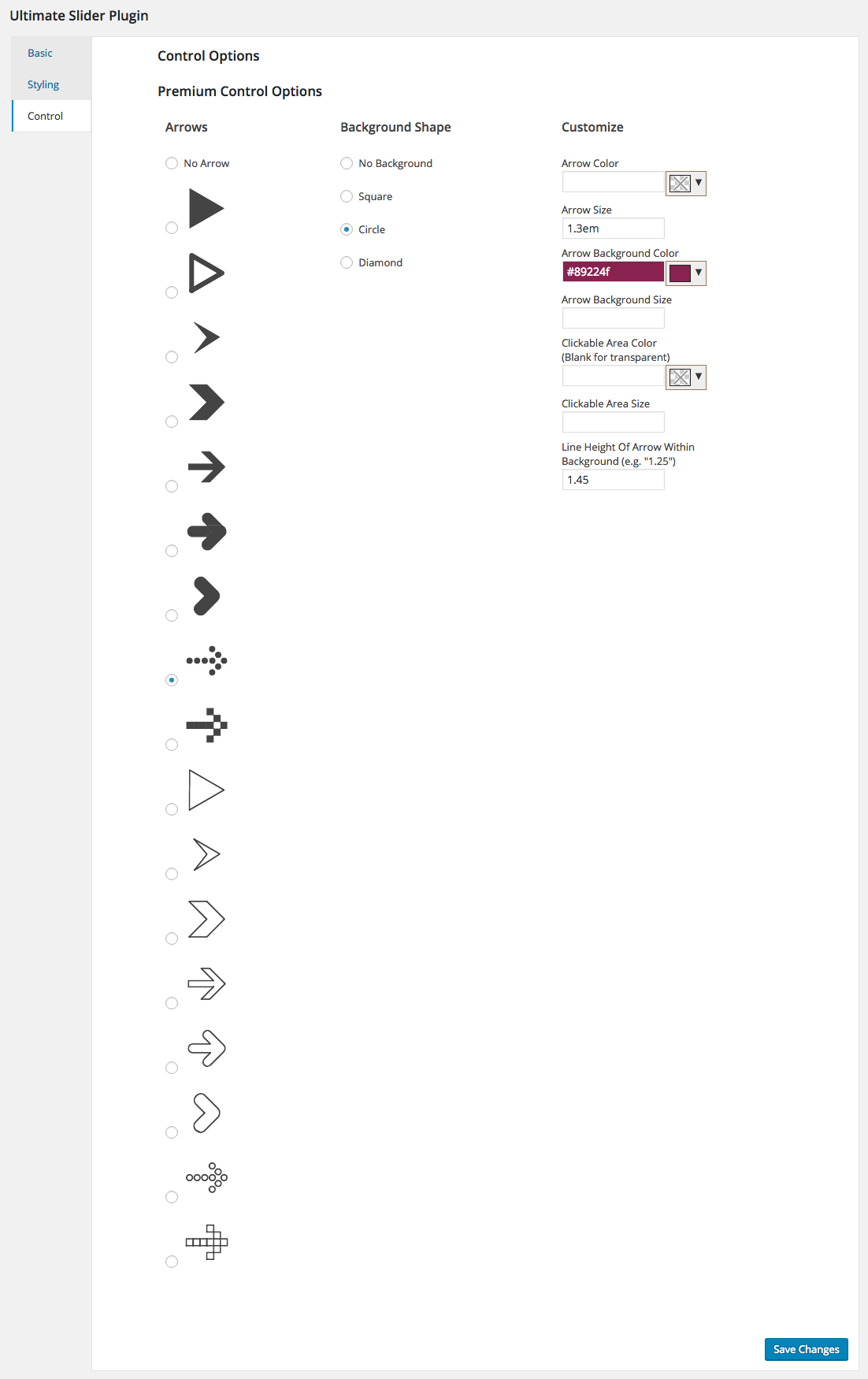
- Choose from ~20 arrows and set any color, size or background you’d like without any coding
- Option to replace the main image on the WooCommerce Product Page with an image slider of all of a product’s images
- Lightbox option to create scrolling galleries with the carousel feature
- Multiple slide transition effects
- Title animations for your slides
- Options to hide certain slide elements in mobile view
- Set a separate aspect ratio for the slider for mobile view
- Option to force the slider to take the full width of the window, regardless of theme containers
- Option to add watermarks to your slides to protect your images
- Styling options, including the font family, size and color of your slide’s title, text and buttons
Shortcode
- [ultimate-slider]: displays all slides that you’ve created, can accept the attributes ‘category’ (set to a category’s slug), to display only slides from a certain category, and ‘slider_type’ to display WooCommerce products without having to create new individual slides for them
For more information, please visit our WordPress slider plugin page.
For help and support, please see:
- Our FAQ page, here: https://wordpress.org/plugins/ultimate-slider/faq/
- Our documentation, here: https://www.etoilewebdesign.com/support-center/?Plugin=US&Type=FAQs
- The Ultimate Slider support forum, here: https://wordpress.org/support/plugin/ultimate-slider
Installation
- Upload the ‘ultimate-slider’ folder to the ‘/wp-content/plugins/’ directory
- Activate the plugin through the ‘Plugins’ menu in WordPress
or
- Go to the ‘Plugins’ menu in WordPress and click ‘Add New’
- Search for ‘Ultimate Slider’ and select ‘Install Now’
- Activate the plugin when prompted
Getting Started
-
To create slides:
- Click on ‘Ultimate Slider’ in the WordPress admin sidebar menu
- Click on ‘Add New’
- Enter the slide title in the title area and any desired slide content text in the main post content area
- Use the ‘Featured Image’ area on the right to set the slide image
- Use the ‘Slide Options’ area to configure where the slide content is pulled from, add buttons to the slide and choose whether to display the featured image or a YouTube video
- Select and/or create slider categories and slider tags in the right-side menu
- Click the ‘Publish’ button
-
To display the slider on your site:
- Place the [ultimate-slider] shortcode in the content area of any page you’ve created and it will display your slider
- Use the ‘category’ attribute to display only slides from a specific category. This can be used as a way of making two different sliders.
-
WooCommerce and Ultimate Product Catalog integration:
- Using the ‘Content’ tab in the ‘Slide Options’ area, when creating/editing a slide, you can choose to have your slide pull content from a specific WooCommerce or UPCP product
- You can use the ‘slider_type’ attribute in the shortcode to display WooCommerce or UPCP products without having to create new individual slides for them (i.e. [ultimate-slider slider_type=”woocommerce”] and [ultimate-slider slider_type=”upcp”])
-
Customize your slider experience by making use of the many available settings and options, including autoplay, aspect ratio, carousel mode, timer bar, arrow style, slide transition effect (premium), watermark on your images (premium) and more.
For a list of specific features, see the Ultimate Slider description page here: https://wordpress.org/plugins/ultimate-slider/.
For help and support, please see:
- Our FAQ page, here: https://wordpress.org/plugins/ultimate-slider/faq/
- Our documentation, here: https://www.etoilewebdesign.com/support-center/?Plugin=US&Type=FAQs
- The Ultimate Slider support forum, here: https://wordpress.org/support/plugin/ultimate-slider
Frequently asked questions
How do I add my slider to my site?
Add the [ultimate-slider] shortcode to any page on your site.
How do I create a new slide?
Click on “Ultimate Slider > Add New” in your WordPress admin menu.
How do I change the slide transition effect?
There is an option called “Slide Transition Effect” in the “Basic” area of the slider settings that allows you choose different slider transition effects.
Can I stop the slider from autoplaying when the page loads?
There is an option called “Autoplay Slideshow” in the “Basic” area of the slider settings that allows you to enable or disable autoplay.
How do I change how long each slide stays on the screen during autoplay?
In the “Basic” area of the slider settings, use the “Autoplay Delay” option to set how long the first slide stays on the screen when the page loads and the “Autoplay Interval” option to set how long every other slide thereafter stays on the screen.
Can I change the look and feel of the slider?
You can use the “Custom CSS” input in the “Basic” area of the settings to modify the styling of specific CSS classes and IDs used by the slider.
How do I integrate the Ultimate Product Catalog plugin?
When creating a new slide, or editing an existing one, select the “Content” tab in the “Slide Options” area (just under the main editor). Then select the radio button that says “Use UPCP product content.” Then select the product that you want to display from the drop down box.
How do I integrate WooCommerce?
When creating a new slide, or editing an existing one, select the “Content” tab in the “Slide Options” area (just under the main editor). Then select the radio button that says “Use WooCommerce product content.” Then select the product that you want to display from the drop down box.
How do I set the background image for a slide?
By default, the background image for a slide will be whatever you set as the Featured Image for the post. But, if you make use of Ultimate Product Catalog or WooCommerce integration, then it will be the main product image from your chosen product instead.
How do I change the order of the slides in my slider?
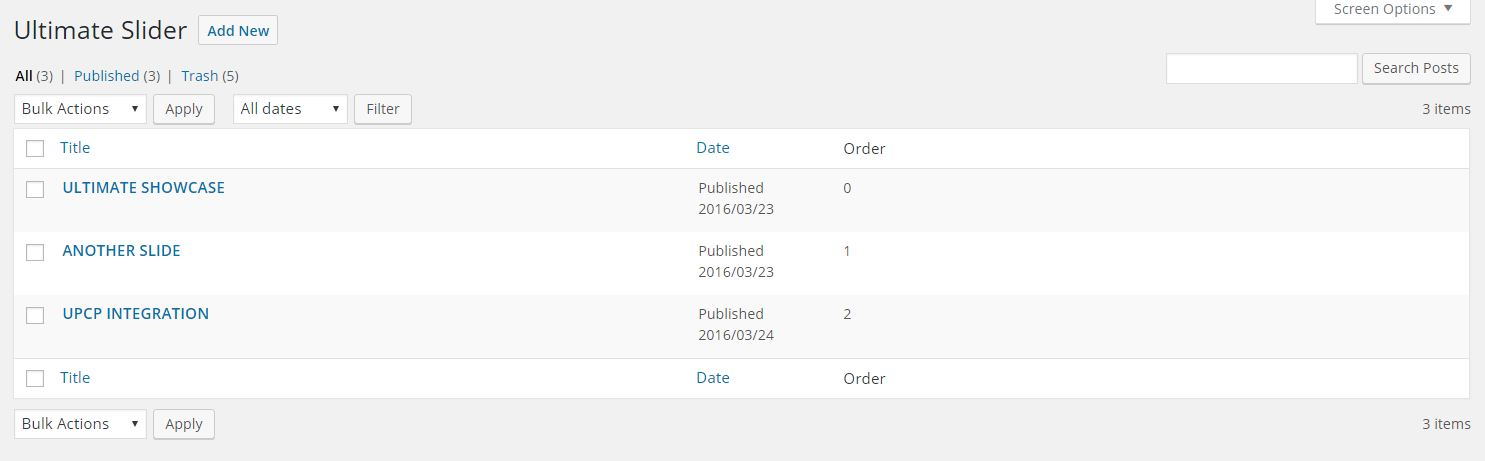
Click on “Ultimate Slider” in your WordPress admin menu to access the table/list of all the slides you’ve created. You can drag and drop the elements in this table to re-order the slides in your slider.
Can I restrict the number of characters in the title and text for a slide?
Yes. When creating or editing a slide, there are two options in the “Content” tab – called “Max Title Characters” and “Max Body Characters” – that allow you to do this.
Changelog
2.2.10 (2026-07-29)
- Added a direct support option to the deactivation survey, making it easier to get help right away if you’re uninstalling due to an issue.
2.2.9 (2026-05-18)
- Compatible with WordPress 7.0.
2.2.8 (2025-04-29)
- Tested with WordPress 6.8.
2.2.7 (2024-11-25)
- Tested with WordPress 6.7.
2.2.6 (2024-07-16)
- Tested with WordPress 6.6.
- Removed deprecated notices.
2.2.5 (2023-11-07)
- Tested for WordPress 6.4 compatibility/support.
Screenshots





For developers
Is this your plugin? Show off the numbers.
Add a live badge to your site, docs or GitHub README. It updates on its own — no account needed.
Best Slider Ultimate alternatives
All carousel plugins →




FAQ
Slider Ultimate: quick answers
Straight answers, pulled from live WordPress.org data.
Live data from WordPress.org · checked Sep 30, 2026
Is Slider Ultimate free?
Yes. Slider Ultimate is free to download and use from the official WordPress.org plugin directory.
Is Slider Ultimate safe to use in 2026?
Slider Ultimate is a solid plugin choice in 2026, with a few things worth checking first. It runs on 500+ sites, is rated 3.9/5 and was last updated 1 month ago, and scores 78/100 on our health check.
How many websites use Slider Ultimate?
Slider Ultimate is active on 500+ WordPress websites and has been downloaded 145,147 times since it launched in April 2016. It was downloaded 325 times in the last 30 days.
Does Slider Ultimate work with WordPress 7.1?
Yes. The developer has tested Slider Ultimate up to WordPress 7.1.2, the latest release. It requires WordPress 4.0 or newer.
When was Slider Ultimate last updated?
The latest version, 2.2.10, was released on August 20, 2026 (1 month ago).
Who makes Slider Ultimate?
Slider Ultimate is developed and maintained by Rustaurius.
What are the best alternatives to Slider Ultimate?
The most popular alternatives to Slider Ultimate are Shortcodes Ultimate (400K+ installs), Carousel, Slider, Photo Gal… (70K+ installs) and Carousel Slider Block for G… (50K+ installs).
Powered by PageForge
Want thousands of pages that rank like these? Build them in an afternoon.
This directory runs on the same engine as PageForge. Turn any spreadsheet, CSV or API into thousands of fast, SEO-ready WordPress pages — with schema, internal links and AI-written copy baked in.
- CSV, Google Sheets & API data sources
- AI content, schema & internal links per page
- Works with Elementor, Gutenberg, Yoast & Rank Math
- Free on WordPress.org — no credit card


