



Ultimate Classified Listings – Classifieds, Directory & Marketplace
Lightweight classifieds & directory plugin: frontend submission, AJAX search, maps with "near me", SEO schema and sharing. Free, no API key.

Solid choice
Ultimate Classified Listings is a solid plugin choice in 2026, with a few things worth checking first. It runs on 50+ sites, is rated 5/5 and was last updated 2 weeks ago, and scores 75/100 on our health check.
- Actively developed — last update 2 weeks ago
- Tested with the latest WordPress (7.1)
- Small user base (50+ active installs)
- Very few reviews so far
How does it stack up?
Side-by-side on installs, updates, ratings & support



Daily downloads
Download spikes usually follow a new release — each site that auto-updates counts as a download.
Rankings
Where Ultimate Classified Listings stands todayWordPress.org search rankings
Live position in the plugin search, top 100| Keyword | Position |
|---|---|
| classified ads | #11 |
| classifieds | #12 |
| directory | #58 |
| listings | #38 |
| Marketplace | #24 |
Version adoption
Share of active sites per release.
Rating breakdown
★★★★★★★★★★ 5 from 2 reviews
About Ultimate Classified Listings
From the official readme · v2.4Description
Ultimate Classified Listings turns any WordPress site into a classifieds, directory or marketplace website — without the bloat, and without paying for the basics. Frontend listing submission, AJAX search with filters, maps with a “near me” radius, unlimited custom fields and a seller dashboard are all included in the free core. A 60-second setup wizard creates every page for you and can even load sample listings so you have something to look at from minute one.
It stays deliberately lightweight. There is no page-builder dependency and no heavy framework loaded on every page — assets load only where a listing, search or dashboard is actually rendered. That keeps front-end pages fast and makes the plugin easy to drop onto an existing theme.
Whether you’re building a Craigslist-style classifieds board, a local business directory, a real-estate site, a jobs board, an automotive marketplace or a community “buy & sell” section, you get a complete, secure, mobile-friendly listing workflow out of the box — and everything advertised here works in the free version.
Why choose Ultimate Classified Listings
- Free where the big plugins paywall. Maps, AJAX search, frontend submission, custom fields, SEO structured data and social sharing are all in the free core — not locked behind an add-on bundle.
- No API keys to chase. Interactive maps and “near me” radius search run on OpenStreetMap (Leaflet) out of the box. Prefer Google Maps? Add a key and switch — your choice, not a requirement.
- SEO-ready out of the box. Every listing automatically outputs schema.org Product, Offer and Breadcrumb structured data (JSON-LD) plus Open Graph / Twitter Card tags, so listings are eligible for Google rich results and look great when shared. It steps aside politely when a dedicated SEO plugin is already handling social meta.
- Lightweight & fast. Scoped CSS/JS, conditional asset loading, and no bloated builder to power your listings.
- Security-first. CSRF nonces on every AJAX endpoint, capability checks on every action, hashed passwords, email-injection protection and rate-limited auth flows.
- Theme & builder friendly. Shortcodes work in Gutenberg, Elementor, Divi and any builder, and every template can be overridden from your theme.
- Developer friendly & multilingual. 40+ hooks and filters, REST API support on the listing post type, and WPML / Polylang awareness.
Core features (all free)
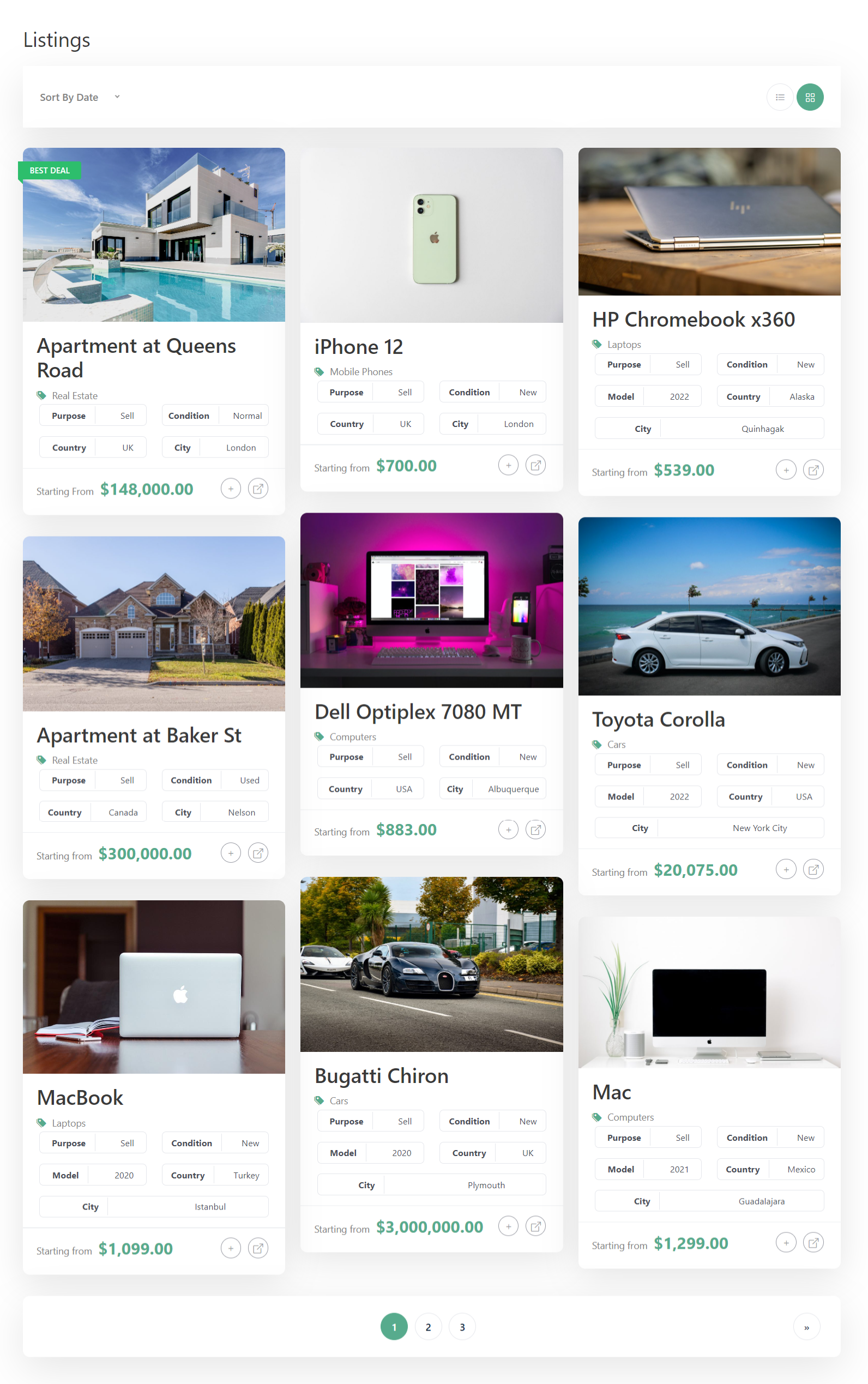
- Frontend listing submission with custom field sections, image galleries, video and maps
- Seller dashboard — add, edit, delete and manage listings, plus profile management
- Unlimited custom fields and field sections via a drag-and-drop builder
- Categories and tags with custom icons / images
- AJAX-powered search with filters, price range, custom-field filters and sort — three search-form styles
- Map search — matching results plotted on a clustered map with a “Near me” / radius filter
- SEO structured data — automatic Product, Offer & Breadcrumb JSON-LD + Open Graph / Twitter cards
- Social sharing — Facebook, X, WhatsApp, LinkedIn and email buttons on every listing (no third-party scripts or tracking)
- Related listings — same-category listings shown on each detail page to keep visitors browsing
- Featured listings — promote any listing with a badge and float it to the top of results; one-click star toggle in the admin
- Listing expiry — optionally expire listings after N days, email the seller before/after, and let sellers renew from their dashboard
- Favorites — visitors can save listings and revisit them from the dashboard
- Listing comparison — side-by-side compare table
- One-click demo importer — seed realistic sample listings for your chosen site type from the setup wizard
- Google Maps or OpenStreetMap (Leaflet) with per-listing location markers
- Gallery slider or grid-with-popup, plus card image, corner-radius and colour controls
- Two seller-registration modes (auto-approve or manual approval) and two submission modes (publish or pending review)
- Contact-seller form with reCAPTCHA and email-injection protection
- Dark mode (off / auto / toggle / force)
- Four listing card styles, three single-listing styles
- Full theme template overrides under
/your-theme/ucl/...
Installation
- In the WordPress dashboard go to Plugins → Add New.
- Search for Ultimate Classified Listings.
- Click Install Now, then Activate.
- The Setup Wizard launches automatically — pick your site type, and it creates the Listings, Search, Categories and Seller Dashboard pages for you (and can load sample listings).
- Fine-tune anything under Ultimate Classified Listings → Settings.
Frequently asked questions
Is this plugin really free?
Yes. Everything described on this page — maps, AJAX search, frontend submission, custom fields, favorites, comparison, SEO schema, social sharing and related listings — is in the free core. There is no paywall on the core workflow.
Is it good for SEO?
Yes. As of 2.2 each listing automatically outputs schema.org Product, Offer and BreadcrumbList structured data (JSON-LD) plus Open Graph and Twitter Card meta tags. That makes listings eligible for Google rich results (price, image, breadcrumbs) and gives them a rich preview when shared on social media. If you run a dedicated SEO plugin (Yoast, Rank Math, SEOPress, All in One SEO), the social meta is skipped automatically to avoid duplicates, while the classified-specific Product schema is still added. You can turn any of it off under Settings → SEO & Sharing.
Does it work with Elementor, Gutenberg or Divi?
Yes. The plugin is shortcode-based, so its listing, search, categories and dashboard blocks drop into Gutenberg, Elementor, Divi or any other builder. Every template can also be overridden from your theme.
Do I need a Google Maps API key?
No. Maps and “near me” radius search run on OpenStreetMap (Leaflet) with no key required. If you prefer Google Maps, add your API key in Settings and switch.
Is it lightweight?
Yes — that’s a core design goal. There’s no page-builder dependency and assets load only on pages that actually render a listing, search or dashboard, so the rest of your site stays untouched.
Can I promote or highlight specific listings?
Yes. As of 2.3 you can mark any listing as featured — from the Promotion box on its edit screen, or with the one-click star toggle in the Listings admin table. Featured listings get a badge on their card and detail page and, by default, float to the top of listing and search results (the visitor’s chosen sort still applies within each group). You can build a dedicated featured section anywhere with [uclwp_listings featured="only"], and turn any of this off under Settings → Featured Listings.
Can listings expire automatically?
Yes, as of 2.4. Turn on Settings → Listing Expiry and choose how many days a listing stays live after it’s published. When a listing expires it’s moved to Draft (or Trash) so it disappears from all public views. You can email the seller when it expires and a few days before, and — if you allow it — sellers renew expired listings with one click from their dashboard. This is off by default, and turning it on only affects listings published from that point on; your existing listings are never changed.
Can I let users pay to post listings?
Built-in payment gateways and listing packages are on the roadmap. Today you can require admin approval before listings go live via Settings → Submission Mode.
How are seller passwords stored?
Passwords are never stored in plain text. Sellers awaiting manual approval have only a salted hash stored; legacy entries from very old versions are routed through the standard WordPress password-reset flow on approval.
How does the plugin protect against CSRF and abuse?
Every AJAX endpoint verifies a nonce via check_ajax_referer() (separate public and admin nonces), every action runs a capability check, and login, registration and contact-seller endpoints are rate-limited.
Can I try it with sample content?
Yes. The setup wizard offers a one-click “Load sample listings” option that seeds realistic listings — with categories, prices and map locations — tailored to the site type you pick. Remove them all again in one click from the wizard’s final screen whenever you’re ready.
How do I show listings on a map?
Add the [uclwp_search_map] shortcode to any page (the auto-created Search page includes it), or enable it inline with [uclwp_search_results map="enable"]. The map plots every matching listing that has coordinates, clusters nearby pins, and offers a “Near me” button plus a radius selector.
Changelog
Adds optional automatic listing expiry — expire after N days, email sellers before/after, and one-click renew from the dashboard. Off by default; existing listings are never changed. Backward compatible.
2.4
- Feature: Automatic listing expiry. Turn it on under Settings → Listing Expiry and listings expire a configurable number of days after they’re published. A daily cron job moves each expired listing to Draft (or Trash), so it drops out of every public listing, search and map view. Off by default and fully backward compatible: enabling it only affects listings published from that point on, and any listing without an expiry date is never touched.
- Feature: Per-listing expiry control. A “Listing Expiry” box on the edit screen lets you set an exact expiry date or mark a listing “Never expires”, and an “Expires” column in the Listings table shows each listing’s date at a glance.
- Feature: Seller renewals. Expired listings show a “Renew” button in the seller dashboard (when allowed) that gives the listing a fresh expiry period and puts it back online in one click.
- Feature: Expiry emails. Optionally email the listing owner when their listing expires, plus a reminder a configurable number of days beforehand. All subjects/bodies are filterable.
- Developer: new meta
ucl_listing_expiry(Unix timestamp; absent = never), actionsuclwp_listing_expiredanduclwp_listing_renewed, and filters on every email string. The daily event isuclwp_expire_listings_eventand is cleared on deactivation.
2.3
- Feature: In-dashboard documentation. A new “Docs” menu (under Ultimate Classified Listings, just before the Setup Wizard) lists every shortcode in plain language — what each one does, its attributes and defaults, copy-ready examples, and which page it belongs on — so anyone can understand how the plugin works without leaving wp-admin.
- Feature: Featured (promoted) listings. Mark any listing as featured and it gets a “Featured” badge on its card and single-listing page, and — by default — floats to the top of listing and search results while the visitor’s chosen sort still applies within the featured and non-featured groups.
- Feature: One-click star toggle in the wp-admin Listings table plus a “Promotion” checkbox on the listing edit screen, so admins can feature/un-feature without opening each listing. The AJAX toggle is nonce-verified and capability-checked (
edit_post). - Feature:
[uclwp_listings featured="only"]renders a dedicated featured-listings section anywhere;featured="first"floats featured to the top of any[uclwp_listings]query. - Feature: New Settings → Featured Listings panel — enable/disable the feature, toggle “show featured first”, and customise the badge text.
- Developer: featured state is stored as post meta
ucl_featured= ‘1’ (deleted when un-featured). New actionuclwp_listing_featured_changed; ordering helperUCLWP_Featured::apply_featured_first()is reusable and idempotent. - Backward compatible: a listing with no featured flag behaves exactly as before; featured-first ordering never excludes any listing (it LEFT JOINs the flag), and the whole feature is off in one setting.
2.2
- Feature: SEO structured data. Every single-listing page now automatically outputs schema.org Product + Offer and BreadcrumbList structured data as JSON-LD, making listings eligible for Google rich results (price, image, availability, breadcrumbs). Price is read from the listing’s
ucl_regular_pricemeta and currency from Settings;conditionmaps to schemaitemConditionwhen set. Filterable viauclwp_seo_product_schemaanduclwp_seo_breadcrumb_schema. - Feature: Open Graph + Twitter Card meta on single listings, so a shared listing renders a rich preview (title, description, image, price) on Facebook, X, WhatsApp, Slack, etc. Suppressed automatically when a major SEO plugin (Yoast, Rank Math, SEOPress, All in One SEO, The SEO Framework, Slim SEO) is active and already emitting social tags — no duplicate tags. Filter:
uclwp_seo_output_social. - Feature: Social sharing row on single listings — Facebook, X, WhatsApp, LinkedIn and email buttons built entirely from plain links. No third-party scripts, pixels or tracking. Networks are filterable via
uclwp_share_networks. - Feature: Related listings. Each listing detail page can show up to N other published listings from the same category (rendered with your chosen card style), which keeps visitors browsing and strengthens internal linking for SEO. Configurable count and heading; query filterable via
uclwp_related_listings_args. - Feature: New Settings → SEO & Sharing panel to toggle structured data/social meta, social share buttons and related listings, and to set the related-listings count and heading. All three features default to enabled but are purely additive.
- Compatibility: “Tested up to” bumped to WordPress 7.1.
- All 2.2 features are backward compatible: existing installs simply gain
<head>schema/meta and two new single-page blocks, each individually removable in Settings, with theme-overridable, filterable output.
2.1
- Feature: One-click demo importer. The setup wizard now offers a “Load sample listings” option that seeds a small set of realistic, published listings for the chosen site type (classifieds, real estate, jobs, local services or automotive). Each sample carries a category, price, custom fields and real map coordinates deliberately clustered across several metros so the new map view has something to show immediately. Every imported post is flagged with
_ucl_sampleand tracked in theuclwp_sample_idsoption; a “Remove sample listings” button on the wizard’s final screen deletes the whole set in one click. No external images are fetched, so the importer works on sites with no outbound network. - Feature: Map-based search results with clustering. New
[uclwp_search_map]shortcode renders the listings matching the current search on an interactive Leaflet map, using the bundledleaflet.markerclusterlibrary to group nearby pins. Each pin opens a popup with the listing thumbnail, title, city, price and a “View listing” link. The map reads the same query args as[uclwp_search_results], so it honours the active filters. Also available inline via a newmap="enable"attribute on[uclwp_search_results](withmap_height). The auto-created Search page now includes the map between the form and the results. - Feature: “Near me” / radius search. The map’s optional toolbar adds a geolocation button and a radius selector (km). Choosing a radius reloads with
ucl_lat/ucl_lng/ucl_radiusquery args, and the search query now restricts results to a bounding box around that point (coordinates cast asDECIMALso fractional degrees aren’t truncated). Radius presets are filterable viauclwp_search_map_radius_presets, the value viauclwp_search_radius_km, and the marker cap viauclwp_search_map_max_markers. - Both features are backward compatible: existing installs see no change until they enable the map shortcode/attribute or run the importer, and the map template is theme-overridable at
/your-theme/ucl/shortcodes/search/map.php.
2.0 – 14 June 2026
- Bug fix: When the archive/search-results top bar was rendered (via
[uclwp_search_results top_bar="enable"]or anywhere theuclwp_archive_topbaraction fires) and a visitor changed the sort dropdown, the resulting URL kept onlysort_byandlayoutand dropped every other active query arg — keywords, price range, custom-field filters, etc. The top bar now re-emits every other$_GETvalue as a hidden input inside the form (using PHP bracket notation for nested sub-arrays likeregular_price[min]), so the sort round-trip preserves the active filter set. The grid/list switcher anchors already usedadd_query_arg()and were unaffected. - Added: New helper
uclwp_flatten_query_args()that flattens nested arrays intoname[sub][sub]/ value pairs suitable for hidden form inputs. Reusable from any template that needs to pass current GET state through a<form method="GET">.
1.16.0
- Feature: Two new single-listing styles. Pick one in Settings → Templates Settings → Single Listing Style. Style 1 (Classic, default) is the existing look. Style 2 (Card Stack) renders each section as a raised card with a coloured left rail and a chip-style heading — e-commerce / property-listing feel. Style 3 (Minimal) drops the card chrome entirely and separates sections with thin top dividers. Implemented as a body class (
ucl-listing-style-1/2/3) added on single-listing pages; templates are unchanged so all theme overrides keep working. - Feature: Price quick-pick chips are now editable from the admin. New “Price Quick-Pick Presets” textarea in Settings → Search Settings (right after Total Listings) — one numeric preset per line; each becomes a “Up to {price}” chip under the price range control in search styles 2 and 3. Leave blank to hide the chips entirely. Still filterable in code via
uclwp_search_price_chips. - Feature:
[uclwp_search_results]now supports atop_bar="enable"attribute (defaultdisable) that adds the same sort + grid/list switcher the[uclwp_listings]shortcode renders. - Feature: Per-listing map zoom level is now saved. The admin metabox map writes the user-chosen zoom into a hidden
ucl_listing_zoominput (Leafletzoomendand Googlezoom_changedevents both wired up); both the admin metabox save path and the frontend create/edit handler persist it; the single-listing template reads it back and the map opens at exactly that zoom on the frontend. - Improvement: Search style 2 polish — reduced cell min-height from 46px to 38px, button is now a properly sized pill (not a tall circle), inputs no longer have huge top/bottom padding. New
columnsshortcode attribute (1–6, default 4) controls how many secondary-field cells appear per row via CSS grid. Mobile collapses to 2 columns at ≤768px and 1 column at ≤480px. - Bug fix: Card image aspect ratio (Settings → Listings → Card Image Aspect Ratio) was not being applied. The CSS selector keyed off
[style*="--ucl-card-image-ratio"], which never matched because the variable is emitted via an inline<style>tag, not the element’sstyleattribute. The aspect-ratio rule now applies directly to.uclwp-grid-box-wrap .uclwp-imageand.uclwp-list-box-wrap .uclwp-image, so all four card styles honour the chosen ratio.
Screenshots


For developers
Is this your plugin? Show off the numbers.
Add a live badge to your site, docs or GitHub README. It updates on its own — no account needed.
Best Ultimate Classified Listings alternatives
All classified ads plugins →




FAQ
Ultimate Classified Listings: quick answers
Straight answers, pulled from live WordPress.org data.
Live data from WordPress.org · checked Sep 27, 2026
Is Ultimate Classified Listings free?
Yes. Ultimate Classified Listings is free to download and use from the official WordPress.org plugin directory.
Is Ultimate Classified Listings safe to use in 2026?
Ultimate Classified Listings is a solid plugin choice in 2026, with a few things worth checking first. It runs on 50+ sites, is rated 5/5 and was last updated 2 weeks ago, and scores 75/100 on our health check.
How many websites use Ultimate Classified Listings?
Ultimate Classified Listings is active on 50+ WordPress websites and has been downloaded 4,458 times since it launched in August 2022. It was downloaded 472 times in the last 30 days.
Does Ultimate Classified Listings work with WordPress 7.1?
Yes. The developer has tested Ultimate Classified Listings up to WordPress 7.1.2, the latest release. It requires WordPress 6.0 or newer.
What PHP version does Ultimate Classified Listings need?
Ultimate Classified Listings requires PHP 7.4 or higher. Most hosts run PHP 8.x today, so it works on any modern WordPress hosting.
When was Ultimate Classified Listings last updated?
The latest version, 2.4, was released on September 17, 2026 (2 weeks ago).
Who makes Ultimate Classified Listings?
Ultimate Classified Listings is developed and maintained by WebCodingPlace.
What are the best alternatives to Ultimate Classified Listings?
The most popular alternatives to Ultimate Classified Listings are Motors (9K+ installs), WPAdverts (4K+ installs) and AWP Classifieds (3K+ installs).
Powered by PageForge
Want thousands of pages that rank like these? Build them in an afternoon.
This directory runs on the same engine as PageForge. Turn any spreadsheet, CSV or API into thousands of fast, SEO-ready WordPress pages — with schema, internal links and AI-written copy baked in.
- CSV, Google Sheets & API data sources
- AI content, schema & internal links per page
- Works with Elementor, Gutenberg, Yoast & Rank Math
- Free on WordPress.org — no credit card


