



WP Twitter Auto Publish
Publish posts automatically to Twitter.

Solid choice
WP Twitter Auto Publish is a solid plugin choice in 2026, with a few things worth checking first. It runs on 3K+ sites, is rated 4.9/5 and was last updated 4 months ago, and scores 62/100 on our health check.
- Loved by users — 4.9/5 from 206 reviews
Daily downloads
Download spikes usually follow a new release — each site that auto-updates counts as a download.
Rankings
Where WP Twitter Auto Publish stands todayWordPress.org search rankings
Live position in the plugin search, top 100| Keyword | Position |
|---|---|
| add link to twitter | #2 |
| publish post to twitter | #1 |
| #3 | |
| twitter auto publish | #1 |
| wp twitter auto publish | #1 |
Version adoption
Share of active sites per release.
Rating breakdown
★★★★★★★★★★ 4.9 from 206 reviews
About WP Twitter Auto Publish
From the official readme · v1.7.7Description
Try it out on your free dummy site: Click here => https://tastewp.com/new/?pre-installed-plugin-slug=twitter-auto-publish
A quick look into WP Twitter Auto Publish :
★ Publish simple text message to Twitter
★ Publish message to Twitter with image
★ Filter items  to be published based on categories
★ Filter items to be published based on custom post types
★ Enable or disable wordpress page publishing
★ Customizable  message formats for Twitter
WP Twitter Auto Publish Features in Detail
The WP Twitter Auto Publish lets you publish posts automatically from your blog to Twitter. You can publish your posts to Twitter as simple text message or as text message with image. The plugin supports filtering posts based on custom post-types as well as categories.
The prominent features of the WP Twitter Auto Publish plugin are highlighted below.
Supported Mechanisms
The various mechanisms of posting to Twitter are listed below.
Simple text message
Text message with image
Filter Settings
The plugin offers multiple kinds of filters for contents to be published automatically.
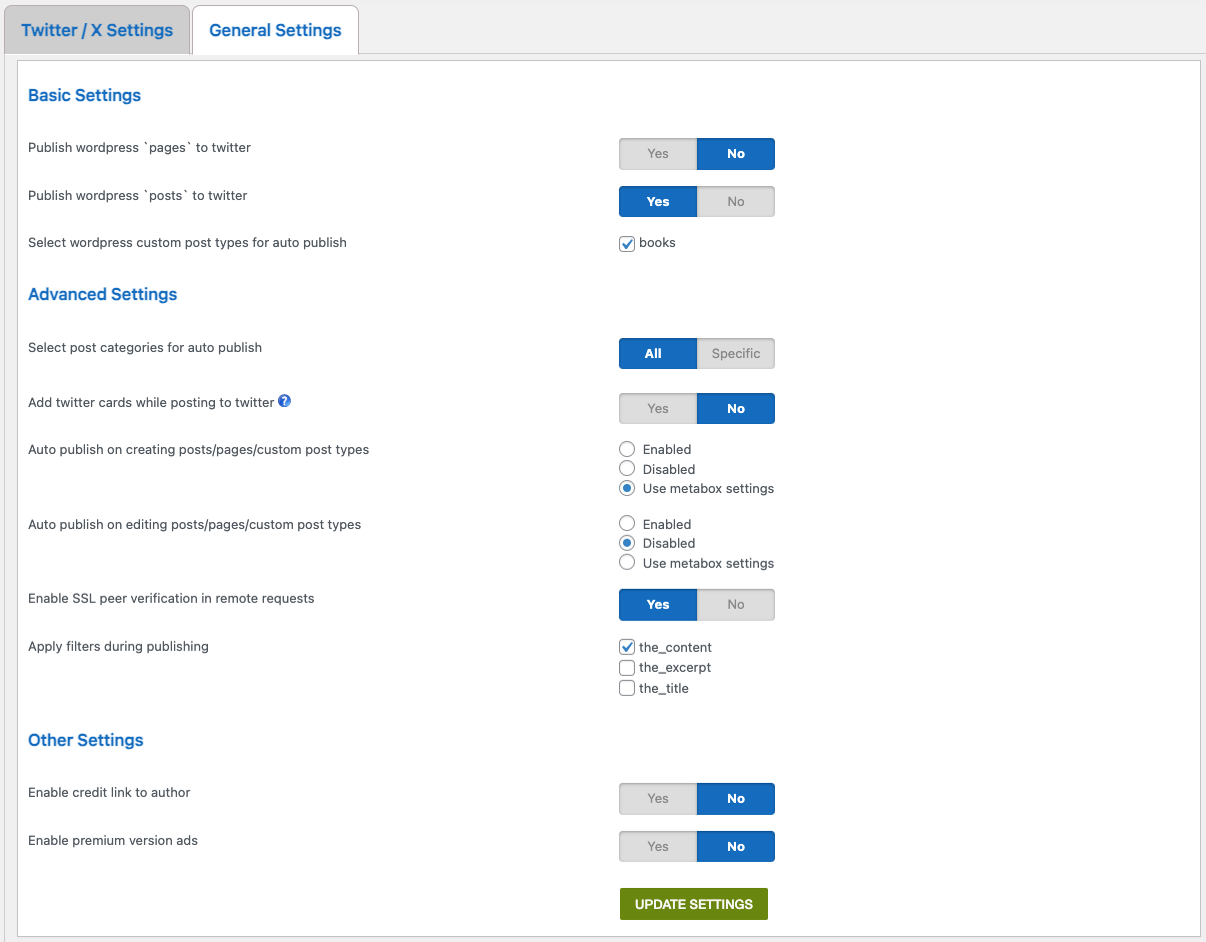
Enable or disable publishing of wordpress pages
Filter posts to be published based on categories
Filtering based on custom post types
Message Format Settings
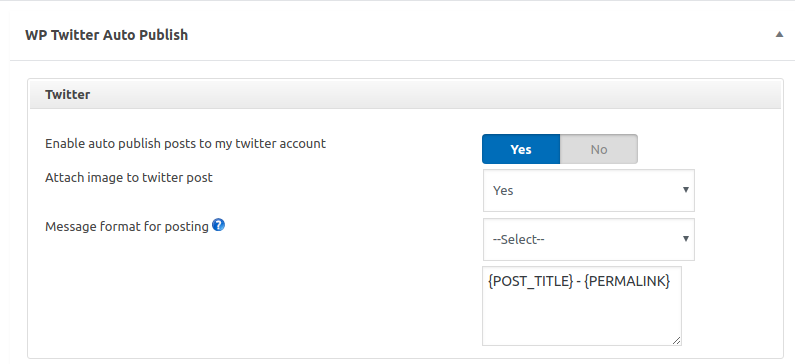
The supported post elements which can be published are given below.
Post title
Post description
Post excerpt
Permalink
Blog title
User nicename
Post ID
Post publish date
About
WP Twitter Auto Publish is developed and maintained by XYZScripts. For any support, you may contact us.
★ WP Twitter Auto Publish User Guide
★ WP Twitter Auto Publish FAQ
More Information
★ WP Twitter Auto Publish User Guide
★ WP Twitter Auto Publish FAQ
Troubleshooting
Please read the FAQ first if you are having problems.
Requirements
WordPress 3.0+
PHP 7.4+
Feedback
We would like to receive your feedback and suggestions about WP Twitter Auto Publish plugin. You may submit them at our support desk.
Installation
★ WP Twitter Auto Publish User Guide
★ WP Twitter Auto Publish FAQ
- Extract
twitter-auto-publish.zipto your/wp-content/plugins/directory. - In the admin panel under plugins activate WP Twitter Auto Publish.
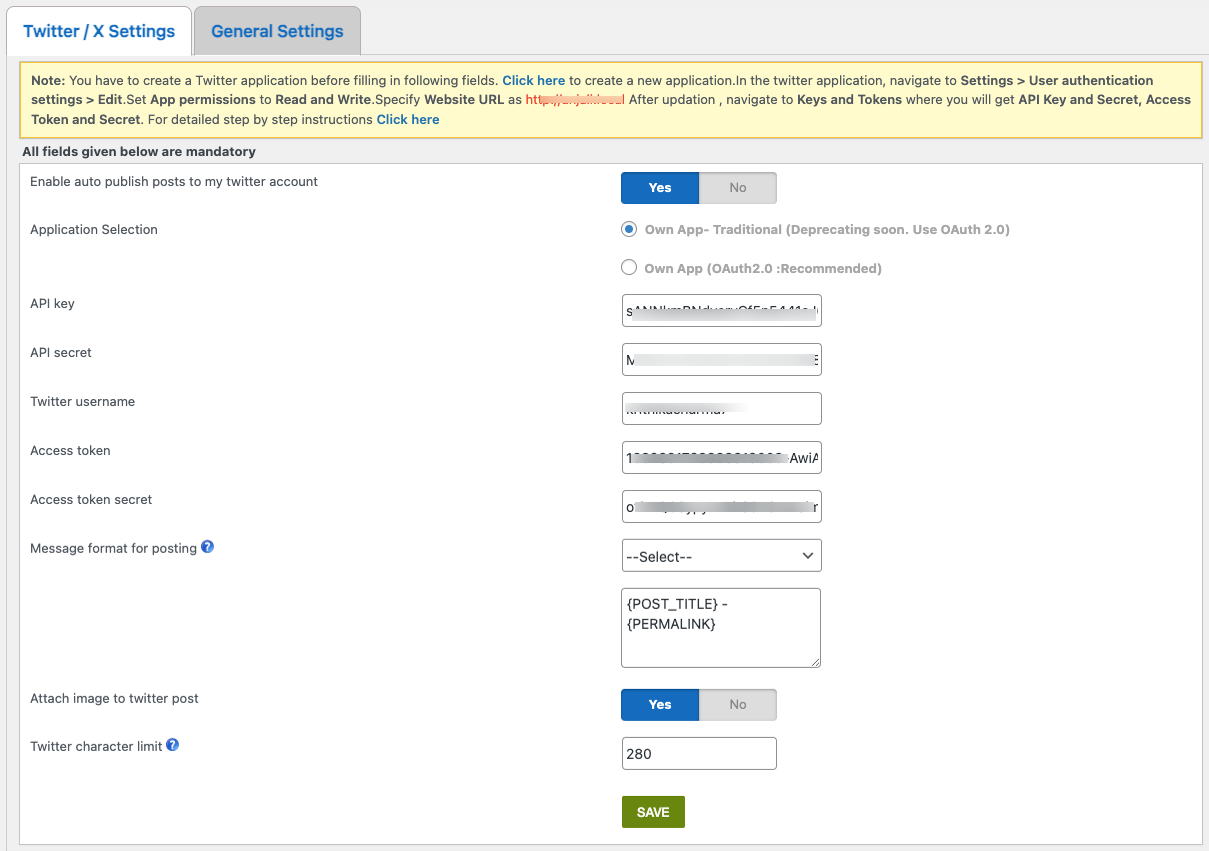
- You can configure the settings from WP Twitter Auto Publish menu. (Make sure to Authorize Twitter application after saving the settings.)
- Once these are done, posts should get automatically published based on your filter settings.
If you need any further help, you may contact our support desk.
Frequently asked questions
1. The WP Twitter Auto Publish is not working properly.
Please check the wordpress version you are using. Make sure it meets the minimum version recommended by us. Make sure all files of the wp twitter auto publish plugin are uploaded to the folder wp-content/plugins/
2. How do I restrict auto publish to certain categories ?
Yes, you can specify the categories which need to be auto published from settings page.
3. Why do I have to create applications in Twitter ?
When you create your own applications, it ensures that the posts to Twitter are not shared with any message like “shared via xxx”
4. Which all data fields can I send to social networks ?
You may use post title, content, excerpt, permalink, site title and user nicename for auto publishing.
5. Why do I see SSL related errors in logs ?
SSL peer verification may not be functioning in your server. Please turn off SSL peer verification in settings of plugin and try again.
More questions ?
Drop a mail and we shall get back to you with the answers.
Changelog
If you had issues with default image used for auto publishing, you may apply this upgrade.
WP Twitter Auto Publish 1.7.7
- Improved excerpt handling.
- Enhanced publishing settings management.
- Minor fixes and improvements for better compatibility.
WP Twitter Auto Publish 1.7.6
- Fixed scheduled auto-publish issue
- Improved post status handling
- Minor bug fixes and code improvements
WP Twitter Auto Publish 1.7.5
- Added vulnerability fix reported by WP Plugin Review Team.
WP Twitter Auto Publish 1.7.4
- Minor bug fixes and code tweaks
- Updated footer
- CSS & JS files now versioned to fix caching
WP Twitter Auto Publish 1.7.3
- Updated redirects to use wp_safe_redirect() for improved security
- Updated a few SQL queries to follow secure practices
WP Twitter Auto Publish 1.7.2
- Added deprecation notice for Twitter v1 (“Own App – Traditional”)
- Refactored code to support OAuth 2.0 and Twitter API v2
Screenshots
For developers
Is this your plugin? Show off the numbers.
Add a live badge to your site, docs or GitHub README. It updates on its own — no account needed.
FAQ
WP Twitter Auto Publish: quick answers
Straight answers, pulled from live WordPress.org data.
Live data from WordPress.org · checked Sep 26, 2026
Is WP Twitter Auto Publish free?
Yes. WP Twitter Auto Publish is free to download and use from the official WordPress.org plugin directory.
Is WP Twitter Auto Publish safe to use in 2026?
WP Twitter Auto Publish is a solid plugin choice in 2026, with a few things worth checking first. It runs on 3K+ sites, is rated 4.9/5 and was last updated 4 months ago, and scores 62/100 on our health check.
How many websites use WP Twitter Auto Publish?
WP Twitter Auto Publish is active on 3K+ WordPress websites and has been downloaded 289,986 times since it launched in September 2013. It was downloaded 1,155 times in the last 30 days.
Does WP Twitter Auto Publish work with WordPress 7.1?
WP Twitter Auto Publish is officially tested up to WordPress 7.0.6, while the latest release is 7.1.2. It may still work, but try it on a staging site first.
What PHP version does WP Twitter Auto Publish need?
WP Twitter Auto Publish requires PHP 7.4 or higher. Most hosts run PHP 8.x today, so it works on any modern WordPress hosting.
When was WP Twitter Auto Publish last updated?
The latest version, 1.7.7, was released on June 8, 2026 (4 months ago).
Who makes WP Twitter Auto Publish?
WP Twitter Auto Publish is developed and maintained by f1logic.
Powered by PageForge
Want thousands of pages that rank like these? Build them in an afternoon.
This directory runs on the same engine as PageForge. Turn any spreadsheet, CSV or API into thousands of fast, SEO-ready WordPress pages — with schema, internal links and AI-written copy baked in.
- CSV, Google Sheets & API data sources
- AI content, schema & internal links per page
- Works with Elementor, Gutenberg, Yoast & Rank Math
- Free on WordPress.org — no credit card


