



TwinCraft AutoGuard
TwinCraft AutoGuard takes the worry out of keeping a WordPress site current. Instead of just flipping on WordPress’s built-in auto-updates and hoping for the best, it follows a simple, safe sequence every time:

Use with caution
TwinCraft AutoGuard works, but test it on a staging site before relying on it in 2026. Was last updated 2 months ago, and scores 55/100 on our health check.
- Small user base (<10 active installs)
- Very few reviews so far
How does it stack up?
Side-by-side on installs, updates, ratings & support


Daily downloads
Download spikes usually follow a new release — each site that auto-updates counts as a download.
Rankings
Where TwinCraft AutoGuard stands todayWordPress.org search rankings
Live position in the plugin search, top 100| Keyword | Position |
|---|---|
| Automatic updates | >100 |
| backup | >100 |
| maintenance | >100 |
| security | >100 |
| updates | >100 |
About TwinCraft AutoGuard
From the official readme · v1.4.1Description
TwinCraft AutoGuard takes the worry out of keeping a WordPress site current. Instead of just flipping on WordPress’s built-in auto-updates and hoping for the best, it follows a simple, safe sequence every time:
Backup → Update → Verify → Notify
- Backup — before anything is changed, the plugin or theme being updated is backed up automatically.
- Update — the update is applied.
- Verify — the plugin checks whether the update actually completed successfully.
- Notify — if anything goes wrong, you get an email immediately with exactly what failed and why. Successful updates are simply logged for your records.
Key features
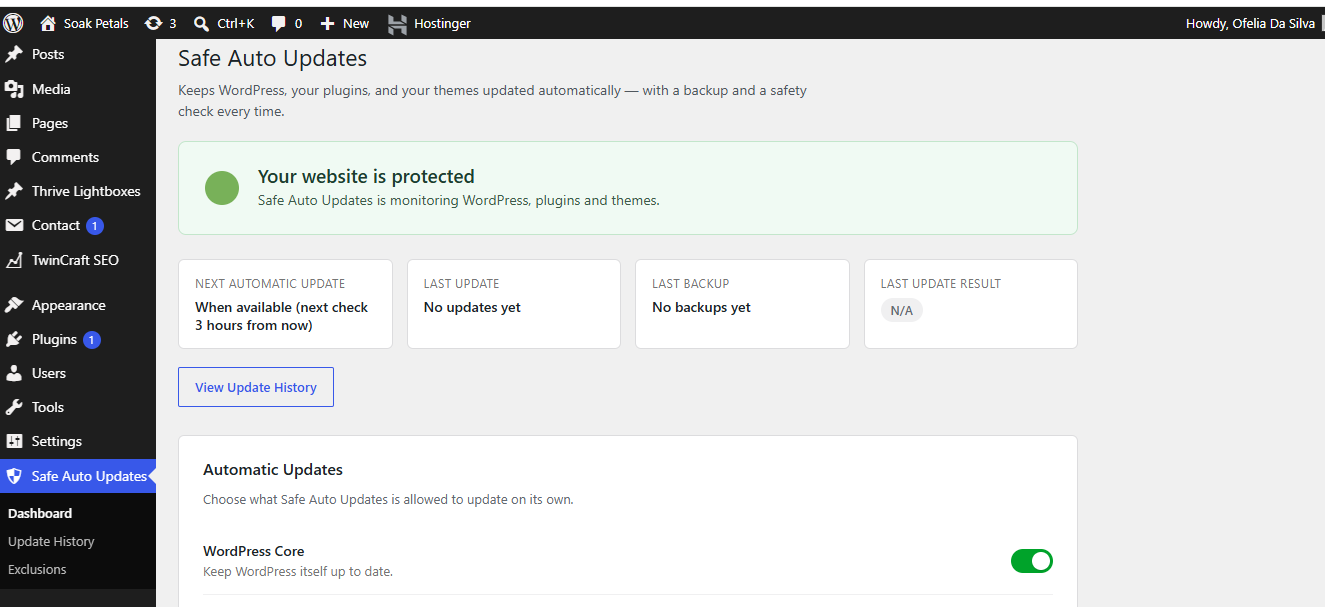
- One clear dashboard that answers “Is my website protected?” at a glance
- Separate on/off switches for WordPress core, plugins, and themes
- Automatic backup before every update
- Instant email alerts on failure, with full details
- A simple, readable Update History log
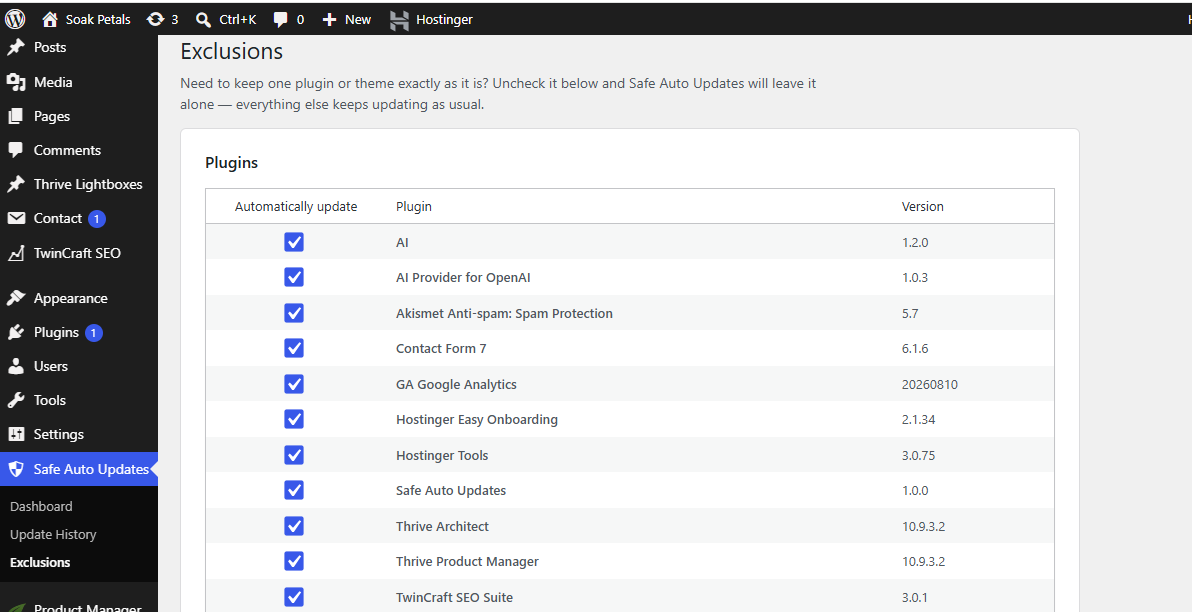
- Exclude individual plugins or themes from automatic updates in one click
- No ads, no upsells, no confusing settings — built to be understood by anyone
Who is this for?
Site owners who want the convenience of automatic updates without the risk of an update breaking their site unnoticed. If something fails, you’ll know immediately — and you’ll have a backup to fall back on.
Installation
- Upload the
twincraft-autoguardfolder to/wp-content/plugins/, or install directly through the WordPress Plugins screen. - Activate the plugin through the “Plugins” menu in WordPress.
- A popup will appear prompting you to run a quick Diagnostics check — this confirms nothing (like a hosting setting or another plugin) is silently blocking automatic updates. It takes a couple of clicks.
- Go to TwinCraft AutoGuard in your admin menu to review your settings — automatic updates, backups, and email notifications are all enabled by default.
Frequently asked questions
Where are backups stored?
Backups are stored in wp-content/tcag-backups/, a folder that is protected from direct web access. Backups older than 30 days are automatically removed to save disk space.
Will this slow down my site?
No. TwinCraft AutoGuard only runs during WordPress’s normal background update process — it adds no load to regular page views.
Can I stop a single plugin or theme from updating automatically without turning everything off?
Yes. Go to TwinCraft AutoGuard → Exclusions and uncheck “Automatically update” next to that specific plugin or theme. Everything else keeps updating as normal.
What happens if an update fails?
You’ll see it flagged on your dashboard immediately, with the item name, current and target versions, backup status, and the error message. You’ll also receive an email with the same details and a link back to your dashboard.
Changelog
1.4.1
- Fixed: WordPress core updates were still occasionally logged as “Failed” (with a false alarm email) even when the update genuinely succeeded. WordPress’s own automatic-update skin can accumulate non-fatal feedback messages during core’s multi-step update process, which were being misread as real errors. A proven version increase on disk is now the authoritative signal, overriding a noisy report either way — not just when a failure was reported. Also added a more reliable, independent way of capturing core’s version right before an automatic update cycle starts, since WordPress’s internal hook structure for core has shifted across versions (e.g. the 6.3+ rollback/temp_backup mechanism).
1.4.0
- Added: a one-time welcome popup right after activation, prompting a Diagnostics check in a couple of clicks. This surfaces the most common cause of “nothing is updating” (something outside the plugin silently blocking WordPress’s background updater) before it causes confusion, rather than leaving it to be discovered later.
1.3.4
- Fixed: two situations where a genuinely successful update was incorrectly logged as “Failed” and triggered a false failure email. First, background auto-updates (especially WordPress core) can retry internally — a failure signal from an earlier attempt could get attached even though a later retry in the same cycle actually succeeded; the plugin now trusts a proven version increase on disk over a noisy failure report. Second, updating something that’s already on the latest version (a normal no-op) was being flagged as a failure just because no version change was detected; it’s no longer treated as an error unless WordPress itself actually reported one.
1.3.3
- Updated Plugin URI to the live landing page at twincraftstudio.com/plugins/twincraft-autoguard/, now that it’s published under the new name.
1.3.2
- Fixed: WordPress core and theme updates were sometimes logged as “Failed” even though they succeeded. Verification was comparing against $wp_version and wp_get_theme(), both of which can hold outdated values in memory for the rest of the same request. Verification now reads the actual version straight from the file on disk (wp-includes/version.php for core, style.css for themes) instead.
1.3.1
- Fixed: the Diagnostics page no longer shows the “something is blocking updates” warning just because there’s nothing to update right now. “No updates currently available” and “Plugins toggle is off” are informational, not blockers, and no longer trigger the warning banner or the daily health-check email.
Screenshots
For developers
Is this your plugin? Show off the numbers.
Add a live badge to your site, docs or GitHub README. It updates on its own — no account needed.
Best TwinCraft AutoGuard alternatives
All Automatic updates plugins →





FAQ
TwinCraft AutoGuard: quick answers
Straight answers, pulled from live WordPress.org data.
Live data from WordPress.org · checked Oct 7, 2026
Is TwinCraft AutoGuard free?
Yes. TwinCraft AutoGuard is free to download and use from the official WordPress.org plugin directory.
Is TwinCraft AutoGuard safe to use in 2026?
TwinCraft AutoGuard works, but test it on a staging site before relying on it in 2026. Was last updated 2 months ago, and scores 55/100 on our health check.
How many websites use TwinCraft AutoGuard?
TwinCraft AutoGuard is active on <10 WordPress websites and has been downloaded 140 times since it launched in August 2026. It was downloaded 64 times in the last 30 days.
Does TwinCraft AutoGuard work with WordPress 7.1?
TwinCraft AutoGuard is officially tested up to WordPress 7.0.7, while the latest release is 7.1.3. It may still work, but try it on a staging site first.
What PHP version does TwinCraft AutoGuard need?
TwinCraft AutoGuard requires PHP 7.4 or higher. Most hosts run PHP 8.x today, so it works on any modern WordPress hosting.
When was TwinCraft AutoGuard last updated?
The latest version, 1.4.1, was released on August 23, 2026 (2 months ago).
Who makes TwinCraft AutoGuard?
TwinCraft AutoGuard is developed and maintained by twincraftstudio.
What are the best alternatives to TwinCraft AutoGuard?
The most popular alternatives to TwinCraft AutoGuard are Disable Updates (9K+ installs), WP Auto Updater (7K+ installs) and Update Control (4K+ installs).
Powered by PageForge
Want thousands of pages that rank like these? Build them in an afternoon.
This directory runs on the same engine as PageForge. Turn any spreadsheet, CSV or API into thousands of fast, SEO-ready WordPress pages — with schema, internal links and AI-written copy baked in.
- CSV, Google Sheets & API data sources
- AI content, schema & internal links per page
- Works with Elementor, Gutenberg, Yoast & Rank Math
- Free on WordPress.org — no credit card


