



Revive Social – Social Media Auto Post and Scheduling Automation Plugin
Automatically share your WordPress posts on multiple social networks like Facebook, X (Twitter), LinkedIn, Instagram and more.

Safe pick
Yes — Revive Social is a safe, well-maintained plugin to use in 2026. It runs on 20K+ sites, is rated 4/5 and was last updated 3 weeks ago, and scores 89/100 on our health check.
- Proven at scale on 20K+ active sites
- Actively developed — last update 3 weeks ago
- Tested with the latest WordPress (7.1)
How does it stack up?
Side-by-side on installs, updates, ratings & support



Daily downloads
Download spikes usually follow a new release — each site that auto-updates counts as a download.
Rankings
Where Revive Social stands todayWordPress.org search rankings
Live position in the plugin search, top 100| Keyword | Position |
|---|---|
| auto post | #5 |
| social media automation | #3 |
| social media scheduling | #2 |
| social media sharing | #11 |
Version adoption
Share of active sites per release.
Rating breakdown
★★★★★★★★★★ 4 from 557 reviews
About Revive Social
From the official readme · v9.4.2Description
Automatically share your WordPress posts on multiple social networks like Facebook, X (Twitter), LinkedIn, Instagram and more. Get more visitors to your website and keep your content alive.
Revive Social automates your social media posting and scheduling, saving you time and increasing your reach.
Imagine never having to manually post on social media again. With Revive Social, your WordPress posts are automatically distributed to Facebook, X (Twitter), LinkedIn, Instagram, and other platforms, maintaining your online presence and boosting your site traffic effortlessly.
Revive Social is the preferred social media automation and scheduling plugin for WordPress, trusted by over 30,000 WP site owners, and celebrated with 340+ five-star 🤩 reviews.
🔗 HELPFUL LINKS:
- Need any help with setup? CHECK DOCUMENTATION
- Interested in Revive Old Post Pro? KNOW MORE ABOUT Revive Social PRO
- Thinking of ways to grow your business? READ WHY SOCIAL MEDIA IS IMPORTANT
- Learn how to create a social media marketing plan. CLICK HERE
Revive Social is a must-have WordPress plugin created to help website administrators boost their website traffic, grow their social media followers, and keep their existing followers engaged by automatically sharing posts and content from their WP site to their social media networks such as Facebook, Twitter, Google My Business, LinkedIn, and Tumblr
Who Is Revive Social For?
-
Small Blog & Website Owners: Essential for those managing blogs or websites, Revive Social efficiently shares posts, pages, and custom post types like Recipes, Books, Products, etc.
-
Large Blogs & High-Volume Sites: Perfect for sites with extensive content, including massive blogs and e-commerce platforms, ensuring consistent engagement and visibility.
-
E-Commerce Online Stores: Great for e-commerce sites to continuously highlight products and promotions on social media.
-
Social media marketers: A must-have for social media professionals looking to streamline their content strategy and maintain a consistent online presence.
-
Hobby bloggers: Whether you’re sharing your latest culinary creations or travel adventures, Revive Social makes social media sharing easy and effective for hobbyists.
-
Non-Profit Organizations: Helpful for non-profits and charities to keep their supporters engaged and informed about causes and events.
-
Educational Institutions: Universities, colleges, and schools can share educational content, updates, and campus news.
-
Freelancers & Creatives: Aids freelancers and artists in showcasing their work and maintaining active engagement with their audience.
-
Digital Agencies: Agencies managing multiple clients’ social media accounts can benefit from streamlined posting and scheduling.
🤔 How Can Revive Social Help Me?
Revive Social is much more than just a wp to Facebook or wp to X (previously Twitter) plugin. Revive Social can be used for many use cases and help many different blogs and sites boost their social media traffic by introducing social media automation functionality to WordPress. It can act as all of the following in one:
A WordPress Social Media Scheduling Plugin
With our plugin, ‘Auto Publish’ your content on a set schedule to share to social media – a feature that’s 100% FREE.
Set how many hours should be between posts or go deeper into scheduling (PRO) by setting the time of day and days of the week you’d like the plugin to post to social media.
🚀 A WordPress Social Media Auto post Plugin
Just finished writing an awesome blog post? Why wait until it gets shared? Automatically post to social media as soon as you click the publish button!
Auto posting is a handy feature for users who want to share to social media as soon as they’re done creating their content.
⏱️ A WP Scheduled Post Plugin
Creating future-dated posts? When WordPress publishes these posts, Revive Social will auto-publish them to your active social media accounts for you!
This feature takes into account filters you have set in the plugin settings, so it won’t share Cat posts if you have added the Cat posts category to your excluded categories!
📊 A WordPress Social Media Analytics Plugin
Tired of manually adding UTM tags to posts to track the source of your traffic?
With Revive Social, shares to social media automatically include UTM tags to help you identify which social networks your traffic is coming from.
Easily see how much social media auto posting is helping with your website traffic inside Google Analytics.
📝 A WordPress Content Curation Plugin
Social media marketing can be a tedious job, especially when it comes to deciding what content to share on social networks.
With our plugin, it is possible to implement curation capabilities by filtering out the posts you don’t want to share on social media with just a few clicks.
Once set, the plugin will then be able to determine which content to auto-share to social media.
🌐 A RSS to Social Media Plugin
With our Revive Network addon, you can share posts from any RSS feed to Facebook, X (previously Twitter), Linkedin, Tumblr, Google My Business, Vkontakte(VK), or Instagram (imported post needs to have an image).
🔁 A WP Auto Republish Plugin
Revive Social can work as a WP Auto Republish plugin that updates your post’s publish date after it has been shared to your connected social media accounts.
Revive Social isn’t like every other social media marketing tool. We’ve tailored its features while keeping the following in mind:
- Sustain and grow website traffic
- Grow social media following
- Keep existing social media followers engaged
- Promote and share evergreen content
The plugin can automatically share posts from:
- WordPress to X (previously Twitter)
- WordPress to Facebook page
- WordPress to Instagram [Pro]
- WordPress to Linkedin Profile [Pro]
- WordPress to Linkedin Page [Pro]
- WordPress to Tumblr [Pro]
- WordPress to Google My Business(GMB) [Pro]
- WordPress to Vkontakte(VK) Profiles [Pro]
- WordPress to Vkontakte(VK) Communities [Pro]
- WordPress to Telegram [Pro]
- WordPress to Mastodon [Pro]
- WordPress to Bluesky [Pro]
Some of the available networks and features require the Pro version of the plugin. Check out the free vs pro table here.
What Can I Do with Revive Social?
-
Automatically share old and new posts to social media on autopilot. [Free]
-
Auto post to social media on blog post publish. [Free]
-
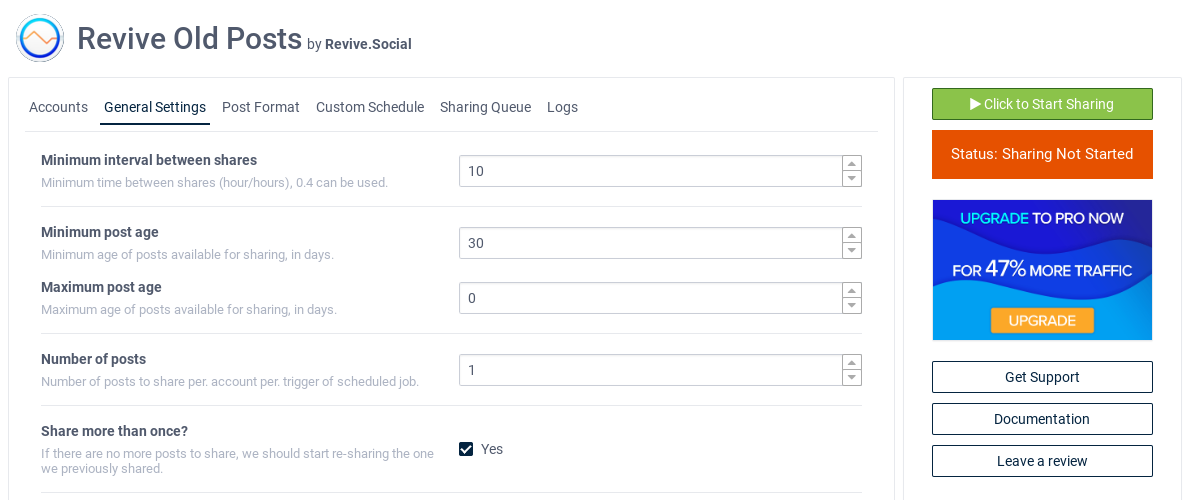
Choose the time between social media post shares. [Free]
-
Choose the number of posts that the plugin shares to social media. [Free]
-
Choose the maximum and minimum age of posts eligible for sharing. [Free]
-
Create common hashtags for post shares. [Free]
-
Include link back to your site. [Free]
-
Compatible with URL Shorteners. Shorten the links for the content that you post to social media. [Free]
-
Exclude categories and tags (and other custom taxonomies) from sharing to social media. [Free]
-
Exclude specific posts from sharing to social media. [Free]
-
Integrate with Google Analytics to track your social media traffic increase. [Free]
-
Post to Facebook Pages. [Free]
-
Post to X (previously Twitter). [Free]
-
Post to Instagram. [Pro]
-
Post to Facebook Groups. [Pro]
-
Post to LinkedIn Profiles. [Pro]
-
Post to LinkedIn Pages. [Pro]
-
Post to Tumblr Blogs [Pro]
-
Post to Google My Business [Pro]
-
Post to Vk Profiles [Pro]
-
Post to Vk Communities [Pro]
-
Post to Telegram [Pro]
-
Post to Mastodon [Pro]
-
WordPress Auto Republish post after sharing [Pro]
-
Automatically shares the post’s link in the first comment when published on social media [PRO]
-
Share multilingual posts to respective pages with WPML, TranslatePress and Polylang support, share English Posts to your English social media accounts, and Spanish posts to your Spanish social media accounts. [Pro]
And More! Try Revive Social, and see why it’s the best WordPress social media marketing tool to boost your site traffic and keep your followers engaged.
What’s Included in Pro?
Using the PRO version of Revive Social unlocks a host of additional features to help improve social media engagement on your accounts and bring more social media traffic to your website.
Awesome features in Pro:
-
RSS feed sharing. Share feed items from ANY website to your connected social media accounts. With the [Revive Network addon](https://revive.social/plugins/revive-network/https://revive.social/plugins/revive-old-post/?utm_source=wpadmin&utm_medium=readme&utm_campaign=Revive Social-RN) it’s all possible (available free with Revive Social Pro).
-
Support for WordPress Custom Post Types (WooCommerce Products, BigCommerce Products, Recipes, etc.)
-
Content Variations; Add multiple share variations to your posts, including custom images, Revive Social will automatically choose a variation to share!
-
Exclude categories and tags (and other custom taxonomies) from sharing to social media on a per account basis. Learn More
-
Share WordPress scheduled posts to social media on publish. Learn More
-
Finer WPML, Polylang, TranslatePress support for multilingual websites. Learn More
Automatically generate hashtags for post shares from tags, categories or from custom fields.
-
WordPress to Instagram scheduling and auto post
-
WordPress to LinkedIn Company Pages scheduling and auto post
-
WordPress to LinkedIn Profiles scheduling and auto post
-
WordPress to Tumblr scheduling and auto post
-
WordPress to Google My Business(GMB) scheduling and auto post
-
WordPress to Vkontakte(VK) Profiles scheduling and auto post
-
WordPress to Vkontakte(VK) Communities scheduling and auto post
-
WordPress to Telegram scheduling and auto post
-
WordPress to Mastodons scheduling and auto post
-
Connect multiple social media accounts to WP
-
Automatically shares the post’s link in the first comment when published on social media
-
Add custom UTM tags for analytics to your social media shares
-
Share different content variations to your social networks
-
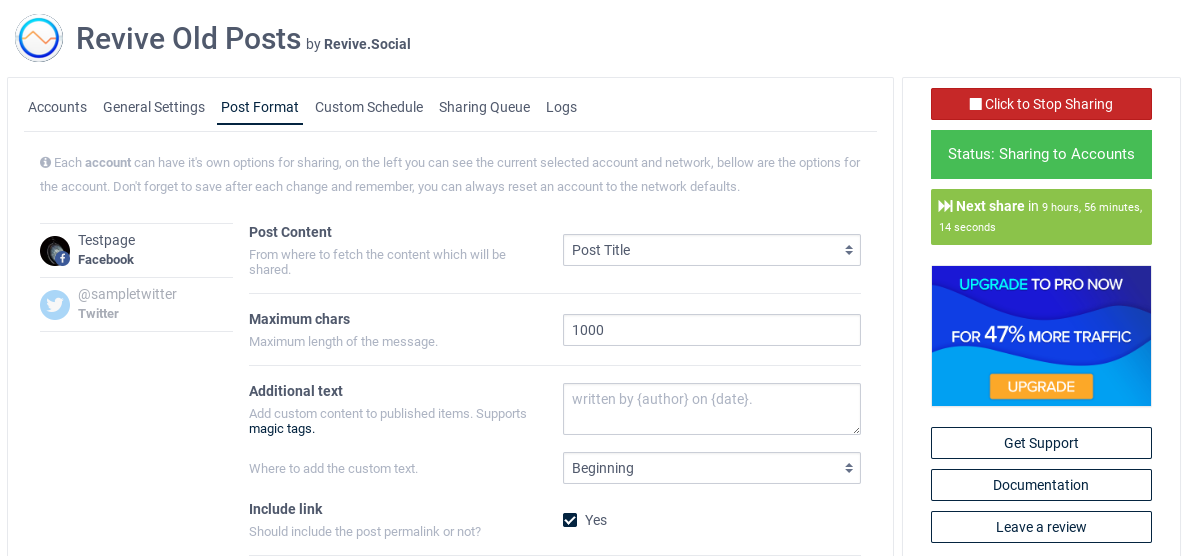
Add predetermined text in front or after your post content (Additional Text)
-
Add Magic tags to content variations
-
Magic tags support for “Additional Text” option
-
Enable Webhook Integration to seamlessly link with various external services, including 30+ networks via Zapier, for effortless automation & updates. Automate your social media tasks & workflows.
-
Automatically share images and video from your media library to your social networks (our users love this feature!)
-
Post as an image; share posts to social media as an image post instead of an article post.
-
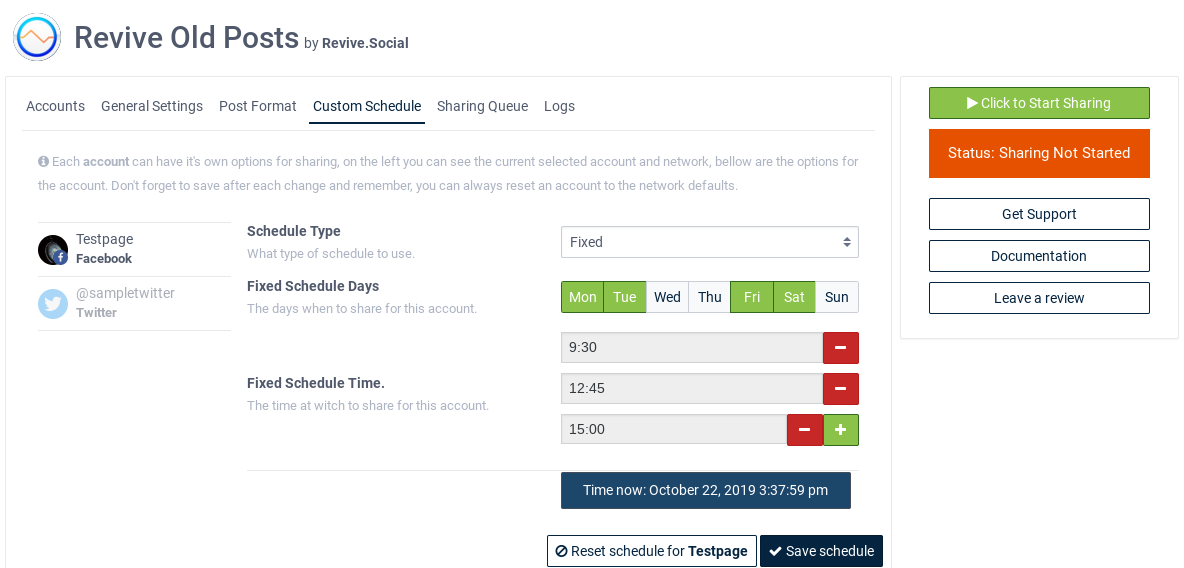
Custom schedule; set the days of the week and times you’d like posts to share, social media scheduling simplified!
WE’RE HERE FOR YOU, AND WE TAKE ALL FEEDBACK SERIOUSLY
- 📚 Knowledge Base: we’ve created a complete documentation library and we’re still constantly updating with new tutorials.
- 🦸 Support forum: we offer support to free version user here and try to reply within one business day.
SEE WHAT REAL USERS TALK ABOUT US
- This plugin helps me send out my WordPress blog posts to my social media channels. Revive Social Is Great
- Started implementing the revive plugin this week. Got prompt support on questions. Excellent Plugin
- I’m on the pro subscription and the plugin is working so far as described. Works as described
- Its Life Saving Very Handy Useful Plugins Works as it say. ❤ Love It
Useful Resources
Installation
The following are the steps to install the Revive Social plugin
- In your WordPress Administration Panels, click on the Add New option under Plugins from the menu.
- Click on Upload at the top.
- Browse the location and select the Tweet old post Plugin and click install now.
- To turn the Revive Social Plugin on, click Activate.
- Check your Administration Panels or WordPress blog to see if the Plugin is working.
- You can change the plugin options from Revive Social under settings menu.
Alternatively, you can use the following steps to install the Revive Social plugin
- Download the latest version of the Revive Social Plugin to your computer from here.
- With an FTP program, access your sites server.
- Upload (copy) the Plugin file(s) or folder to the /wp-content/plugins folder.
- In your WordPress Administration Panels, click on Plugins from the menu.
- You should see Revive Social Plugin listed. If not, with your FTP program, check the folder to see if it is installed. If it isn’t, upload the file(s) again. If it is, delete the files and upload them again.
- To turn the Revive Social Plugin on, click Activate.
- Check your Administration Panels or WordPress blog to see if the Plugin is working.
- You can change the plugin options from Revive Social under settings menu.
Frequently asked questions
Is the Social Media Scheduling feature free?
Yes, in the free plugin you can set how many hours you’d like between each share(e.g 6 hours), Revive Social will automatically post to your social networks when the countdown is up. To set the days and time of the week this would require the Pro plugin.
Is the Auto Publish (aka Auto Post) feature free?
Yes, this feature is free for the accounts that can be connected via the free plugin (Facebook and Twitter). Once you check the option to post on publish, our plugin will do the rest.
Can I share RSS feeds to social media?
Yes, you will need our Revive Network addon which is currently in the beta stages of testing for Pro users.
REST API error
This issue is normally caused by an antimalware or firewall plugin. Please try disabling all plugins(except Revive Social) to see if the issue persists. If not then enable each plugin one by one while checking Revive Social dashboard to see if the issue returns, that will help you determine the conflicting plugin.
Why isn’t sharing working?
Your website Cron might be faulty. This is a common WordPress issue with many plugins, see our solution doc here for fixing the issue.
Does Revive Social have Social media share buttons?
No, the plugin does not have share buttons currently. You can vote for it on our RoadMap here.
Which link shorteners are included in Revive Social?
The link shorteners the plugin currently supports are: bit.ly, is.gd, rviv.ly, google firebase, rebrandly and native WordPress shortlinks.
Can Revive Socials share Posts from WordPress to Facebook Group?
Yes, this however requires the pro version of the plugin.
Can Revive Social share to LinkedIn Business page?
Yes, Revive Social can share to LinkedIn business pages as well as personal profiles.
How to report a security issue?
Plugin security is a core priority for us. If you identify a potential vulnerability, we ask that you disclose it responsibly. Please follow the reporting protocols outlined on our Security Page.
Changelog
8.0 is a major update. Make sure to backup your site before upgrading.
Version 9.4.2 (2026-09-07)
- Fixed queued posts being shared even after exceeding the maximum post age limit.
- Fixed stale Instant Sharing queue entries flooding connected accounts after a cron recovery — entries older than one day now expire instead of being shared.
- Fixed LinkedIn account reconnection losing data before the dashboard reloads.
Version 9.4.1 (2026-08-04)
- Fixed an issue where Bluesky posts containing emoji, accented, or other multi-byte characters could fail to publish with a grapheme
Version 9.4.0 (2026-07-09)
- Added keyword-based filtering to include or exclude posts from sharing based on keywords
- Added an Edit Post button in the sharing queue for quick access to the post editor
- Added support for the higher character limit on X Premium accounts [PRO]
- Fixed Google Business Profile sharing by converting unsupported WebP images to JPEG [PRO]
- Fixed WPML multilingual shares pointing to the wrong translated URL [PRO]
- Improved Bluesky sharing to use higher resolution images within the upload size limit [PRO]
- Kept the Add account button visible while scrolling a long accounts list
- Enhanced security
- Updated dependencies
Version 9.3.6 (2026-05-21)
- Updated the LinkedIn API version to fix sharing to this network
- Fixed issue where Post link was not included when sharing as image on Bluesky
- Updated dependencies
Version 9.3.5 (2026-04-03)
- Fixed creation hashtags on Bluesky network
- Fixed issue with Google Business Profile posting failure when locations are connected from multiple Google account
- Added automatic cleanup for sharing logs to prevent database slowdowns
- Improved status showing up correctly in dashboard when using Start/Stop sharing buttons
- Updated dependencies
Version 9.3.4 (2025-11-05)
- Enhanced security
Version 9.3.3 (2025-08-27)
- Fixed issue when the Disable Gutenberg plugin hides the Revive Social option in the classic editor
- Reverts the removal of the option to change Instant Sharing’s default state
- Added search option to find specific accounts
- Fixed instant sharing for classic editor
Version 9.3.2 (2025-07-21)
- Fixes Instant Sharing options not appearing with WPBakery
- Fixes issue with Instant Sharing not working with Scheduled posts
Version 9.3.1 (2025-07-15)
- Fixes issue with previously shared posts being published
Version 9.3.0 (2025-07-14)
- Bluesky Network Integration [PRO]
- Post Sharing Controls in the Block Editor
- Fixed Issue with X (Twitter) Not Sharing Posts with Images
Version 9.2.5 (2025-05-20)
- Fixed posting issue with LinkedIn network
- Updated X API version
- Updated dependencies
Version 9.2.4 (2025-04-16)
- Fixed issue with Mastodon network when using a custom domain
Version 9.2.3 (2025-02-25)
- Fixed Instagram sharing with additional content issue [PRO]
- Updated dependencies
Version 9.2.2 (2025-02-18)
- Tested compatibility between versions of the plugin
Version 9.2.1 (2025-02-17)
- Removed Telegram SDK and added a custom Telegram API handler
Version 9.2.0 (2025-02-13)
New Features
– Added Telegram network service [PRO]
– Added Mastodon network service [PRO]
– Ability to share the link in the first comment of a shared post and customize the comment [PRO]
– Added compatibility with Polylang and TranslatePress translation plugins [PRO]
Improvements
– Adds action scheduler support
Fixes
– Fixed issue with image not being sent via Zapier integrations
– Fixed issue with remaining accounts being temporarily invisible in the Post Form tab after removing any existing account
Version 9.1.3 (2024-11-11)
- Fixed issue with Revive Social menu item being visible to match user permissions
- Fixed PHP deprecation error showing in the console
- Updated dependencies
Version 9.1.2 (2024-08-28)
- Upgraded Facebook Graph API version
- Fixed an issue where a PHP error was being thrown when posting
Version 9.1.1 (2024-07-23)
- Tested compatibility with WordPress 6.6
Version 9.1.0 (2024-07-17)
New features
– Connect 30+ additional networks via Zapier with our new Webhook integration (PRO).
– Advanced Content Editing: Introduced a new Custom Content editor for post captions, including magic tags for dynamic content (PRO).
Improvements
– Rebranded to Revive Social
– Integrated Yoast Title & Description option for sharing content (PRO).
– Reduced the add-on file size (PRO).
– Improved the UI with optimized button positions, enhanced color contrast, and a reorganized layout for options and Dashboard notices.
– Improved documentation to better assist with error handling when connecting to Facebook.
Fixes
– Resolved issue with disconnected Facebook groups appearing in the Dashboard.
– Corrected social network icons display issues across all site languages.
– Removed the outdated plugin roadmap from the Dashboard.
– Updated the “Get Support” button to direct users to the appropriate channel (Free/Pro).
– Eliminated the outdated authentication method for connecting to X.
Version 9.0.31 (2024-06-04)
- Fixed sharing on LinkedIn: updated LinkedIn API Version
- Updated Facebook API Version
Version 9.0.30 (2024-05-22)
- Updated internal dependencies
Version 9.0.29 (2024-05-20)
- Updated internal dependencies
Version 9.0.28 (2024-05-20)
- Updated internal dependencies
Version 9.0.27 (2024-04-23)
Bug Fixes
– Fixed issue with titles not always showing correct escaped characters.
– Fixed instant sharing not working correctly with scheduled posts, only published posts are now eligible.
Improvements
– Improved compatibility with newer versions of PHP
– Updated internal dependencies
Version 9.0.26 (2024-02-29)
Fixes
– Updated dependencies
Version 9.0.25 (2024-02-20)
Fixes
- Page will refresh when a social media account is added.
- Instant sharing checkbox will now be selected when Instant
Version 9.0.24 (2024-02-12)
Fixes
– Social media accounts are not selected with Instant sharing activated
Version 9.0.23 (2024-02-01)
Improvements
– Quota limit handling when sharing in X Network (re-quires re-login with your X account)
– Button to export Logs as a text file
– New logs display design
– Sharing tweets via the Revive Social server
Bux Fixes:
– URL shortener error handling
– Fixed instant sharing issue with scheduled posts
Version 9.0.22 (2023-12-22)
Fixes
– Changed the default usage of X (ex Twitter) to own API keys
– Updated the JS pipeline
– Fixed compatibility issue with the LearnPress plugin
Version 9.0.21 (2023-09-27)
- Implemented post-sharing limit API to prevent sharing errors
Version 9.0.20 (2023-09-19)
- Fixed Facebook login issue by upgrading Graph API version v7.0 to v12.0
Version 9.0.19 (2023-08-23)
- Fixed LinkedIn sharing (API version changed)
Version 9.0.18 (2023-08-17)
- Added new authentication permissions scope for LinkedIn
Version 9.0.17 (2023-08-03)
PHP version required updated to 7.4
Version 9.0.16 (2023-08-03)
- Updated the required PHP version to 7.4
Version 9.0.15 (2023-07-28)
- Fixed post-sharing issue with post image
- Added Twitter v2 API support
Version 9.0.14 (2023-06-06)
- Added LinkedIn new API support
- Added About Us page integration
- Fixed post sharing issue with GMB
Version 9.0.13 (2023-03-31)
- Fixed hashtags issue with camel case text #860
- WordPress core tested up to version 6.2
- Fixed instant sharing regression #861
Version 9.0.12 (2023-01-31)
- Improved query strings encoding
Version 9.0.11 (2023-01-03)
- Harden security of the plugin
Version 9.0.10 (2022-08-26)
- [Dev] Remove old buffer service that doesn’t exist anymore.
- [Dev] Less cumbersome error messages when services fail to build by using getMessage() instead of getTrace()
Version 9.0.9 (2022-07-25)
- [New Pro] Option to automatically crop Instagram Images if they do not meet the Instagram supported aspect ratios
- [Fix] PHP 8 related errors
- [Fix] Long taxonomy names were overflowing their container in multiselect fields
- [Info] Tested on WP 6.0
- [Info] Minimum PHP version has been changed to 7.2 to address composer dependency PHP errors
- [Info] Updated Themeisle SDK
Version 9.0.8 (2022-04-22)
Info
- Update tested up to version
Version 9.0.7 (2022-04-21)
Info
– Update WP tested up to version
– Added two new hooks and that fire before post is shared
– Clean up some old options from version < 8.0 when housekeeping option is turned on
Version 9.0.6 (2021-12-13)
Fixes
– The same post would some times get shared too soon after it had previously been shared.
Version 9.0.5 (2021-08-17)
Changes
– Add notice about Remote Cron feature removal
Version 9.0.4 (2021-08-17)
Fixes
– Google My Business posts were not sharing because of missing Topic Type field
Changes
– Turned off Remote Cron feature. Use this doc if you have issues where your posts aren’t sharing.
– Google My Business errors will now return more information with details on why the post didn’t share.
Version 9.0.3 (2021-06-24)
Fixes
– LinkedIn shared article posts would not show the preview image.
– The filter to set the WPML language that is shared to accounts was being overridden in the Lite version of the plugin.
– Handle cases where the wpml_language option is not set for an account and the user tries to share a post.
– Handle cases where randomize hashtags option is not set for an account and the user tries to share a post.
9.0.2 – 2021-06-07
Features
* [New Pro] Post Format “Share Content” option to share post’s Yoast SEO title or description.
* New Post Format option to randomize hashtags before sharing.
Fixes
* All backslashes were not being removed from Post on Publish share messages.
* Post on Publish checkboxes would sometimes be checked by default while updating already published posts.
* Post on Publish feature would sometimes share the post at odd times if the “True Instant Share” option was turned off in General Settings of ROP.
* Better error handling for wp_remote_post() calls.
9.0.1 – 2021-04-22
- [Fix Pro] Issue with saving maximum post age setting for users on Personal Plan
- [Change] Don’t show ROP Log error notice to non-admins
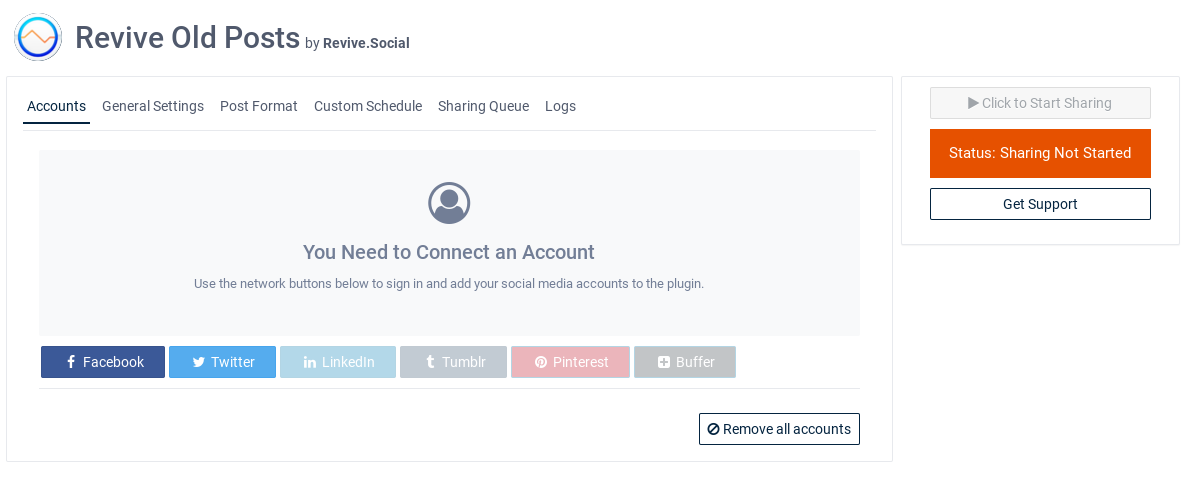
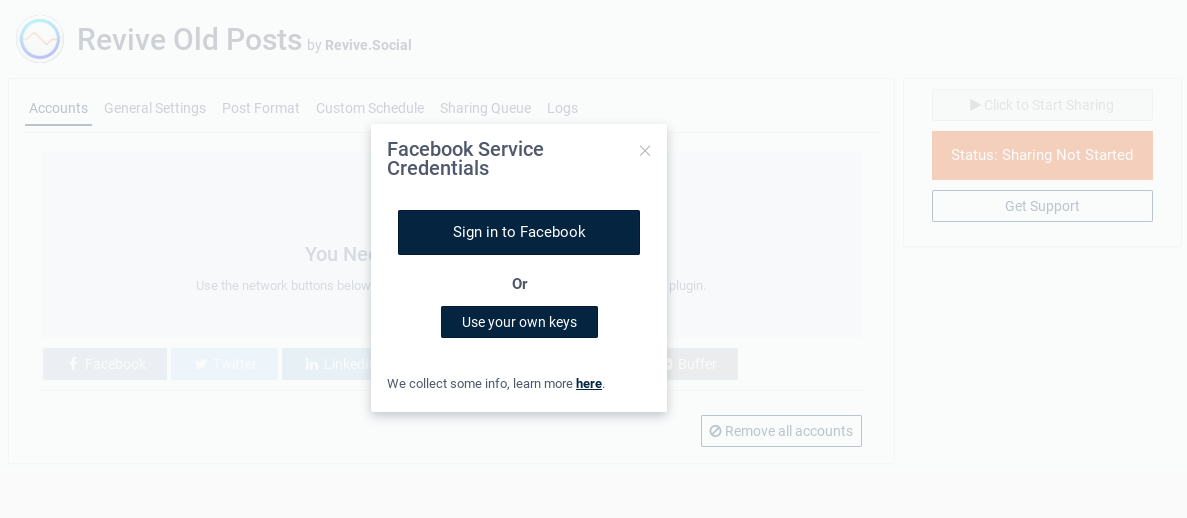
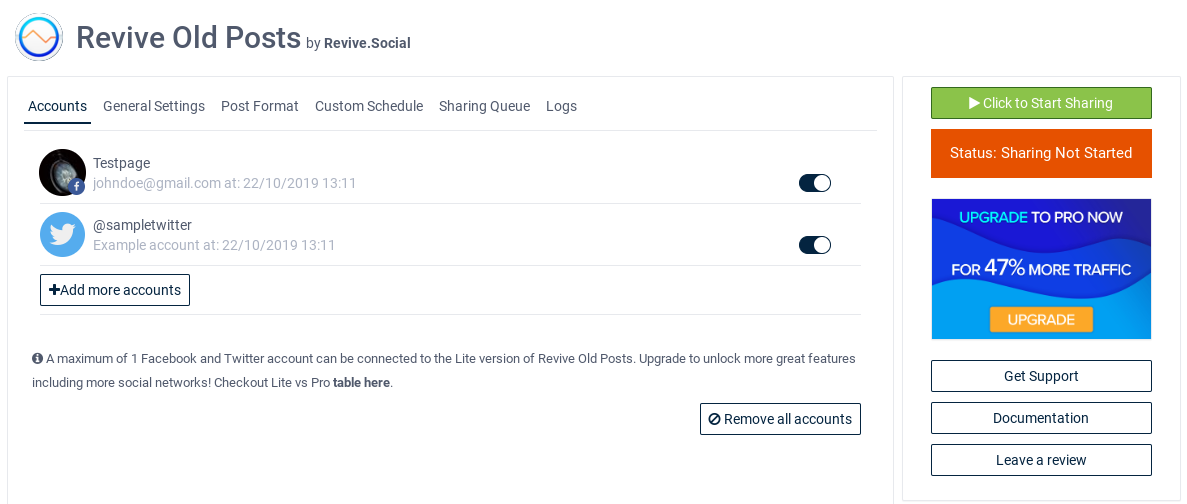
Screenshots


For developers
Is this your plugin? Show off the numbers.
Add a live badge to your site, docs or GitHub README. It updates on its own — no account needed.
Best Revive Social alternatives
All auto post plugins →





FAQ
Revive Social: quick answers
Straight answers, pulled from live WordPress.org data.
Live data from WordPress.org · checked Sep 26, 2026
Is Revive Social free?
Yes. Revive Social is free to download and use from the official WordPress.org plugin directory.
Is Revive Social safe to use in 2026?
Yes — Revive Social is a safe, well-maintained plugin to use in 2026. It runs on 20K+ sites, is rated 4/5 and was last updated 3 weeks ago, and scores 89/100 on our health check.
How many websites use Revive Social?
Revive Social is active on 20K+ WordPress websites and has been downloaded 3,599,530 times since it launched in December 2009. It was downloaded 16,446 times in the last 30 days.
Does Revive Social work with WordPress 7.1?
Yes. The developer has tested Revive Social up to WordPress 7.1.2, the latest release. It requires WordPress 4.7 or newer.
What PHP version does Revive Social need?
Revive Social requires PHP 7.4 or higher. Most hosts run PHP 8.x today, so it works on any modern WordPress hosting.
When was Revive Social last updated?
The latest version, 9.4.2, was released on September 7, 2026 (3 weeks ago).
Who makes Revive Social?
Revive Social is developed and maintained by rsocial.
What are the best alternatives to Revive Social?
The most popular alternatives to Revive Social are Blog2Social: Social Media A… (50K+ installs), Social Media Auto Poster (7K+ installs) and Bit Social (6K+ installs).
Powered by PageForge
Want thousands of pages that rank like these? Build them in an afternoon.
This directory runs on the same engine as PageForge. Turn any spreadsheet, CSV or API into thousands of fast, SEO-ready WordPress pages — with schema, internal links and AI-written copy baked in.
- CSV, Google Sheets & API data sources
- AI content, schema & internal links per page
- Works with Elementor, Gutenberg, Yoast & Rank Math
- Free on WordPress.org — no credit card


