


Tryonixs Virtual Try-On for Eyewear Stores
Add AI-powered virtual try-on to online eyewear stores. Let customers try glasses and sunglasses before buying with Tryonixs AR technology.

Solid choice
Tryonixs Virtual Try-On for Eye… is a solid plugin choice in 2026, with a few things worth checking first. Is rated 5/5 and was last updated 3 months ago, and scores 62/100 on our health check.
- Small user base (<10 active installs)
- Very few reviews so far
How does it stack up?
Side-by-side on installs, updates, ratings & support



Daily downloads
Download spikes usually follow a new release — each site that auto-updates counts as a download.
Rankings
Where Tryonixs Virtual Try-On for… stands todayWordPress.org search rankings
Live position in the plugin search, top 100| Keyword | Position |
|---|---|
| artificial intelligence | #99 |
| Augmented Reality | #33 |
| eyewear | #2 |
| virtual try on | #21 |
| woocommerce | >100 |
Rating breakdown
★★★★★★★★★★ 5 from 1 reviews
About Tryonixs Virtual Try-On for Eyewear Sto…
From the official readme · v1.3.8Description
Tryonixs Virtual Try-On for Eyewear Stores
Online shoppers cannot walk into a store and try on frames. That uncertainty leads to hesitation, abandoned carts, and higher return rates for eyewear brands.
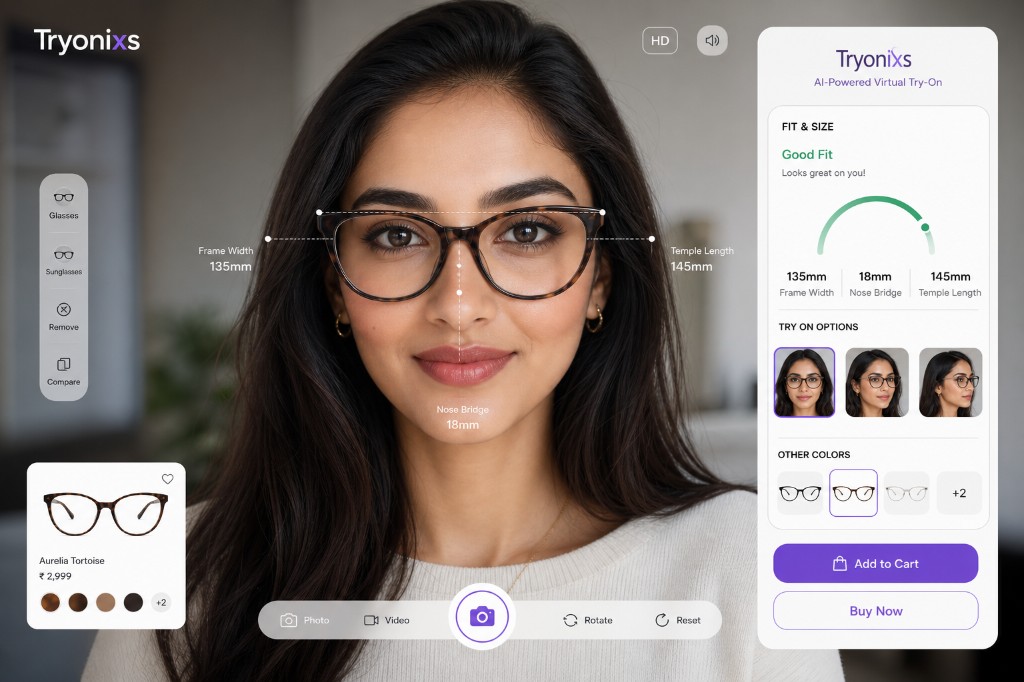
Tryonixs brings AI-powered AR shopping to your online store. Customers open their camera, try glasses and sunglasses virtually, and buy with confidence — all without leaving your product page.
This plugin connects online eyewear stores with Tryonixs AI Virtual Try-On technology. A Tryonixs account is required to activate the service.
Features
AI Eyewear Virtual Try-On
Customers can instantly try glasses and sunglasses using their device camera with realistic AR placement.
Online Store Integration
Works directly on product pages, shop archives, and shortcode placements.
Product-Level Control
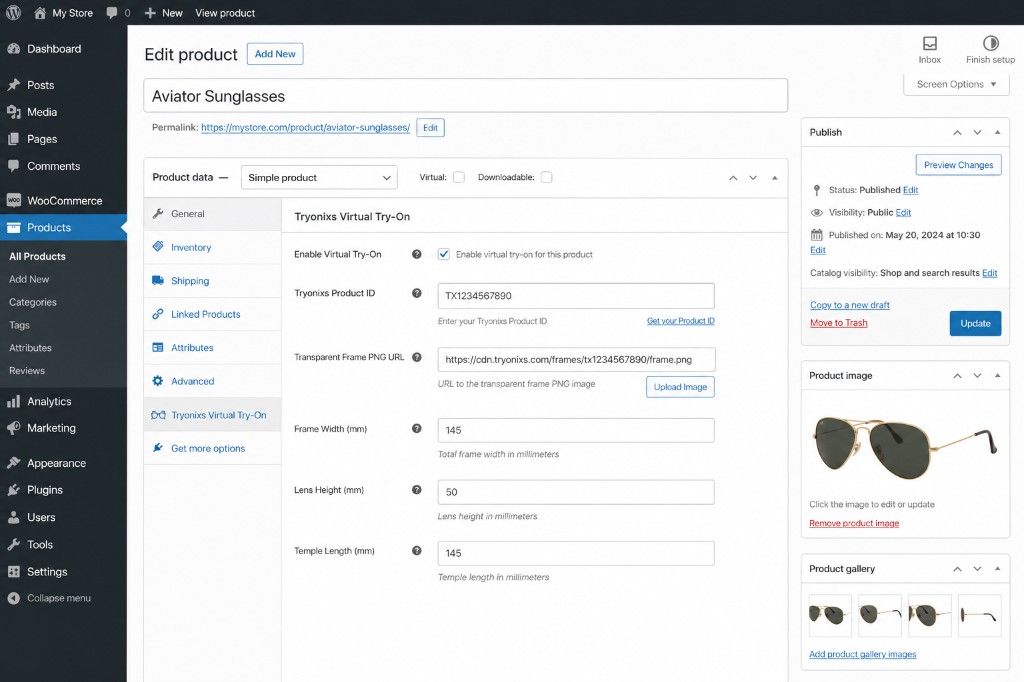
Enable or disable try-on per product. Optionally set a Tryonixs product ID, transparent frame PNG, and frame measurements.
Mobile Optimized
Designed for mobile browsers where most eyewear shoppers browse and convert.
Easy Setup
Connect your Tryonixs account with a public API key — no custom coding required.
Conversion Optimization
Help customers visualize fit before purchase and reduce returns caused by “it doesn’t look right on me.”
How It Works
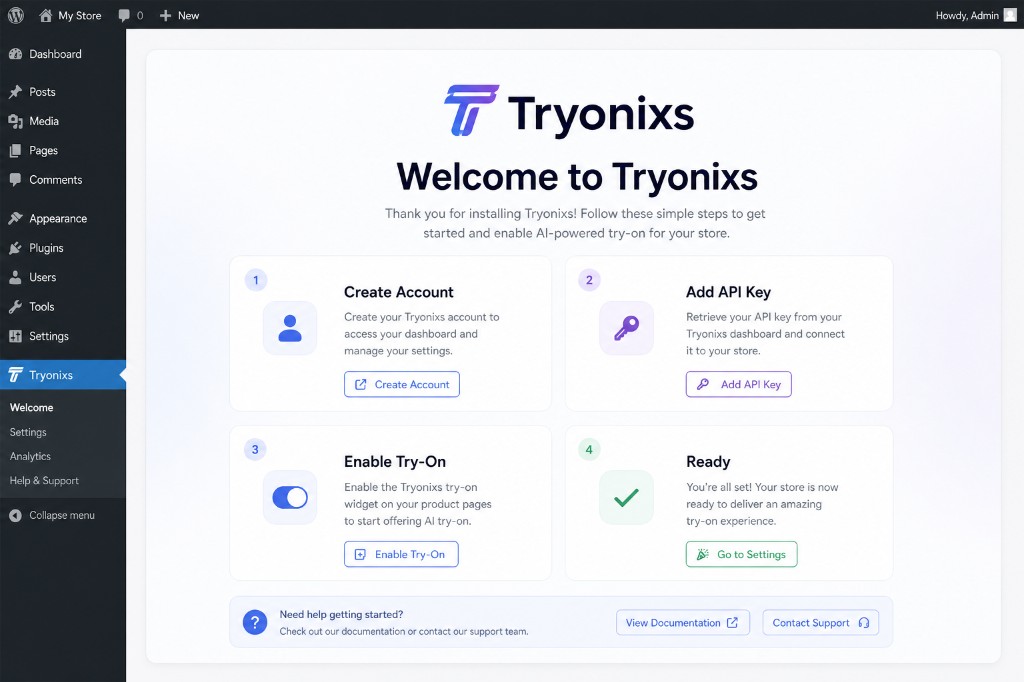
Step 1 — Create a Tryonixs Account
Visit https://tryonixs.com and create your account.
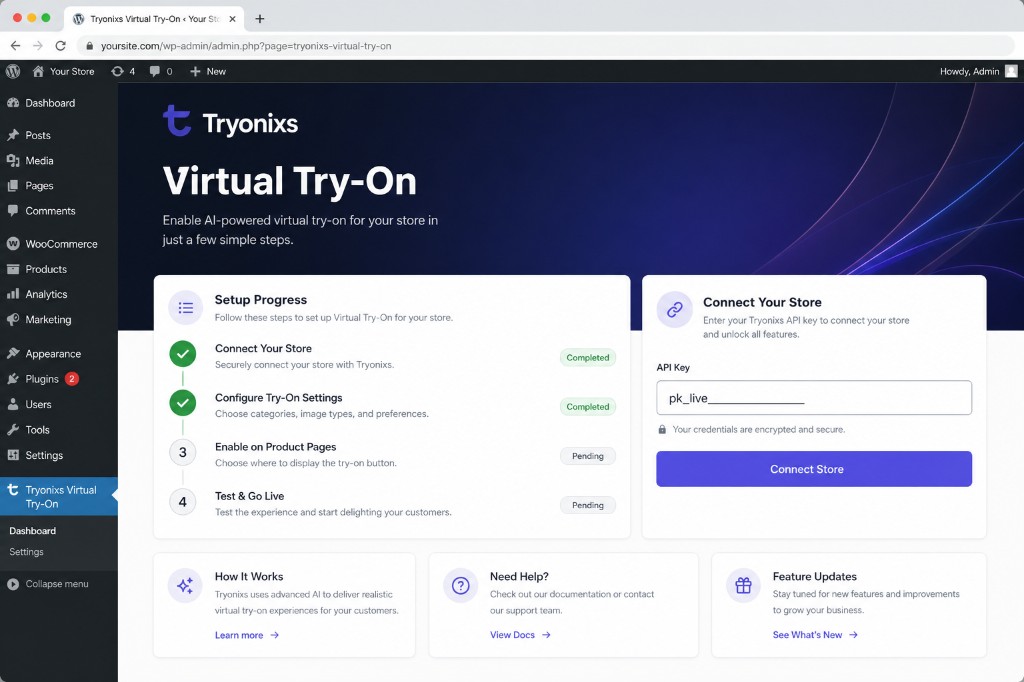
Step 2 — Copy Your Public API Key
Copy your public key in the format pk_live_xxxxxxxxx.
Step 3 — Connect Your Store
Paste the API key in Tryonixs → Dashboard.
Step 4 — Enable Virtual Try-On
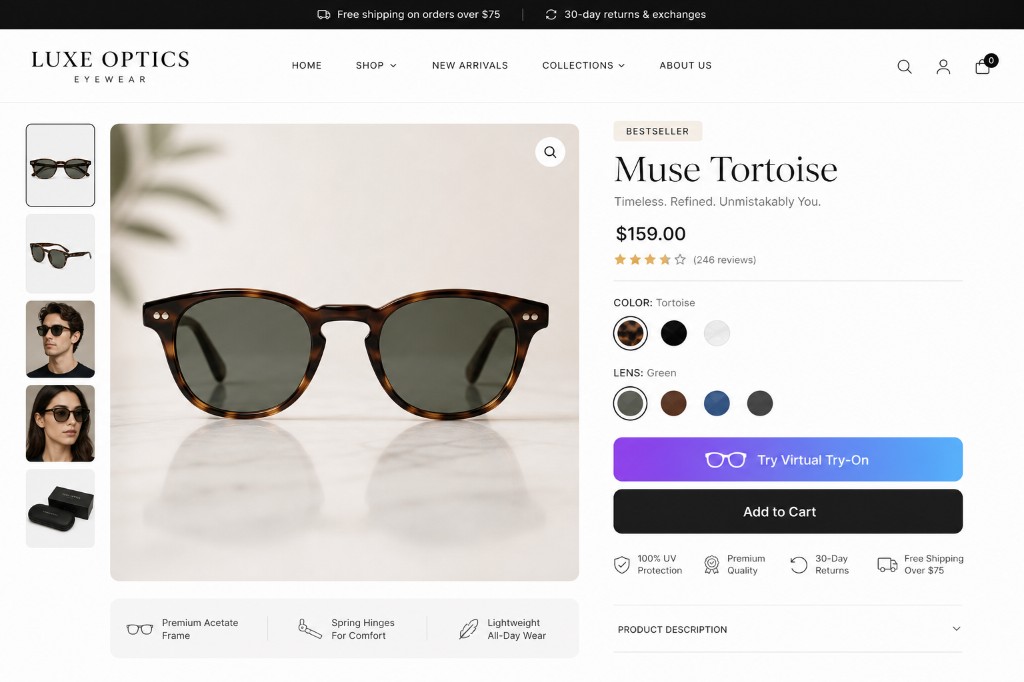
Enable try-on on your eyewear products and publish. Customers will see a premium Try Virtual Try-On button near Add to Cart.
Shortcode
[eyewvitr_button id="123"]
Replace 123 with the WooCommerce product ID. Useful for page builders and custom layouts.
Requirements
- WordPress 5.8 or higher
- WooCommerce (active)
- A Tryonixs account with a public API key
- Eyewear products with a featured image (or custom transparent frame PNG)
Installation
- Upload the plugin folder to
/wp-content/plugins/, or install the ZIP via Plugins → Add New → Upload Plugin. - Activate the plugin.
- Complete the welcome setup (or go to Tryonixs → Dashboard).
- Enter your Public API Key from tryonixs.com.
- Open a WooCommerce eyewear product with a featured image and confirm the try-on button appears.
Frequently asked questions
Do I need a Tryonixs account?
Yes. This plugin connects WooCommerce to the Tryonixs AI Virtual Try-On service. Create an account at tryonixs.com.
Why is the try-on button not showing?
API key saved under Tryonixs → Dashboard WooCommerce is active Product is published with a featured image (or custom frame PNG) Virtual Try-On is enabled on the product For page builders, use [eyewvitr_button id="PRODUCT_ID"]
Does the customer need a mobile app?
No. Virtual try-on runs in the browser. Camera permission is requested when the session starts.
Can I control which products show try-on?
Yes. Use the Tryonixs Virtual Try-On panel on each product to enable/disable try-on, set a product ID, frame image, and optional frame measurements.
Changelog
Resubmission package for WordPress.org review — no functional changes.
1.3.8
- Removed WordPress.org directory assets from plugin package (upload via SVN after approval)
- Plugin URI now points to the live https://tryonixs.com/wordpress-plugin page
1.3.7
- Updated Tested up to WordPress 7.0
- Aligned text domain and main plugin file with slug tryonixs-virtual-try-on-for-eyewear-stores
1.3.6
- Separated Plugin URI and Author URI in plugin headers for WordPress.org compliance
1.3.5
- Renamed plugin for WordPress.org trademark compliance (removed restricted term from display name)
- Updated readme title and short description for professional branding
1.3.4
- Premium SaaS admin dashboard with setup progress and connection status
- Guided onboarding welcome experience after activation
- Redesigned frontend try-on button
- Expanded product panel with frame measurement fields
- Ethical review request for happy merchants
- SEO-optimized readme, metadata, and WordPress.org tags
- Stable tag and version alignment for SVN release
1.3.3
- Updated plugin branding to Tryonixs
- Updated default service URLs to tryonixs.com
Screenshots
For developers
Is this your plugin? Show off the numbers.
Add a live badge to your site, docs or GitHub README. It updates on its own — no account needed.
Best Tryonixs Virtual Try-On for E… alternatives
All artificial intelligence plugins →





FAQ
Tryonixs Virtual Try-On for Eyewear…: quick answers
Straight answers, pulled from live WordPress.org data.
Live data from WordPress.org · checked Oct 19, 2026
Is Tryonixs Virtual Try-On for Eye… free?
Yes. Tryonixs Virtual Try-On for Eye… is free to download and use from the official WordPress.org plugin directory.
Is Tryonixs Virtual Try-On for Eye… safe to use in 2026?
Tryonixs Virtual Try-On for Eye… is a solid plugin choice in 2026, with a few things worth checking first. Is rated 5/5 and was last updated 3 months ago, and scores 62/100 on our health check.
How many websites use Tryonixs Virtual Try-On for Eye…?
Tryonixs Virtual Try-On for Eye… is active on <10 WordPress websites and has been downloaded 229 times since it launched in July 2026. It was downloaded 66 times in the last 30 days.
Does Tryonixs Virtual Try-On for Eye… work with WordPress 7.1?
Tryonixs Virtual Try-On for Eye… is officially tested up to WordPress 7.0.7, while the latest release is 7.1.3. It may still work, but try it on a staging site first.
What PHP version does Tryonixs Virtual Try-On for Eye… need?
Tryonixs Virtual Try-On for Eye… requires PHP 7.4 or higher. Most hosts run PHP 8.x today, so it works on any modern WordPress hosting.
When was Tryonixs Virtual Try-On for Eye… last updated?
The latest version, 1.3.8, was released on July 20, 2026 (3 months ago).
Who makes Tryonixs Virtual Try-On for Eye…?
Tryonixs Virtual Try-On for Eye… is developed and maintained by Tryonixs.
What are the best alternatives to Tryonixs Virtual Try-On for Eye…?
The most popular alternatives to Tryonixs Virtual Try-On for Eye… are AI Provider for Anthropic (60K+ installs), AI (60K+ installs) and AI Provider for OpenAI (60K+ installs).
Powered by PageForge
Want thousands of pages that rank like these? Build them in an afternoon.
This directory runs on the same engine as PageForge. Turn any spreadsheet, CSV or API into thousands of fast, SEO-ready WordPress pages — with schema, internal links and AI-written copy baked in.
- CSV, Google Sheets & API data sources
- AI content, schema & internal links per page
- Works with Elementor, Gutenberg, Yoast & Rank Math
- Free on WordPress.org — no credit card


