



Transcoder
Transcoding services for ANY WordPress website. Convert audio/video files of any format to a web-friendly format (mp3/mp4).

Use with caution
Transcoder works, but test it on a staging site before relying on it in 2026. It runs on 400+ sites, is rated 3.6/5 and was last updated 1 year ago, and scores 42/100 on our health check.
- Small user base (400+ active installs)
- No update in over a year
- Only tested up to WordPress 6.8 (latest is 7.1)
How does it stack up?
Side-by-side on installs, updates, ratings & support



Daily downloads
Download spikes usually follow a new release — each site that auto-updates counts as a download.
Rankings
Where Transcoder stands todayWordPress.org search rankings
Live position in the plugin search, top 100| Keyword | Position |
|---|---|
| audio | >100 |
| media | >100 |
| multimedia | #42 |
| music | #95 |
| songs | #15 |
Version adoption
Share of active sites per release.
Rating breakdown
★★★★★★★★★★ 3.6 from 8 reviews
About Transcoder
From the official readme · v1.4.1Description
Transcoder plugin has been discontinued and no longer maintained, we recommend to use our new video management solution GoDAM which provides smart transcoding & adaptive bitrate, generate thumbnail, add custom layers, better way to organize media files, serve via CDN and do a lot more. Install the GoDAM plugin from here
Transcoder easily converts all audio and video files uploaded to your website to a web-friendly format.
Transcoder eliminates the need for a dedicated media node- no fiddling with installation, managing dependancies or renting servers! Transcoder also works on shared hosting- just install, subscribe and go!
All transcoding services are available via a subscription plan through this plugin.
Subscribe to our free plan from the plugin’s settings or from our product page. Note that Transcoder will not provide any services without a subscription plan.
Supported input media types:
- Audio: mp3, m4a, wav, ogg, wma
- Video: 3g2, 3gp, avi, flv, m4v, mp4, mpg, ogv, webm, wmv
Supported output media types:
- Audio: mp3
- Video: mp4
Create the ultimate niche community by combining Transcoder with our rtMedia plugin. Transcoder works perfectly with rtMedia to create a social experience that is accessible across all desktop and mobile devices.
Transcoder Features
- Works with ANY WordPress website – Transcoder plugs into your current website seamlessly, instantly improving user audio/video experience.
- rtMedia integration – Works perfectly with our own rtMedia, for a complete social media platform.
- Thumbnail generation – Automatically generate up to 10 thumbnails for every video, from which your users can choose one.
- [rt_media] shortcode – Use our shortcode to display transcoded audio/video file on any post or page. For example, [rt_media attachment_id=xx] the attachment_id parameter specifies the file to be displayed.
Privacy Warning
In order for us to transcode your media files, we need to copy it over to our server.
After transcoding is completed, the media can reside on our server for a maximum of 24 hours, before it is permanently and irreversibly removed by a Cron job.
Future Roadmap
- Additional output formats for video- ogg, webm
- Downsampling capabilities for output video resolution
- RESTful API
Important Links
- Project Homepage
- Documentation
- FAQ
- GitHub – Please mention your wordpress.org username when sending pull requests.
Installation
- Install the plugin from the ‘Plugins’ section in your dashboard (Go to
Plugins > Add New > Searchand search for “Transcoder”). - Alternatively, you can download the plugin from this plugin directory. After downloading, unzip and upload it to the plugins folder of your WordPress installation (
wp-content/plugins/directory of your WordPress installation). - Activate it through the ‘Plugins’ section.
Changelog
Transcoder 1.4.1 with improved shortcode security.
1.4.1 [August 22, 2025]
- FIXED
- Added validation and sanitization for
[rt_media]shortcode attributes. - Graceful fallback when media file is unavailable (prevents broken audio/video players).
- Added validation and sanitization for
= 1.4.0 [May 30, 2025]
-
REMOVED
- Update to users – Discontinuing the Transcoder service and replacing with GoDAM.
-
ENHANCEMENTS
- Update admin notice for the GoDAM.
- Add notice for transcoding disabled on uploads page.
- Update messages for license activation.
1.3.9 [May 13, 2025]
-
ENHANCEMENTS
- Update GoDAM Notice to include UTM parameters.
- Update Notice colour and add a dashicon.
- Add plugin page visibility for the GoDAM Notice.
1.3.8 [April 18, 2025]
-
ENHANCEMENTS
- Changed the admin notice for users on transcoder tabs and main dashboard page.
- Removed the subscription reminder notice shown when no API key is configured.
1.3.6 [February 27, 2024]
-
FIXED
- Enhance security checks.
1.3.5 [October 20, 2023]
-
FIXED
- Compatible with PHP8.1
- Enhance security checks and fixed deprecation errors.
- Fixed rtMedia attachment shortcode issue.
- Fixed cancelled the subscription message issue.
- Add support for custom API endpoint to transcode media.
1.3.4 [August 17, 2021]
-
FIXED
- Transcoder plugin preventing read more from expanding
- Compatibility with WordPress 5.8 and PHP 8.0
Screenshots
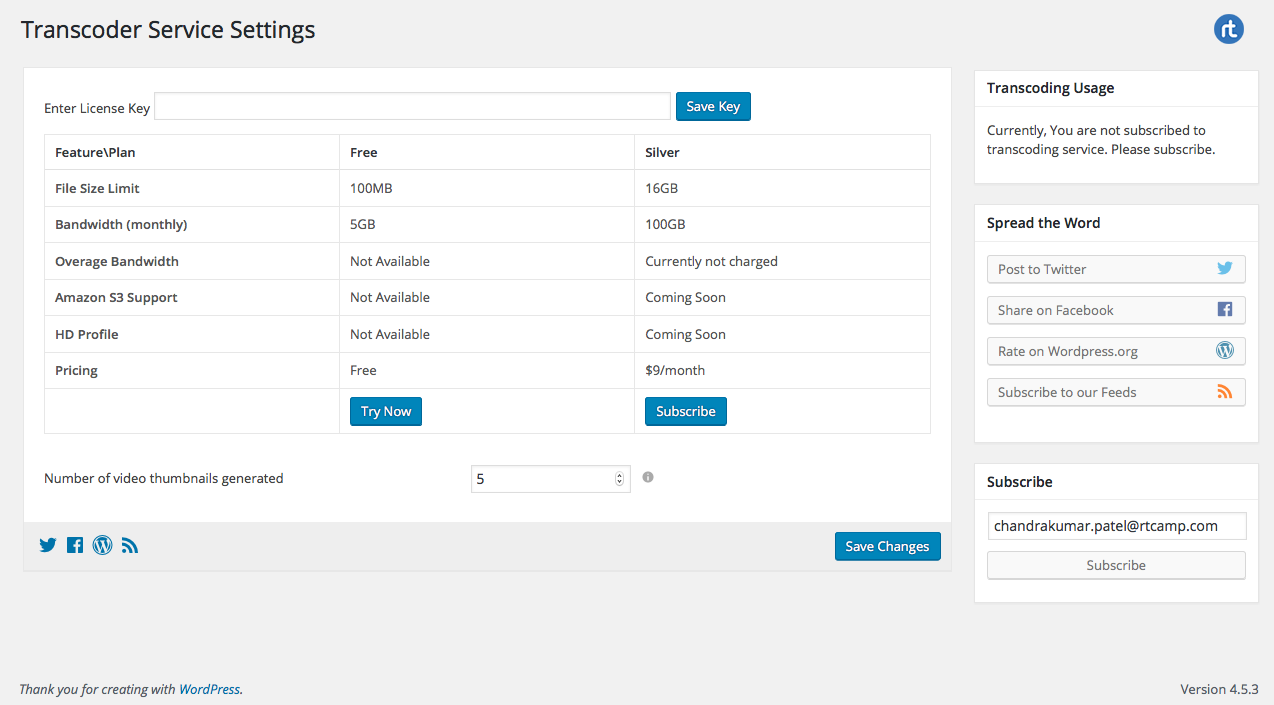
For developers
Is this your plugin? Show off the numbers.
Add a live badge to your site, docs or GitHub README. It updates on its own — no account needed.
Best Transcoder alternatives
All audio plugins →





FAQ
Transcoder: quick answers
Straight answers, pulled from live WordPress.org data.
Live data from WordPress.org · checked Sep 26, 2026
Is Transcoder free?
Yes. Transcoder is free to download and use from the official WordPress.org plugin directory.
Is Transcoder safe to use in 2026?
Transcoder works, but test it on a staging site before relying on it in 2026. It runs on 400+ sites, is rated 3.6/5 and was last updated 1 year ago, and scores 42/100 on our health check.
How many websites use Transcoder?
Transcoder is active on 400+ WordPress websites and has been downloaded 88,587 times since it launched in August 2016. It was downloaded 184 times in the last 30 days.
Does Transcoder work with WordPress 7.1?
Transcoder is officially tested up to WordPress 6.8.10, while the latest release is 7.1.2. It may still work, but try it on a staging site first.
When was Transcoder last updated?
The latest version, 1.4.1, was released on August 22, 2025 (1 year ago).
Who makes Transcoder?
Transcoder is developed and maintained by rtCamp.
What are the best alternatives to Transcoder?
The most popular alternatives to Transcoder are Presto Player (100K+ installs), Seriously Simple Podcasting (30K+ installs) and Compact WP Audio Player (20K+ installs).
Powered by PageForge
Want thousands of pages that rank like these? Build them in an afternoon.
This directory runs on the same engine as PageForge. Turn any spreadsheet, CSV or API into thousands of fast, SEO-ready WordPress pages — with schema, internal links and AI-written copy baked in.
- CSV, Google Sheets & API data sources
- AI content, schema & internal links per page
- Works with Elementor, Gutenberg, Yoast & Rank Math
- Free on WordPress.org — no credit card


