



Tracking Code Manager
Tracking Code manager is a plugin that give you the ability to manage ALL third party tracking codes and scripts in one single interface.

Solid choice
Tracking Code Manager is a solid plugin choice in 2026, with a few things worth checking first. It runs on 90K+ sites, is rated 4.1/5 and was last updated 1 month ago, and scores 79/100 on our health check.
- Proven at scale on 90K+ active sites
Daily downloads
Download spikes usually follow a new release — each site that auto-updates counts as a download.
Rankings
Where Tracking Code Manager stands todayWordPress.org search rankings
Live position in the plugin search, top 100| Keyword | Position |
|---|---|
| deliver content by ad | #3 |
| map google ads | #15 |
| profit google ad | #4 |
| track google ad | #16 |
| UTM management | #5 |
Version adoption
Share of active sites per release.
Rating breakdown
★★★★★★★★★★ 4.1 from 58 reviews
About Tracking Code Manager
From the official readme · v2.8.0Description
Tracking Code manager is a plugin that give you the ability to manage ALL third party tracking codes and scripts in one single interface.
This plugin is a service of Data443.com.
Data443 is a Data Security and Privacy Compliance company that is publicly traded ATDS. We have been providing leading GDPR compliance products such as WordPress GDPR Framework and Data Identification Manager, Blockchain privacy, and enterprise cloud eDiscovery tools.
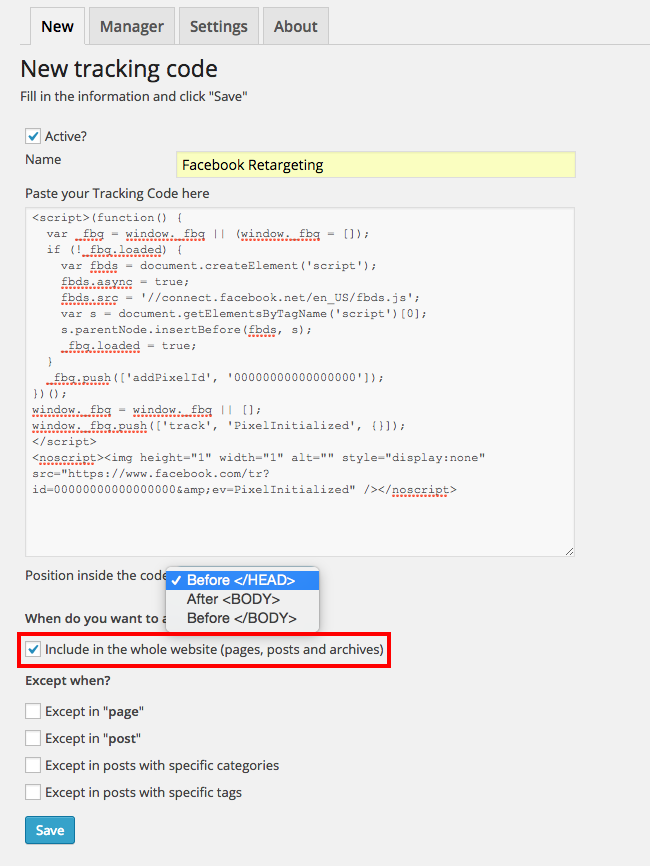
It doesn’t matter where you want to put the codes, because with Tracking Code Manager you can place the codes on any page, any location with complete freedom. Maintain compliance with worldwide privacy laws by segmenting your pixel tracking, blocking by country or location if you wish. Remove or update pixels quickly with a single mouse click.
Very quickly add custom codes for world leading user enhancement platforms like Google Analytics, Facebook Custom Audiences, Facebook Retargeting, Google Remarketing, Zendesk, Live Chat tools, eye tracking analytics, popups, affiliate tracking pixels and so on…
For every single service you may use – or even test – you’ll have to put a script or a tracking pixel in the <head> or <body> tag of your WordPress site OR in some of its pages. Manually. You may even break pages or themes!
Maintin privacy compliance for your users by removing tags for certain locations, pages or types of content. Make advanced decisions based privacy laws that apply to your region!
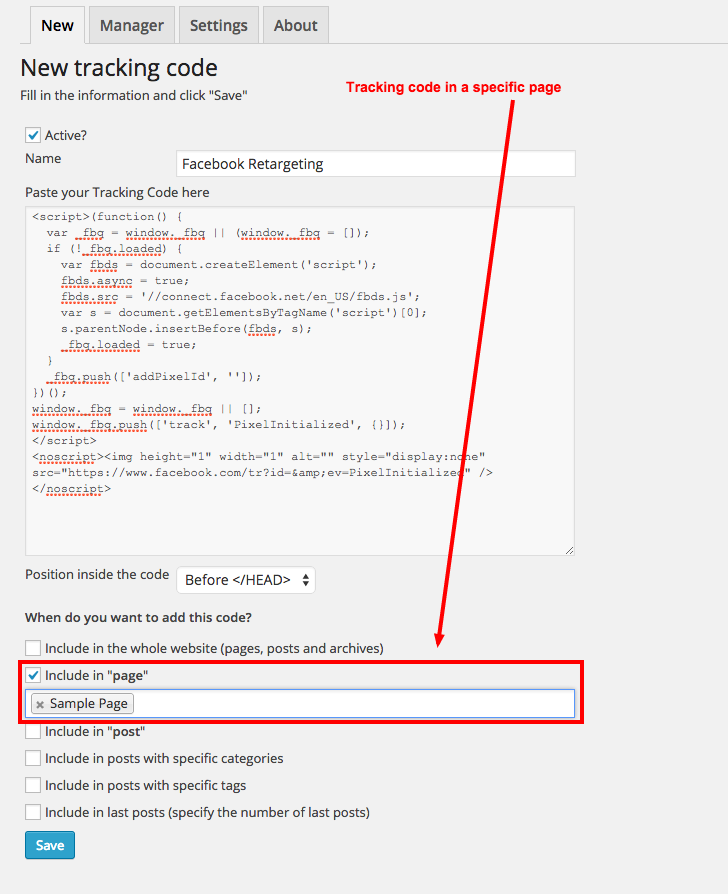
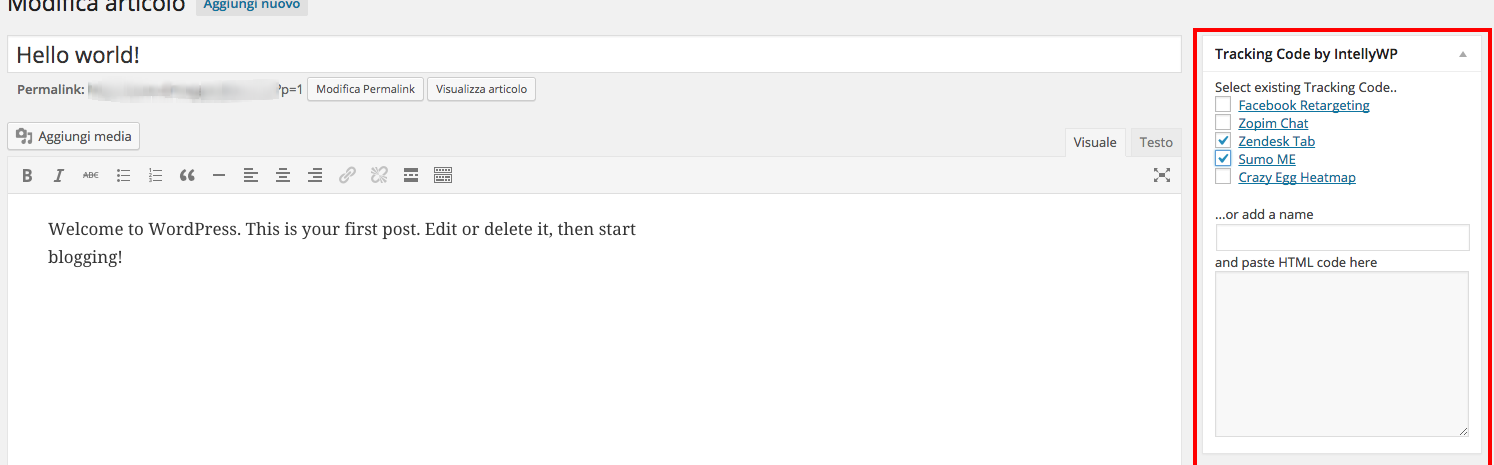
Tracking Code Manager plugin allows you to gather EVERY code and snippet displaying them exactly where you want, whether in the whole site or in specific pages and posts. Very quickly, simply. More importantly, you will be able to remove them just as quickly – without any fuss.
TRACK CONVERSION ON YOUR E-COMMERCE PLUGIN
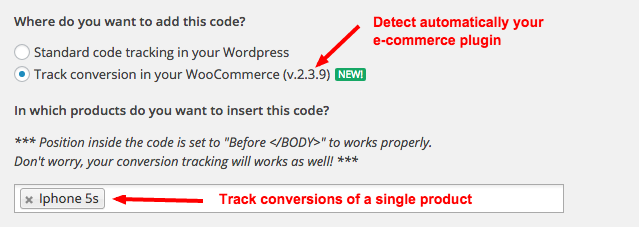
When it comes to track conversions on a WordPress page it’s easy… but if it’s a “dynamic thank you page” is a big problem.Tracking Code Manager plugin DETECT AUTOMATICALLY your e-commerce plugin (WooCommerce, Easy Digital Downloads or WP eCommerce) and let you put the conversion pixels every time someone completes a sale on your store.
In addition you also have the ability to track a single product at time 😉
Check some screenshots here.
THE REAL PROBLEM
Since almost every service requires some sort of tracking, update, javascript update or other customization – you can make it extremely simply with this plugin – the fast Tracking Code Manager plugin.
FORGET THE UPDATING PROBLEM
Its very easy to break your site! Putting the tracking code directly in the theme files, you risk to lose important trackings or external service integrations when it will be updated. We have all been there!
With Tracking Code Manager you can forget about this problem also if you will change your theme in the future. Because we are external to the theme – you have reduced your risk between updates to WordPress and any themes or plugin updates.
Premium version
If you need more advanced feature you can also try our PREMIUM version available in the link http://intellywp.com/tracking-code-manager/. This is our official webpage, you will see the plugin in action, with the possibility to buy our PREMIUM version and which includes full support.
Installation
- Download
- Upload to your plugins/ directory.
- Activate the plugin through the ‘Plugins’ menu in WordPress.
- Put your tracking code, script or iframe in the plugin by going to the Settings => Tracking Code Manager menu
You can also click on this link http://intellywp.com/tracking-code-manager/ to see a full explanation. This is our official webpage, you will see the plugin in action, with the possibility to buy PREMIUM version and have full support.
For documentation click here: https://intellywp.com/docs/category/tracking-code-manager/
Frequently asked questions
How can I report security bugs?
You can report security bugs through the Patchstack Vulnerability Disclosure Program. The Patchstack team helps validate, triage and handle any security vulnerabilities. Report a security vulnerability.
Do you have a video that show me the plugin working?
Sure! Click on the link http://intellywp.com/tracking-code-manager/ for a full explanation. This is our official webpage, you will see the plugin in action, with the possibility to buy PREMIUM version and have full support.
Will this plugin slow down my website?
Absolutely not! Since this plugin is built with lightweight code, and injects on the client side – no one will notice any difference in speed.
Can I put a tracking code or a script in ONE (maybe TWO?) specific page?
Of course you can! You can choose to put the code in a single page, in some posts, or in the whole website (more features in PREMIUM version).
Can I track conversions?
Yep! This is one of the main reason to use this plugin! You can track your conversions by putting the conversion pixel or code ONLY inside the thank you page. Save Money, track more specifically your campaigns and most importantly – GET MORE EFFICIENT with your sales.
Can I manage Facebook Retargeting and Custom Audiences?
Yes! For example you can put Facebook Pixel inside a certain posts of your blog to retarget those users who have already visited that posts on Facebook.
Will this plugin interferes with my Google Analytics plugin?
Nope! We tested the most famous Google Analytics plugins and it will not break any of the most popular ones!
Can I use unlimited tracking codes and conversion pixels?
You have 6 slots to use. Which means six different locations with unlimited tracking codes (enough for 99% of users).
How to verify that a tracking code is properly working?
Have a look at the source code of your page (search for: Tracking Code Manager) or you can install Google Chrome Add-ons. We suggest FB Pixel Helper for Facebook codes and Tag Assistant (by Google) for Google codes.
Changelog
For detailed release notes, see our documentation here: https://intellywp.com/docs/category/tracking-code-manager/.
2.8.0
Release Date – 2026-8-20
- Fix an potential security issue.
2.7.0
Release Date – 2026-7-28
- Do a full security audit on this plugin and make various changes.
2.6.0
Release Date – 2026-5-20
- Test plugin against WordPress 7.0
2.5.0
Release Date – 2025-6-16
- Test plugin against PHP 8.4.4
- RDU-1630 Avoid writing to $_POST superglobal and fix null argument warning
2.4.0
Release Date – 2024-12-22
- Require untiltered_html to add codes in the post editor.
2.3.0
Release Date – 2024-7-3
- In a multisite configuration, the unfiltered_html capability is required to change plugin settings (the Super-Admin role has this by default).
Screenshots
![Include also [All] posts or pages without selecting all one-by-one](https://ps.w.org/tracking-code-manager/trunk/screenshot-4.png?rev=3657266)
For developers
Is this your plugin? Show off the numbers.
Add a live badge to your site, docs or GitHub README. It updates on its own — no account needed.
FAQ
Tracking Code Manager: quick answers
Straight answers, pulled from live WordPress.org data.
Live data from WordPress.org · checked Sep 26, 2026
Is Tracking Code Manager free?
Yes. Tracking Code Manager is free to download and use from the official WordPress.org plugin directory.
Is Tracking Code Manager safe to use in 2026?
Tracking Code Manager is a solid plugin choice in 2026, with a few things worth checking first. It runs on 90K+ sites, is rated 4.1/5 and was last updated 1 month ago, and scores 79/100 on our health check.
How many websites use Tracking Code Manager?
Tracking Code Manager is active on 90K+ WordPress websites and has been downloaded 2,711,816 times since it launched in April 2015. It was downloaded 17,023 times in the last 30 days.
Does Tracking Code Manager work with WordPress 7.1?
Tracking Code Manager is officially tested up to WordPress 7.0.6, while the latest release is 7.1.2. It may still work, but try it on a staging site first.
What PHP version does Tracking Code Manager need?
Tracking Code Manager requires PHP 5.6 or higher. Most hosts run PHP 8.x today, so it works on any modern WordPress hosting.
When was Tracking Code Manager last updated?
The latest version, 2.8.0, was released on August 20, 2026 (1 month ago).
Who makes Tracking Code Manager?
Tracking Code Manager is developed and maintained by Data443 Risk Mitigation, Inc..
Powered by PageForge
Want thousands of pages that rank like these? Build them in an afternoon.
This directory runs on the same engine as PageForge. Turn any spreadsheet, CSV or API into thousands of fast, SEO-ready WordPress pages — with schema, internal links and AI-written copy baked in.
- CSV, Google Sheets & API data sources
- AI content, schema & internal links per page
- Works with Elementor, Gutenberg, Yoast & Rank Math
- Free on WordPress.org — no credit card


