


Track-A-Bot
Logs and analyzes SEO bots, AI crawlers, and other automated traffic.

Consider an alternative
Track-A-Bot shows warning signs in 2026 — compare the alternatives below before installing. It runs on 100+ sites and was last updated 7 months ago, and scores 40/100 on our health check.
- Small user base (100+ active installs)
- Very few reviews so far
- Only tested up to WordPress 6.9 (latest is 7.1)
Daily downloads
Download spikes usually follow a new release — each site that auto-updates counts as a download.
Rankings
Where Track-A-Bot stands todayWordPress.org search rankings
Live position in the plugin search, top 100| Keyword | Position |
|---|---|
| ai activity | >100 |
| analytics | >100 |
| bot tracking | #29 |
| crawler detection | #45 |
| seo | >100 |
Version adoption
Share of active sites per release.
About Track-A-Bot
From the official readme · v1.0.3Description
Track-A-Bot helps you see which SEO, AI, and LLM crawlers are visiting your site — and exactly what they’re doing.
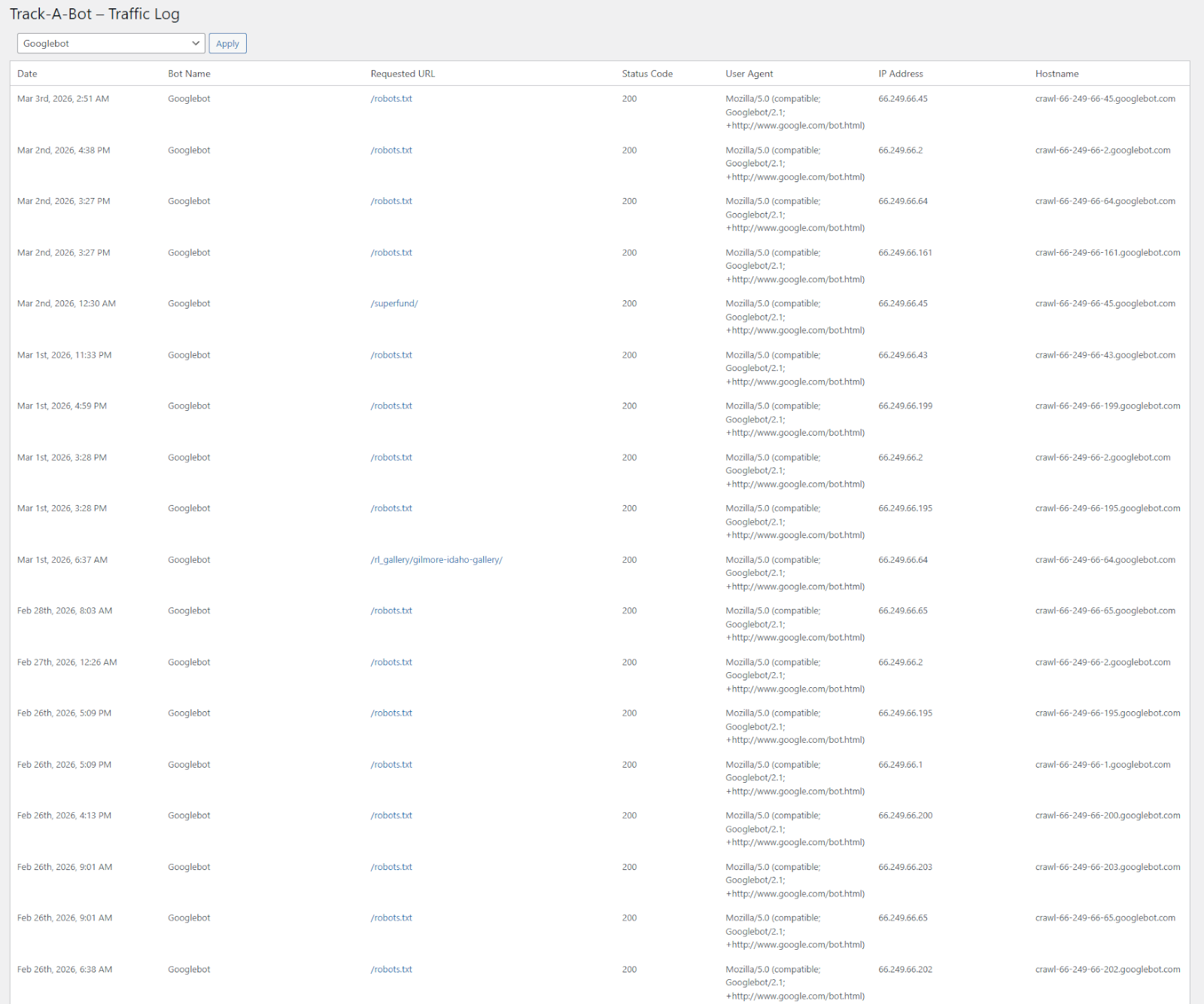
After activation, Track-A-Bot adds a “Bot Analytics” dashboard and detailed traffic log in the WordPress admin.
Track-A-Bot ships with a large built-in bot list (250+ bots for free) so you can quickly see which crawlers are visiting your site without complicated setup.
Features:
* Logs bot visits on front-end requests by matching against a known bot list (User-Agent match).
* Admin traffic log with filtering and pagination.
* Settings: choose how many log rows to display per page.
* Optional hostname enrichment in the background via WP-Cron (reverse DNS lookup + caching).
* Safe admin-only controls and nonce validation for filter actions.
Installation
- Upload the
track-a-botfolder to the/wp-content/plugins/directory, or install the plugin through the WordPress Plugins screen. - Activate the plugin through the “Plugins” screen in WordPress.
- In the WordPress admin menu, go to Track-A-Bot to view the bot traffic log.
- (Optional) Go to Track-A-Bot → Settings to change how many rows are displayed per page.
Notes:
* Track-A-Bot creates a custom database table on activation to store bot traffic logs.
* Track-A-Bot uses WP-Cron to enrich missing hostnames in the background. Your site must receive traffic for WP-Cron to run automatically (or you can use a real cron job that triggers wp-cron.php).
Frequently asked questions
What does Track-A-Bot do?
Track-A-Bot tracks and logs automated traffic from SEO bots, AI crawlers, and LLM agents visiting your WordPress site. It helps you understand which bots are accessing your content, when they visit, and what pages they request, using a built-in list of known bots and detailed request-level logging.
How does Track-A-Bot detect bots?
Track-A-Bot matches the request’s User-Agent string against a built-in list of known bots. If a match is found, the visit is logged. (Hostname matching can also be used by the detection function when you supply a hostname, but the front-end logger uses User-Agent matching by default.)
Does this log human visitors too?
No. Track-A-Bot only logs requests that match a known bot in the bot list.
What data is stored when a bot is logged?
The plugin stores the timestamp, bot ID/name, requested URL, HTTP status, user agent, IP address, and (when available) the hostname.
Why is the Hostname column sometimes blank?
Hostnames are resolved using reverse DNS lookups. Track-A-Bot fills in missing hostnames in the background using WP-Cron and caches lookups to reduce load. Some IPs do not have a valid reverse DNS hostname, in which case the hostname will remain blank.
Does Track-A-Bot slow down my site?
The front-end logger is designed to be lightweight: it performs a simple User-Agent match and inserts a row when a known bot is detected. Hostname lookups (the expensive part) are performed later in small batches via WP-Cron and cached using transients.
Can I change how many rows are shown per page?
Yes. Go to Track-A-Bot → Settings and choose “Bots per page”.
Does Track-A-Bot modify my robots.txt?
No, Track-A-Bot does not modify your /robots.txt file.
How many bots are included?
Track-A-Bot includes 250+ bots in its built-in bot list for free.
Changelog
1.0.3
- Added new “Bot Analytics” dashboard page with 7-day bot activity overview.
- Integrated Chart.js and custom admin chart scripts for visual bot traffic trends.
- Added dynamic 7-day daily bot totals query using prepared SQL and UTC-safe date handling.
- Improved admin menu structure with new top-level “Track-A-Bot” overview page.
- Renamed first submenu item to “Bot Analytics” for improved clarity.
- Hardened activation redirect logic with additional sanitization.
- Improved request logging sanitization (user agent + request URI length limiting and cleanup).
- Updated admin style loading logic to correctly load on all Track-A-Bot admin pages.
- Improved i18n support for fallback bot labels.
- Version bump to 1.0.3.
1.0.2
- Expanded bot detection list to ~250 known bots (bot-list.php update).
- Fixed Settings page so the “Bots per page” option saves and applies correctly.
- Improved validation and sanitization for pagination settings.
1.0.1
- Documentation updates and readme improvements.
1.0.0
- Initial release.
Screenshots


For developers
Is this your plugin? Show off the numbers.
Add a live badge to your site, docs or GitHub README. It updates on its own — no account needed.
FAQ
Track-A-Bot: quick answers
Straight answers, pulled from live WordPress.org data.
Live data from WordPress.org · checked Oct 10, 2026
Is Track-A-Bot free?
Yes. Track-A-Bot is free to download and use from the official WordPress.org plugin directory.
Is Track-A-Bot safe to use in 2026?
Track-A-Bot shows warning signs in 2026 — compare the alternatives below before installing. It runs on 100+ sites and was last updated 7 months ago, and scores 40/100 on our health check.
How many websites use Track-A-Bot?
Track-A-Bot is active on 100+ WordPress websites and has been downloaded 1,596 times since it launched in January 2026. It was downloaded 434 times in the last 30 days.
Does Track-A-Bot work with WordPress 7.1?
Track-A-Bot is officially tested up to WordPress 6.9.10, while the latest release is 7.1.3. It may still work, but try it on a staging site first.
What PHP version does Track-A-Bot need?
Track-A-Bot requires PHP 7.0 or higher. Most hosts run PHP 8.x today, so it works on any modern WordPress hosting.
When was Track-A-Bot last updated?
The latest version, 1.0.3, was released on March 3, 2026 (7 months ago).
Who makes Track-A-Bot?
Track-A-Bot is developed and maintained by Track-A-Bot.
Powered by PageForge
Want thousands of pages that rank like these? Build them in an afternoon.
This directory runs on the same engine as PageForge. Turn any spreadsheet, CSV or API into thousands of fast, SEO-ready WordPress pages — with schema, internal links and AI-written copy baked in.
- CSV, Google Sheets & API data sources
- AI content, schema & internal links per page
- Works with Elementor, Gutenberg, Yoast & Rank Math
- Free on WordPress.org — no credit card


