


Tidy Images – Used & Unused Image Cleaner
Find used and unused WordPress images, see exactly where images are used, and permanently remove unnecessary media files.

Use with caution
Tidy Images works, but test it on a staging site before relying on it in 2026. It runs on 30+ sites and was last updated 3 months ago, and scores 58/100 on our health check.
- Small user base (30+ active installs)
- Very few reviews so far
How does it stack up?
Side-by-side on installs, updates, ratings & support



Daily downloads
Download spikes usually follow a new release — each site that auto-updates counts as a download.
Rankings
Where Tidy Images stands todayWordPress.org search rankings
Live position in the plugin search, top 100| Keyword | Position |
|---|---|
| media cleaner | #36 |
| media cleanup | >100 |
| media library | >100 |
| unused images | #17 |
Version adoption
Share of active sites per release.
About Tidy Images
From the official readme · v1.0.0Description
Tidy Images is a lightweight WordPress media cleanup plugin that helps you identify used and unused images in your Media Library.
Instead of simply marking an image as used, Tidy Images also shows where the image is being used. This helps you understand your media usage before permanently deleting unnecessary files.
The plugin is designed to be simple, transparent, and easy to manage without adding unnecessary features.
Used and Unused Image Detection
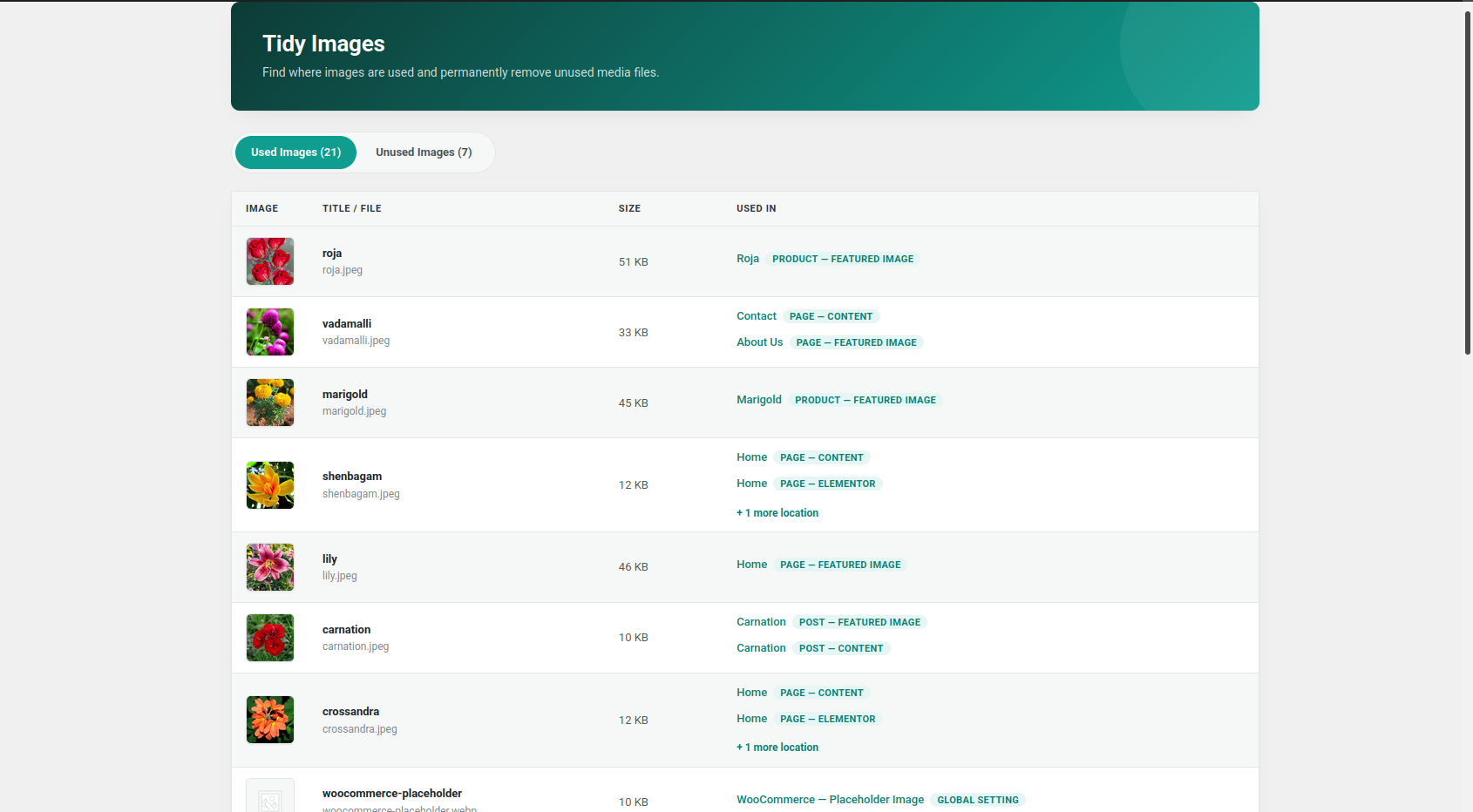
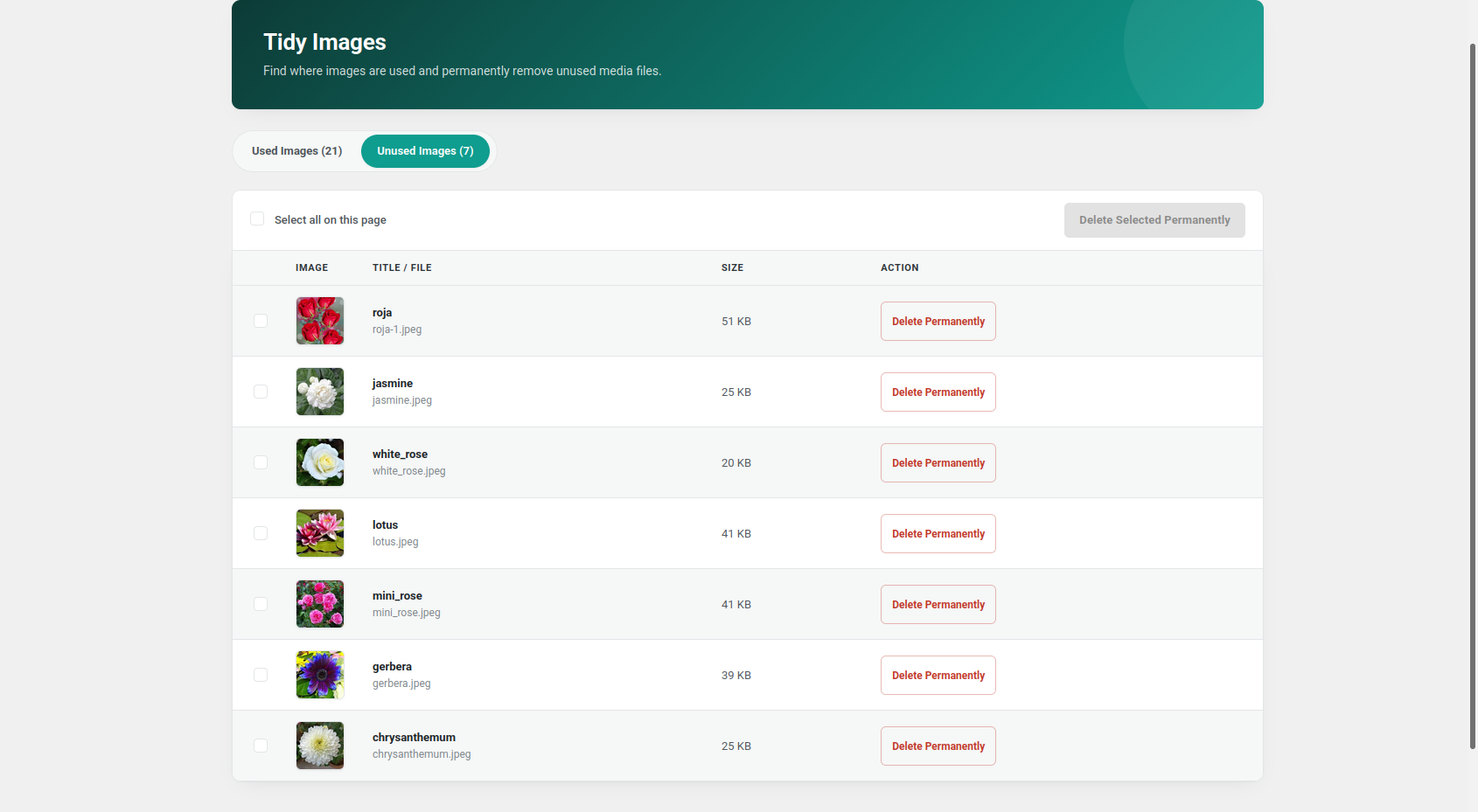
Tidy Images scans your Media Library and separates images into two clear sections:
- Used Images
- Unused Images
This makes it easier to review your media files and identify images that may no longer be needed.
See Where Images Are Used
For each used image, the plugin displays where the image was detected.
Usage information can include:
- Posts
- Pages
- Custom post types
- Featured images
- Post content
- Custom image fields
- Gutenberg content
- Elementor content
- WooCommerce products
If the same image is used in multiple locations, Tidy Images displays the different usage locations.
WordPress Content Support
Tidy Images can detect images used in:
- Posts
- Pages
- Public custom post types
- Featured images
- Post content
- Custom fields
- Gutenberg blocks
- Elementor content
WooCommerce Support
When WooCommerce is active, Tidy Images can detect and protect images used as:
- Product featured images
- Product gallery images
- Product variation images
- WooCommerce placeholder images
The WooCommerce placeholder image is treated as a used image to help prevent accidental deletion.
Important Image Protection
Tidy Images protects important WordPress images from being marked as unused, including:
- Site Icon
- Custom Logo
- WooCommerce Placeholder Image
Safe Review Before Deletion
Unused images are displayed separately so you can review them before deletion.
You can:
- Delete a single unused image
- Select multiple unused images
- Select all unused images on the current page
- Permanently delete selected images
A confirmation message is shown before permanent deletion.
Pagination
Used and unused images are displayed with separate pagination.
This makes larger Media Libraries easier to browse and manage.
Lightweight and Focused
Tidy Images focuses on one main purpose: helping you understand which images are used and which images may be safely reviewed for cleanup.
The plugin does not try to replace image optimization, compression, or CDN plugins.
Installation
- Upload the
tidy-imagesfolder to the/wp-content/plugins/directory, or install the plugin through the WordPress Plugins screen. - Activate Tidy Images through the Plugins screen in WordPress.
- Open
Tidy Imagesfrom the WordPress admin menu. - Review the Used Images and Unused Images sections.
- Check image usage information before permanently deleting any image.
Frequently asked questions
Does Tidy Images automatically delete unused images?
No. Tidy Images does not automatically delete images. You must manually review and confirm images before permanent deletion.
Can I see where an image is being used?
Yes. Used images display the detected usage location, such as a post, page, custom post type, featured image, content area, custom field, or supported WooCommerce location.
Does the plugin support custom post types?
Yes. Tidy Images scans public custom post types and can detect featured images, content images, and supported custom image field values.
Does the plugin support Gutenberg?
Yes. Tidy Images can detect images used in supported Gutenberg content.
Does the plugin support Elementor?
Yes. Tidy Images can detect supported image references stored in Elementor content.
Does the plugin support WooCommerce?
Yes. When WooCommerce is active, the plugin can detect product featured images, gallery images, variation images, and the WooCommerce placeholder image.
Are the Site Icon and Custom Logo protected?
Yes. The WordPress Site Icon and Custom Logo are treated as used images.
What happens when I permanently delete an image?
The original image and its generated image sizes are permanently removed using WordPress attachment deletion functionality. Permanent deletion cannot be undone. Always review images before deleting them and keep a recent website backup.
Can I delete multiple images at once?
Yes. The Unused Images section supports selecting multiple images and permanently deleting the selected files after confirmation.
Why is an image marked as used even if I cannot see it on the front end?
An image may still be referenced by content, a custom field, a page builder, a draft or private post, a WooCommerce product, or another supported location. Review the usage information before deleting any image.
Can every dynamically loaded image be detected?
No image cleanup plugin can guarantee detection of every possible dynamically generated or custom-coded image reference. Themes, plugins, custom code, external storage, CSS files, JavaScript, and unsupported data structures may reference images in ways that are not detectable by Tidy Images. Always review unused images and keep a recent backup before permanent deletion.
Changelog
Initial release of Tidy Images – Used & Unused Image Cleaner.
1.0.0
- Initial release.
- Added used and unused image detection.
- Added image usage location tracking.
- Added support for posts and pages.
- Added support for public custom post types.
- Added featured image detection.
- Added content image detection.
- Added custom image field detection.
- Added Gutenberg content detection.
- Added Elementor content detection.
- Added WooCommerce product image detection.
- Added WooCommerce gallery image detection.
- Added WooCommerce variation image detection.
- Added WooCommerce placeholder image protection.
- Added WordPress Site Icon protection.
- Added WordPress Custom Logo protection.
- Added separate pagination for used and unused images.
- Added single permanent image deletion.
- Added bulk permanent image deletion.
- Added confirmation before permanent deletion.
- Added nonce verification and user capability checks.
Screenshots
For developers
Is this your plugin? Show off the numbers.
Add a live badge to your site, docs or GitHub README. It updates on its own — no account needed.
Best Tidy Images alternatives
All media cleaner plugins →





FAQ
Tidy Images: quick answers
Straight answers, pulled from live WordPress.org data.
Live data from WordPress.org · checked Oct 3, 2026
Is Tidy Images free?
Yes. Tidy Images is free to download and use from the official WordPress.org plugin directory.
Is Tidy Images safe to use in 2026?
Tidy Images works, but test it on a staging site before relying on it in 2026. It runs on 30+ sites and was last updated 3 months ago, and scores 58/100 on our health check.
How many websites use Tidy Images?
Tidy Images is active on 30+ WordPress websites and has been downloaded 273 times since it launched in July 2026. It was downloaded 95 times in the last 30 days.
Does Tidy Images work with WordPress 7.1?
Tidy Images is officially tested up to WordPress 7.0.6, while the latest release is 7.1.2. It may still work, but try it on a staging site first.
What PHP version does Tidy Images need?
Tidy Images requires PHP 7.4 or higher. Most hosts run PHP 8.x today, so it works on any modern WordPress hosting.
When was Tidy Images last updated?
The latest version, 1.0.0, was released on July 11, 2026 (3 months ago).
Who makes Tidy Images?
Tidy Images is developed and maintained by Pushpasharmila S.
What are the best alternatives to Tidy Images?
The most popular alternatives to Tidy Images are Media Tracker (1K+ installs), Unattached Media Manager (200+ installs) and DevDome Media Cleaner: Remo… (200+ installs).
Powered by PageForge
Want thousands of pages that rank like these? Build them in an afternoon.
This directory runs on the same engine as PageForge. Turn any spreadsheet, CSV or API into thousands of fast, SEO-ready WordPress pages — with schema, internal links and AI-written copy baked in.
- CSV, Google Sheets & API data sources
- AI content, schema & internal links per page
- Works with Elementor, Gutenberg, Yoast & Rank Math
- Free on WordPress.org — no credit card


