



Broadcast
Network content syndication made easy! Automatically share content by multiposting between multisite blogs.

Safe pick
Yes — Broadcast is a safe, well-maintained plugin to use in 2026. It runs on 1K+ sites, is rated 4.9/5 and was last updated 1 month ago, and scores 83/100 on our health check.
- Loved by users — 4.9/5 from 214 reviews
- Tested with the latest WordPress (7.1)
How does it stack up?
Side-by-side on installs, updates, ratings & support



Daily downloads
Download spikes usually follow a new release — each site that auto-updates counts as a download.
Rankings
Where Broadcast stands todayWordPress.org search rankings
Live position in the plugin search, top 100| Keyword | Position |
|---|---|
| duplicate | #75 |
| marketing | >100 |
| multipost | #1 |
| sharing | #99 |
| syndication | #7 |
Version adoption
Share of active sites per release.
Rating breakdown
★★★★★★★★★★ 4.9 from 214 reviews
About Broadcast
From the official readme · v52.08Description
Network Content Syndication Made Easy!
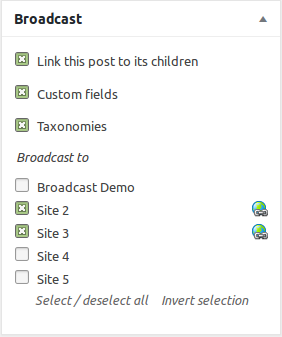
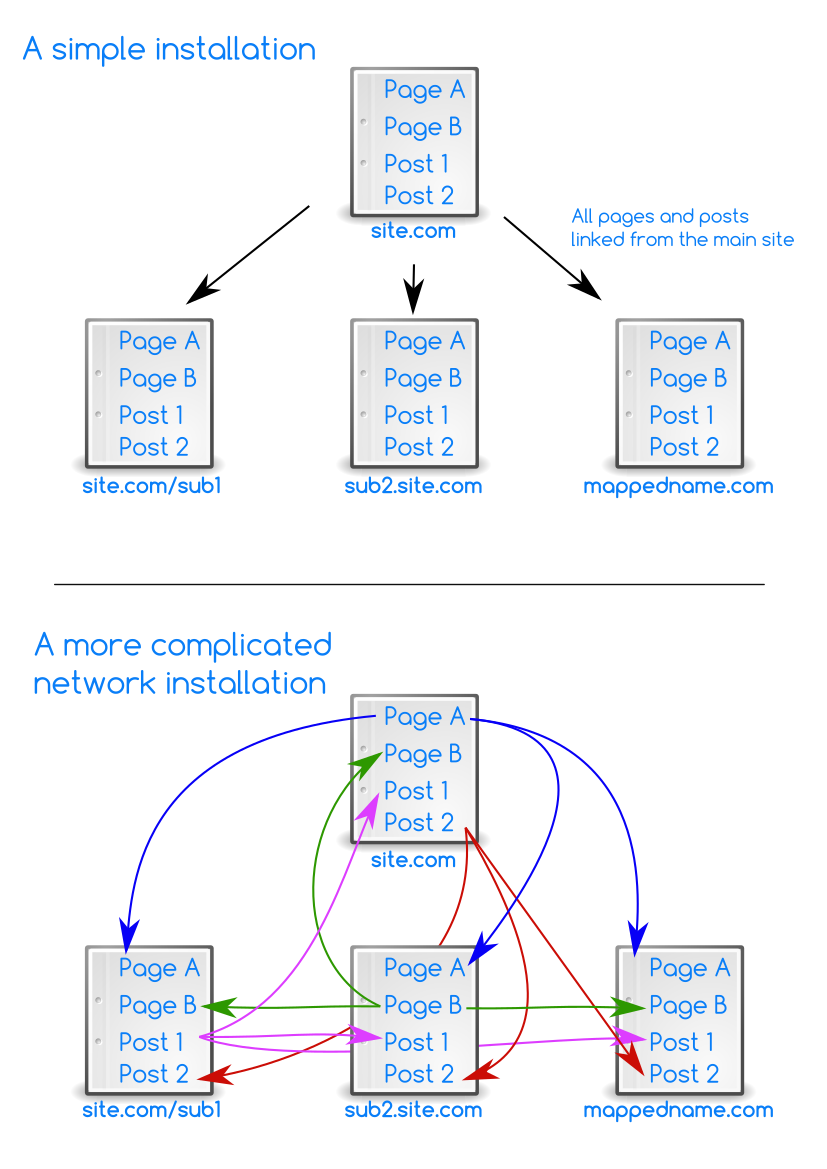
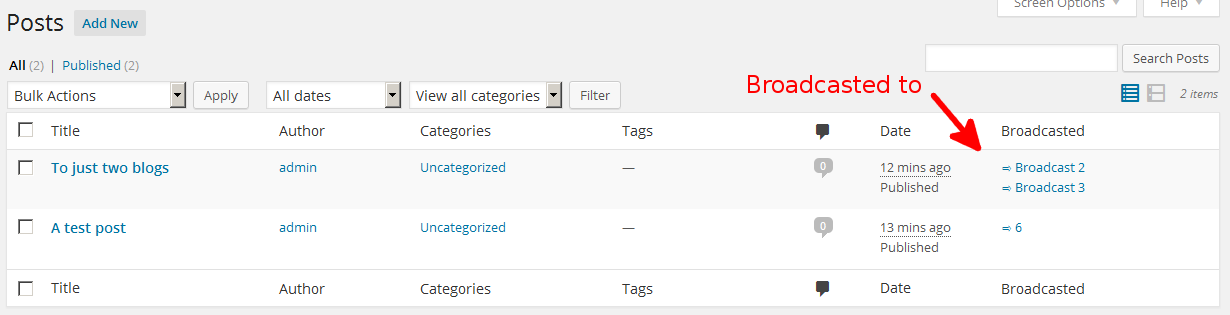
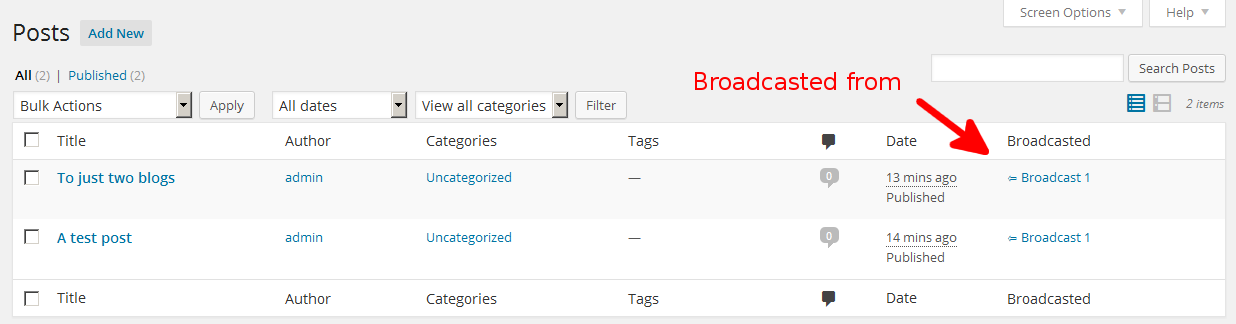
Single source content on a WordPress multisite network is now as easy as pie! Syndicate posts to other blogs in the network, update posts between blogs, sync posts, share content templates, etc. Broadcasted posts can be linked to their parents, which updates child posts when the parent post is updated. This includes all data: title, slug, content, custom fields, attachments, etc.
Broadcast is great for:
- Chain stores
- Content hubs
- Franchises
- News sites
- Schools
- Anything else with distributed content!
Here are some use cases for Broadcast:
- Broadcast in the school classroom
- Franchising with WordPress and Broadcast
- On-Demand Content Syndication with Broadcast Parent Pull
- Sharing forms on a WordPress network
- Wholesale with WooCommerce and Broadcast
Broadcast
- Posts, pages, custom post types
- Taxonomies (categories, tags, etc)
- Custom fields
- Attached images
- Featured images
- Galleries
- Custom field blacklist, whitelist, and protect list.
- User role access granularity
- CDN support (nominally tested Amazon S3)
- Many extra features in the add-on packs
SEO support
- Canonical URLs of child posts.
- Hreflang links (also see Hreflang add-on in the add-on packs)
- Permalinks of child posts (also see Permalinks add-on in the add-on packs)
- Yoast’s WordPress SEO plugin integration and support
Add-on Packs
There are several Broadcast add-on packs that expand the capabilities of Broadcast.
3rd party pack
The following add-ons add support for the plugin after which they are named:
- Activity Monitor
- Advanced Custom Fields
- All In One Calendar
- All In One SEO
- Aqua Page Builder
- Avia Layout Builder
- bbPress
- Beaver Builder
- Bricks Builder
- Caldera Forms
- Calendarize It
- Category Order and Taxonomy Terms Order
- CM Tooltip Glossary
- Code Snippets Pro
- Contact Form 7
- Create
- Dear Flipbook adds support for the Dear Flipbook PDF book plugin.
- Divi Builder
- Download Manager
- Download Monitor
- Elementor
- EventOn
- Event Organiser
- Events Manager
- Flip HTML5
- FooGallery
- Formidable Forms
- GeneratePress
- GEO my WordPress
- Geodirectory
- Global Blocks For Cornerstone
- Global Content Blocks
- GoodLayers
- Google Maps Pro
- Gravity Forms
- H5P
- Image Map Pro
- Imagify
- Inbound Now
- Intagrate
- JetEngine
- LearnDash
- LiteSpeed Cache
- Mailster
- Metaslider
- Modern Events
- Ninja Forms
- NS Cloner
- OneSignal
- Permalink Manager
- Pods
- Polylang
- Post Expirator
- Rank Math SEO
- Search And Filter
- Search Exclude
- Sensei
- Simple Custom Post Order
- SiteOrigin Page Builder
- Slider Revolution
- Smart Slider 3
- Soliloquy
- TablePress
- Tao Schedule Update
- The Events Calendar
- Toolset
- UberMenu
- Ultimate Member
- Unyson
- User Access Manager
- Vimeography
- WooCommerce
- WP All Import
- WPCustom Category Image
- WPForms
- WPLMS
- WPML
- WP Rocket
- WP Ultimate Recipe
- WP Ultimo
- Yoast SEO
If you don’t see your plugin in this list, it might not need a specialized add-on.
Control pack
These add-ons give you extra control of what you broadcast and how:
- All Blogs gives all users access to all of the blogs in the network.
- All Blogs Superadmin allows only superadmins to broadcast to all blogs in the network without having to be a user of the blog.
- All Images detects all referenced local images in post text fields and adds them to the broadcast.
- Back To Parent updates the parent post with the new child content.
- Comments adds support for broadcasting of comments.
- Custom Field Attachments allows post custom field containing attachment IDs to be broadcasted correctly.
- Custom Field Posts allows post custom field containing post IDs to be broadcasted correctly.
- Custom Field Terms allows post custom field containing taxonomy term IDs to be broadcasted correctly.
- Delete Before Broadcast deletes duplicate and similar child posts on each blog before broadcasting.
- Gutenberg Attachments: Modify attachment IDs found in Gutenberg blocks to match their equivalent attachments on each blog.
- Gutenberg Menus: Modify menu IDs found in Gutenberg blocks to match their equivalent attachments on each blog.
- Gutenberg Posts: Modify post IDs found in Gutenberg blocks to match their equivalent attachments on each blog.
- Gutenberg Protect: Protects specific Gutenberg blocks from being overwritten during broadcasting.
- Gutenberg Terms: Modify taxonomy term IDs found in Gutenberg blocks to match their equivalent attachments on each blog.
- Hreflang adds support for SEO-friendly hreflang html tags.
- Keep Child Status keeps the status of post children to private, pending, published, draft, no matter the status of the parent.
- Link Before Broadcast attempts to find unlinked children on each child blog during broadcast.
- Local Files automatically copies local files to each blog and updates the links in the content.
- Local Links automatically updates links to local posts on each child blog.
- No New Terms prevents taxonomy terms from being created on child blogs.
- Parent Pull allows content to be pulled from (parent) blogs.
- Per Blog Taxonomies allows individual control of specific taxonomies for each child post.
- Permalinks provides more precise control of permalinks for both parents and children.
- Protect Child Properties prevents various properties of child posts from being overwritten.
- Rebroadcaster: Periodically and automatically rebroadcast specific posts.
- <a href="https://broadcast.plainviewplugins.com/addon/rebroadcast-parent-here/"Rebroadcast Parent Here: Rebroadcast the parent to this linked child.
- Redirect All Children redirects single post views from visitors of child posts to the parent post.
- Redirect Parent redirect all views of a parent post to the first child post.
- Relink To Parent: Relink an unlinked child to the parent.
- Same post ID: Create a new post on several blogs with the same post ID.
- Search And Replace finds and replaces texts in posts during broadcast.
- Shortcode Attachments modifies attachment IDs found in shortcodes to match their equivalent attachments on each blog.
- Shortcode Menus modifies menu IDs found in shortcodes to match their equivalent menus on each blog.
- Shortcode Posts modifies post IDs found in shortcodes to match their equivalent posts on each blog.
- Shortcode Terms automatically translates taxonomy term IDs found in shortcodes when broadcasting.
- Term Meta Attachments: Allow taxonomy term meta containing attachment IDs to be broadcasted correctly.
- Thumbnail Sizes allows for different additional thumbnail sizes on a per-blog basis.
- Update Attachments updates existing attachments by copying over the files to the child blogs.
- Update Family updates the parent post and siblings when editing a child post.
- Unlink On Edit unlinks child posts when they are modified.
- User & Blog Settings (UBS) can hide the broadcast meta box and/or menu, modify the meta box to force/prevent broadcast to blogs, with separate settings for users / blogs / roles.
- User & Blog Settings Post uses the modifications from the UBS plugin to broadcast posts with one click.
Efficiency pack
These add-ons allow you to broadcast more efficiently, saving you even more time:
- Blog Groups 2 provides a means of groups blogs together, in order to be able to quickly select and unselect blogs from the Broadcast meta box.
- Blog Search: Search and filter the blog list in the editor meta box.
- Duplicate Attachments will duplicate the attachment and thumbnails, instead of letting WordPress regenerate them.
- Find Some Unlinked Children can selectively link orphans / unlinked posts to parents, instead of automatically linking all found children.
- New Blog Broadcast automatically broadcasts posts when creating a new blog.
- Purge Children removes children and their attached files from child blogs.
- Queue adds a broadcast queue which helps to broadcast posts to tens / hundreds / thousands of blogs.
- Rebroadcast updates selected parent posts by using a bulk action.
- Rebroadcaster: Periodically and automatically rebroadcast specific posts.
- Send To Many allows mass broadcast of several posts to blogs at once.
Utilities pack
These add-ons do things semi-related to broadcasting, but are good to have none-the-less:
- Bulk Cloner creates clones of existing blogs on the network.
- CDN Workaround works around faulty CDNs that do not report the correct URL for attachments.
- : Run code snippets on specific blogs.
- Copy options copies blog options / settings between blogs.
- : Runs WordPress cron periodically on all sites of the network.
- Custom Field Cleanup: Cleans up the custom fields of a post.
- Lock Post allows users to lock editing of posts / pages to only themselves and super admins.
- Manual Post Actions manually runs bulk post actions on posts.
- Media Cleanup: cleans up unused media by looking for unused items in the database and on disk.
- Menus copies menus between blogs (overwrite / update), with support for equivalent child posts on the child blogs and equivalent taxonomies.
- Page Content Shortcode provides a
[bc_page_content slug="pageslug"]shortcode to display the contents of a page. - PHP Code runs custom PHP code on selected blogs. Easily switch themes for all blogs, for example.
- Shortcodes provides arbitrary admin-defined global or local shortcodes.
- Sitemaps generates network-aware sitemaps and robots.txt.
- Sync Taxonomies synchronizes the taxonomies of target blogs with those from a source blog.
- User Role Sync copies user roles between blogs.
- Widgets copies widget and sidebar settings between blogs.
Documentation
Although Broadcast is relatively easy to understand by itself, for extra documentation see Broadcast’s online documentation, which covers:
- Attachments, images and media
- Custom fields
- Linking
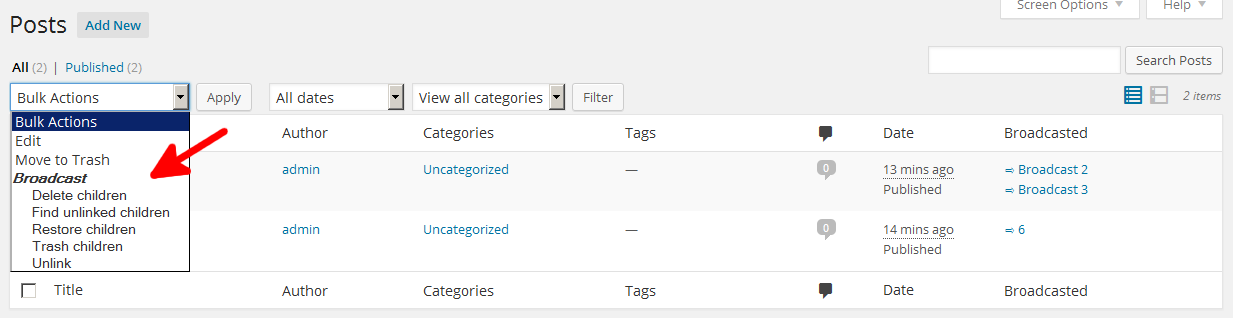
- Post actions and the bulk action dropdown
- Taxonomy handling
Here are instructions for merging existing single installs into a WordPress network.
For developers: the code should be well-commented and easily legible for the most part. Extra developer documentation covers:
Misc
The git repository can be found at: https://bitbucket.org/edward_electric/broadcast
Installation
- Activate the plugin sitewide.
Frequently asked questions
I need support!
Broadcast is supported in the forum. For users of the add-on packs, support is available via e-mail.
Debug dumps
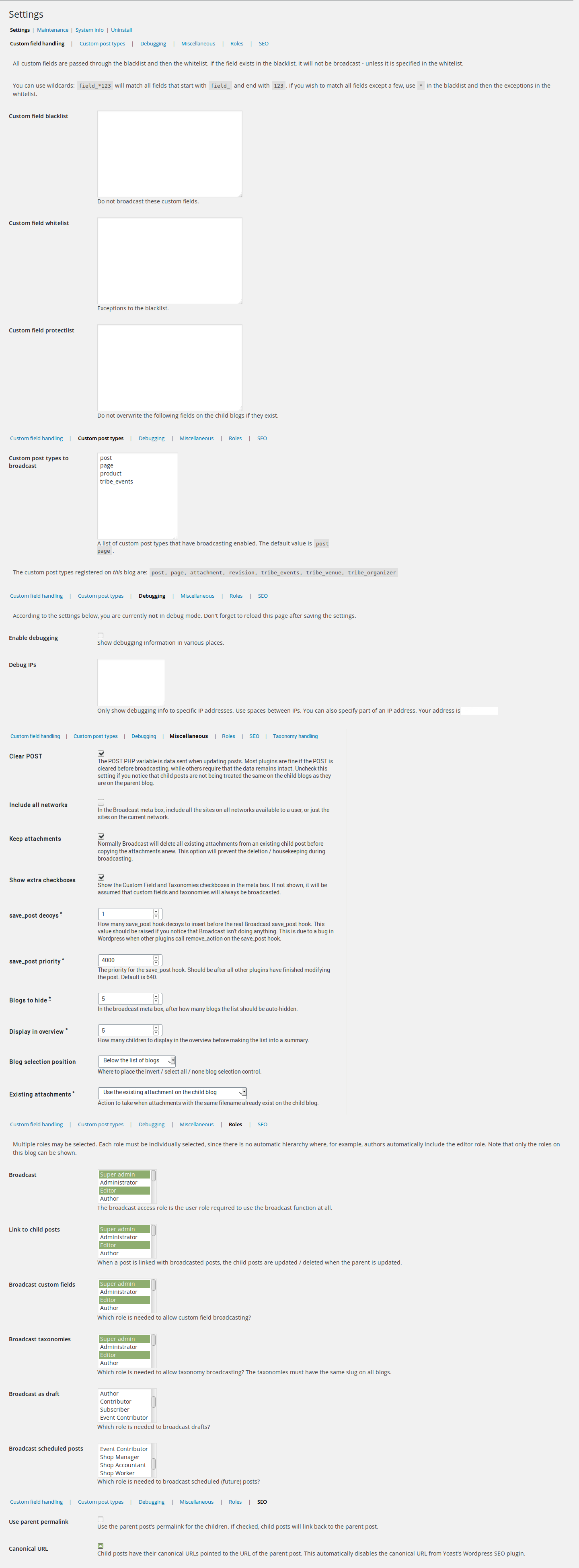
A debug dump is the long text that is displayed when broadcasting a post with debug mode on. This dump can then be read to see what Broadcast is or isn’t doing. To switch on debug mode, see the admin settings. If your site is live it would be wise to input your IP in the associated textarea, so that only you see the debug dump.
Gutenberg support?
Yes, works as normal with one exception: the meta box does not update after publishing, so you’ll have to reload the page after publishing changes to see the new blogs list.
Blacklist, whitelisting, force broadcast
Broadcasting to specific blogs, hiding blogs and forcing blogs can be acheived with the User & Blog Settings add-on.
Bulk broadcast existing pages
To broadcast many posts at once, see the Send To Many add-on.
Galleries and attachments
How broadcast handles attachments: Attachments directly attached are stored. Attachments found in [gallery] shortcodes are stored. On the child blog, the existing attachments to the post, if any, are automatically deleted to keep attachments clean. This behavior can be configured using custom code or add-ons: Duplicate Attachments, Update Attachments. The stored attachments are copied. The thumbnail ID is replaced. The image URLs in the post content are replaced. The image IDs in [gallery] shortcodes are replaced. Do you have a lot of attachments that you don’t want duplicated to hundreds of…
Hide broadcast from the users
The broadcast meta box, menu and columns in the post view can be hidden from users / roles / blogs using the User & Blog Settings add-on.
Incompatible plugins
Below is a list of plugins that just will not work properly with Broadcast and / or its addons: Cloudflare Image Resizing – Creates 404 errors for images. Post Type Switcher – Turns post types into attachments and vice versa. Query Monitor causes the queue data to increase exponentially. Theia Smart Thumbnails Premium Tracking Code Manager – prevents User & Blog Settings from working by inserting data into the _POST variable during a normal page GET. Very non-standard behavior. WP Activity Log – kills WordPress when taxonomies are about to be synced.
Orphans?
If you have already created posts on other blogs that are supposed to be children of a specific post, you can use the “find unlinked” bulk action to find and link them. If the existing posts are not linked, broadcasting a post can result in duplicates. To be considered an orphan the orphaned posts must have the exact same title (name) as the soon-to-be parent and be of the same post type. You can also use the Delete Before Broadcast add-on to delete any similar posts on the child blog before broadcasting.
Timeout problems
If you have many attachments in your post, and are broadcasting the post to many blogs, you might encounter a PHP timeout. This means that broadcasting exceeded the PHP time limit and had to be aborted. There are several solutions to this problem: Increase the PHP timeout in your PHP.ini settings. This will not speed up broadcasting, only increase your chances of completely broadcasting the post. Use the Duplicate Attachments add-on. This will duplicate any attachments + thumbnails instead of regenerating them on each child blog. Use the Queue add-on to put each child broadcast into a queue…
Why can I not see the Broadcast meta box?
Make sure that: Your user level has broadcast access (Broadcast access role) Your user has write access to more than this blog (see Admin settings > Maintenenace > View blog access). You can also use the All Blogs add-on to give yourself access to all blogs. The correct post type(s) have been selected in the Broadcast settings The User & Blog Settings add-on is not set to hide the meta box from the user / role / blog
WooCommerce
Broadcast is capable of handling simple WooCommerce products. In the Broadcast custom post type settings: Add “product”. Save the product normally first. Then broadcast, selecting the custom fields and taxonomies checkboxes. This will broadcast all normal product settings: SKU, price, etc. If your products have variations, a product image gallery, you want to sync stock, you want to sync orders, need the attribute taxonomies to be synced, you’ll be wanting the WooCommerce add-on.
Changelog
52.08 20260822
- Fix: Bulk actions selector not working with selected posts.
52.07 20260816
- Tested with WordPress beta version 7.1-RC.
52.06 20260801
- Updated “tested up to” version.
52.05 20260608
- Updated javascript so that it remembers which settings subtab one submits the form on, returning to the same subtab after loading the page.
52.04 20260521
- Added support for WP 7.0
- New add-on: WP Job Manager: Adds support support for the WP Job Manager plugin.
52.03 20260325
- Fix: Prevent PHP timeouts during Broadcast Data maintenance checks by chunking the checks more efficiently. Thanks to mj@networker.de for the patch and testing.
- Dev: Add ->existing_child_post in the broadcasting_data to help the modify_post action see how the existing child post looks.
- Dev: Fix proper display of custom fields in view post info maintenance check.
Screenshots


For developers
Is this your plugin? Show off the numbers.
Add a live badge to your site, docs or GitHub README. It updates on its own — no account needed.
Best Broadcast alternatives
All duplicate plugins →




FAQ
Broadcast: quick answers
Straight answers, pulled from live WordPress.org data.
Live data from WordPress.org · checked Oct 6, 2026
Is Broadcast free?
Yes. Broadcast is free to download and use from the official WordPress.org plugin directory.
Is Broadcast safe to use in 2026?
Yes — Broadcast is a safe, well-maintained plugin to use in 2026. It runs on 1K+ sites, is rated 4.9/5 and was last updated 1 month ago, and scores 83/100 on our health check.
How many websites use Broadcast?
Broadcast is active on 1K+ WordPress websites and has been downloaded 453,274 times since it launched in March 2010. It was downloaded 3,573 times in the last 30 days.
Does Broadcast work with WordPress 7.1?
Yes. The developer has tested Broadcast up to WordPress 7.1.2, the latest release. It requires WordPress 6.2 or newer.
What PHP version does Broadcast need?
Broadcast requires PHP 8.0 or higher. Most hosts run PHP 8.x today, so it works on any modern WordPress hosting.
When was Broadcast last updated?
The latest version, 52.08, was released on August 22, 2026 (1 month ago).
Who makes Broadcast?
Broadcast is developed and maintained by edward_plainview.
What are the best alternatives to Broadcast?
The most popular alternatives to Broadcast are WPvivid (900K+ installs), Post Duplicator (200K+ installs) and Duplicate Menu (100K+ installs).
Powered by PageForge
Want thousands of pages that rank like these? Build them in an afternoon.
This directory runs on the same engine as PageForge. Turn any spreadsheet, CSV or API into thousands of fast, SEO-ready WordPress pages — with schema, internal links and AI-written copy baked in.
- CSV, Google Sheets & API data sources
- AI content, schema & internal links per page
- Works with Elementor, Gutenberg, Yoast & Rank Math
- Free on WordPress.org — no credit card


