


Thenameda Partial Form Recovery for WPForms
Track and recover partial WPForms submissions before visitors leave your site.

Use with caution
Thenameda Partial Form Recovery… works, but test it on a staging site before relying on it in 2026. Was last updated 3 months ago, and scores 55/100 on our health check.
- Small user base (<10 active installs)
- Very few reviews so far
Daily downloads
Download spikes usually follow a new release — each site that auto-updates counts as a download.
Rankings
Where Thenameda Partial Form Reco… stands todayWordPress.org search rankings
Live position in the plugin search, top 100| Keyword | Position |
|---|---|
| abandoned forms | >100 |
| csv export | >100 |
| >100 | |
| form tracking | >100 |
| lead recovery | #79 |
About Thenameda Partial Form Recovery for WPF…
From the official readme · v1.0.0Description
Thenameda Partial Form Recovery for WPForms helps you capture incomplete form submissions when visitors start filling out a WPForms form but leave before submitting.
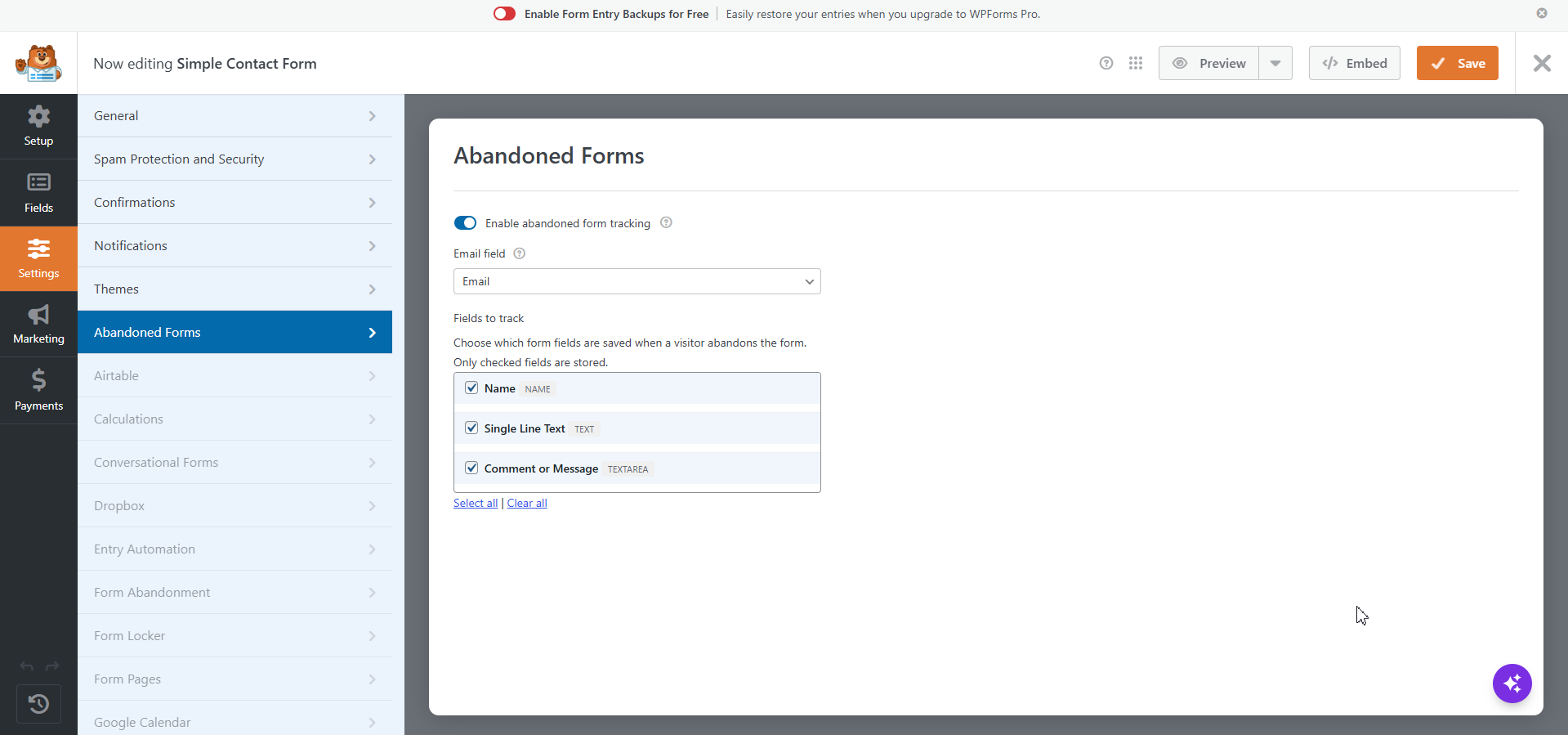
The plugin integrates directly with the WPForms form builder. Enable tracking per form, choose which fields to store, and pick the email field used to identify each abandoned visitor.
Why use this plugin?
- Recover lost leads — Turn incomplete visits into follow-up opportunities.
- Per-form control — Enable tracking only on the forms that matter.
- Privacy-conscious defaults — Sensitive field types such as file uploads, payments, and signatures are not captured.
- No coding required — Configure everything from the WPForms builder and WordPress admin.
Key features
- Per-form tracking toggle in WPForms → Settings → Abandoned Forms
- Email field selection to identify abandoned users
- Field allowlist so you choose exactly which inputs are stored
- Automatic capture when visitors change fields and leave the page
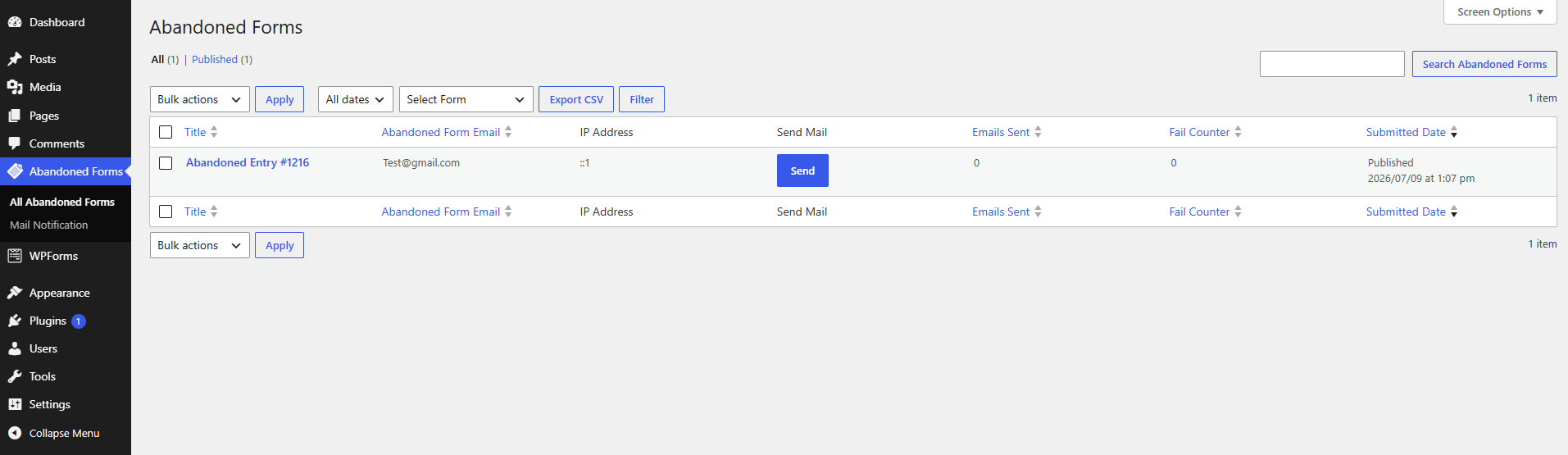
- Abandoned Users admin list with email, IP address, and submission date
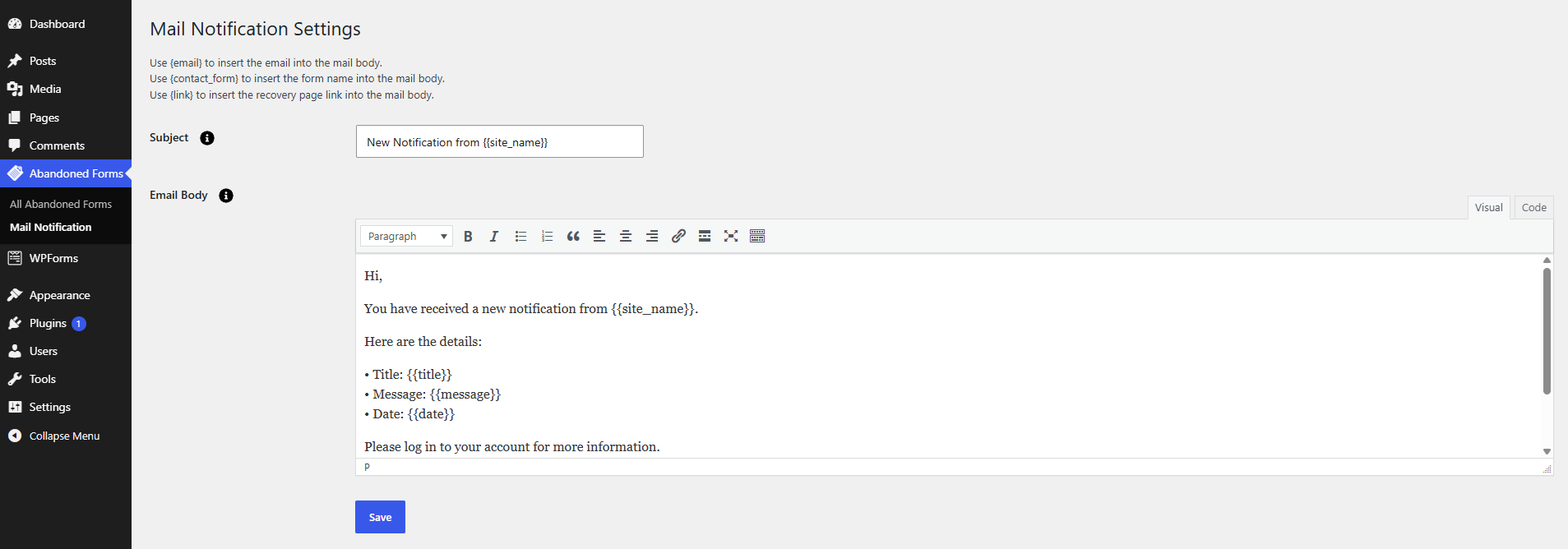
- Manual recovery emails with a customizable global template
- Secure recovery links with token-based URLs that pre-fill saved field values
- CSV export filtered by form
- Automatic cleanup when a visitor completes and submits the form
How it works
- A visitor starts filling out a WPForms form on your site.
- As they type, partial data is saved in the background.
- If they leave without submitting, an abandoned entry is stored in WordPress.
- You can review the entry, export it, or email the visitor a recovery link.
- When they return via the link, their previous answers are pre-filled.
- After a successful submission, the abandoned entry is removed automatically.
Compatibility
- WordPress 6.2 or later (tested up to 7.0)
- PHP 7.2 or later
- WPForms Lite 1.8.0 or later (tested up to 1.10.2)
- WPForms Pro
- Classic and modern WPForms front-end markup
- Multipage forms
Privacy note
This plugin stores partial form submissions that may include personal data (such as names and email addresses). Make sure your privacy policy explains that incomplete form data may be collected, and only enable tracking on forms where you have a lawful basis to do so.
Installation
Automatic installation
- In your WordPress dashboard, go to Plugins → Add New.
- Search for Thenameda Partial Form Recovery for WPForms.
- Click Install Now, then Activate.
- Confirm that WPForms Lite (or WPForms Pro) is installed and active.
Manual installation
- Download the plugin ZIP file.
- Go to Plugins → Add New → Upload Plugin.
- Choose the ZIP file, click Install Now, then Activate.
Configuration
- Edit any form in WPForms → All Forms.
- Open the Settings panel in the form builder.
- Select the Abandoned Forms section.
- Enable abandoned form tracking.
- Choose the Email field used to identify visitors.
- Select the Fields to track you want stored.
- Save the form.
Abandoned entries appear under Abandoned Forms in the WordPress admin menu.
Frequently asked questions
Does this work with WPForms Lite?
Yes. The plugin works with both WPForms Lite and WPForms Pro.
Do I need WPForms Pro?
No. WPForms Lite is sufficient. The plugin uses its own storage for abandoned entries and does not require the WPForms entries feature.
Which fields are not tracked?
For security and privacy, the plugin does not capture file uploads, payment fields, credit card fields, signatures, CAPTCHA values, or similar sensitive inputs.
When is an entry considered abandoned?
An entry is saved when a visitor interacts with the form and then leaves the page—for example by navigating away, closing the tab, or moving the mouse off the page—before submitting successfully.
Can I send recovery emails automatically?
Version 1.0.0 supports manual recovery emails from the admin. You can customize the default email subject and body under Abandoned Forms → Mail Notification Settings.
What placeholders can I use in recovery emails?
{email} — the visitor’s email address {contact_form} — the form title {link} — a secure recovery URL that pre-fills saved field values
Are recovery links secure?
Yes. Recovery URLs include a unique token. The token is verified on the server before any data is loaded or updated.
Can I export abandoned entries?
Yes. On the Abandoned Forms list screen, choose a form from the filter dropdown and click Export CSV.
Does the plugin delete entries after submission?
Yes. When a visitor successfully submits the form, the matching abandoned entry is removed automatically.
Will this slow down my site?
The front-end script loads on public pages and throttles save requests to avoid excessive AJAX traffic.
Changelog
Initial release of Thenameda Partial Form Recovery for WPForms for sites using WPForms Lite or Pro.
1.0.0
- Initial release.
Screenshots
For developers
Is this your plugin? Show off the numbers.
Add a live badge to your site, docs or GitHub README. It updates on its own — no account needed.
FAQ
Thenameda Partial Form Recovery for…: quick answers
Straight answers, pulled from live WordPress.org data.
Live data from WordPress.org · checked Oct 4, 2026
Is Thenameda Partial Form Recovery… free?
Yes. Thenameda Partial Form Recovery… is free to download and use from the official WordPress.org plugin directory.
Is Thenameda Partial Form Recovery… safe to use in 2026?
Thenameda Partial Form Recovery… works, but test it on a staging site before relying on it in 2026. Was last updated 3 months ago, and scores 55/100 on our health check.
How many websites use Thenameda Partial Form Recovery…?
Thenameda Partial Form Recovery… is active on <10 WordPress websites and has been downloaded 188 times since it launched in July 2026. It was downloaded 54 times in the last 30 days.
Does Thenameda Partial Form Recovery… work with WordPress 7.1?
Thenameda Partial Form Recovery… is officially tested up to WordPress 7.0.6, while the latest release is 7.1.2. It may still work, but try it on a staging site first.
What PHP version does Thenameda Partial Form Recovery… need?
Thenameda Partial Form Recovery… requires PHP 7.2 or higher. Most hosts run PHP 8.x today, so it works on any modern WordPress hosting.
When was Thenameda Partial Form Recovery… last updated?
The latest version, 1.0.0, was released on July 13, 2026 (3 months ago).
Who makes Thenameda Partial Form Recovery…?
Thenameda Partial Form Recovery… is developed and maintained by Imtiyaj.
Powered by PageForge
Want thousands of pages that rank like these? Build them in an afternoon.
This directory runs on the same engine as PageForge. Turn any spreadsheet, CSV or API into thousands of fast, SEO-ready WordPress pages — with schema, internal links and AI-written copy baked in.
- CSV, Google Sheets & API data sources
- AI content, schema & internal links per page
- Works with Elementor, Gutenberg, Yoast & Rank Math
- Free on WordPress.org — no credit card


