


Theme and plugin translation for Polylang (TTfP)
Theme and plugin translation using Polylang for WordPress. Extension for Polylang plugin.

Use with caution
Theme and plugin translation fo… works, but test it on a staging site before relying on it in 2026. It runs on 10K+ sites, is rated 4.7/5 and was last updated 2 years ago, and scores 49/100 on our health check.
- Proven at scale on 10K+ active sites
- Loved by users — 4.7/5 from 35 reviews
- No update in over a year
- Only tested up to WordPress 6.6 (latest is 7.1)
How does it stack up?
Side-by-side on installs, updates, ratings & support



Daily downloads
Download spikes usually follow a new release — each site that auto-updates counts as a download.
Rankings
Where Theme and plugin translatio… stands todayWordPress.org search rankings
Live position in the plugin search, top 100| Keyword | Position |
|---|---|
| languages | >100 |
| multilanguage | #35 |
| polylang | #23 |
| translate | >100 |
| translation | #52 |
Version adoption
Share of active sites per release.
Rating breakdown
★★★★★★★★★★ 4.7 from 35 reviews
About Theme and plugin translation for Polyla…
From the official readme · v3.4.9Description
What is “Theme and plugin translation for Polylang”?
Extension for Polylang plugin (Polylang is an extension to make multilingual WordPress websites.).
Plugin is needed to translate the WordPress themes and plugins by Polylang.
How to configure it?
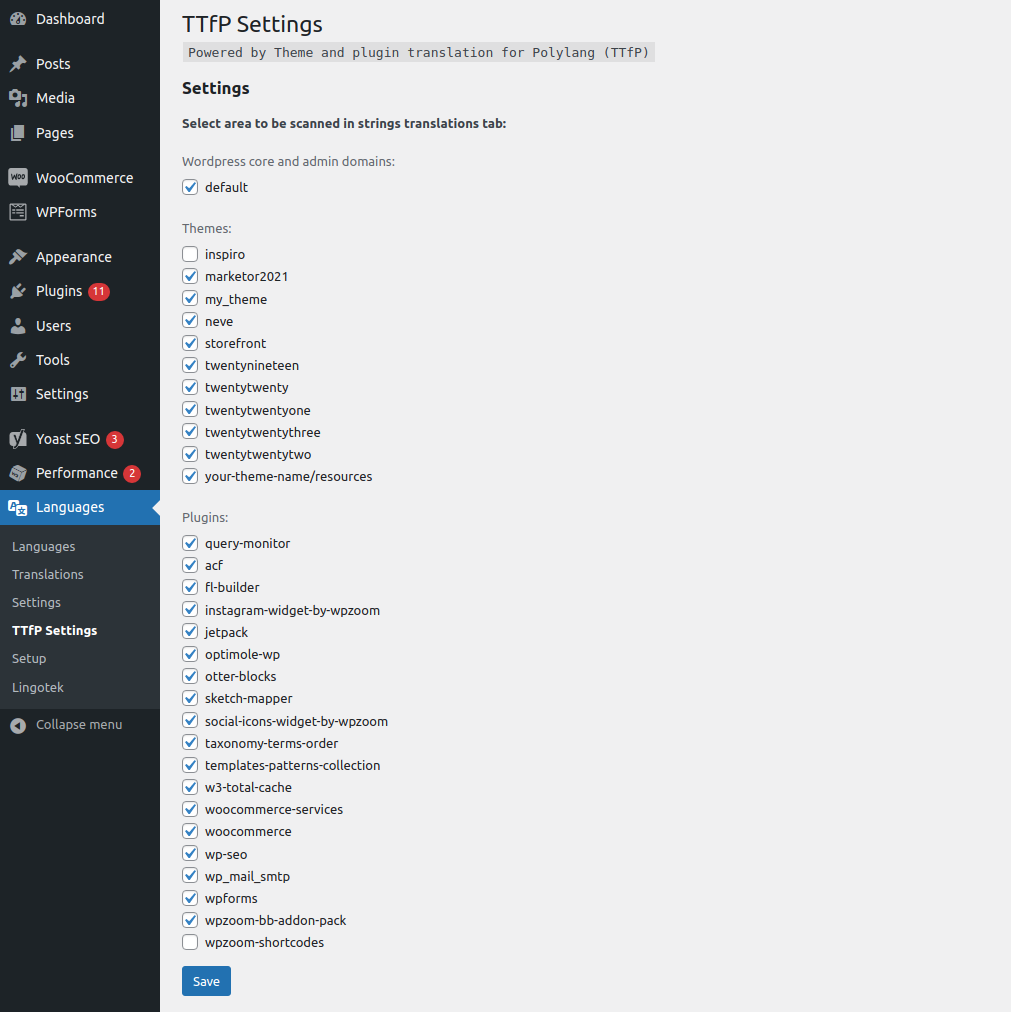
Select themes and plugins to find texts for translation by Polylang.
In admin dashboard:
Languages -> TTfP Settings
How it is work?
“Theme and plugin translation for Polylang” automatically searches all files of WordPress themes and plugins. It chooses from this file only those files with extensions:
- php
- inc
- twig
In addition, is implemented the integration with Timber library (read more: http://timber.upstatement.com) – which allows to translate twig’s skins in simple way.
Plugin in searched skins or plugins chooses texts from Polylang functions, such as:
- _e(string $text, string $domain = ‘default’);
- __(string $text, string $domain = ‘default’);
- _x(string $text, string $context, string $domain = ‘default’);
- pll_e(string $text);
- pll__(string $text);
- esc_html(string $text);
- esc_html_e(string $text, string $domain = ‘default’);
- esc_html__(string $text, string $domain = ‘default’);
- _n(string $single, string $plural, int $number, string $domain = ‘default’);
- esc_attr_e(string $text, string $domain = ‘default’);
- esc_attr__(string $text, string $domain = ‘default’);
In your function.php, themes or plugins.
For example:
<p><?php pll_e('My text'); ?></p>

<p><?php _e('My another text', 'my_theme'); ?></p>
On the timber context declare this functions like:
$context['pll_e'] = TimberHelper::function_wrapper('pll_e');

$context['pll_'] = TimberHelper::function_wrapper('pll_');
See more on: https://polylang.wordpress.com/documentation/documentation-for-developers/functions-reference/
These functions are defined by Polylang plugin for printing translations.
Thanks “Theme and plugin translation for Polylang” you can find these strings to translate and add to Polylang register on very simple way.
And then you can translate these texts from the admin dashboard.
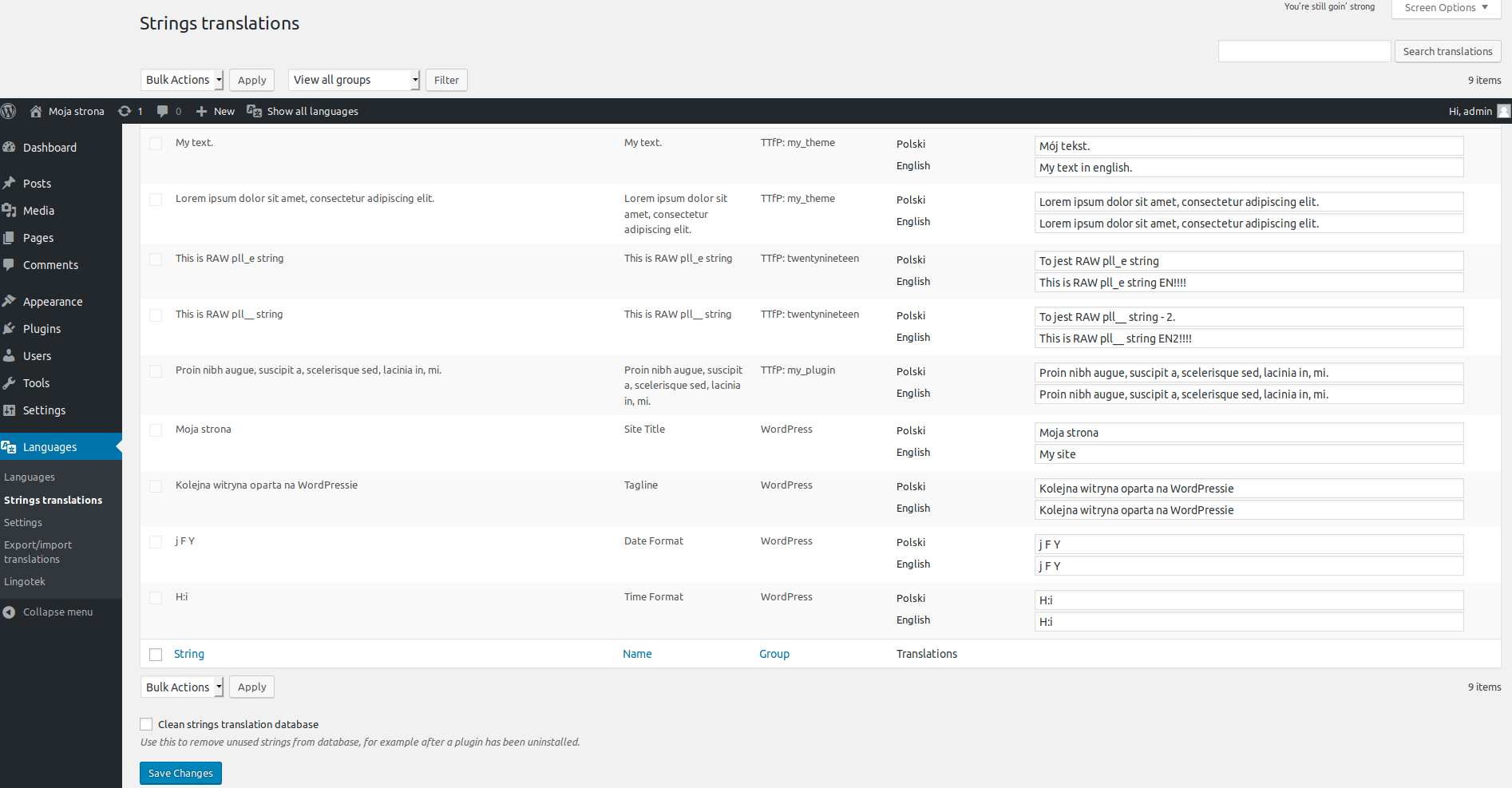
The scan result can be seen on the tab with translations:
Settings -> Languages -> String translation
or
Languages -> String translation
You don’t need programs like poedit – you don’t change files with extensions like: .pot, .po, .mo.
“Theme and plugin translation for Polylang” is highly efficient because the scanner is worked only on admin dashboard in tab:
In dashboard:
Settings -> Languages -> String translation
or
Languages -> String translation
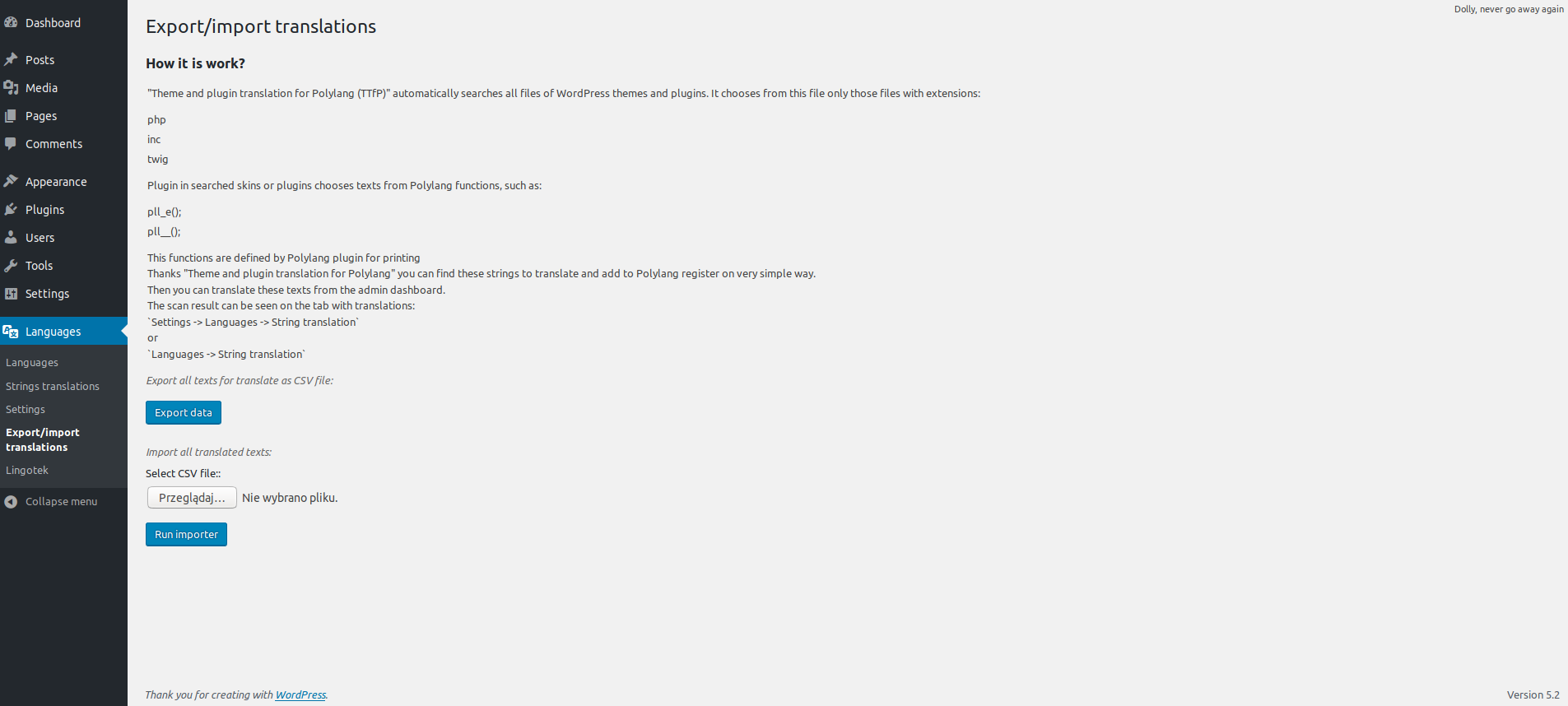
Export and import string translation
In dashboard:
Languages -> TTfP Settings
Filter reference
ttfp_domains
Allows plugins and themes (in functions.php) to modify list of text domains (unique identifier for retrieving translated strings).
List of text domains is displayed on “TTfP Settings” page to select them for translation by polylang engine.
Example:
add_filter('ttfp_domains', 'custom_ttfp_domains', 10, 1);
function custom_ttfp_domains(array $domains):array
 {
     $domains[] = "my-custom-domain";
     return $domains;
 }
Filter reference
ttfp_translation_access
Returns whether the user has capability to view and edit translations provided by TTfP.
Example:
add_filter('ttfp_translation_access', 'custom_ttfp_translation_access', 10, 1);
function custom_ttfp_translation_access(bool $hasAccess):bool
 {
     return current_user_can('edit_posts');
 }
Installation
This plugin requires to be installed and activated the Polylang plugin,
This plugin requires PHP 7.0
- Upload the “Theme and plugin translation for Polylang” folder to the
/wp-content/plugins/directory on your web server. - Activate the plugin through the Plugins menu in WordPress.
- In Dashboard go to the
Settings -> Languages -> String translationorLanguages -> String translationand find your texts.
Use
<?php
 pll_e('My string'); // similar to _e();
 // or:
 $var = pll_('My string'); // similar to __();
 // or:
  _e('My string', 'my_theme');
 // or:
  $var = __('My string', 'my_theme');
How to enable Twig extension with “Theme and plugin translation for Polylang”? [Timber plugin]
In functions.php add:
if (!class_exists('Timber')) {
    add_action('admin_notices', function () {
        echo '<div class="error"><p>Timber not activated. Make sure you activate the plugin in <a href="' . esc_url(admin_url('plugins.php#timber')) . '">' . esc_url(admin_url('plugins.php')) . '</a></p></div>';
    });
    return;
}

function timber_context()
{
    $context = Timber::get_context();
    $post = Timber::query_post();
    $context['post'] = $post;
    $context['pll_e'] = TimberHelper::function_wrapper('pll_e');
    $context['pll__'] = TimberHelper::function_wrapper('pll__');
    return $context;
}

Timber::$dirname = array('templates', 'views'); // directory names with twig templates
timber_context();
Next, for example in index.php add:
<?php
 $context = timber_context();
 $templates = array('home.twig', 'index.twig'); // twig files for render
 Timber::render($templates, $context);
Then you can use in twig templates polylang functions like this (in templates/home.twig):
{% extends "base.twig" %}
 {% block content %}
     <p>
         {{ pll_e("Test text on TWIG template 1.") }}
     </p>
     <p>
         {{ pll__("Test text on TWIG template 2.") }}
     </p>
 {% endblock %}
Changelog
3.4.9 – 2025/03/15
- Updated pll_get_plugin_info function – function loads wrong textdomain.
3.4.8 – 2024/10/18
- Optimized performance for the CSV translations importer.
- Added support for network-activated plugins.
3.4.7 – 2024/09/01
- Load current language for “Multilingual Contact Form 7 with Polylang” plugin in translate_cf7_messages.
3.4.6 – 2024/08/07
- Requires Plugins – by problems with the pro version of Polylang.
3.4.5 – 2024/08/07
- Requires Plugins – by problems with the pro version of Polylang.
3.4.4 – 2024/08/07
- Requires Plugins – allow pro version of polylang.
Screenshots
For developers
Is this your plugin? Show off the numbers.
Add a live badge to your site, docs or GitHub README. It updates on its own — no account needed.
Best Theme and plugin translation… alternatives
All languages plugins →



FAQ
Theme and plugin translation for Po…: quick answers
Straight answers, pulled from live WordPress.org data.
Live data from WordPress.org · checked Sep 26, 2026
Is Theme and plugin translation fo… free?
Yes. Theme and plugin translation fo… is free to download and use from the official WordPress.org plugin directory.
Is Theme and plugin translation fo… safe to use in 2026?
Theme and plugin translation fo… works, but test it on a staging site before relying on it in 2026. It runs on 10K+ sites, is rated 4.7/5 and was last updated 2 years ago, and scores 49/100 on our health check.
How many websites use Theme and plugin translation fo…?
Theme and plugin translation fo… is active on 10K+ WordPress websites and has been downloaded 287,382 times since it launched in February 2016. It was downloaded 2,670 times in the last 30 days.
Does Theme and plugin translation fo… work with WordPress 7.1?
Theme and plugin translation fo… is officially tested up to WordPress 6.6.9, while the latest release is 7.1.2. It may still work, but try it on a staging site first.
What PHP version does Theme and plugin translation fo… need?
Theme and plugin translation fo… requires PHP 7.0 or higher. Most hosts run PHP 8.x today, so it works on any modern WordPress hosting.
When was Theme and plugin translation fo… last updated?
The latest version, 3.4.9, was released on March 15, 2025 (2 years ago).
Who makes Theme and plugin translation fo…?
Theme and plugin translation fo… is developed and maintained by Marcin Kazmierski.
What are the best alternatives to Theme and plugin translation fo…?
The most popular alternatives to Theme and plugin translation fo… are Events Manager and WPML Com… (1K+ installs), Disable Login Language Sele… (1K+ installs) and Language Switcher (1K+ installs).
Powered by PageForge
Want thousands of pages that rank like these? Build them in an afternoon.
This directory runs on the same engine as PageForge. Turn any spreadsheet, CSV or API into thousands of fast, SEO-ready WordPress pages — with schema, internal links and AI-written copy baked in.
- CSV, Google Sheets & API data sources
- AI content, schema & internal links per page
- Works with Elementor, Gutenberg, Yoast & Rank Math
- Free on WordPress.org — no credit card


