


Theme Blvd Piecemaker Addon
Add Piecemaker 2 to slider manager when using a theme with Theme Blvd framework version 2.0.4+.

Consider an alternative
Theme Blvd Piecemaker Addon shows warning signs in 2026 — compare the alternatives below before installing. It runs on 30+ sites and was last updated 15 years ago, and scores 24/100 on our health check.
- Small user base (30+ active installs)
- Very few reviews so far
- No update in 14 years
- Only tested up to WordPress 3.3 (latest is 7.1)
How does it stack up?
Side-by-side on installs, updates, ratings & supportDaily downloads
Download spikes usually follow a new release — each site that auto-updates counts as a download.
Rankings
Where Theme Blvd Piecemaker Addon stands todayWordPress.org search rankings
Live position in the plugin search, top 100| Keyword | Position |
|---|---|
| piecemaker | #1 |
| slider | >100 |
| themeblvd | #25 |
Version adoption
Share of active sites per release.
About Theme Blvd Piecemaker Addon
From the official readme · v1.0.0Description
This plugin will add the Piecemaker 2 Flash slider to the Slider Manager’s built-in slider types when using a WordPress theme with the Theme Blvd framework version 2.0.4+.
Who is this plugin for?
If you’re not using a Theme Blvd theme, and you’re looking to incorporate Piecemaker into your WordPress site, the following plugin is what you’re looking for:
https://wordpress.org/extend/plugins/the-piecemaker-image-rotator/
However, if you are using a Theme Blvd WordPress theme, this plugin will allow you to use Piecemaker 2 within the the features of the framework. This means that you can use your theme’s current Slider Manager to create Piecemaker sliders. You can then use those sliders in all standard places like within the Layout Builder and via the [slider] shortcode in pages and posts.
How do I use the plugin?
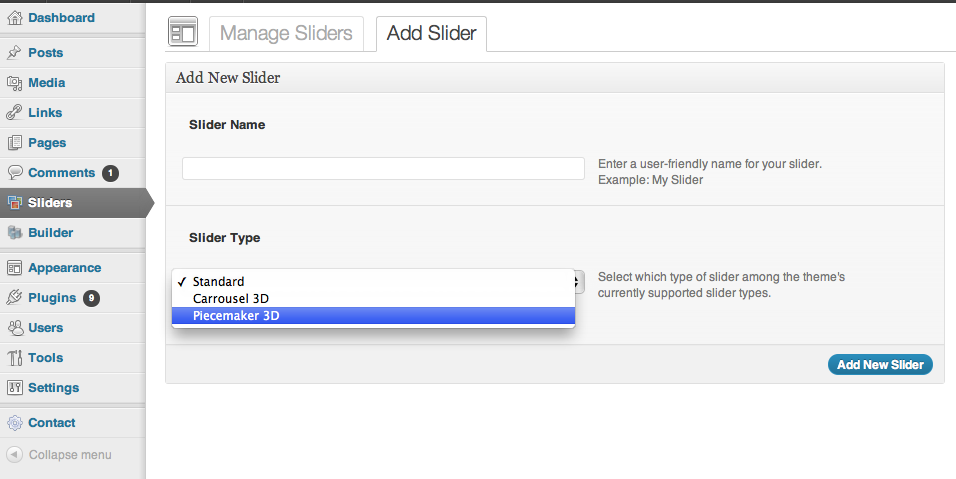
After you install this plugin, a new slider type will be added to the current slider types you already have. So, you’ll need to go to the Sliders page in your WordPress admin panel, and now when you click the “Add New” tab, you’ll notice “Piecemaker” has been added to the list of slider types you can choose from. Proceed in creating your slider as you normally would, however you will notice that you obviously have less options for configuring your slides than with the framework’s standard slider type.
Plugin Limitations
Since the Theme Blvd framework v2.0+ is 100% responsive, this Piecemaker addon obviously comes with its limitations. If it had no limitations, we would have most likely incorporated it into the core sliders of the framework.
Slider Location: First of all, because Piecemaker is a Flash/XML slider, it cannot be setup to automatically re-size with the rest of your site. So, this limits you in where you can actually use this slider within your site. The standard slider type that comes with your Theme Blvd theme can be placed essentially anywhere in your site. However when you’re using the Piecemaker Addon, it can only be used within a “full-width” area. So this means you can either use it up in the “Featured Area” or in the “Primary Area” only when you have a “Full Width” sidebar layout selected.
Mobile Devices and Tablets: Second, also because piecemaker is a Flash/XML slider, it obviously will not work at all on iOS devices (i.e. iPads and iPhones), which provide no support for Flash. Also, because the theme will get scaled down on other mobile and tablet devices that do support Flash anyway, the slider would look bad because your images would be cut off. So, for this plugin what I’ve done is provide a responsive fallback. When your site is being viewed on any device with a viewport 800px or smaller, the Piecemaker plugin gets hidden, and in its place, you will see all of your slider’s images listed out.
Important Note
After installing this plugin, you must give the “xml” directory within the plugin writeable file permissions (755 or 777 depending on your server). Not doing this will make the plugin impossible to use because the XML files required for your Piecemaker sliders will not be generated.
Installation
- Upload
theme-blvd-piecemaker-addonfolder to the/wp-content/plugins/directory - Activate the plugin through the ‘Plugins’ menu in WordPress
- Make sure the
xmlfolder within the plugin folder has been given writeable permissions (755 or 777 depending on your server).
Screenshots

For developers
Is this your plugin? Show off the numbers.
Add a live badge to your site, docs or GitHub README. It updates on its own — no account needed.
Best Theme Blvd Piecemaker Addon alternatives
All piecemaker plugins →| Rank | Plugin | Active installs |
|---|---|---|
| 1 |
 The Piecemaker
 allows you to display famous Piecemaker 3D flash gallery by modular web in… |
40+ |
FAQ
Theme Blvd Piecemaker Addon: quick answers
Straight answers, pulled from live WordPress.org data.
Source: WordPress.org
Is Theme Blvd Piecemaker Addon free?
Yes. Theme Blvd Piecemaker Addon is free to download and use from the official WordPress.org plugin directory.
Is Theme Blvd Piecemaker Addon safe to use in 2026?
Theme Blvd Piecemaker Addon shows warning signs in 2026 — compare the alternatives below before installing. It runs on 30+ sites and was last updated 15 years ago, and scores 24/100 on our health check.
How many websites use Theme Blvd Piecemaker Addon?
Theme Blvd Piecemaker Addon is active on 30+ WordPress websites and has been downloaded 5,246 times since it launched in January 2012. It was downloaded 116 times in the last 30 days.
Does Theme Blvd Piecemaker Addon work with WordPress 7.1?
Theme Blvd Piecemaker Addon is officially tested up to WordPress 3.3.2, while the latest release is 7.1.5. It may still work, but try it on a staging site first.
When was Theme Blvd Piecemaker Addon last updated?
The latest version, 1.0.0, was released on February 2, 2012 (15 years ago).
Who makes Theme Blvd Piecemaker Addon?
Theme Blvd Piecemaker Addon is developed and maintained by Jason.
What are the best alternatives to Theme Blvd Piecemaker Addon?
The most popular alternatives to Theme Blvd Piecemaker Addon are The Piecemaker (40+ installs).
Powered by PageForge
One template and a spreadsheet. A real page for every search.
PageForge turns each row of a CSV into a WordPress page with its own title, URL, SEO fields and schema, built on the layout you already designed. Free on WordPress.org.
- CSV and XLSX, plus Google Sheets on Professional and Enterprise
- Its own title, URL, SEO fields and schema for every page
- Works with the block editor, Elementor, Divi and Avada
- Free on WordPress.org, no credit card