



Terms descriptions
This plugin allows you to create list of terms and assign links to them. Plugin replaces terms occurrences in your posts with appropriate links.

Use with caution
Terms descriptions works, but test it on a staging site before relying on it in 2026. It runs on 1K+ sites, is rated 4.9/5 and was last updated 9 months ago, and scores 43/100 on our health check.
- Only tested up to WordPress 6.9 (latest is 7.1)
How does it stack up?
Side-by-side on installs, updates, ratings & supportDaily downloads
Download spikes usually follow a new release — each site that auto-updates counts as a download.
Rankings
Where Terms descriptions stands todayWordPress.org search rankings
Live position in the plugin search, top 100| Keyword | Position |
|---|---|
| cross-linking | #1 |
| link building | #28 |
| links | >100 |
| page | >100 |
| post | >100 |
Version adoption
Share of active sites per release.
Rating breakdown
★★★★★★★★★★ 4.9 from 10 reviews
About Terms descriptions
From the official readme · v3.4.10Description
The main purpose of this plugin is easy link building.
For example, you can create a page or post with detail description of some term. Most likely, this term is used in other posts and it would be appropriate to put a links from that posts to you page. But doing this operation manually is very time consuming task.
This WordPress plugin allow you to maintain a list of terms and assign links to them. Plugin automatically replaces terms occurrences in posts with appropriate links. You can control the number of terms replacements.
This plugin allows.
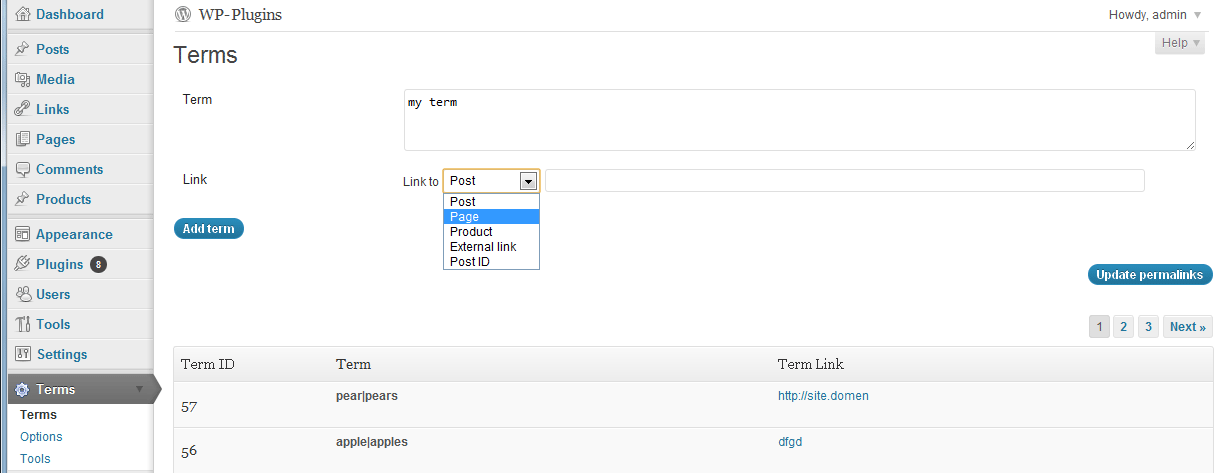
- Create, update and delete terms through admin interface (Terms menu). Each term can contain one or several word forms (e.g. pear, pears).
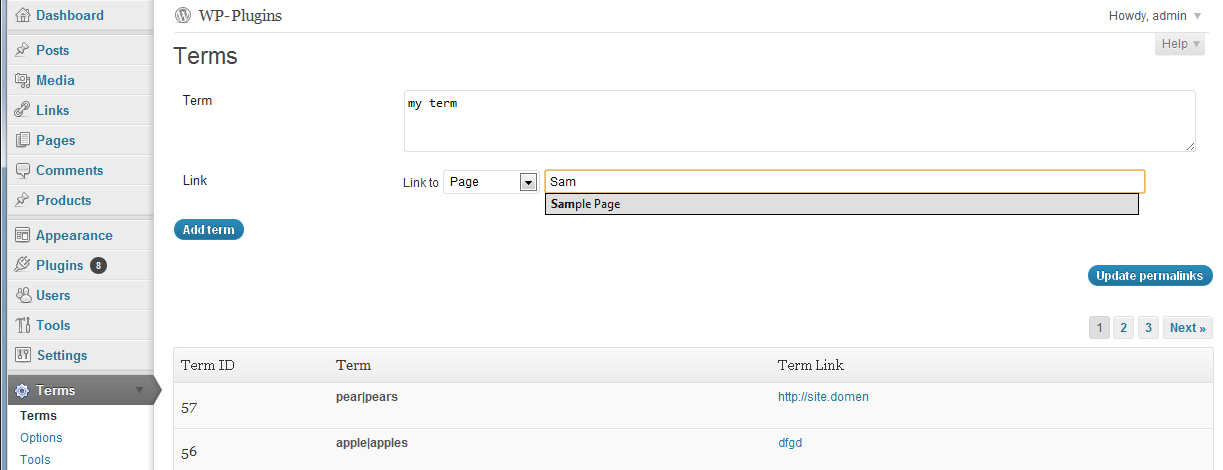
- Assign a link to a term. This link can point to your blog post, page, custom post type or to a page on another site.
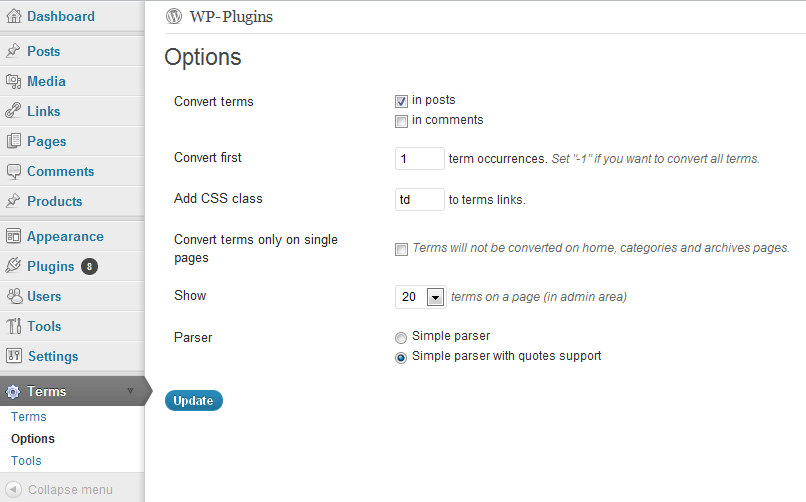
- Control how many terms will be converted to links in each post.
- Select where you want to replace terms, in posts content, in posts comments or both.
- Set several word forms for each term. For example, “apple|apples”. Word forms should be separated with a “|” symbol.
- Search for terms in posts content and convert them to appropriate links. This task is performed automatically when plugin is activated.
- Disable terms to links conversion for individual posts.
- Wrap links with arbitrary text (for example, you can wrap link with strong tag)
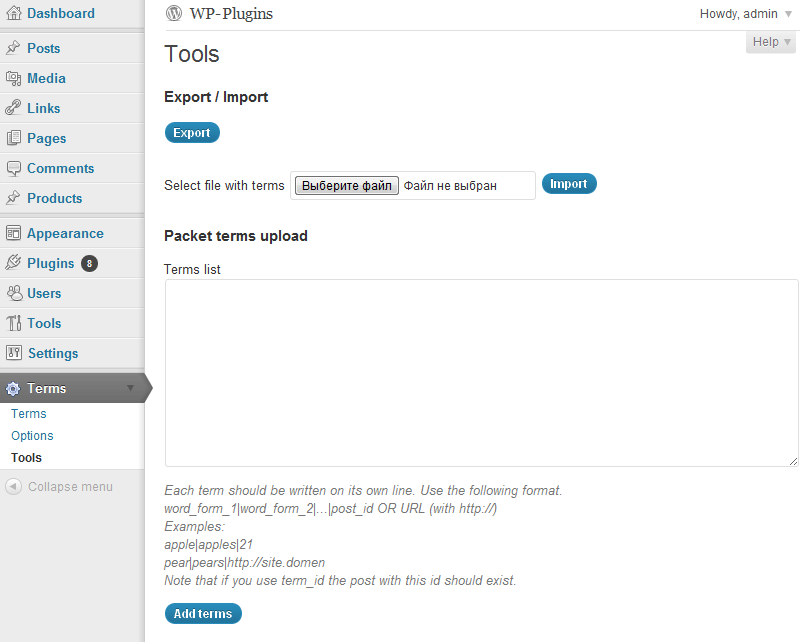
- Export and import terms and plugin options.
- Export terms in CSV format.
- Packet terms creation.
- Permalinks update function (use it after permalinks structure updates).
Please, note that terms will not be replaced with links in following cases.
- If the term is already inside the link. E.g. if the link was created manually. So the plugin will not change any links that already exists in the post.
- If the term is located inside html tag. For example, inside
altattribute ofimgtag. - If the term is located in
h1–h6tags. - If the term is part of another word. E.g. term =
carand the word iscarrot. - If you checked “Disable Terms Descriptions plugin for this post” checkbox (at the bottom of post edit screen).
Important!
Huge terms lists with hundreds of terms can increase page creation time. In such cases, consider to use caching plugin.
Detail description of this plugin is available in English.
Detail description of this plugin is available in Russian.
Serbo-Croatian translations were created by Borisa Djuraskovic.
Spanish translations were created by Juan.
Development
If you want to participate in the plugin development, create a pull request to the official GutHub repository.
The plugin built with PhpStorm
Installation
- Download the zip file
- Extract
terms-descriptionsfolder - Upload
terms-descriptionsfolder to yourwp-content/pluginsdirectory - Log in to your WordPress blog
- Click on “Plugins”
- Locate the “Terms Descriptions” plugin and click “Activate”
- Go to “Term” > “Terms” to create your list of terms
- Update DB message may appear after plugin upgrade at the top of admin pages. In this case backup you database and press “Update DB” button.
- Go to “Terms” > “Options” and select parser type. Simple parser will search for exact terms. Simple parser with quotes support will search for terms that may be surrounded with quotes.
- If you change permalinks structure go to “Term” > “Terms” page and press “Update permalinks” button
- If you want to disable the plugin for individual posts check “Disable Terms Descriptions plugin for this post” checkbox (at the bottom of post edit screen)
Changelog
3.4.10
- Bug fixes: Sensitive Data Exposure vulnerability fixed
- Bug fix: in saving skip_tags
- Bug fixes: XSS vulnerability fixed
3.4.9
- Bug fixes: XSS vulnerability fixed
3.4.8
- Bug fixes: XSS vulnerability fixed
3.4.7
- Bug fixes: reflected XSS vulnerability fixed
- WordPress 6.6.2 support
3.4.6
- WordPress 6.5 support
3.4.5
- Bug fixes: reflected XSS vulnerability fixed
- WordPress 6.2 support
Screenshots

For developers
Is this your plugin? Show off the numbers.
Add a live badge to your site, docs or GitHub README. It updates on its own — no account needed.
Best Terms descriptions alternatives
All cross-linking plugins →| Rank | Plugin | Active installs |
|---|---|---|
| 2 |
 Related Links Blender
The Related Links Blender plugin provides a easy way to cross link posts. Target posts or…
Related Links Blender
The Related Links Blender plugin provides a easy way to cross link posts. Target posts or…
|
10+ |
| 3 |
 Electric Studio Cross-linker
Inserts cross linking into your site from post names
Electric Studio Cross-linker
Inserts cross linking into your site from post names
|
10+ |
FAQ
Terms descriptions: quick answers
Straight answers, pulled from live WordPress.org data.
Live data from WordPress.org · checked Oct 14, 2026
Is Terms descriptions free?
Yes. Terms descriptions is free to download and use from the official WordPress.org plugin directory.
Is Terms descriptions safe to use in 2026?
Terms descriptions works, but test it on a staging site before relying on it in 2026. It runs on 1K+ sites, is rated 4.9/5 and was last updated 9 months ago, and scores 43/100 on our health check.
How many websites use Terms descriptions?
Terms descriptions is active on 1K+ WordPress websites and has been downloaded 108,849 times since it launched in November 2010. It was downloaded 473 times in the last 30 days.
Does Terms descriptions work with WordPress 7.1?
Terms descriptions is officially tested up to WordPress 6.9.10, while the latest release is 7.1.3. It may still work, but try it on a staging site first.
When was Terms descriptions last updated?
The latest version, 3.4.10, was released on January 25, 2026 (9 months ago).
Who makes Terms descriptions?
Terms descriptions is developed and maintained by Vladimir Statsenko.
What are the best alternatives to Terms descriptions?
The most popular alternatives to Terms descriptions are Related Links Blender (10+ installs) and Electric Studio Cross-linker (10+ installs).
Powered by PageForge
Want thousands of pages that rank like these? Build them in an afternoon.
This directory runs on the same engine as PageForge. Turn any spreadsheet, CSV or API into thousands of fast, SEO-ready WordPress pages — with schema, internal links and AI-written copy baked in.
- CSV, Google Sheets & API data sources
- AI content, schema & internal links per page
- Works with Elementor, Gutenberg, Yoast & Rank Math
- Free on WordPress.org — no credit card


