


Terms and Conditions per Product for WooCommerce
Add a required Terms and Conditions checkbox per WooCommerce product, variation, category or tag. Classic and block checkout.

Safe pick
Yes — Terms and Conditions per Produc… is a safe, well-maintained plugin to use in 2026. It runs on 800+ sites, is rated 4.6/5 and was last updated 5 days ago, and scores 80/100 on our health check.
- Actively developed — last update 5 days ago
- Tested with the latest WordPress (7.1)
- Momentum — downloads up 315.2% vs the previous 30 days
- Small user base (800+ active installs)
How does it stack up?
Side-by-side on installs, updates, ratings & support



Daily downloads
Download spikes usually follow a new release — each site that auto-updates counts as a download.
Rankings
Where Terms and Conditions per Pr… stands todayWordPress.org search rankings
Live position in the plugin search, top 100| Keyword | Position |
|---|---|
| checkout | >100 |
| consent | >100 |
| GDPR | >100 |
| terms and conditions | #3 |
| woocommerce | >100 |
Version adoption
Share of active sites per release.
Rating breakdown
★★★★★★★★★★ 4.6 from 13 reviews
About Terms and Conditions per Product for Wo…
From the official readme · v1.4.0Description
WooCommerce gives you one Terms and Conditions checkbox for the whole store. Some products need their own: a non-refundable deposit, a digital download you cannot take back, an age-restricted item, a rental with a damage clause, a booking with a cancellation window.
This plugin adds a Terms URL to any product, variation, product category or product tag. When that item is in the cart, its own checkbox appears at checkout, and the customer cannot place the order until every box is ticked. Everything else about your checkout stays as it is.
Important: This plugin is an extension of the WooCommerce plugin and it cannot function independently.
How it works
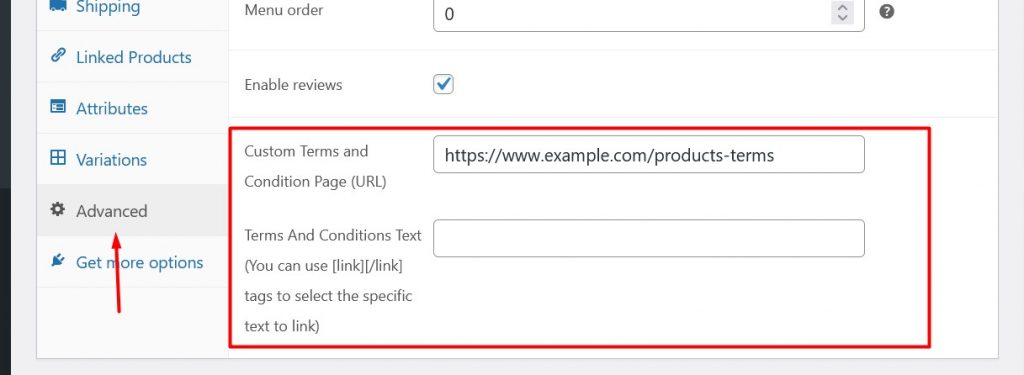
- Edit a product and open the Advanced tab. Paste the URL of your Terms page and, if you want, the link text.
- The checkbox appears at checkout for every customer with that product in the cart, once per product, however many times it appears in the order.
- The customer ticks it and the order goes through. With the Premium version, the acceptance is written against the order with a timestamp, the user and the exact Terms link that was shown.
Stores that use it
✅ Shops selling both ordinary goods and items with their own conditions, where a single store-wide checkbox says nothing useful.
✅ Digital products and downloads with a no-refund policy.
✅ Age-restricted goods, where you need the customer to confirm before checkout.
✅ Rentals, hire and equipment, with a separate damage or return agreement.
✅ Deposits, made-to-order and custom work, where the cancellation terms differ per item.
✅ Services and bookings, where each service carries its own cancellation window.
Free
✅ Terms and Conditions URL and link text on any product.
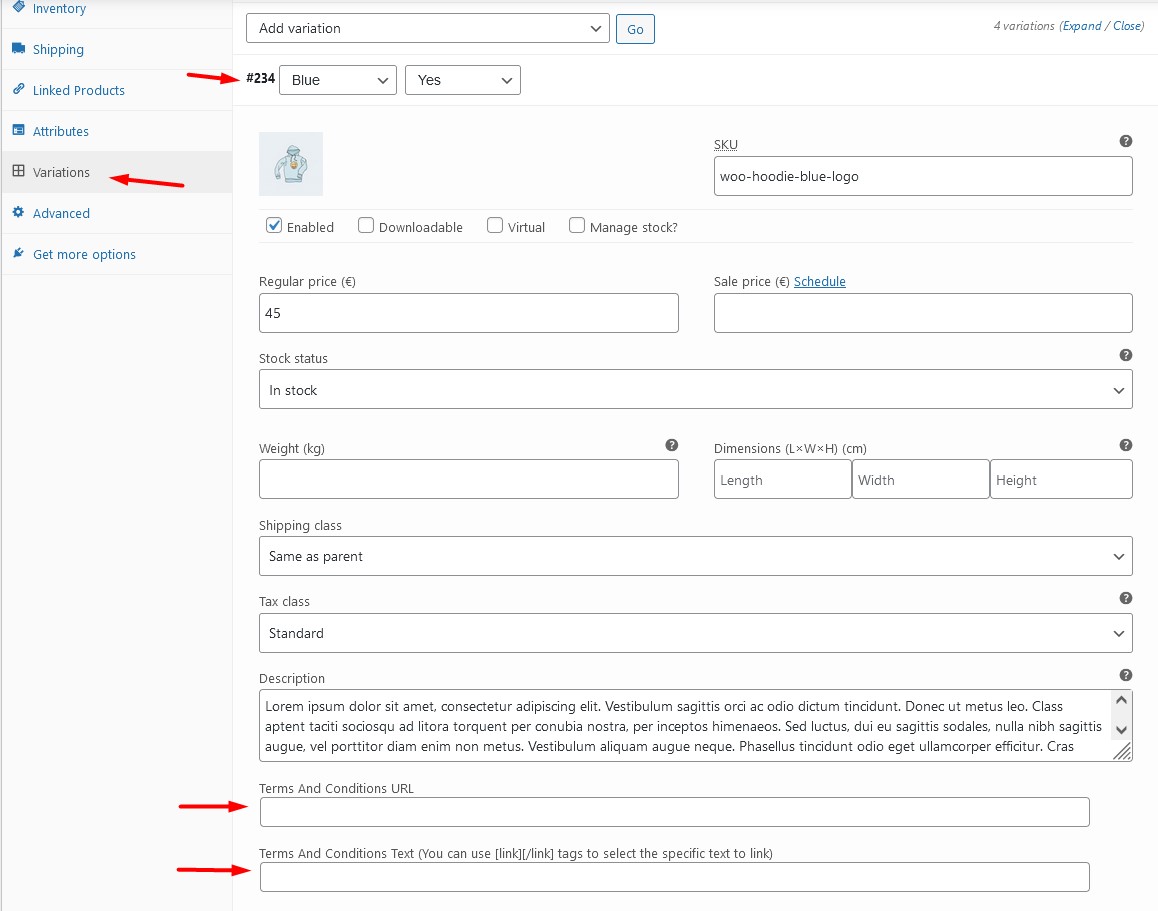
✅ Different Terms on each variation of a variable product.
✅ A checkbox per product at checkout, on both the classic checkout and the WooCommerce block checkout.
✅ Server-side validation. Acceptance is checked again on the server before payment is taken, so an order cannot get through without it.
✅ Optionally require the customer to open the Terms link before the checkbox unlocks.
✅ Optionally show the Terms on the single product page.
✅ Optionally hide the default WooCommerce Terms checkbox when custom Terms apply.
✅ Filters and actions throughout, for developers.
✅ Translation ready.
Premium
✅ Terms per product category and per product tag, so a whole range is covered by one setting.
✅ An acceptance log on the order screen: who accepted what, when, and which link they were shown. Useful the day a customer disputes a charge.
✅ Open Terms in a modal instead of a new tab, for your Terms and for the default WooCommerce ones.
Built for current WooCommerce
Block checkout is supported in full since 1.4.0, on WooCommerce 9.9 and above. The checkboxes render inside the checkout block, they rebuild themselves when the cart changes mid-checkout, and the acceptance is verified again through the Store API before stock is reserved or payment is taken. HPOS (High-Performance Order Storage) is supported on the order screens.
What this plugin does not do
It does not write your Terms and it is not legal advice. You host your Terms on your own page or PDF. The plugin links to them, requires the tick, and records it.
Documentation | Plugin homepage | Changelog
Using it and it works? A 5-star review is the one thing that moves a small plugin. Questions: contact us.
Installation
- Upload the “Terms and Conditions per Product for WooCommerce” plugin into the directory
wp-content/plugins/. - Enable the “Terms and Conditions per Product for WooCommerce” plugin.
Frequently asked questions
How do I add different terms to different products?
Edit the product, open the Advanced tab and paste the URL of the Terms page that applies to it. Repeat on the next product with a different URL. Each product carries its own, and a customer only ever sees the checkboxes for what is in their cart. On a variable product you can go a level deeper and set a different URL on each variation.
Can I set terms for a whole product category instead of each product?
Yes, in the Premium version. Edit a product category or a product tag, set the Terms there, and every product in it is covered. A product with Terms of its own overrides the category. The plugin checks the variation first, then the product, then the category or tag, and the first level with a URL wins.
Does it work with variable products?
Yes. Each variation gets its own Terms and Conditions fields on the product edit screen. A variation with no Terms of its own falls back to the ones set on the parent product.
Where is the proof that the customer accepted?
In the Premium version, every acceptance is written against the order. Open the order in the admin and the “User Accepted Terms” box lists what was accepted, when, and the exact Terms link the customer was shown, so you are not relying on what that page says today. It works on the classic and the block checkout, and on both legacy and HPOS order storage. The free version enforces the checkbox but keeps no record.
Does this make my store GDPR compliant?
No plugin does that on its own. What this one gives you is a record that a named customer accepted a specific document, at a specific time, on a specific order, which is the part most stores are missing. Whether your Terms themselves and the rest of your data handling meet GDPR is a question for your lawyer.
Is this plugin compatible with WooCommerce Checkout Blocks?
Yes, since version 1.4.0, on WooCommerce 9.9 or newer. The Block Checkout then works the same way as the classic checkout: Your custom Terms are displayed on the checkout. “Place Order” is blocked until every Terms checkbox has been ticked, and the customer is told which Terms are still missing. The check is repeated on the server before payment is taken, so an order cannot skip it. Acceptance is recorded against the order and shown on the order screen. [Premium] The Terms also keep up with the cart. If the cart changes while the customer is on the checkout, the Terms checkboxes are rebuilt…
Do the Terms apply to express payment buttons?
No. Express payment buttons, such as Apple Pay, Google Pay and the PayPal button, sit above the checkout form and place the order straight from the payment sheet. The customer never reaches the Terms step, so there is nothing to tick and nothing to record, and the plugin lets those orders through rather than blocking them at a point where the customer cannot do anything about it. If you need consent recorded on every single order, turn off express payment buttons in your payment gateway’s settings, so that all customers go through the checkout form.
Does “Customer must open the Terms link” stop someone ticking the box without reading?
It stops the obvious case. The checkbox stays disabled until the Terms link has been opened, on both the classic and the Block Checkout. This runs in the customer’s browser, because opening a link is not something a website can confirm from the server. Treat it as a prompt to read the Terms, not as proof that they were read. What is recorded in the acceptance log is that the checkbox was ticked.
Is this plugin compatible with all WordPress themes?
Compatibility with all themes is practically impossible, because they are too many and differently built. Still, if themes are developed according to WordPress and WooCommerce guidelines and practices then the plugin should work as intended.
Can I translate the Terms and Conditions per Product?
You can translate Terms & Conditions Per Product into your language.
I am facing a problem using this plugin. What can I do?
Post detailed information about the issue in the support forum or contact us on our site [Premium].
Where can I find Documentation for this plugin?
On our website, you can find detailed information in the documentation section.
What are Terms and Conditions
Terms and Conditions are the rules and regulations that govern the use of a website or a service. They are also known as Terms of Service or Terms of Use.
Changelog
1.4.0
- Feature: Full WooCommerce Block Checkout support. Terms acceptance is now validated on the server before payment is taken, instead of in the browser alone. Because of this WooCommerce 9.9 is now the minimum supported version.
- Feature: Terms acceptance is now fully recorded in the User Acceptance log for Block Checkout orders, the same as for the classic checkout. [Premium]
- Feature: The Terms checkboxes on the Block Checkout now follow the cart. If the cart changes while the customer is checking out, the checkboxes are rebuilt to match, keeping any boxes already ticked.
- Feature: Express payment buttons, such as Apple Pay and Google Pay, are exempt from the Terms step, because the customer never sees it. See the FAQ.
- Tweak: The Block Checkout now shows a message next to the Terms that were not accepted, instead of disabling the “Place Order” button with a tooltip.
- Fix: The Block Checkout assets are now loaded whenever the page contains the checkout block, including a block nested inside another block and a checkout page that is not the one set in WooCommerce settings.
- Fix: “Open terms in a modal” and the “Open WooCommerce terms in a modal” now works on the Block Checkout, which renders those links with different markup to the classic checkout. [Premium]
- Fix: Acceptance is recorded once per order, so retrying a failed payment no longer creates duplicate log records.
- Refactor: The checkout rows, the single product page and the Store API now share one Terms renderer.
1.3.2
- Fix: The Terms acceptance log no longer writes records when the log setting is switched off or the site is on the free version.
- Fix: Acceptance log records are now rebuilt from the order’s own items, so a product that sits in more than one category with Terms no longer produces duplicate records, and only products actually in the order can be recorded.
- Fix: Terms text saved on a product category or tag no longer keeps escape slashes, so apostrophes and quotes are stored as typed.
- Security: Saving Terms on a product category or tag now requires the manage_product_terms capability.
- Performance: The WooCommerce Checkout block check no longer parses page content on every front-end request, only on the checkout.
- Performance: Per-product Terms lookups are now reused within a request instead of being repeated for the checkout display, the validation pass and the default-terms check.
- Refactor: Checkout display, checkout validation, the single product page and the acceptance log now share one deduplicated Terms builder, exposed through a new tacpp_checkout_terms_items filter.
- Tweak: Restyle the “Rate us” admin notice to match the Checkout Guard promo banner and show it above that banner.
- Tweak: Redesign the Checkout Guard promo banner on the settings page and make it dismissible.
- Feature: Add a promotional banner for the Checkout Guard plugin on the settings page.
- Update: Freemius SDK to 2.13.4
1.3.1
- Fix: Move uninstall.php cleanup logic to the Freemius
after_uninstallaction so uninstall events and user feedback are reported correctly.
1.3
- Security: Hardened input sanitization, output escaping, AJAX nonces, and capability checks across admin and checkout flows.
- Security: Bundle Popper, Tippy, and jQuery Modal locally instead of loading from third-party CDNs.
- Security: Replace register_uninstall_hook() with uninstall.php so cleanup runs reliably on every removal.
- Performance: Cache the custom-terms post count behind the rate-me admin notice in a transient.
- Performance: Only enqueue admin scripts and styles on plugin-related screens.
- Fix: Rate-me admin notice no longer compounds threshold suffixes across iterations.
- Fix: Drop deprecated SQL_CALC_FOUND_ROWS from the acceptance log query.
- Fix: Activation now seeds default settings on fresh installs without overwriting existing values.
- Refactor: Extract variation Terms & Conditions handling into its own class.
- Translations: Move HTML out of translatable strings, add translator comments, regenerate POT.
1.2.18
- Check: WordPress 7.0.0 compatibility
- Check: WooCommerce 10.7.0 compatibility
- Update: Freemius SDK to 2.13.1
1.2.17
- Check: WordPress 6.8.1 compatibility
- Check: WooCommerce 9.8.5 compatibility
- Update: Freemius SDK to 2.10.1
Screenshots




For developers
Is this your plugin? Show off the numbers.
Add a live badge to your site, docs or GitHub README. It updates on its own — no account needed.
Best Terms and Conditions per Prod… alternatives
All checkout plugins →





FAQ
Terms and Conditions per Product fo…: quick answers
Straight answers, pulled from live WordPress.org data.
Live data from WordPress.org · checked Sep 27, 2026
Is Terms and Conditions per Produc… free?
Yes. Terms and Conditions per Produc… is free to download and use from the official WordPress.org plugin directory.
Is Terms and Conditions per Produc… safe to use in 2026?
Yes — Terms and Conditions per Produc… is a safe, well-maintained plugin to use in 2026. It runs on 800+ sites, is rated 4.6/5 and was last updated 5 days ago, and scores 80/100 on our health check.
How many websites use Terms and Conditions per Produc…?
Terms and Conditions per Produc… is active on 800+ WordPress websites and has been downloaded 23,756 times since it launched in May 2020. It was downloaded 1,121 times in the last 30 days.
Does Terms and Conditions per Produc… work with WordPress 7.1?
Yes. The developer has tested Terms and Conditions per Produc… up to WordPress 7.1.2, the latest release. It requires WordPress 6.1 or newer.
What PHP version does Terms and Conditions per Produc… need?
Terms and Conditions per Produc… requires PHP 7.4 or higher. Most hosts run PHP 8.x today, so it works on any modern WordPress hosting.
When was Terms and Conditions per Produc… last updated?
The latest version, 1.4.0, was released on September 23, 2026 (5 days ago).
Who makes Terms and Conditions per Produc…?
Terms and Conditions per Produc… is developed and maintained by Giannis Kipouros.
What are the best alternatives to Terms and Conditions per Produc…?
The most popular alternatives to Terms and Conditions per Produc… are Brazilian Market on WooComm… (60K+ installs), reCAPTCHA for WooCommerce (40K+ installs) and Fluid Checkout for WooComme… (20K+ installs).
Powered by PageForge
Want thousands of pages that rank like these? Build them in an afternoon.
This directory runs on the same engine as PageForge. Turn any spreadsheet, CSV or API into thousands of fast, SEO-ready WordPress pages — with schema, internal links and AI-written copy baked in.
- CSV, Google Sheets & API data sources
- AI content, schema & internal links per page
- Works with Elementor, Gutenberg, Yoast & Rank Math
- Free on WordPress.org — no credit card


