


Tendforge Shortcode & Block Auditor
Before removing a plugin or switching page builders, see exactly which pages break — broken Gutenberg blocks and broken shortcodes, and where.

Use with caution
Tendforge Shortcode & Block Aud… works, but test it on a staging site before relying on it in 2026. Was last updated 2 months ago, and scores 55/100 on our health check.
- Small user base (<10 active installs)
- Very few reviews so far
How does it stack up?
Side-by-side on installs, updates, ratings & support



Daily downloads
Download spikes usually follow a new release — each site that auto-updates counts as a download.
Rankings
Where Tendforge Shortcode & Block… stands todayWordPress.org search rankings
Live position in the plugin search, top 100| Keyword | Position |
|---|---|
| audit | >100 |
| blocks | >100 |
| cleanup | >100 |
| gutenberg | >100 |
| shortcode | >100 |
About Tendforge Shortcode & Block Auditor
From the official readme · v1.1.6Description
Removing a plugin or switching page builders is the moment things silently break. The page builder is gone, but its content stays behind — Gutenberg blocks that now show the editor’s “this block contains unexpected or invalid content” warning, and shortcodes like [vc_row], [su_button] or [old_slider id="3"] that visitors now see as raw bracket text. There is no built-in screen that lists them, so they are easy to miss until someone reports a broken page. Shortcode Auditor flips that around: scan first, see exactly which pages will break, then decide.
One scan shows you everything left behind, page by page:
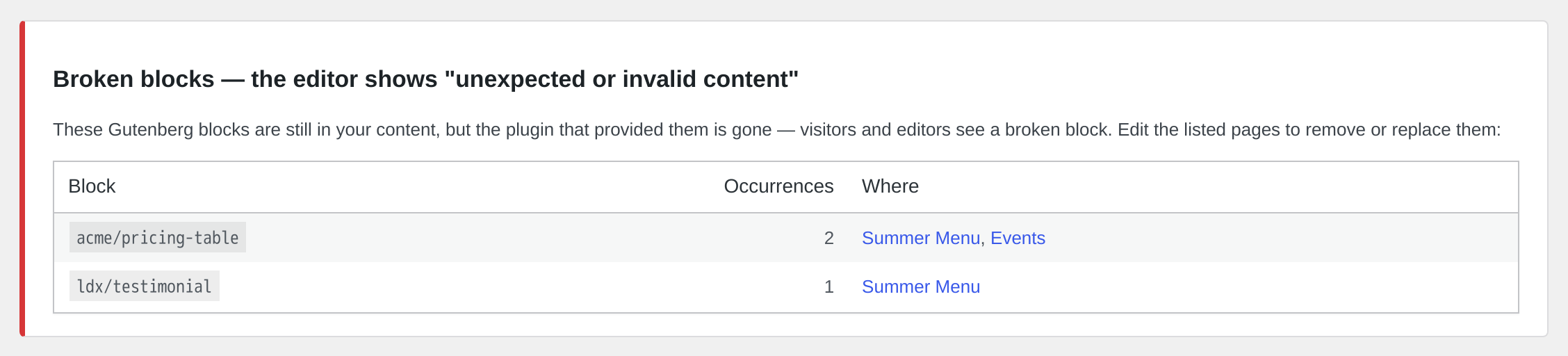
- Broken block detection — Gutenberg blocks left behind by a removed plugin, the ones the editor flags as “this block contains unexpected or invalid content”, with the exact pages they sit on
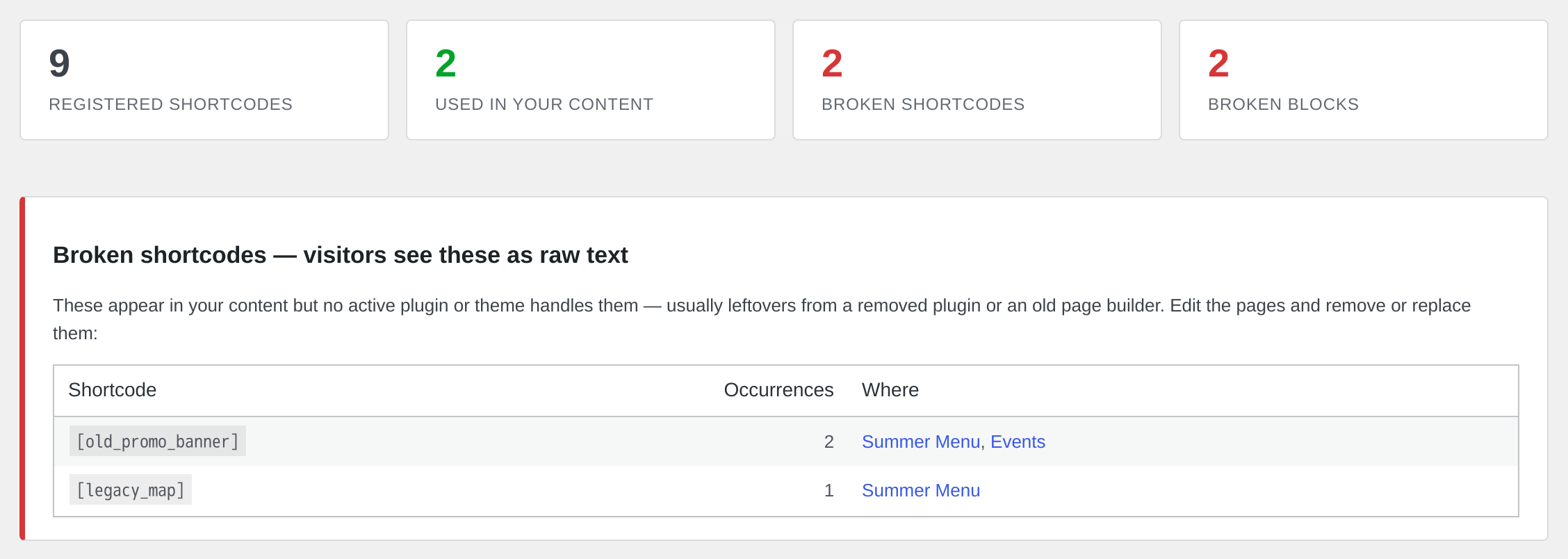
- Broken shortcode detection — every shortcode in your content that no active plugin or theme handles, shown as raw
[bracket]text to visitors, with direct links to the affected pages - Page-level impact — for each broken item, the precise posts and pages it appears on, so you see the blast radius before you touch anything
- Usage by provider — every registered shortcode mapped to the plugin or theme that provides it, with usage counts, so you know which plugins your content actually depends on
- Smart filtering — prose like “[sic]” and escaped
[[shortcodes]]are not false-flagged - Batched scan — works on large sites without timeouts; covers all public post types and reusable blocks
Read-only by design
The auditor never modifies your content. It reports, you decide.
Shortcode Auditor Pro
Pro is a separate plugin available from tendforge.com. None of its code is included in this free version — everything described below is a Pro-only plugin, and nothing in this free download is locked, limited or time-restricted.
The free plugin finds what is already broken. Pro answers the question you have before you remove anything:
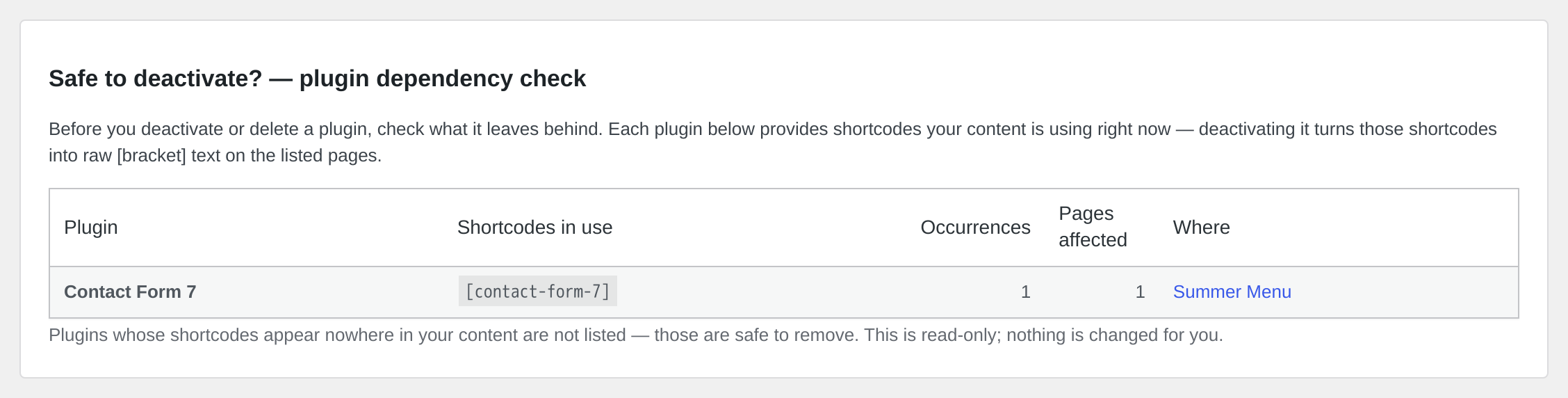
- Safe to deactivate? — plugin dependency check — before you remove a plugin, see exactly which live pages depend on it. Pro maps every active plugin whose shortcodes are still in your content, with the exact occurrences and pages that would break into raw [bracket] text the moment you deactivate it. It is the difference between knowing before you deactivate and finding out from a visitor afterwards.
Also included:
- Monitoring — scheduled weekly or monthly re-scans with an email alert whenever NEW broken shortcodes appear, so you catch a builder or plugin removal before your visitors do
- Widget scanning — finds shortcodes in text, custom HTML and block widgets, the area the free content scan does not cover
- CSV export of the full audit
Installation
- Install and activate the plugin.
- In the WordPress admin, open Tools → Shortcode & Block Auditor.
- Click Scan site — it lists your registered shortcodes, flags any broken shortcodes and broken blocks, and shows where each is used (posts and pages).
- Review the reported locations and fix or remove the content with full context.
- (Optional) Upgrade to Pro for CSV export and a scheduled email alert when new broken shortcodes appear.
Frequently asked questions
What counts as a “broken” shortcode?
A shortcode-looking token in your content whose tag is not registered by any active plugin or theme. To avoid false alarms, unregistered tokens only count when they plausibly were shortcodes: they carry attributes, have a closing pair, or use separators in the name. Plain words in brackets (like “[sic]”) are ignored.
Which content is scanned?
The content of all public post types (posts, pages, products, custom types) plus reusable blocks, in published, private, scheduled, pending and draft status. Shortcodes inside widgets or page builder fields are outside the scan.
Can it remove the broken shortcodes for me?
No — deliberately. Every occurrence links to the page so you can fix it with full context. Automatic text surgery on your content is not something a v1 should do.
Changelog
1.1.6
- Reword the description to remove comparative claims.
1.1.5
- Translations now come from translate.wordpress.org instead of being bundled.
1.1.4
- Clarify in the readme that Pro is a separate plugin, not included in this download.
- Harden the Pro loader against a missing
includes/premium/directory.
1.1.3
- Tidy the directory title.
1.1.2
- Initial public release: scan your site content to find registered shortcodes, broken shortcodes and broken blocks, and see exactly which posts and pages they appear on.
Screenshots
For developers
Is this your plugin? Show off the numbers.
Add a live badge to your site, docs or GitHub README. It updates on its own — no account needed.
Best Tendforge Shortcode & Block A… alternatives
All audit plugins →




FAQ
Tendforge Shortcode & Block Auditor: quick answers
Straight answers, pulled from live WordPress.org data.
Live data from WordPress.org · checked Oct 5, 2026
Is Tendforge Shortcode & Block Aud… free?
Yes. Tendforge Shortcode & Block Aud… is free to download and use from the official WordPress.org plugin directory.
Is Tendforge Shortcode & Block Aud… safe to use in 2026?
Tendforge Shortcode & Block Aud… works, but test it on a staging site before relying on it in 2026. Was last updated 2 months ago, and scores 55/100 on our health check.
How many websites use Tendforge Shortcode & Block Aud…?
Tendforge Shortcode & Block Aud… is active on <10 WordPress websites and has been downloaded 136 times since it launched in August 2026. It was downloaded 49 times in the last 30 days.
Does Tendforge Shortcode & Block Aud… work with WordPress 7.1?
Tendforge Shortcode & Block Aud… is officially tested up to WordPress 7.0.6, while the latest release is 7.1.2. It may still work, but try it on a staging site first.
What PHP version does Tendforge Shortcode & Block Aud… need?
Tendforge Shortcode & Block Aud… requires PHP 7.4 or higher. Most hosts run PHP 8.x today, so it works on any modern WordPress hosting.
When was Tendforge Shortcode & Block Aud… last updated?
The latest version, 1.1.6, was released on August 12, 2026 (2 months ago).
Who makes Tendforge Shortcode & Block Aud…?
Tendforge Shortcode & Block Aud… is developed and maintained by tendforge.
What are the best alternatives to Tendforge Shortcode & Block Aud…?
The most popular alternatives to Tendforge Shortcode & Block Aud… are Audit Trail (20K+ installs), MYAIO (400+ installs) and Sa11y, the accessibility qu… (300+ installs).
Powered by PageForge
Want thousands of pages that rank like these? Build them in an afternoon.
This directory runs on the same engine as PageForge. Turn any spreadsheet, CSV or API into thousands of fast, SEO-ready WordPress pages — with schema, internal links and AI-written copy baked in.
- CSV, Google Sheets & API data sources
- AI content, schema & internal links per page
- Works with Elementor, Gutenberg, Yoast & Rank Math
- Free on WordPress.org — no credit card


