


NFT Maker
DEPRECATED / NOT MAINTAINED: Please be aware that we have stopped the development of this WordPress plugin and recommend to use our API or SDK directly. Visit Tatum.

Consider an alternative
NFT Maker shows warning signs in 2026 — compare the alternatives below before installing. It runs on 100+ sites, is rated 4/5 and was last updated 3 years ago, and scores 33/100 on our health check.
- Small user base (100+ active installs)
- No update in 2 years
- Only tested up to WordPress 5.8 (latest is 7.1)
How does it stack up?
Side-by-side on installs, updates, ratings & support
Daily downloads
Download spikes usually follow a new release — each site that auto-updates counts as a download.
Rankings
Where NFT Maker stands todayWordPress.org search rankings
Live position in the plugin search, top 100| Keyword | Position |
|---|---|
| bsc | #23 |
| celo | #2 |
| erc721 | #4 |
| ethereum | >100 |
| nft | #25 |
Version adoption
Share of active sites per release.
Rating breakdown
★★★★★★★★★★ 4 from 5 reviews
About NFT Maker
From the official readme · v2.0.37Description
DEPRECATED / NOT MAINTAINED: Please be aware that we have stopped the development of this WordPress plugin and recommend to use our API or SDK directly. Visit Tatum.
If you want to sell NFTs but don’t want to build an entire NFT marketplace from scratch, then NFT Maker is the plugin you’ve been waiting for. Lazy Minting. WordPress integration. Free IPFS Storage, forever.
NFT Maker supports the following blockchains:
Ethereum
Polygon
Binance Smart Chain
Celo
Harmony
NFT Maker allows you to turn your Woocommerce store into an NFT store with a simple plugin. Just install, follow your usual WordPress product publishing flow, and tick which blockchain you’d like to mint your NFTs on. It’s so easy, you’ll be up and running in no time!
Lazy Minting
Put simply, lazy minting is when an NFT is available off the blockchain and only gets minted when someone buys it. This means that you, the seller, don’t have to pay any upfront gas fees to mint your NFTs. Gas fees are only paid once the NFT is purchased and then minted on the blockchain.
Free IPFS Storage, forever.
With native IPFS integration, you can store your images, videos, audio files, or whatever other metadata you’d like to include in your NFT at no cost whatsoever. Like the NFTs themselves, files stored on IPFS cannot be tampered with or changed, so your NFT will always be connected to their original metadata, forever.
NFT Maker Tutorial
Check out our full video tutorial on how to get started..
Here’s it works:
1. Install the plugin.
2. Sign up for a Tatum API key. The Tatum is an external service which provides access for the blockchain infrastructure. The credits from your plan are used to pay for the gas fees to mint NFTs. You can try NFT Maker with Test API keys for free, but NFT minted with Test API keys will not have any value, because they are minted on Testnet network.
3. Create your NFT by uploading an image. This won’t consume any credits until someone buys it.
4. When someone buys your NFT, the metadata is uploaded to IPFS, and the NFT is minted to the blockchain address provided by the customer at checkout.
5. Credits to pay the gas fees for minting are deducted from your Tatum plan.
IMPORTANT NOTICE
NFT Maker works with the both free and paid Tatum plans. You can try NFT Maker with Test API keys for free, but NFTs minted with Test API keys will not have any value, because they are minted on Testnet network.
The paid Tatum API key plan works with blockchain Mainnet networks, and it pays for the gas fees to mint your NFTs from your Tatum API key plan.
Please note, you can cancel your plan at any time, but Tatum DOES NOT offer refunds for received payments.
Due to high ETH fees, minting NFTs with ETH is available only with enterprise API keys.
If you want to know which smart contracts are used for minting NFTs you can find them inside the admin section of the NFT Maker plugin in the help section.
You are welcome to add your pull request to our Github repository. If you have any questions just drop us a line on the Tatum Discord.
Or feel free to contact developer via Telegram.
Installation
This section describes how to install the Tatum plugin and get it working.
- Download and install the Woocommerce plugin if you haven’t already.
- Click “Get your Tatum API key.”
- Login to the Tatum dashboard and purchase a paid plan. The Tatum is an external service which provides access for the blockchain infrastructure.
- When you have completed your purchase, you will be directed back to the Tatum dashboard. Next to your newly created API key, click “Show” and copy your API key.
- Now, back in the NFT Maker dashboard, paste your API key in the field labeled “Paste your API key below.”
- Okay, you’re all ready to mint NFT tokens! In the overview, you can see info about your API key.
- Open the “Product” tab in the left-hand column of your WordPress dashboard.
- Click “Add product.”
- Name your NFT.
- Set its price in the “General” tab of the “Product data” box.
- In the “NFT Maker” tab of the same box, select the blockchain on which to mint the NFT upon purchase.
- Upload an image by clicking “Set product image” in the “Product Image” field in the right-hand column of the screen.
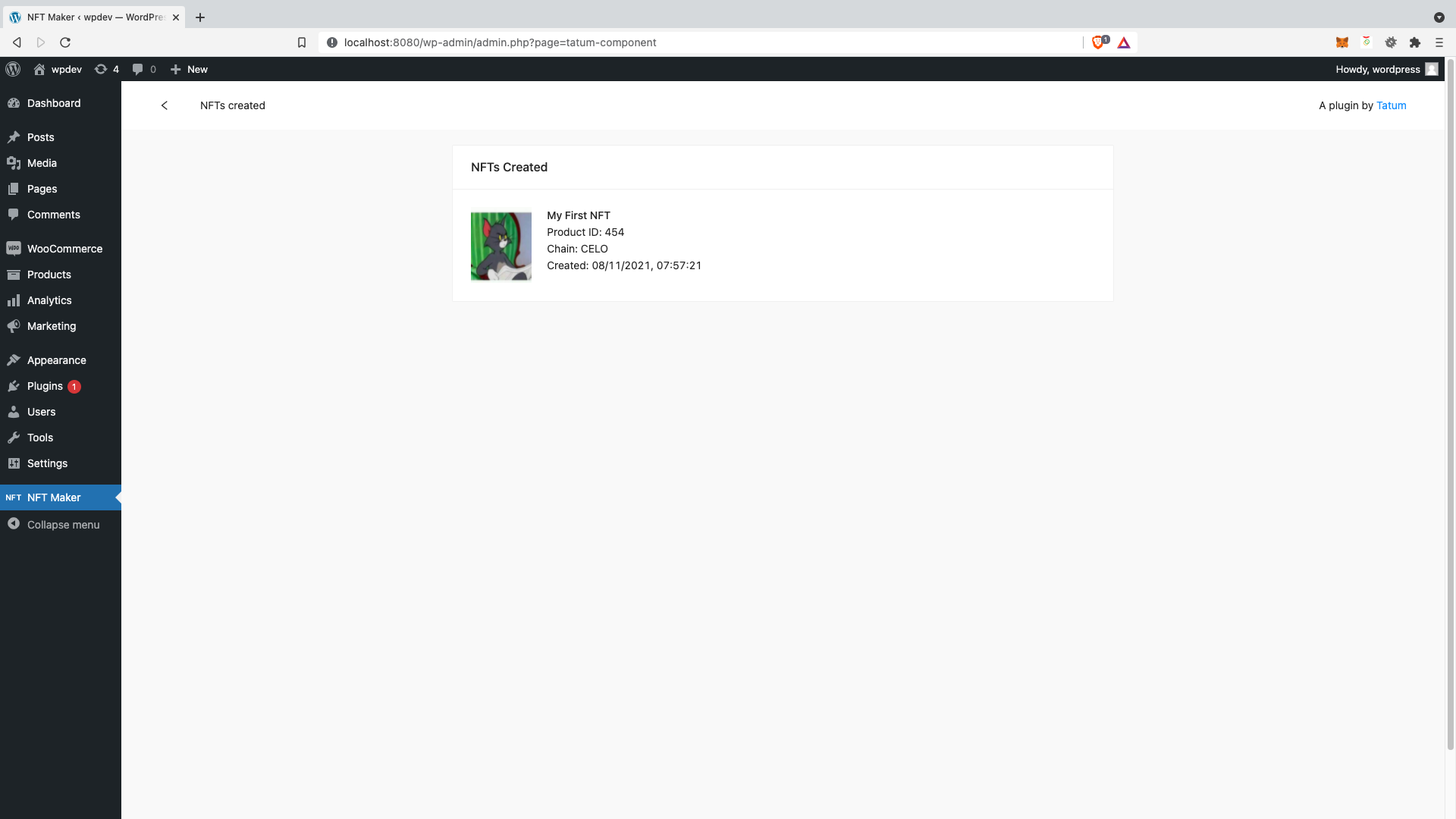
- Click “Publish” to create your product. Now it is available for purchase in your e-shop. You can also view it in your list of lazy-minted NFTs. You will not consume any credits from your paid plan for gas fees until someone purchases your NFT and it is minted on the blockchain you have selected.
- When a buyer adds the NFT to their cart and proceeds to checkout, they will have to enter a blockchain address on the blockchain to which the NFT will be minted.
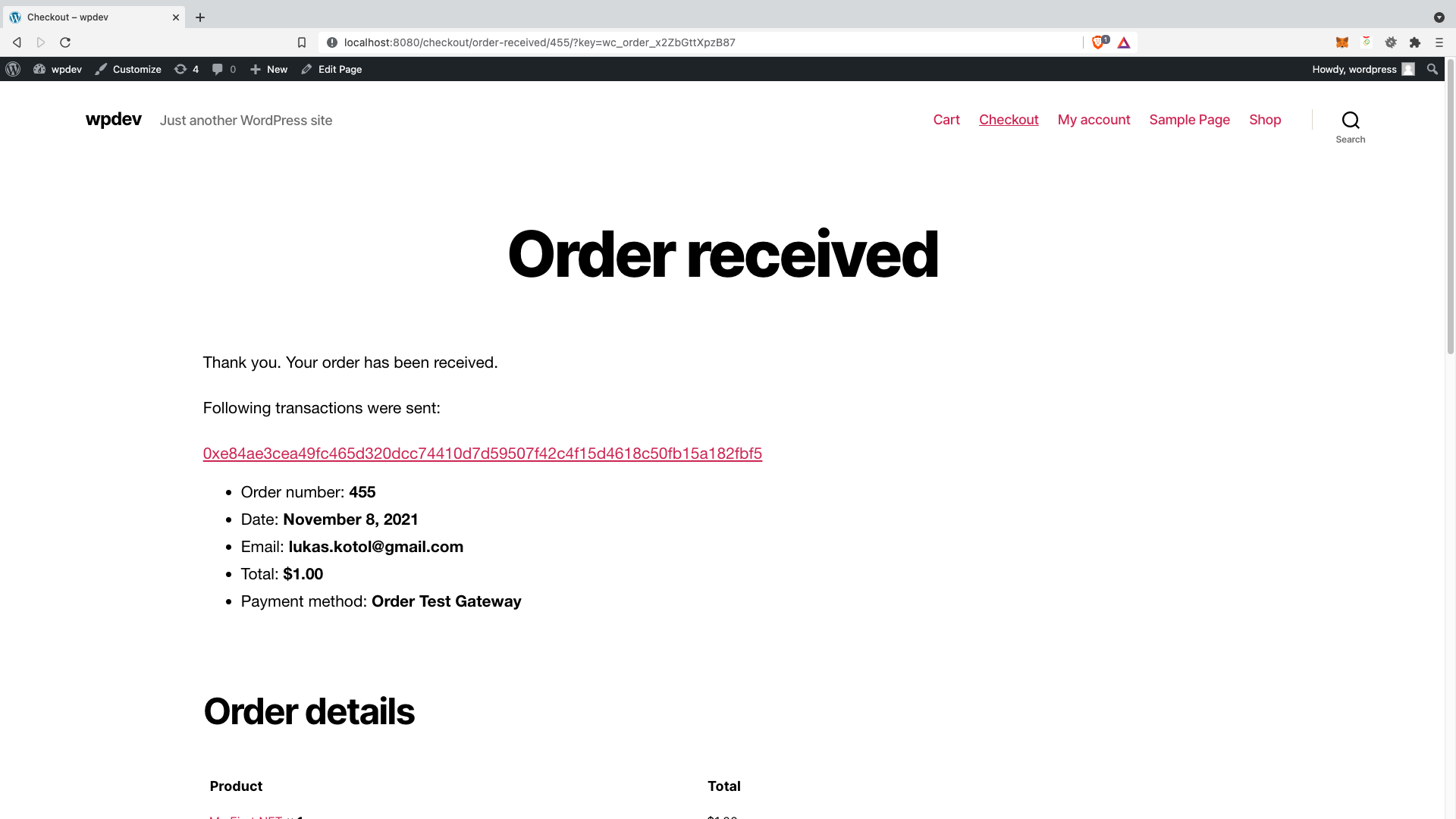
- After a successful purchase of the NFT, the customer will be shown a link to the blockchain transaction.
- The blockchain transaction link redirects the customer to the blockchain explorer of the respective blockchain where they can view NFT mint transaction details.
- Admins of the WordPress shop can also view all lazy-minted and sold NFTs.
Frequently asked questions
Why do I need an API key?
Normally, to create NFTs on different blockchains, you would need to have access to blockchain nodes and create wallets on each blockchain. With NFT Maker, you can simply use an API key to connect to different blockchains through Tatum, and everything else is taken care of for you.
What are credits used for?
Credits are used to pay for the gas fees on the blockchain on which you are minting NFTs. Each time you mint an NFT, credits are deducted from your monthly credit amount.
How many NFTs can I mint with each type of plan on each blockchain?
This depends on the current gas prices on each blockchain. In general, Harmony and Celo are very cheap, Polygon and BSC are somewhere in the middle, and Ethereum is extremely expensive.
Do I have to pay any other fees?
No, your plan covers all fees.
Can I create a multi-vendor peer-to-peer NFT marketplace with the plugin?
No, you can only create and sell NFTs directly to your users with the plugin.
Is there a file size limit to the files I upload?
Yes, the file limit is 50MB.
Does NFT Maker support royalty NFTs?
No, it only supports standard ERC-721 NFTs.
Can I modify the NFT Maker plugin?
Yes, the plugin is open source. You can download the source code here and modify anything you like.
Can NFT Maker generate wallets?
No, the plugin cannot generate wallets, it just mints your NFTs to the addresses your users provide.
Can users connect their own MetaMask wallets to the plugin?
No, there would be no reason for this. They can simply provide the address of their wallet and the NFT will be minted to that address.
What blockchains do you support?
Ethereum, Polygon, Binance Smart Chain, Celo, Harmony
Can I change the collection name?
No, the name of the collection is in the smart contract on each blockchain and cannot be changed.
Do I need to generate a blockchain wallet on each blockchain I want to mint NFTs on?
No, since NFTs are lazy-minted, you do not need to create wallets on any blockchain. Once an NFT is purchased, it is minted directly to the buyer’s blockchain address.
Do I have to choose which blockchain I will mint all of my NFTs on during setup?
No, you can choose which NFT to mint on which blockchain when you are setting up each product. You can select one blockchain per product, but you can also create multiple NFTs of the same image for multiple blockchains if you so choose.
Is the plugin free?
Yes, the NFT Maker plugin itself is completely free. However, in order to pay for the gas fees necessary to mint NFTs, you must buy a paid plan in the Tatum Dashboard. Each paid plan has different credit amounts, and credits will be consumed when your NFTs are purchased and minted to the blockchain, based on the current gas fees of the given blockchain. For testing purposes you can try NFT Maker with Test API keys for free, but NFTs minted with Test API keys will not have any value, because they are minted on Testnet network.
If I don’t use all my credits within a month, do they carry over to the next month?
At the moment, no, unused credits do not carry over to the following month.
Can my users sell their NFTs with NFT Maker?
NFT Maker can only be used to sell NFTs created by admins to customers. To create NFT marketplaces that allow users to sell their own NFTs, please refer to Tatum’s How to build p2p NFT marketplaces guide.
Can I sell my existing NFTs on my e-shop using NFT Maker?
No, again, NFT Maker can only be used to sell NFTs created with the plugin. For a complete guide on how to build the backend to an NFT marketplace from scratch, please refer to Tatum’s How to build NFT marketplaces part 2 – Backend guide.
Changelog
No upgrade notice yet
1.0.0
- Initial version
1.0.1
- Added deploy smart contract enough balance validation
1.0.2
- Added information about fees cost
1.0.3
- Fixed deploy NFT minor bug
1.0.5
- Fixed minor bugs
2.0.0
- Completely new version with IPFS and lazy minting support
Screenshots



For developers
Is this your plugin? Show off the numbers.
Add a live badge to your site, docs or GitHub README. It updates on its own — no account needed.
Best NFT Maker alternatives
All bsc plugins →FAQ
NFT Maker: quick answers
Straight answers, pulled from live WordPress.org data.
Live data from WordPress.org · checked Sep 27, 2026
Is NFT Maker free?
Yes. NFT Maker is free to download and use from the official WordPress.org plugin directory.
Is NFT Maker safe to use in 2026?
NFT Maker shows warning signs in 2026 — compare the alternatives below before installing. It runs on 100+ sites, is rated 4/5 and was last updated 3 years ago, and scores 33/100 on our health check.
How many websites use NFT Maker?
NFT Maker is active on 100+ WordPress websites and has been downloaded 24,879 times since it launched in May 2021. It was downloaded 122 times in the last 30 days.
Does NFT Maker work with WordPress 7.1?
NFT Maker is officially tested up to WordPress 5.8.17, while the latest release is 7.1.2. It may still work, but try it on a staging site first.
What PHP version does NFT Maker need?
NFT Maker requires PHP 7.0 or higher. Most hosts run PHP 8.x today, so it works on any modern WordPress hosting.
When was NFT Maker last updated?
The latest version, 2.0.37, was released on March 18, 2024 (3 years ago).
Who makes NFT Maker?
NFT Maker is developed and maintained by lukaskotol.
What are the best alternatives to NFT Maker?
The most popular alternatives to NFT Maker are Login and Pay with Metamask (10+ installs) and Enefti NFT Marketplace Core… (10+ installs).
Powered by PageForge
Want thousands of pages that rank like these? Build them in an afternoon.
This directory runs on the same engine as PageForge. Turn any spreadsheet, CSV or API into thousands of fast, SEO-ready WordPress pages — with schema, internal links and AI-written copy baked in.
- CSV, Google Sheets & API data sources
- AI content, schema & internal links per page
- Works with Elementor, Gutenberg, Yoast & Rank Math
- Free on WordPress.org — no credit card


