


Tarkva – Expiry Tracking and Discount Engine
Track batch expiry dates in WooCommerce and automatically discount products as they approach their best-before or use-by date.

Solid choice
Tarkva is a solid plugin choice in 2026, with a few things worth checking first. Is rated 5/5 and was last updated 3 weeks ago, and scores 66/100 on our health check.
- Actively developed — last update 3 weeks ago
- Small user base (<10 active installs)
- Very few reviews so far
How does it stack up?
Side-by-side on installs, updates, ratings & supportDaily downloads
Download spikes usually follow a new release — each site that auto-updates counts as a download.
Rankings
Where Tarkva stands todayWordPress.org search rankings
Live position in the plugin search, top 100| Keyword | Position |
|---|---|
| clearance | #16 |
| discounts | >100 |
| expiry date | #59 |
| inventory | >100 |
| woocommerce | >100 |
Rating breakdown
★★★★★★★★★★ 5 from 1 reviews
About Tarkva
From the official readme · v1.9.1Description
Perishable and dated stock — food, supplements, cosmetics, anything with a best-before or use-by date — needs a different kind of pricing than the rest of your catalogue. Left alone, it either sits at full price until it’s unsellable, or someone has to remember to mark it down manually, product by product, week after week.
Expiry Tracking and Discount Engine tracks expiry dates natively per product (or per variation), and automatically prices clearance discounts as each batch approaches its date — no spreadsheets, no manual sale-price editing, no forgotten stock.
This is a WooCommerce extension. WooCommerce must be installed and active; the plugin adds to your existing products rather than replacing any part of your store.
What it does (free)
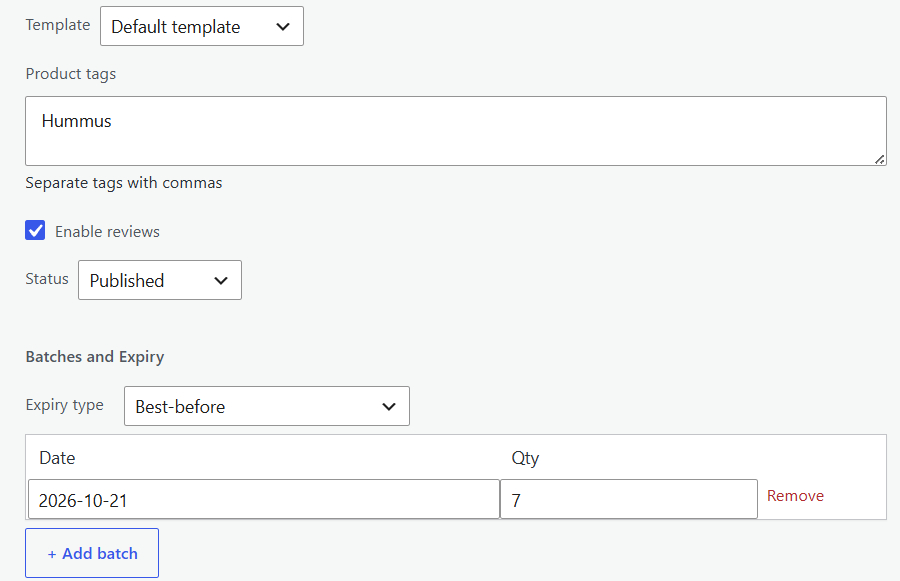
- Native batch tracking — record one or more expiry dates and quantities per product, right on the product edit screen. Works with simple and variable products.
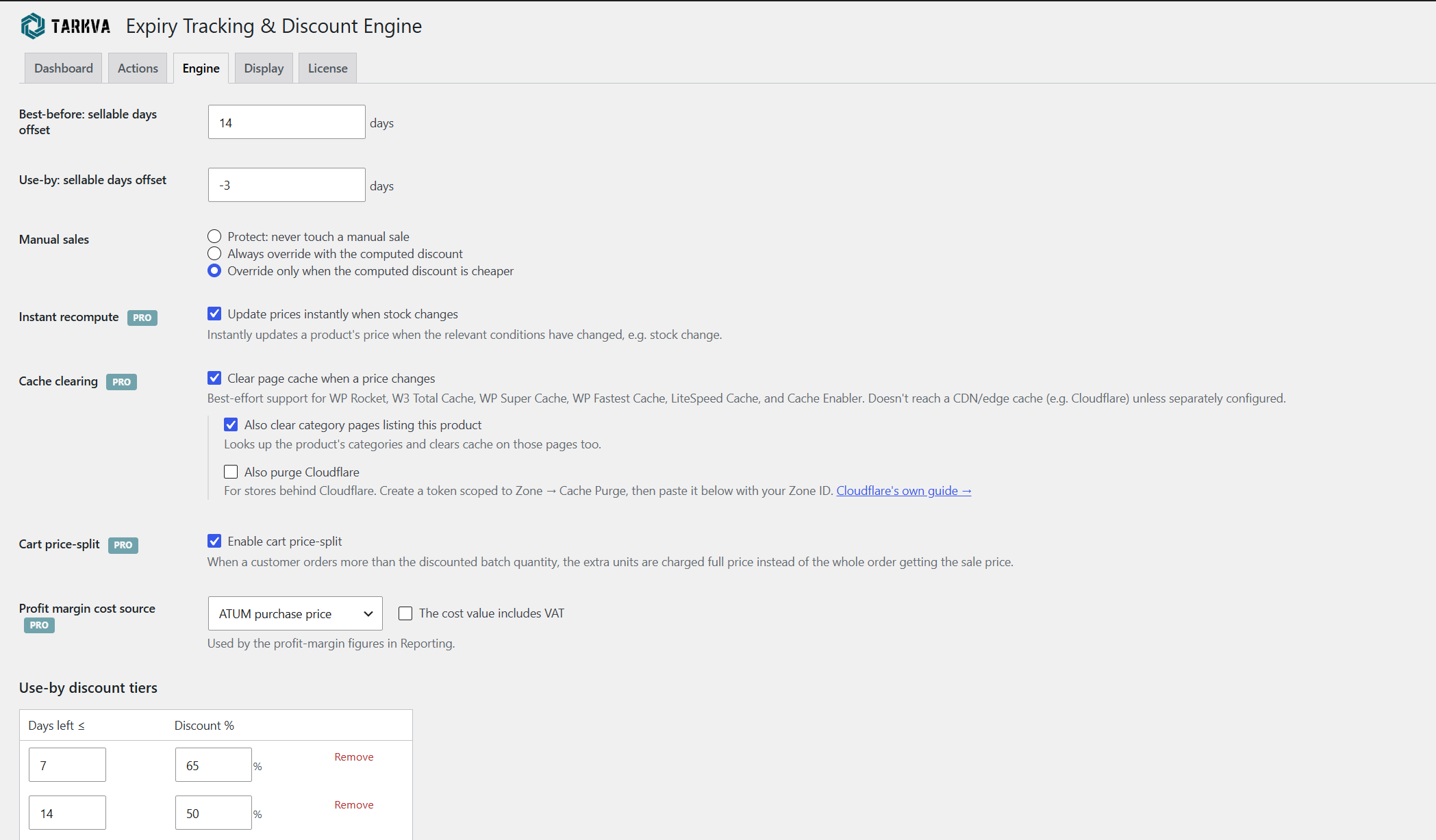
- Best-before and use-by aware — the two date types behave differently (best-before stays sellable a little past its date; use-by is pulled before it), each with its own configurable grace window.
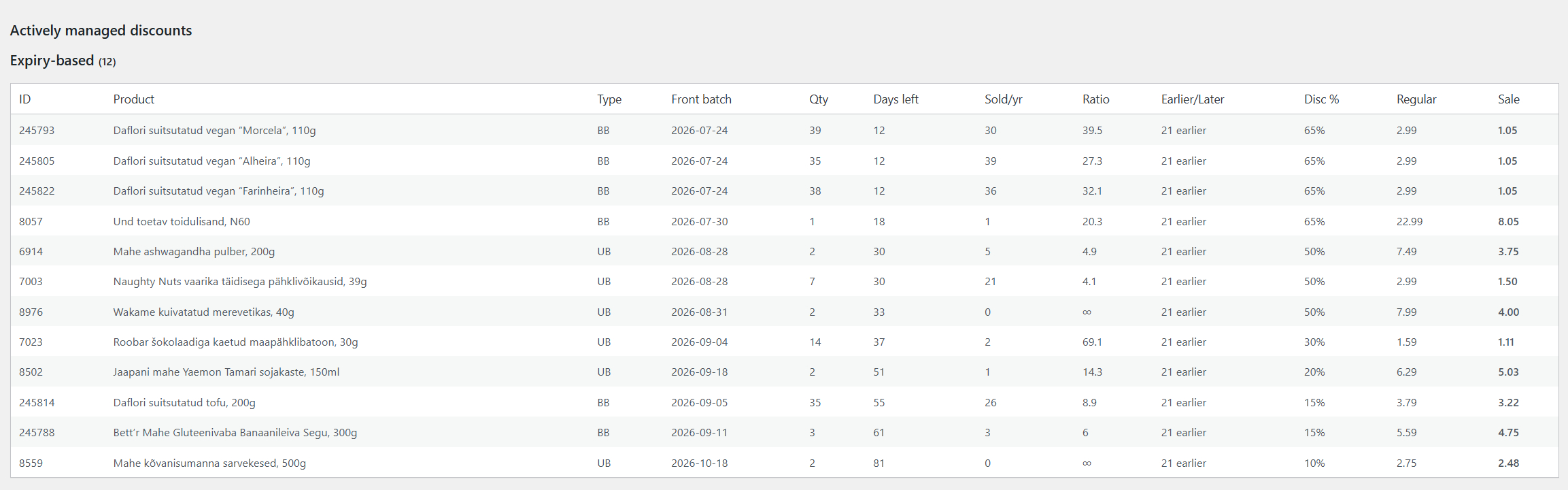
- Automatic clearance pricing — a configurable table of discount tiers (“7 days left → 65% off”, “30 days left → 20% off”, and so on) prices each product automatically as its date approaches.
- Runs on its own schedule — an automatic sweep recalculates every tracked product’s price for you; pick twice daily, daily, weekly, semi-monthly or monthly to match how fast your stock moves.
- Customers never buy expired stock — expired-but-retained stock stays visible to you for reference, but is automatically hidden from customers and excluded from product feeds (Google Shopping, Facebook, etc.) once it’s no longer sellable.
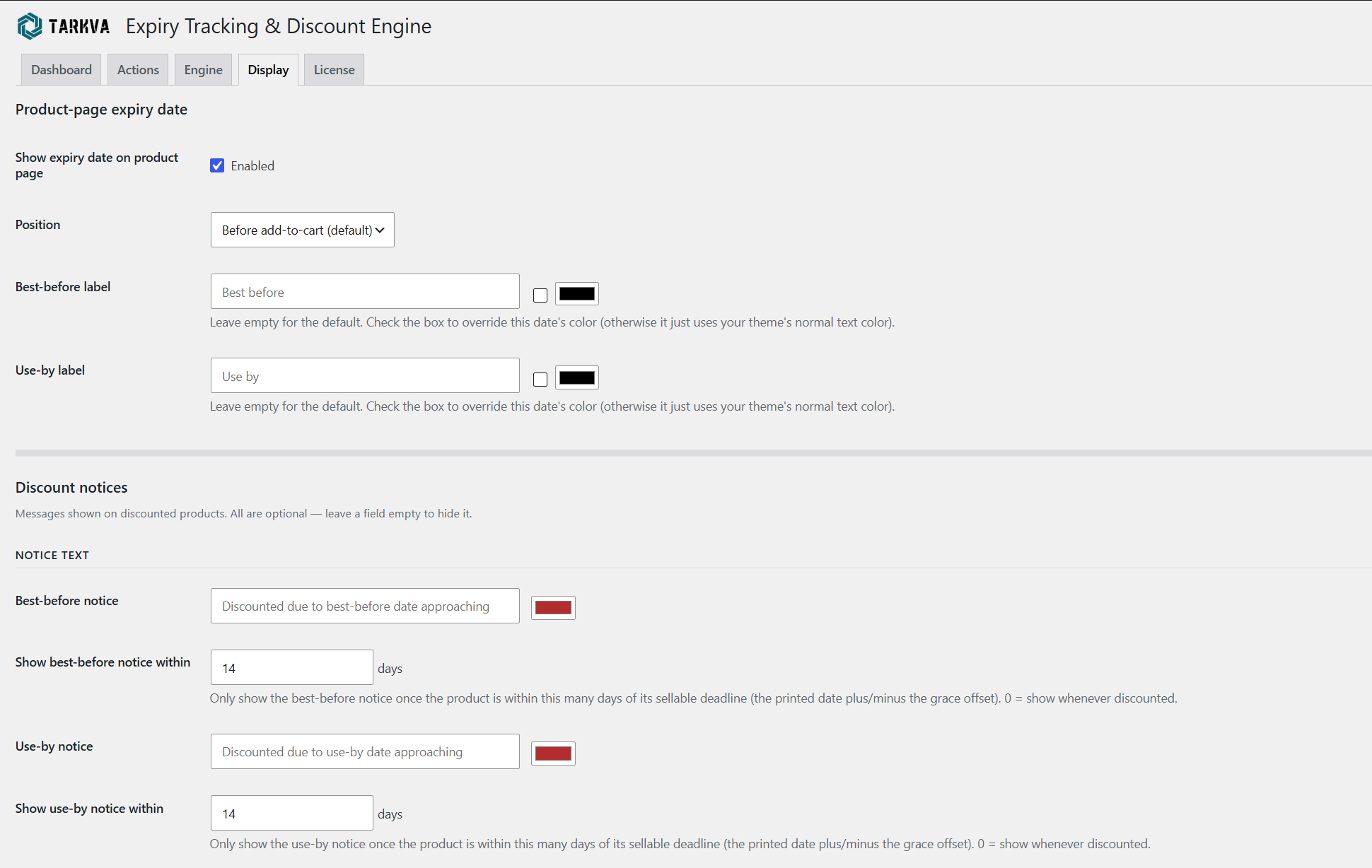
- A clear expiry notice on the product page — a configurable message shown to shoppers, with labels, colors, and placement you control so it fits your store’s voice and design.
- Your choice on manual sale prices — protect a price you’ve set by hand entirely, let the engine always manage it, or only override it when the engine’s own discount is deeper: you decide which.
- EU Omnibus-friendly pricing — your product’s regular price is never altered or reset when a discount tier applies, so the reference (“was”) price shown to customers is always your genuine original price, not an inflated or escalating one.
- Unlimited tracked products and unlimited discount tiers — no caps of any kind. Track your whole catalogue and build as many discount tiers per date type as your pricing strategy needs.
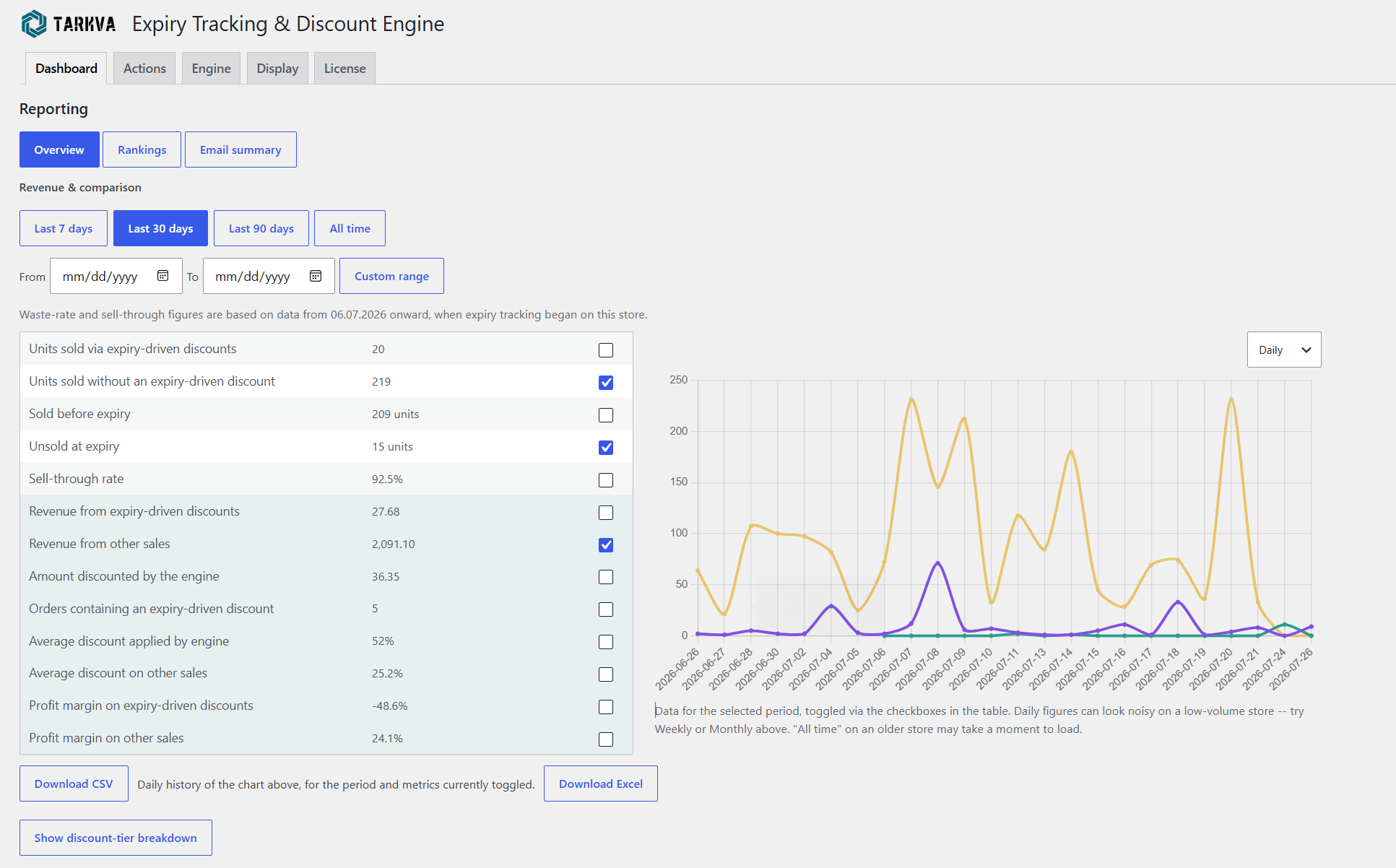
- Free Reporting dashboard — sales, waste, and sell-through metrics with a toggleable trend chart, a full Rankings table comparing every tracked product side by side, and a scheduled email summary, all included at no cost.
- Backup and restore — snapshot all your batch and expiry data at any time, and restore from any saved snapshot.
- WP-CLI support for previewing, applying, and inspecting discounts from the command line.
Why this is different
Most “sale” or “dynamic pricing” plugins schedule a fixed discount for a fixed period. This plugin instead reasons about your actual expiry dates: how close a batch is to its sellable deadline drives the price, automatically, continuously, without you touching it.
Want more?
The Pro add-on builds on the same engine for stores that want to go further:
- Stock & velocity intelligence — slow-selling or overstocked batches discount earlier and harder; batches projected to sell out comfortably discount later or not at all, protecting margin
- Cart price-split — only the at-risk quantity gets the discounted price; extra units in the same order are charged full price
- Advanced notices — cart reminders, discounted-quantity display, custom CSS placement
- Scheduled, automated backups
- Bulk CSV import for batch and expiry data
- Deeper reporting — revenue and profit-margin figures, plus one-click Excel exports
- Instant price recompute plus automatic page-cache clearing (including Cloudflare)
- Priority customer support and configuration assistance
Learn more at tarkva.com.
Privacy and external services
This plugin does not send any data anywhere by default. See “External services” below for the one case where it does, and only when you explicitly opt into it.
External services
This plugin connects to tarkva.com, the developer’s own licensing server, to validate a Pro add-on license key and check for available Pro updates. This only happens if and when you enter a license key on the plugin’s License tab — nothing is sent otherwise, and this free plugin works fully without ever triggering it. The data sent is the license key itself and this plugin’s fixed product identifier; no other site data is transmitted. This service is provided by Tarkva: Terms of Service, Privacy Policy.
The Engine tab’s cache-clearing settings (a Pro-only feature) include a link to Cloudflare’s own public documentation on creating an API token, for reference if you also install the separate Pro add-on. This free plugin never contacts Cloudflare itself, sends it no data, and does not require an account with it — the link is informational only, and the associated settings fields are read solely by that separate add-on’s own code, never by this plugin.
License
This plugin is free software, licensed under the GPLv2 (or later) — see LICENSE.txt in this plugin’s own folder for the full license text, or https://www.gnu.org/licenses/old-licenses/gpl-2.0.html. In plain terms: you’re free to use, study, modify, and redistribute this plugin, including copies you’ve modified yourself, for any purpose, commercial or otherwise. There is no warranty of any kind, including for any financial gain or loss resulting from the automatic pricing decisions this plugin makes on your store. As with any plugin that automatically modifies your store’s data, keep your own regular backups before and during use — standard practice for any such plugin, not a sign that this one is unusually risky. This applies only to this free plugin — the separately-sold “Expiry Tracking and Discount Engine PRO” add-on is not distributed under the GPL and is not covered by this section; see its own LICENSE.txt for the terms that apply to it.
Installation
- Make sure WooCommerce is installed and active — this plugin extends it and will not activate without it.
- Upload the plugin files to
/wp-content/plugins/tarkva-expiry-tracking-and-discount-engine, or install directly through the WordPress plugins screen. - Activate the plugin through the ‘Plugins’ screen in WordPress.
- Go to Products → Expiry & Discounts to configure discount tiers and notices.
- On any product you want to track, open the Inventory tab and set its expiry type and batch dates.
Frequently asked questions
Do I need WooCommerce?
Yes. This is a WooCommerce extension, not a standalone plugin — it reads your WooCommerce products, prices and orders, and WordPress will not let it activate unless WooCommerce is active. It works with any reasonably current WooCommerce version; there is nothing to configure on the WooCommerce side.
Does this work with variable products?
Yes. Each variation can have its own expiry batches; the expiry type (best-before/use-by) is set once on the parent and inherited by all variations.
Will customers ever be able to buy expired stock?
No. Once a batch is past its sellable window, it’s automatically excluded from what customers can purchase and from product feeds, while remaining visible to you for reference.
Does it work with multilingual/translation plugins?
Yes. All customer-facing text (notices, labels) is a setting you configure, so your translation plugin translates it exactly like any other text on your site.
Does it replace my existing expiry-tracking plugin?
It can. The plugin includes a native batch/expiry data model, so once your dates are entered here, you no longer need a separate expiry-tracking plugin.
Can I set discounts without expiry dates involved?
Not at this time — this plugin is purpose-built for expiry-driven clearance. For general-purpose discount rules unrelated to expiry dates, pair it with a dedicated dynamic pricing plugin.
Changelog
Fixes stock and discounts after a batch sells out, is removed or is refunded. Recommended for all users.
1.9.1
Fixed
- Stock and availability now update right after an order or refund changes a product’s batches. With the Pro add-on’s instant recompute, prices update at the same moment.
- Removing or selling a product’s last batch now sets its stock to 0, including when saving a product whose batch list is already empty, and its expiry discount is removed by the next scheduled run. Stock left over from earlier deletions is corrected the same way.
- A product with no sellable batch is no longer shown as in stock.
- Refunds with restocking now return units to the batch they were sold from, even if that batch was already sold out or removed.
- Sold-out batches are now removed from the batch list.
- Discounts on individual variations are now recorded correctly for reporting.
1.9.0
Fixed
- Sale prices set by hand on a product that already had an expiry discount were reverted on the next save, whichever “manual sale prices” setting was chosen. That setting now applies to these products too.
1.8.9
Fixed
- An issue where saving a product’s batches — from the full product edit screen, Quick Edit, or the Pro CSV importer — could clear that product’s batch list instead of saving the changes, without updating the WooCommerce stock quantity shown for the product. If you’ve added or edited a product’s batch dates or quantities recently, please check that product’s batch list and re-enter it if it appears empty.
1.8.8
Fixed
- The expiry notice could appear on a product that was still a long way from its sellable deadline. When a batch sold out and the next batch happened to fall in the same discount tier, the price did not change, so the stored batch date was never refreshed and the notice kept measuring against the sold-out batch. In testing, a product 25 days from its deadline showed a notice configured to appear within 7. The notice now reads the batch that is actually being sold from, the same one shown in the expiry date on the product page, so the two can never disagree.
1.8.7
Fixed
- The “show notice within N days” setting measured against a stale day count instead of against today, so the notice could stay hidden for a product genuinely close to its sellable deadline. The stored count is only refreshed when a product’s price actually changes, so a product sitting inside the same discount tier kept the day count it had when it entered that tier — a product 1 day from its deadline could still be reporting 8, and the notice only appeared once the window was widened past that stale number. This affected every automatic schedule equally, daily included, because the runs in between genuinely had no price change to apply. The remaining days are now recalculated from the batch date on each page view.
- Ticking a notice’s background colour box produced an apparently blank notice. The background defaulted to the same red as the notice text, so the text was drawn in the same colour as the box behind it. Backgrounds now default to a light tint, visible immediately when switched on.
1.8.6
Changed
- Discount notices are now coloured text by default, rather than white text inside a solid coloured box. The colour you choose for each notice is its text colour.
New
- Each notice also gained an optional background colour, off by default, with its own tick box so “no background” stays a real choice. Text colour and background sit side by side on the same settings row. Available for the best-before, use-by, general and cart notices alike.
Screenshots
For developers
Is this your plugin? Show off the numbers.
Add a live badge to your site, docs or GitHub README. It updates on its own — no account needed.
Best Tarkva alternatives
All clearance plugins →| Rank | Plugin | Active installs |
|---|---|---|
| 1 |
 Simply Buy
SimplyBuy is the easiest way to add a small "shop-like" request form or service calculator…
Simply Buy
SimplyBuy is the easiest way to add a small "shop-like" request form or service calculator…
|
<10 |
FAQ
Tarkva: quick answers
Straight answers, pulled from live WordPress.org data.
Live data from WordPress.org · checked Oct 20, 2026
Is Tarkva free?
Yes. Tarkva is free to download and use from the official WordPress.org plugin directory.
Is Tarkva safe to use in 2026?
Tarkva is a solid plugin choice in 2026, with a few things worth checking first. Is rated 5/5 and was last updated 3 weeks ago, and scores 66/100 on our health check.
How many websites use Tarkva?
Tarkva is active on <10 WordPress websites and has been downloaded 544 times since it launched in August 2026. It was downloaded 122 times in the last 30 days.
Does Tarkva work with WordPress 7.1?
Tarkva is officially tested up to WordPress 7.0.7, while the latest release is 7.1.3. It may still work, but try it on a staging site first.
What PHP version does Tarkva need?
Tarkva requires PHP 8.0 or higher. Most hosts run PHP 8.x today, so it works on any modern WordPress hosting.
When was Tarkva last updated?
The latest version, 1.9.1, was released on September 28, 2026 (3 weeks ago).
Who makes Tarkva?
Tarkva is developed and maintained by Tarkva.
What are the best alternatives to Tarkva?
The most popular alternatives to Tarkva are Simply Buy (<10 installs).
Powered by PageForge
Want thousands of pages that rank like these? Build them in an afternoon.
This directory runs on the same engine as PageForge. Turn any spreadsheet, CSV or API into thousands of fast, SEO-ready WordPress pages — with schema, internal links and AI-written copy baked in.
- CSV, Google Sheets & API data sources
- AI content, schema & internal links per page
- Works with Elementor, Gutenberg, Yoast & Rank Math
- Free on WordPress.org — no credit card


