


Tako Movable Comments
Move WordPress comments easily with Tako Movable Comments.

Use with caution
Tako Movable Comments works, but test it on a staging site before relying on it in 2026. It runs on 1K+ sites, is rated 4.8/5 and was last updated 10 years ago, and scores 43/100 on our health check.
- Loved by users — 4.8/5 from 77 reviews
- No update in 10 years
- Only tested up to WordPress 4.6 (latest is 7.1)
Daily downloads
Download spikes usually follow a new release — each site that auto-updates counts as a download.
Rankings
Where Tako Movable Comments stands todayWordPress.org search rankings
Live position in the plugin search, top 100| Keyword | Position |
|---|---|
| change comment | >100 |
| comments | >100 |
| edit comments | >100 |
| nested comments | >100 |
| update comment | >100 |
Version adoption
Share of active sites per release.
Rating breakdown
★★★★★★★★★★ 4.8 from 77 reviews
About Tako Movable Comments
From the official readme · v1.0.7Description
This plugin allows you to move comments from one post or page to another. You can also move comments across post types and custom post types.
By using this plugin in order to move comments, admins no longer need to manually insert the post ID number. Instead, admins can choose the post title through a drop down list. This allows admins to choose the post title that they want to move the comments to easily. Nested comments will also be automatically moved if the comment chosen to be moved has any nested comments under it. This plugin also allows admin to move WordPress comments in bulk. It has a bulk action that moves bulk comments automatically across posts, pages, and custom post types!
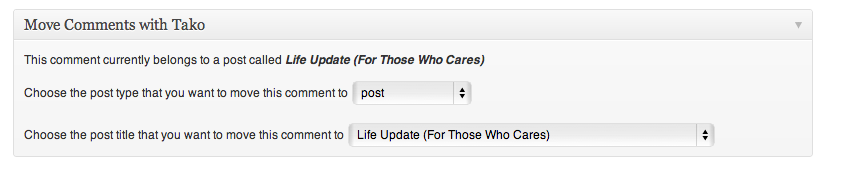
In order to use the plugin, just click on edit comments and move your comments through the ‘Move Comments with Tako’ metabox.
Notice: PHP5 is required since version 1.0.5!
Features:
- Move comments across posts, pages, and posts under custom post types
- Automatically move all the nested comments under the comment chosen to be moved
- Manual insertion of post ID is not needed; post/page can be chosen under a dropdown list
- No more ugly dropdowns! Autocomplete enabled; searching for post title becomes easier
- Comments can be move in bulk! No more slaving around and moving only one comment at a time!
Rate this Plugin
Please rate this plugin if you find it useful. It gives the plugin more exposure and it will generate more downloads. Thank you so much for your help! 🙂
Installation
- Upload the Tako folder to the
/wp-content/plugins/directory - Activate the plugin through the ‘Plugins’ menu in WordPress
- Click on edit comment and move the comment through the ‘Move Comments with Tako’ metabox
Screenshots


For developers
Is this your plugin? Show off the numbers.
Add a live badge to your site, docs or GitHub README. It updates on its own — no account needed.
FAQ
Tako Movable Comments: quick answers
Straight answers, pulled from live WordPress.org data.
Source: WordPress.org
Is Tako Movable Comments free?
Yes. Tako Movable Comments is free to download and use from the official WordPress.org plugin directory.
Is Tako Movable Comments safe to use in 2026?
Tako Movable Comments works, but test it on a staging site before relying on it in 2026. It runs on 1K+ sites, is rated 4.8/5 and was last updated 10 years ago, and scores 43/100 on our health check.
How many websites use Tako Movable Comments?
Tako Movable Comments is active on 1K+ WordPress websites and has been downloaded 23,415 times since it launched in February 2013. It was downloaded 372 times in the last 30 days.
Does Tako Movable Comments work with WordPress 7.1?
Tako Movable Comments is officially tested up to WordPress 4.6.30, while the latest release is 7.1.5. It may still work, but try it on a staging site first.
When was Tako Movable Comments last updated?
The latest version, 1.0.7, was released on October 14, 2016 (10 years ago).
Who makes Tako Movable Comments?
Tako Movable Comments is developed and maintained by RenettaRenula.
Powered by PageForge
One template and a spreadsheet. A real page for every search.
PageForge turns each row of a CSV into a WordPress page with its own title, URL, SEO fields and schema, built on the layout you already designed. Free on WordPress.org.
- CSV and XLSX, plus Google Sheets on Professional and Enterprise
- Its own title, URL, SEO fields and schema for every page
- Works with the block editor, Elementor, Divi and Avada
- Free on WordPress.org, no credit card