


Taboola
Use the Taboola plugin to generate revenue from native ads and drive engagement with editorial content.

Solid choice
Taboola is a solid plugin choice in 2026, with a few things worth checking first. It runs on 1K+ sites and was last updated 1 month ago, and scores 66/100 on our health check.
- Tested with the latest WordPress (7.1)
- Very few reviews so far
How does it stack up?
Side-by-side on installs, updates, ratings & support


Daily downloads
Download spikes usually follow a new release — each site that auto-updates counts as a download.
Rankings
Where Taboola stands todayWordPress.org search rankings
Live position in the plugin search, top 100| Keyword | Position |
|---|---|
| ad networks | #45 |
| ads | >100 |
| content recommendations | #55 |
| discovery | #82 |
| taboola | #1 |
Version adoption
Share of active sites per release.
About Taboola
From the official readme · v3.1.0Description
This plugin provides an easy way to integrate Taboola content into your WordPress pages.
Using Taboola’s mix of sponsored and editorial content, you can generate revenue and drive engagement.
(Requires an account with Taboola. For more detail, see the Taboola Dev Center.)
Installation
Requirements
- PHP 5.x, 7.x or 8.x
- WordPress 5.2 or higher (tested up to 7.1)
Installation Process
- Log into the WordPress admin for your site
- Go to ‘Plugins’ -> ‘Add New’
- Search for Taboola. Once found click on ‘Install Now’
- Select ‘Activate Plugin’ from the download page or go to ‘Plugins’ -> ‘Installed Plugins’ -> ‘Activate Plugin’
Your Taboola widgets
- Find Taboola in the ‘Installed Plugins’ section
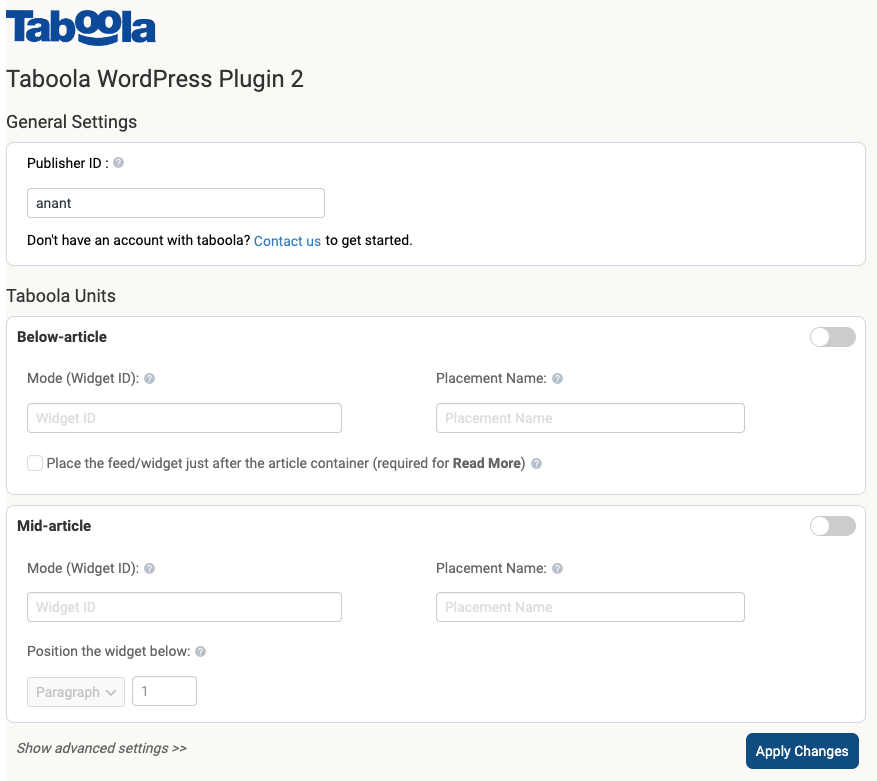
- Select ‘Settings’ – this will take you to the plugin dashboard.
- If you have not already done so, contact Taboola to obtain your specific settings.
- Fill in your specific settings, as provided by Taboola.
- Your below-article unit will appear directly below your article. Your mid-article unit will appear directly below your chosen paragraph number.
- Click ‘Apply Changes’.
- The Taboola units should now appear on your article pages.
For more detail, see the Taboola Dev Center.
Frequently asked questions
How do I use Taboola’s Plugin?
Once you have a Taboola account, reach out to us to obtain your specific Taboola settings. You can contact us through Backstage or reach out to your Taboola representative.
Where do the units appear on my pages?
Taboola works best on article pages – this is where your users are most engaged. Our below-article units appear directly after your content. The plugin manages this for you automatically. For your mid-article widget, choose a paragraph number – the unit will display beneath your chosen location.
Can I have additional features, such as video or sticky ads?
Yes, once you have added Taboola to your pages, you can request any other Taboola solution. You can do this in your Backstage account, or by contacting your Taboola representative. These additional solutions are activated by Taboola – no work required from you!
Can I customize the UI of the Taboola units?
While we have created a UI that we know performs the best, you can make changes. Simply contact us in your Backstage account or reach out to your Taboola representative. These customizations are activated by Taboola – no work required from you!
How can I report security bugs?
You can report security bugs through the Patchstack Vulnerability Disclosure Program. The Patchstack team help validate, triage and handle any security vulnerabilities. Report a security vulnerability.
Changelog
3.1.0
- Improved reliability: Ads and widgets should continue to load even when certain browsers or privacy settings block some services.
- Fixed content display issues: Content added within or below articles will now display correctly instead of appearing as plain text.
- Improved settings: Plugin settings will now save properly. If there’s a problem saving them, you’ll see a clear error message instead of the changes being lost.
3.0.2
- Bug Fix related to Simple HTML DOM
Error Message”Fatal error: Cannot redeclare function …”
3.0.1
- Bug Fix related to Mid Article
-“Loc_mid empty error” - Bug Fix related to WebPush
- Minor Ui Modifications
3.0
- Added the Category integration functionality and Multiple Mid Article thumbnails.
- Added the Homepage integration functionality for Feed
- Minor Ui Change
2.2.2
- Added the web push integration functionality and enabled push notifications
2.2.1
- The webPush scripts have been added to all pages, including Home, Category, and Article pages.
Screenshots
For developers
Is this your plugin? Show off the numbers.
Add a live badge to your site, docs or GitHub README. It updates on its own — no account needed.
Best Taboola alternatives
All ad networks plugins →FAQ
Taboola: quick answers
Straight answers, pulled from live WordPress.org data.
Live data from WordPress.org · checked Sep 29, 2026
Is Taboola free?
Yes. Taboola is free to download and use from the official WordPress.org plugin directory.
Is Taboola safe to use in 2026?
Taboola is a solid plugin choice in 2026, with a few things worth checking first. It runs on 1K+ sites and was last updated 1 month ago, and scores 66/100 on our health check.
How many websites use Taboola?
Taboola is active on 1K+ WordPress websites and has been downloaded 54,181 times since it launched in June 2014. It was downloaded 611 times in the last 30 days.
Does Taboola work with WordPress 7.1?
Yes. The developer has tested Taboola up to WordPress 7.1.2, the latest release. It requires WordPress 5.2 or newer.
When was Taboola last updated?
The latest version, 3.1.0, was released on August 21, 2026 (1 month ago).
Who makes Taboola?
Taboola is developed and maintained by Taboola.
What are the best alternatives to Taboola?
The most popular alternatives to Taboola are Davsy (10+ installs), myWidget recommendations (10+ installs) and Outbrain Feed (<10 installs).
Powered by PageForge
Want thousands of pages that rank like these? Build them in an afternoon.
This directory runs on the same engine as PageForge. Turn any spreadsheet, CSV or API into thousands of fast, SEO-ready WordPress pages — with schema, internal links and AI-written copy baked in.
- CSV, Google Sheets & API data sources
- AI content, schema & internal links per page
- Works with Elementor, Gutenberg, Yoast & Rank Math
- Free on WordPress.org — no credit card


