



Table Of Content Block – Auto-Generate Clickable Table of Contents
The Table of Contents block allows you to automatically generate a table of contents for your WordPress post or page.

Solid choice
Table Of Content Block is a solid plugin choice in 2026, with a few things worth checking first. It runs on 3K+ sites, is rated 5/5 and was last updated 4 days ago, and scores 66/100 on our health check.
- Actively developed — last update 4 days ago
- Very few reviews so far
- Only tested up to WordPress 6.9 (latest is 7.1)
Daily downloads
Download spikes usually follow a new release — each site that auto-updates counts as a download.
Rankings
Where Table Of Content Block stands todayWordPress.org search rankings
Live position in the plugin search, top 100| Keyword | Position |
|---|---|
| Best Table of Contents | #5 |
| block | >100 |
| sitemap | >100 |
| table of content block | #5 |
| table of contents | #8 |
Version adoption
Share of active sites per release.
Rating breakdown
★★★★★★★★★★ 5 from 4 reviews
About Table Of Content Block
From the official readme · v1.0.10Description
Enhance your long-form content with the Table of Contents Block! 📚 This powerful WordPress plugin automatically generates a smart, interactive table of contents, making your content easy to navigate. It helps guide your readers effortlessly to the sections they’re interested in.Ideal for content creators, bloggers, and website owners, this tool transforms any lengthy article into a well-organized, user-friendly masterpiece.
Tired of losing readers in lengthy articles? Our Table of Contents Block is your solution! It automatically scans your content, identifies all headings, and creates a beautiful, clickable navigation menu that helps readers instantly jump to the sections they’re most interested in.
📌 Ideal For
✔ Blog Posts – Keep readers scrolling longer.
✔ Documentation & FAQs – Make help articles easier to navigate.
✔ Tutorials & Guides – Improve readability for step-by-step content.
✔ Knowledge Bases & Wikis – Organize long-form content like a pro.
✔ Affiliate & Review Sites – Help users find key sections faster.
What makes this plugin special? It’s not just a table of contents – it’s a complete content navigation system that:
• Works automatically – just add the block and watch the magic happen
• Stays synchronized with your content – updates in real-time as you edit
• Looks beautiful on all devices – fully responsive design
• Enhances reader engagement – keeps visitors on your page longer
• Improves SEO performance – helps search engines understand your content structure better
Whether you’re a blogger, content creator, or business owner, this plugin helps make your content more professional, accessible, and user-friendly. Give your readers the premium content experience they deserve!
Why choose Table of Contents Block?
Readers often get lost in lengthy content. This plugin helps guide them exactly where they want to go—improving navigation, boosting time-on-page, and enhancing the overall experience.
Table Of Content Block Features
-
Automatic Generation: The block automatically generates a TOC based on the headings in your post or page.
-
Customizable Styles: You can customize the appearance of TOC, including font, size, and colors.
-
Smooth Scrolling: Clicking on a table of contents entry smoothly scrolls the page to the corresponding heading.
-
Anchor Links: TOC entries are linked to the corresponding headings using anchor links.
-
Gutenberg Integration: The block seamlessly integrates with the Gutenberg editor, making it easy to add a table of contents to your content.
-
Responsive Design: TOC is designed to be responsive and adapt to different screen sizes.
Benefits:
-
Improved Navigation: Provides an easy way for visitors to navigate long-form content.
-
Enhanced User Experience: Makes it easier for visitors to find the information they are looking for.
-
SEO Optimization: Helps search engines understand the structure of your content, which can improve your SEO rankings.
How to use Table Of Content Block
- First, install the Table Of Content Block plugin from the WordPress dashboard.
- Add the Table Of Content Block from the block category called “widgets” in the Gutenberg editor.
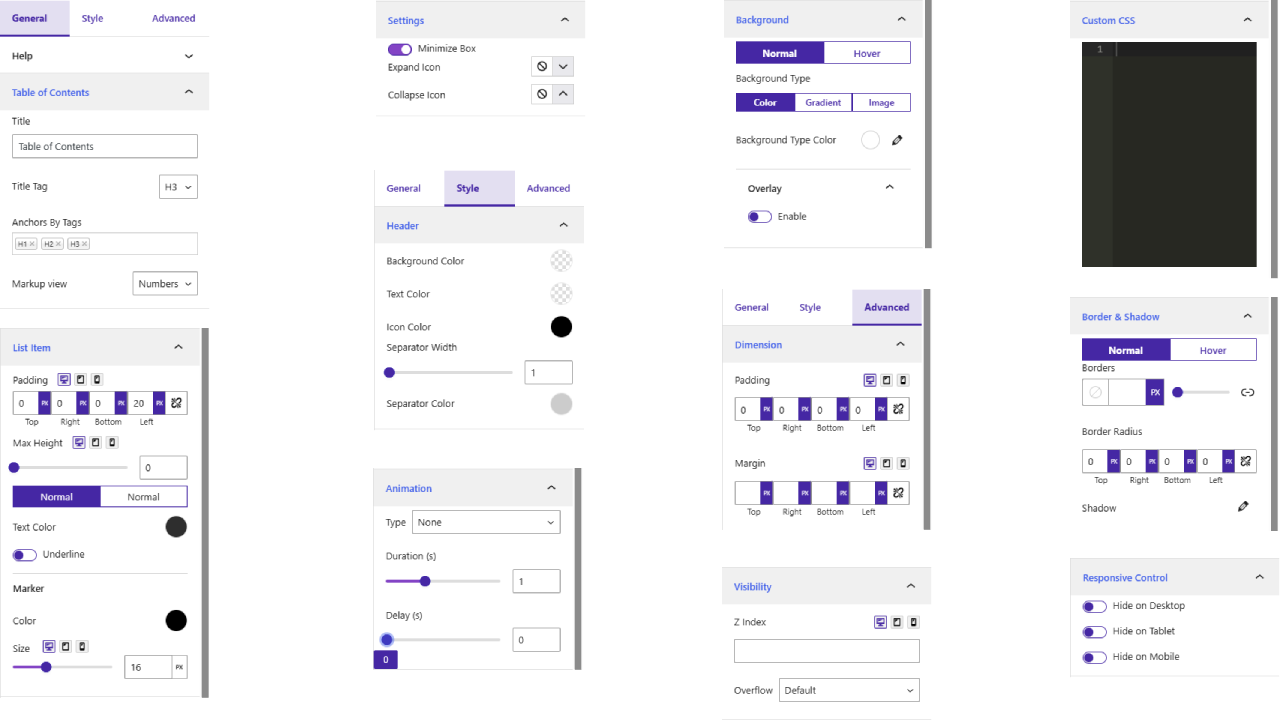
- You can change block settings from the right-side settings sidebar.
-
Enjoy!
-
For installation help click on Installation Tab
– Did you like this plugin? Dislike it? Have a feature request? Please share your feedback with us
⭐ Check out the Parent Plugin of this plugin-
🔥 B Blocks – Best gutenberg blocks collections for WordPress.
⭐ Check out our other WordPress Plugins-
🔥 Html5 Audio Player – Best audio player plugin for WordPress.
🔥 Html5 Video Player – Best video player plugin for WordPress.
🔥 PDF Poster – A fully-featured PDF Viewer Plugin for WordPress.
🔥 Document Embedder – Best WordPress Document Embedder Plugin.
🔥 3D Viewer – Display interactive 3D models on the webs.
🔥 Advanced Post Block – Best Post Display Plugin for WordPress.
External Service Integration
Service Name: package.js
- Docs link: package docs link
Developer Notes
-
Assets file name
assets file destination. ex: public/js/*.min.js -
Public source code GitHub link for review, study, and contribute.
For more information on how to contribute to this plugin, please visit our GitHub repository.
Installation
From Gutenberg Editor:
- Go to the WordPress Block/Gutenberg Editor
- Search For Table Of Content Block
- Click on the Table Of Content Block to add the block
Download & Upload:
- Download the Table Of Content Block plugin (.zip file)
- In your admin area, go to the Plugins menu and click on Add New
- Click on Upload Plugin and choose the
table-of-content-block.zipfile and click on Install Now - Activate the plugin and Enjoy!
Manually:
- Download and upload the Table Of Content Block plugin to the
/wp-content/plugins/directory - Activate the plugin through the Plugins menu in WordPress
Frequently asked questions
Does it work with any WordPress theme?
Yes, it will work with any standard WordPress theme.
Can I change block settings?
Yes, you can change block settings from the Gutenberg block editor’s right sidebar.
How many times can I reuse a block?
You can use unlimited times as you want.
Where can I get support?
You can post your questions on the support forum here
Changelog
1.0.10 – 17 August 2026
- Added: Two new themes, Timeline and List.
1.0.9 – 14 June 2026
- Fixed: iframe issues in the latest WordPress version.
- Fixed: Jump issue in smooth scroll.
- Fixed: Anchor link issue.
- Changed: Block icon color.
1.0.8 – 29 April 2026
- Added: Nested heading option.
1.0.7 – 10 March 2026
- Fixed: Heading innerTag remove issue.
1.0.6 – 06 August 2025
- Added: Free SDK integration.
1.0.5 – 15 May 2025
- Fixed: Navigation.
Screenshots
For developers
Is this your plugin? Show off the numbers.
Add a live badge to your site, docs or GitHub README. It updates on its own — no account needed.
FAQ
Table Of Content Block: quick answers
Straight answers, pulled from live WordPress.org data.
Live data from WordPress.org · checked Sep 26, 2026
Is Table Of Content Block free?
Yes. Table Of Content Block is free to download and use from the official WordPress.org plugin directory.
Is Table Of Content Block safe to use in 2026?
Table Of Content Block is a solid plugin choice in 2026, with a few things worth checking first. It runs on 3K+ sites, is rated 5/5 and was last updated 4 days ago, and scores 66/100 on our health check.
How many websites use Table Of Content Block?
Table Of Content Block is active on 3K+ WordPress websites and has been downloaded 20,717 times since it launched in March 2025. It was downloaded 1,152 times in the last 30 days.
Does Table Of Content Block work with WordPress 7.1?
Table Of Content Block is officially tested up to WordPress 6.9.9, while the latest release is 7.1.2. It may still work, but try it on a staging site first.
What PHP version does Table Of Content Block need?
Table Of Content Block requires PHP 7.2 or higher. Most hosts run PHP 8.x today, so it works on any modern WordPress hosting.
When was Table Of Content Block last updated?
The latest version, 1.0.10, was released on September 22, 2026 (4 days ago).
Who makes Table Of Content Block?
Table Of Content Block is developed and maintained by bPlugins.
Powered by PageForge
Want thousands of pages that rank like these? Build them in an afternoon.
This directory runs on the same engine as PageForge. Turn any spreadsheet, CSV or API into thousands of fast, SEO-ready WordPress pages — with schema, internal links and AI-written copy baked in.
- CSV, Google Sheets & API data sources
- AI content, schema & internal links per page
- Works with Elementor, Gutenberg, Yoast & Rank Math
- Free on WordPress.org — no credit card


