



Bulk Product Sync – Bulk Product Editor for WooCommerce with Google Sheets™
Bulk Product Editor plugin allows you to create and edit your WooCommerce products and categories with Google Sheets.

Solid choice
Bulk Product Sync is a solid plugin choice in 2026, with a few things worth checking first. It runs on 400+ sites, is rated 4.2/5 and was last updated 2 months ago, and scores 74/100 on our health check.
- Small user base (400+ active installs)
How does it stack up?
Side-by-side on installs, updates, ratings & support


Daily downloads
Download spikes usually follow a new release — each site that auto-updates counts as a download.
Rankings
Where Bulk Product Sync stands todayWordPress.org search rankings
Live position in the plugin search, top 100| Keyword | Position |
|---|---|
| bulk price editor | #15 |
| bulk products | #20 |
| bulk stock manage | #13 |
| WooCommerce products | >100 |
| woocommerce stock | >100 |
Version adoption
Share of active sites per release.
Rating breakdown
★★★★★★★★★★ 4.2 from 27 reviews
About Bulk Product Sync
From the official readme · v9.7Description
Managing products like creating, updating inventory and prices, or updating images, short descriptions, or titles for SEO across multiple products is very hectic and time-consuming. So, rather than focusing on marketing or sales strategy, most of your time is being eaten up by bulk product or category management. Bulk Product Editor is the ultimate solution. Our plugin provides the easiest and quickest way to manage your products and categories with Google Sheets. Google Sheets are amazing when it comes to managing tabular data in the cloud. We have built a Google Sheet Addon, approved and listed by the Google Marketplace. No complex or tricky setup, no need to generate API keys — just run our connection wizard, and your store will be connected in less than a minute. Now you can manage your products and categories with ease. Adding a new product or updating an existing product in Google Sheets is really easy and quick, and thousands of products can be pushed or fetched in one click.
Watch Video Guide
What is Sync Vs Fetch?
Sync means to push your products from Google Sheets to your connected store, and Fetch is the reverse, i.e., to pull products from your store to Google Sheets.
How to fetch products from my store?
- Just click BPS Menu > Fetch
- Click Fetch Products
- Make sure you set the chunk size as per your need
- Chunk means how many products will be pushed and pulled in one round. Recommended: 200–300
Can custom fields or taxonomies be attached?
- Yes, create a new column in the sheet and set the header name.
- E.g., if you want to add
seo_titleas a custom field, set the header name toseo_title - Note: this
seo_titlemust be set inside theManage Fieldsmenu first
Live Demo
- Check all features in the Live Demo
- This demo has already installed BPS Free and Pro versions.
- When the demo is ready, please follow the instructions as explained here
Features
- One-Click Import
- Sync All Your Products
- Sync All Your Categories
- Add/remove product fields
- Sync from Store to Google Sheet™
- Built using the latest Google App Script API
- Dynamic Custom Taxonomy Support
PRO Features
- Variable Products Supported
- Auto-Sync [hourly, twice daily, daily]
- Logging Auto Sync
- Export Existing Products into Google Sheet™
- Export Existing Categories into Google Sheet™
- Export Existing Variations into Google Sheet™
- Metadata columns
- Custom Taxonomy Support (product_brand, etc.)
Start managing your store with WooCommerce Bulk Products Editor
Use Cases
Opening a new store
Add all of your products to the Google Sheet, select Sync Products, and bask in the joy.
Managing an existing store
To manage any updates or new products, export all of your products from your store to Google Sheets™.
Managing the stock
If the present solution’s stock management is driving you crazy, use Bulk Product Sync to add manage_stock and quantity columns to the sheet, and you’ll be free of the problem.
Installation
This section describes how to install the plugin and get it working.
e.g.
- Upload
bulk-product-syncto the/wp-content/plugins/directory - Activate the plugin through the ‘Plugins’ menu in WordPress
- Go to WooCommerce > BulkProductSync to configure the plugin1. Download the plugin and activate it
- Go to WooCommerce > Settings > Google Products
- Enter your Google Credentials
- Enter WooCommerce API/Secret Keys
Frequently asked questions
Does this plugin work with custom taxonomies?
Yes! Version 9.0 introduces dynamic custom taxonomy support. Any custom taxonomy (like product_brand) defined in your sheet mapping will automatically work for both sync and fetch operations.
Can I sync product brands?
Yes! Product brands and any other custom taxonomies are now fully supported. Just add the taxonomy column to your Google Sheet and it will sync automatically.
How do I handle large product catalogs (20k+ products)?
For large catalogs, increase your server’s PHP memory limit and execution time. The plugin includes chunking to handle large datasets efficiently.= What is the difference between Pro and Free versions? = The only import option in the free version is from a Google Sheet™ to the store, and some fields, such as images, and variable products, cannot be imported. As mentioned above in the PRO features list, you can export (from store to Google Sheet™) and do much more when using the Pro version.
Can I fetch my existing products/categories?
Yes, in Pro version
Should I need to connect with my own Google Account?
Yes
Can I see live Demo?
Check all features in Live Demo This demo has already installed BPS Free and Pro version. Make sure you follow the instructions as explained here
Can we use formulas in Google Sheet for e.g. prices, stock?
Yes
Changelog
Nothing so far..
9.7 July 28, 2026
- Fixed: Restored missing plugin header block in readme.txt (lost in 9.6 release)
- Compatibility: Tested with WordPress 7.0
9.6 October 23, 2025
- SECURITY FIX: Fixed critical vulnerability that exposed all WooCommerce REST API endpoints
- Fixed: Permission bypass now only applies to wbps endpoints, not all WooCommerce APIs
- Improved: CORS headers restricted to wbps endpoints only
- Enhanced: Better security isolation for plugin-specific endpoints
9.5
- Added: Dynamic custom taxonomy support for all taxonomies
- Added: Automatic product_brand and custom taxonomy sync/fetch
- Fixed: Custom taxonomy fields not being fetched from store to sheet
- Improved: Dynamic filter registration for better extensibility
- Enhanced: Better handling of taxonomy data in both directions
9.3 April 26, 2025
Bug fixed: Images by ids were syncing, it is fixed now
9.2 April 26, 2025
- Bug fixed: CORS issue fixed while synced.
9.1 April 25, 2025
- Bug fixed: Sync issue fixed caused by last udpate
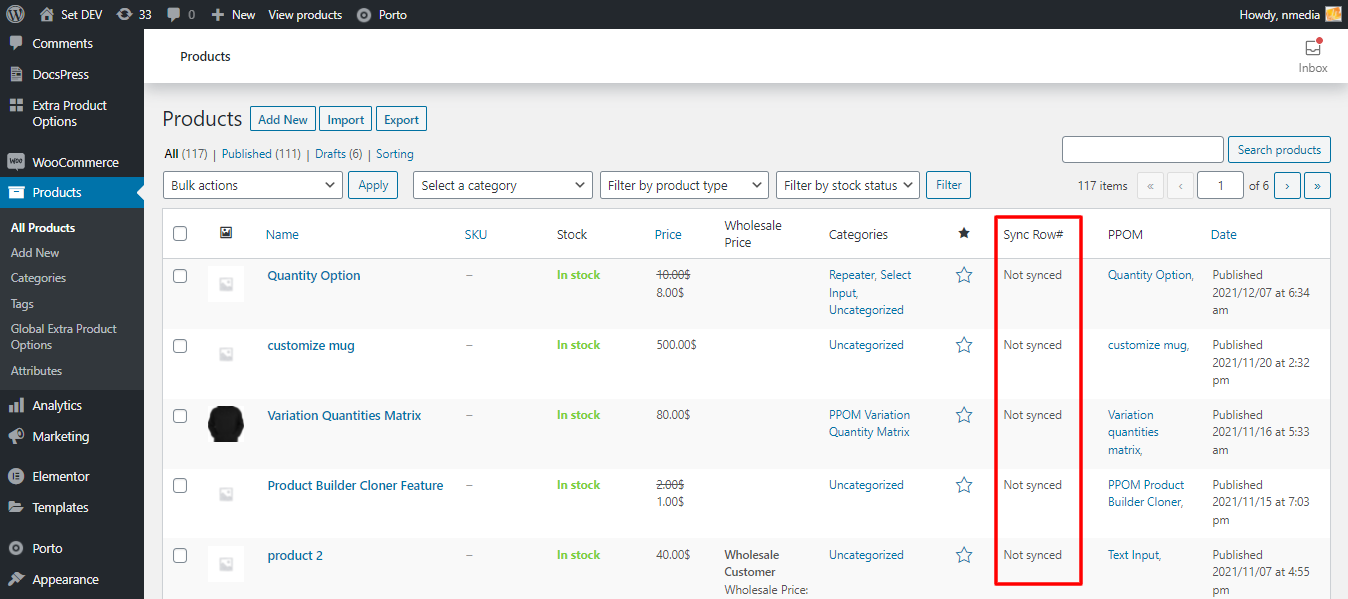
Screenshots



For developers
Is this your plugin? Show off the numbers.
Add a live badge to your site, docs or GitHub README. It updates on its own — no account needed.
Best Bulk Product Sync alternatives
All bulk price editor plugins →FAQ
Bulk Product Sync: quick answers
Straight answers, pulled from live WordPress.org data.
Live data from WordPress.org · checked Oct 6, 2026
Is Bulk Product Sync free?
Yes. Bulk Product Sync is free to download and use from the official WordPress.org plugin directory.
Is Bulk Product Sync safe to use in 2026?
Bulk Product Sync is a solid plugin choice in 2026, with a few things worth checking first. It runs on 400+ sites, is rated 4.2/5 and was last updated 2 months ago, and scores 74/100 on our health check.
How many websites use Bulk Product Sync?
Bulk Product Sync is active on 400+ WordPress websites and has been downloaded 41,513 times since it launched in October 2020. It was downloaded 252 times in the last 30 days.
Does Bulk Product Sync work with WordPress 7.1?
Bulk Product Sync is officially tested up to WordPress 7.0.7, while the latest release is 7.1.3. It may still work, but try it on a staging site first.
What PHP version does Bulk Product Sync need?
Bulk Product Sync requires PHP 5.6 or higher. Most hosts run PHP 8.x today, so it works on any modern WordPress hosting.
When was Bulk Product Sync last updated?
The latest version, 9.7, was released on July 28, 2026 (2 months ago).
Who makes Bulk Product Sync?
Bulk Product Sync is developed and maintained by N-Media.
What are the best alternatives to Bulk Product Sync?
The most popular alternatives to Bulk Product Sync are Plugsera Bulkrify (<10 installs), Nice Price Editor (<10 installs) and ChandBood (<10 installs).
Powered by PageForge
Want thousands of pages that rank like these? Build them in an afternoon.
This directory runs on the same engine as PageForge. Turn any spreadsheet, CSV or API into thousands of fast, SEO-ready WordPress pages — with schema, internal links and AI-written copy baked in.
- CSV, Google Sheets & API data sources
- AI content, schema & internal links per page
- Works with Elementor, Gutenberg, Yoast & Rank Math
- Free on WordPress.org — no credit card


