



Summary box for Wikipedia links
Enhance your site with Wikipedia summary boxes! Offer instant info previews on existing and new Wikipedia links without altering your website code.

Use with caution
Summary box for Wikipedia links works, but test it on a staging site before relying on it in 2026. It runs on 30+ sites, is rated 5/5 and was last updated 5 months ago, and scores 59/100 on our health check.
- Small user base (30+ active installs)
- Very few reviews so far
How does it stack up?
Side-by-side on installs, updates, ratings & support



Daily downloads
Download spikes usually follow a new release — each site that auto-updates counts as a download.
Rankings
Where Summary box for Wikipedia l… stands todayWordPress.org search rankings
Live position in the plugin search, top 100| Keyword | Position |
|---|---|
| content | >100 |
| education | #83 |
| enhancement | #98 |
| preview | >100 |
| wikipedia | #2 |
Version adoption
Share of active sites per release.
Rating breakdown
★★★★★★★★★★ 5 from 1 reviews
About Summary box for Wikipedia links
From the official readme · v1.1.3Description
The «Summary box for Wikipedia links» plugin brings the Page Previews from WikiMedia to your website. It displays simple and nice summary boxes on every Wikipedia link.
Immediately after activating the plugin, you get nicely animated summary boxes for all existing and new Wikipedia links on your site!
All without touching your source code in any way, so you can try it out without hesitation.
Authors and visitors love it! ❤️
- Simplifies content creation by providing on-demand term explanations.
- Connects your visitors to Wikipedia’s wealth of knowledge.
- Enhances your site with a simple, valuable, useful and nice feature!
This plugin …
- Works out of the box, just set a Wikipedia link as usual and the summary box appears.
- Works smoothly with touch and mouse on mobile, desktop and tablet.
- Supports all existing languages and text directions (ltr, rtl) on Wikipedia.
- Does not affect your website in any way.
- Is based on our library that can bring this feature to any website, not just WP, first release was 12/2021.
- Is very lightweight, free and open source.
Settings. You have control over whether to …
- Show summary boxes for all Wikipedia links, or none but only show selected ones.
- Show images in all boxes, or none but also only in selected ones.
- Display or hide each box and each image within it separately.
- Change the width of the summary boxes, the number of characters displayed, the font size and more.
Best of all, using the settings it’s really simple, but in most cases you don’t need them at all, just activate the plugin and see if you like it.
Examples
Try it out on our project page (su-pa.net).
Use on our website dontwastemy.energy
Links related to the plugin
Project page (su-pa.net) contains:
– WordPress plugin
– version to implement the feature everywhere (pure HTML5),source code](https://github.com/su-pa/Summary-box-for-Wikipedia-links) (github.com)
– version to implement the feature with a one-liner everywhere
Plugin source code (github.com)
Plugin test page (cyon.site)
Give it a try!
Thank you very much.
Donate
The first version was created for our “The Horse” project, which supports cross-border student learning and collaboration projects. If you find the plugin helpful, please consider supporting the development by donating to THE ! association.
For suggestions or inquiries, feel free to contact us
Dominik, wikinick@su-pa.net.
Installation
- From your WordPress dashboard go to Plugins > Add New.
- Search for Summary box for Wikipedia links in the Search Plugins box.
- Click Install Now to install the Summary box for Wikipedia links plugin.
- Click Activate to activate the plugin.
- After activating the plugin all existing and new Wikipedia links on your website will automatically show a nice preview box with a article summary of the Wikipedia article.
- After that you can change the appearance of the boxes in the settings page (go to “Settings”, “Summary for Wikipedia”) if you like to do so.
You can also download the plugin directly as a ZIP file from the repository (github.com) and install it in WordPress via “Plugins”, “Add New”, “Upload Plugin”.
Frequently asked questions
Why is no image in a specific summary box?
Not all, but most, Wikipedia articles contain an image that can be displayed in the summary box. Also make sure that you didn’t use the “#dontshowimage” parameter in your Wikipedia link or you have selected “Disable Images” in the administration.
Why is a particular summary box showing fewer characters than set in the admin?
The value set in the admin is a maximum. The number of characters displayed in a summary box also depends on the text in the linked Wikipedia article.
How do I customize the settings for the summary boxes?
In your WordPress admin area, navigate to Settings > Summary for Wikipedia. There, you can adjust the width, number of characters, font size, disable showing images in all summary boxes, and more.
I did a change in the settings but it seems not to have an effect.
The pages of your website may be cached by your web server or browser – please clear these caches.
Changelog
1.0.0 – 20.11.2023
- Initial release.
1.0.0 – 24.11.2023
- Update Details text.
1.0.1 – 25.11.2023
- Added some allowed tags in the summary box.
1.0.1 – 27.11.2023
- Update details text; settings, FAQ, screenshot added.
1.0.2 – 05.04.2024
- Update for WP 6.5 compatibility, some minor text updates.
1.0.3 – 21.07.2024
- Update for WP 6.6 compatibility.
Screenshots
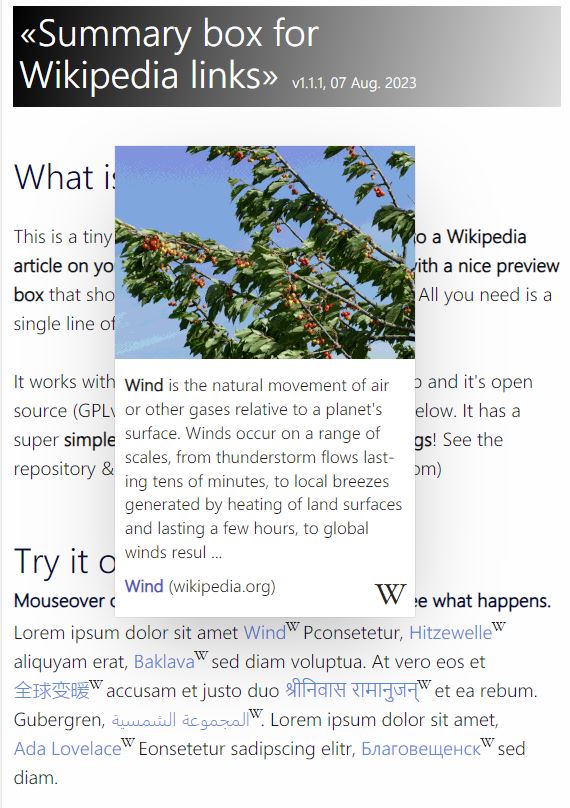



For developers
Is this your plugin? Show off the numbers.
Add a live badge to your site, docs or GitHub README. It updates on its own — no account needed.
Best Summary box for Wikipedia lin… alternatives
All content plugins →





FAQ
Summary box for Wikipedia links: quick answers
Straight answers, pulled from live WordPress.org data.
Live data from WordPress.org · checked Oct 21, 2026
Is Summary box for Wikipedia links free?
Yes. Summary box for Wikipedia links is free to download and use from the official WordPress.org plugin directory.
Is Summary box for Wikipedia links safe to use in 2026?
Summary box for Wikipedia links works, but test it on a staging site before relying on it in 2026. It runs on 30+ sites, is rated 5/5 and was last updated 5 months ago, and scores 59/100 on our health check.
How many websites use Summary box for Wikipedia links?
Summary box for Wikipedia links is active on 30+ WordPress websites and has been downloaded 2,994 times since it launched in November 2023. It was downloaded 69 times in the last 30 days.
Does Summary box for Wikipedia links work with WordPress 7.1?
Summary box for Wikipedia links is officially tested up to WordPress 7.0.7, while the latest release is 7.1.3. It may still work, but try it on a staging site first.
What PHP version does Summary box for Wikipedia links need?
Summary box for Wikipedia links requires PHP 5.6 or higher. Most hosts run PHP 8.x today, so it works on any modern WordPress hosting.
When was Summary box for Wikipedia links last updated?
The latest version, 1.1.3, was released on May 22, 2026 (5 months ago).
Who makes Summary box for Wikipedia links?
Summary box for Wikipedia links is developed and maintained by Dominik Fehr.
What are the best alternatives to Summary box for Wikipedia links?
The most popular alternatives to Summary box for Wikipedia links are One Click Demo Import (1M+ installs), Advanced Excerpt (80K+ installs) and Rara One Click Demo Import (20K+ installs).
Powered by PageForge
Want thousands of pages that rank like these? Build them in an afternoon.
This directory runs on the same engine as PageForge. Turn any spreadsheet, CSV or API into thousands of fast, SEO-ready WordPress pages — with schema, internal links and AI-written copy baked in.
- CSV, Google Sheets & API data sources
- AI content, schema & internal links per page
- Works with Elementor, Gutenberg, Yoast & Rank Math
- Free on WordPress.org — no credit card


