



Subpage as Expandable Text Shortcode
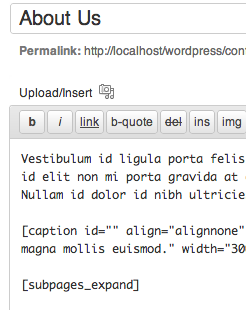
Add [subpages_expand] to any parent page. All child pages' titles are shown as links that expand to content when clicked

Consider an alternative
Subpage as Expandable Text Shor… shows warning signs in 2026 — compare the alternatives below before installing. It runs on 70+ sites, is rated 5/5 and was last updated 2 years ago, and scores 35/100 on our health check.
- Small user base (70+ active installs)
- Very few reviews so far
- No update in over a year
- Only tested up to WordPress 6.7 (latest is 7.1)
How does it stack up?
Side-by-side on installs, updates, ratings & support


Daily downloads
Download spikes usually follow a new release — each site that auto-updates counts as a download.
Rankings
Where Subpage as Expandable Text… stands todayWordPress.org search rankings
Live position in the plugin search, top 100| Keyword | Position |
|---|---|
| effect | >100 |
| jquery | >100 |
| navigation | >100 |
| pages | >100 |
| text | >100 |
Version adoption
Share of active sites per release.
Rating breakdown
★★★★★★★★★★ 5 from 2 reviews
About Subpage as Expandable Text Shortcode
From the official readme · v1.20Description
Intended users: editors, authors, contributors
This plugin will allow you to display the content of subpages as expandable links.
Simply add [subpages_expand] to any parent page. The titles of each of the subpages will be displayed there as clickable links. When the user clicks the link, it will expand, displaying the content of that child page.
Clicking the title again will collapse the content.
Acknowledgements
Plugin Icon (CC BY 3.0) by DinosoftLabs
Installation
If you have a single file (ending in “.zip”), then use the Upload method. If you have multiple files, use the Files method. If you’re installing from WordPress directly, just hit the big ‘Install Plugin’ button.
Upload
- From the plugins, add new screen, choose upload
- Navigate to where the .zip file is located and select it
- Make sure to activate the plugin once it is installed
Files
- Upload the entire directory (not just the files) to the
/wp-content/plugins/directory - Activate the plugin through the ‘Plugins’ menu in WordPress
Planned Enhancements
In no particular order
- Option to display arrows next to titles to show if they are expanded or not (option to pick arrow type)
- Option to display child page titles as links (will still expand when clicked)
- Option to lazy-load subpages when clicked
- Potentially move away from jQuery for performance
Frequently asked questions
Q. Does this work on posts?
A. No, only on pages
Q. I added the shortcode and nothing happened!
A1. Make sure you spelled it correctly A2. Make sure you added the shortcode to a page, not a post. A3. Make sure your page has sub-pages. A4. Verify that your parent page and all child pages are published (not draft or pending)
Q. My page has more than one subpage, but only one is showing up! When I click the link the other subpages are in the text that appears.
A. You have an HTML error in one of your pages. If you have mismatched div tags, the child pages after that can get “trapped” in the first child’s content.
Q. Error 324 (net::ERR_EMPTY_RESPONSE)
A. This error usually occurs when you try to have this shortcode on a child page. You cannot nest this shortcode (i.e., have it on a parent page and one of the child pages).
Q. It takes a long time for the page to display.
A. The time it takes for the page to display is the time it takes for all of the subpages’ content to load. If you have subpages with lots of content (or javascript that loads in content), it will take time for WordPress to load that page.
Changelog
Verified it works on WP 6.7.2; fixed embarrassing typo
1.20 Verified it works on WP 6.7.2; fixed embarrassing typo
1.19 Verified it works on WP 5.4.2
1.17 Verified it works on WP 4.8.0. Code cleanup.
1.15 Verified it works on WP 4.6.1
1.13 Added support for WP 4.5
1.11 Button only appears on page editor now (shortcode doesn’t work on posts, so there’s no reason to show it there) – tested up to 4.3
1.10 Added button to page editor * Added l10n support to button
1.09a Not all child page links were displaying. Added additional FAQs that came up.
1.09 Fixed “Undefined variable: content” bug; cleaned up code
1.07 Fixed bug where shortcodes in the child pages weren’t rendering
1.05a Corrected spelling/grammar errors in documentation (no functionality change)
1.05 Fixed issue with missing subpages
1.03 Expanded readme with information about an issue; added screenshots to zip
1.01 Released with a debug fix, some formatting for the titles and code cleanup
0.90 CSS change to title cursor
0.70 Initial
Screenshots

For developers
Is this your plugin? Show off the numbers.
Add a live badge to your site, docs or GitHub README. It updates on its own — no account needed.
Best Subpage as Expandable Text Sh… alternatives
All effect plugins →





FAQ
Subpage as Expandable Text Shortcode: quick answers
Straight answers, pulled from live WordPress.org data.
Live data from WordPress.org · checked Oct 4, 2026
Is Subpage as Expandable Text Shor… free?
Yes. Subpage as Expandable Text Shor… is free to download and use from the official WordPress.org plugin directory.
Is Subpage as Expandable Text Shor… safe to use in 2026?
Subpage as Expandable Text Shor… shows warning signs in 2026 — compare the alternatives below before installing. It runs on 70+ sites, is rated 5/5 and was last updated 2 years ago, and scores 35/100 on our health check.
How many websites use Subpage as Expandable Text Shor…?
Subpage as Expandable Text Shor… is active on 70+ WordPress websites and has been downloaded 4,748 times since it launched in November 2012. It was downloaded 64 times in the last 30 days.
Does Subpage as Expandable Text Shor… work with WordPress 7.1?
Subpage as Expandable Text Shor… is officially tested up to WordPress 6.7.9, while the latest release is 7.1.2. It may still work, but try it on a staging site first.
When was Subpage as Expandable Text Shor… last updated?
The latest version, 1.20, was released on March 26, 2025 (2 years ago).
Who makes Subpage as Expandable Text Shor…?
Subpage as Expandable Text Shor… is developed and maintained by salubrio.
What are the best alternatives to Subpage as Expandable Text Shor…?
The most popular alternatives to Subpage as Expandable Text Shor… are Product Image Hover Effects… (700+ installs), Nice page transition (700+ installs) and Saeid Simple Text Rotator (100+ installs).
Powered by PageForge
Want thousands of pages that rank like these? Build them in an afternoon.
This directory runs on the same engine as PageForge. Turn any spreadsheet, CSV or API into thousands of fast, SEO-ready WordPress pages — with schema, internal links and AI-written copy baked in.
- CSV, Google Sheets & API data sources
- AI content, schema & internal links per page
- Works with Elementor, Gutenberg, Yoast & Rank Math
- Free on WordPress.org — no credit card


