



StoreCanary Order Monitor for WooCommerce
Finds WooCommerce orders stuck in Processing and failed or past-due scheduled actions, and tells you what to check next. Local, no account.

Solid choice
StoreCanary Order Monitor for W… is a solid plugin choice in 2026, with a few things worth checking first. Was last updated 2 weeks ago, and scores 64/100 on our health check.
- Actively developed — last update 2 weeks ago
- Tested with the latest WordPress (7.1)
- Small user base (<10 active installs)
- Very few reviews so far
- Needs PHP 8.1 or newer
How does it stack up?
Side-by-side on installs, updates, ratings & support



Daily downloads
Download spikes usually follow a new release — each site that auto-updates counts as a download.
Rankings
Where StoreCanary Order Monitor f… stands todayWordPress.org search rankings
Live position in the plugin search, top 100| Keyword | Position |
|---|---|
| action scheduler | >100 |
| order monitoring | >100 |
| past due actions | #40 |
| stuck orders | #93 |
| woocommerce | >100 |
About StoreCanary Order Monitor for WooCommer…
From the official readme · v1.0.0Description
Store Canary watches two things that quietly cost WooCommerce stores money, and tells you what to check next.
1. Failed or past-due scheduled actions
WooCommerce runs a lot of background work through Action Scheduler: subscription renewals, emails, webhooks, stock syncs, analytics imports. When that queue breaks, WooCommerce may show a notice like “Action Scheduler: 848 past-due actions found; something may be wrong.” Store Canary finds failed scheduled actions and pending actions that are past due, groups them by hook and status, and links straight to the matching Scheduled Actions screen so you can see which task is stuck.
2. Paid orders stuck in Processing
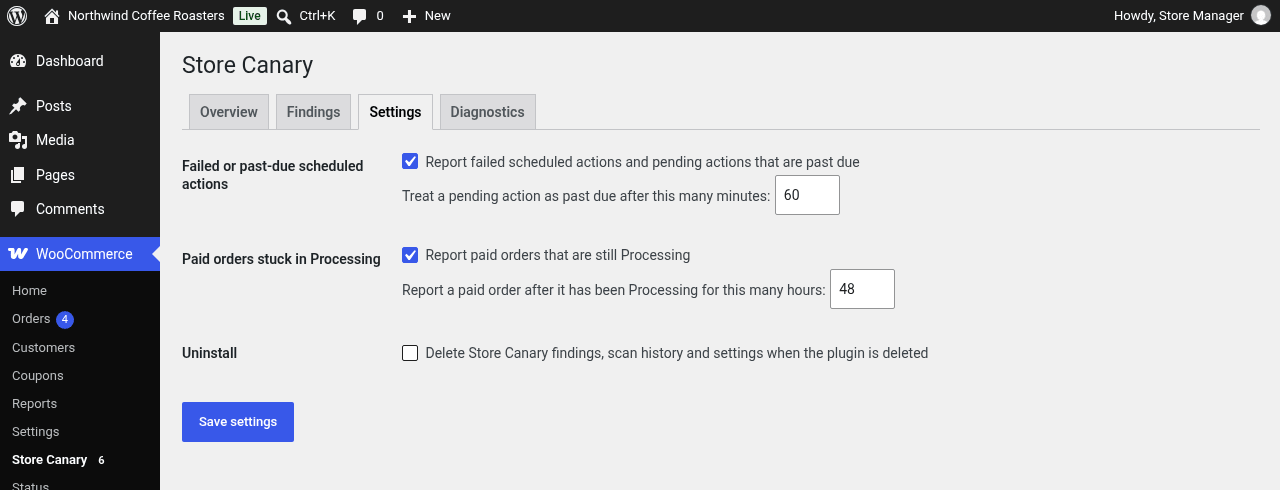
An order that is paid but still Processing days later usually means a fulfilment step, an integration or a workflow has stopped. Store Canary lists orders stuck in Processing longer than your threshold (48 hours by default), shows how long each one has waited, and adds up the money at risk per currency.
What you get, free:
- An Overview with the last scan, the next background scan, open findings per check and money at risk.
- A Findings list with open, dismissed and resolved findings. Dismiss what you have handled, restore it if you change your mind.
- Run scan now, plus an hourly background scan through Action Scheduler.
- Settings for both checks: turn each one on or off and set its threshold.
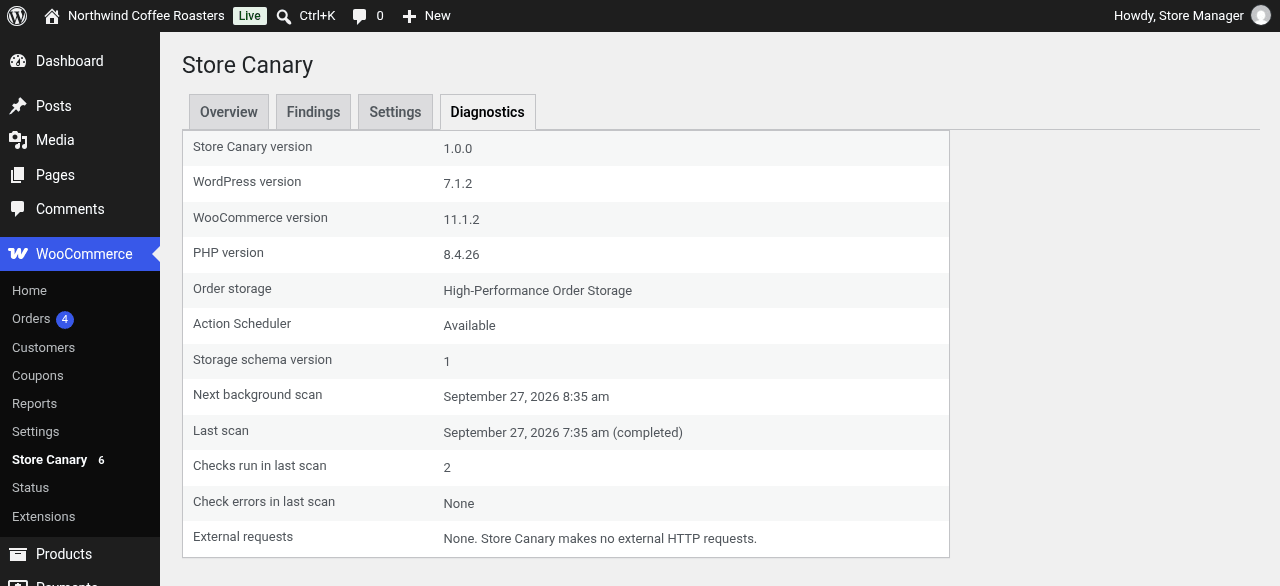
- A Diagnostics tab with versions, order storage mode and the last scan’s result.
- An open-findings count badge on the admin menu.
- WP-CLI:
wp storecanary last-scanandwp storecanary check-health. - Works with High-Performance Order Storage (HPOS) and with legacy posts storage.
What it does not do: Store Canary reports and explains. It never changes orders, retries actions or edits your store.
Private by design: there is no account, no sign-up, no licence key and no tracking. Store Canary makes no external HTTP requests and loads no remote files. Everything runs inside your WordPress admin and your data stays in your database.
Store Canary Pro
Store Canary Pro is a standalone plugin, sold as WooCommerce Daily Ops at storecanary.app. It includes both checks in this plugin and adds recent failed payments, newly observed stockouts and an email digest of findings (daily, weekdays or weekly, sent only when there are findings). Pro connects to your Store Canary account to confirm your trial or subscription. Run one or the other: while Pro is active, this plugin pauses its checks and you can deactivate it.
Privacy
Store Canary makes no external requests. It does not collect, send or share any data, and it sets no cookies. It stores findings, scan history and its settings in your WordPress database only.
Installation
- Install and activate WooCommerce.
- Install Store Canary from Plugins > Add New and activate it.
- Open WooCommerce > Store Canary and click Run scan now.
After that, Store Canary scans every hour in the background.
Frequently asked questions
Why does WooCommerce say “past-due actions found”?
Action Scheduler runs background tasks on a queue. “Past-due” means tasks are waiting longer than they should, usually because WP-Cron is not running, a task keeps failing, or the queue is overloaded. Store Canary groups the stuck and failed actions by hook so you can see which task is the problem. Guide: Failed scheduled actions in WooCommerce and Overdue scheduled actions.
Why are my WooCommerce orders stuck in Processing?
Processing means the order is paid and waiting for you or an integration to fulfil it. Orders that sit there for days often point to a fulfilment integration that stopped, a missed manual step or a payment gateway that marks orders paid without the next step running. Store Canary lists each one with a link to the order. Guide: WooCommerce orders stuck in Processing.
Does it detect failed payments?
Not in this plugin. Store Canary checks scheduled actions and paid orders stuck in Processing. Recent failed payments are covered by Store Canary Pro.
Does it send data anywhere?
No. Store Canary makes no external HTTP requests, has no telemetry and needs no account. Findings and scan history are stored in two database tables on your site.
Does it fix anything?
No. It reports what it finds and explains what to check next. It never changes orders or scheduled actions.
Does it support HPOS?
Yes. Store Canary declares compatibility with High-Performance Order Storage and reads orders through WooCommerce’s own APIs, so it works with HPOS and with legacy posts storage.
Does it work on multisite?
Not yet. Store Canary currently runs on single-site installations only.
What happens to my data when I delete the plugin?
By default, findings and scan history are kept. To remove them, tick Delete Store Canary findings, scan history and settings when the plugin is deleted in Settings before deleting the plugin.
Changelog
First WordPress.org release.
1.0.0
- First WordPress.org release: failed or past-due scheduled actions check and paid orders stuck in Processing check, hourly background scan, Run scan now, findings list with dismiss and restore, settings, diagnostics and WP-CLI commands.
Screenshots


For developers
Is this your plugin? Show off the numbers.
Add a live badge to your site, docs or GitHub README. It updates on its own — no account needed.
Best StoreCanary Order Monitor for… alternatives
All action scheduler plugins →





FAQ
StoreCanary Order Monitor for WooCo…: quick answers
Straight answers, pulled from live WordPress.org data.
Live data from WordPress.org · checked Oct 8, 2026
Is StoreCanary Order Monitor for W… free?
Yes. StoreCanary Order Monitor for W… is free to download and use from the official WordPress.org plugin directory.
Is StoreCanary Order Monitor for W… safe to use in 2026?
StoreCanary Order Monitor for W… is a solid plugin choice in 2026, with a few things worth checking first. Was last updated 2 weeks ago, and scores 64/100 on our health check.
How many websites use StoreCanary Order Monitor for W…?
StoreCanary Order Monitor for W… is active on <10 WordPress websites and has been downloaded 82 times since it launched in September 2026. It was downloaded 85 times in the last 30 days.
Does StoreCanary Order Monitor for W… work with WordPress 7.1?
Yes. The developer has tested StoreCanary Order Monitor for W… up to WordPress 7.1.3, the latest release. It requires WordPress 7.0 or newer.
What PHP version does StoreCanary Order Monitor for W… need?
StoreCanary Order Monitor for W… requires PHP 8.1 or higher. Most hosts run PHP 8.x today, so it works on any modern WordPress hosting.
When was StoreCanary Order Monitor for W… last updated?
The latest version, 1.0.0, was released on September 28, 2026 (2 weeks ago).
Who makes StoreCanary Order Monitor for W…?
StoreCanary Order Monitor for W… is developed and maintained by Store Canary.
What are the best alternatives to StoreCanary Order Monitor for W…?
The most popular alternatives to StoreCanary Order Monitor for W… are ZS Action Scheduler Optimiz… (300+ installs), Advanced Cron Scheduler for… (100+ installs) and Failed Actions Monitor for… (20+ installs).
Powered by PageForge
Want thousands of pages that rank like these? Build them in an afternoon.
This directory runs on the same engine as PageForge. Turn any spreadsheet, CSV or API into thousands of fast, SEO-ready WordPress pages — with schema, internal links and AI-written copy baked in.
- CSV, Google Sheets & API data sources
- AI content, schema & internal links per page
- Works with Elementor, Gutenberg, Yoast & Rank Math
- Free on WordPress.org — no credit card


