


Store Opening Closing Hours Manager
Setup your WooComerce store opening and closing hours to manage your business at ease!

Solid choice
Store Opening Closing Hours Man… is a solid plugin choice in 2026, with a few things worth checking first. It runs on 300+ sites, is rated 4/5 and was last updated 4 months ago, and scores 62/100 on our health check.
- Small user base (300+ active installs)
- Needs PHP 8.2 or newer
How does it stack up?
Side-by-side on installs, updates, ratings & support


Daily downloads
Download spikes usually follow a new release — each site that auto-updates counts as a download.
Rankings
Where Store Opening Closing Hours… stands todayWordPress.org search rankings
Live position in the plugin search, top 100| Keyword | Position |
|---|---|
| shop manager | #20 |
| shop-closing-opening | #1 |
| store manager | #16 |
| store-closing-opening | #1 |
| woocommerce | >100 |
Version adoption
Share of active sites per release.
Rating breakdown
★★★★★★★★★★ 4 from 5 reviews
About Store Opening Closing Hours Manager
From the official readme · v2.0.5Description
Let your customers know when your store is open or closed! Take action when store is closed, you can even disable shopping at all! Add a notice that your store is going to close soon!! Customers can also see if store is closed when it will be open again! Enable Widget to show your entire week store opening & closing hours! Plugin Comes with 6 types of notice designs which also has 5 types of countdown timer design!
Features:
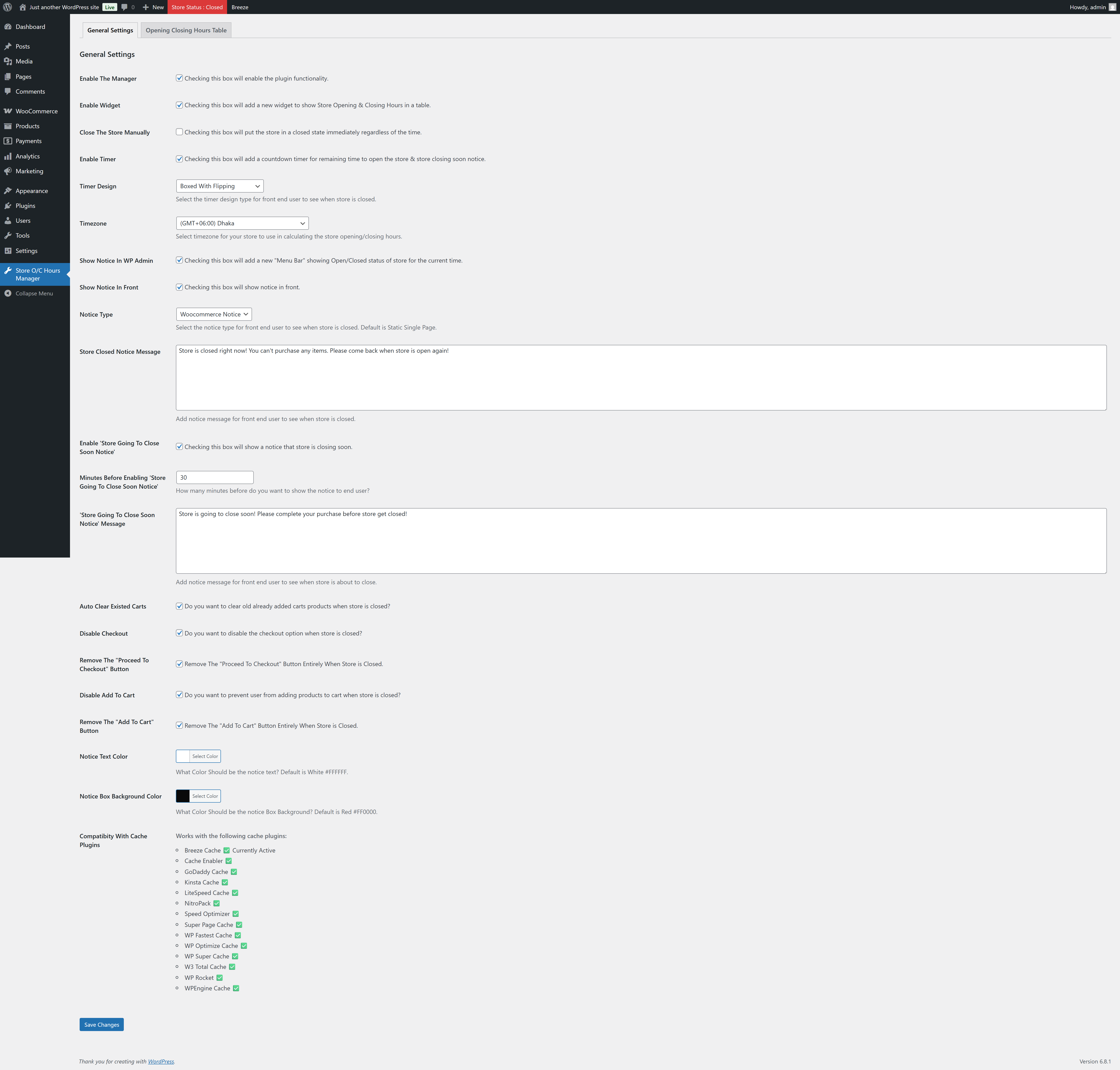
- Enable/Disable The Plugin Functionality
- Set The Store Status Close Manually
- Show Store Opening/Closing Hours In A Widget
- Show Store Opening/Closing Hours In Shortcode
[sochm_display_table] - Enable Countdown
- Choose Timer Design From 5 Different Types
- Set Your Store Timezone
- Add Store Closed/Open Notice In WP Admin Area (Admin Bar)
- Choose Notice Design From 6 Different Types
- Add Your Own Store Closed Notice Message
- Enable Store Going To Close Soon Notice
- Add Your Own Store Going To Close Soon Notice Message
- Auto Clear Existed Carts If Store Closed
- Disable The Entire Checkout System If Store Closed
- Remove The Proceed To Checkout Button From Cart Page If Store Closed
- Disable Add To Cart Button If Store Closed
- Remove The Add To Cart Button Entirely If Store Closed
- You Can Even Show A Message To Your Customers If They Click The Add To Cart Button If Store Closed
- Change The Notice Text Color & Background Color
- Templating system for the notice & timer designs.
Overriding Plugin Templates
To override a specific template, copy the desired file from the plugin’s /templates/ directory and place it in your child theme under /templates/sochm/. You can then modify the template as needed.
Example:
If the plugin template is located at:
wp-content/plugins/store-opening-closing-hours-manager/templates/notice-type-single-page.php
You can override it by copying it to:
wp-content/themes/your-theme/templates/sochm/notice-type-single-page.php
Make sure to maintain the same file structure to ensure proper loading.
Compatibity With Cache Plugins
If your site uses page caching, certain dynamic functionalities may not work as expected. This plugin includes built-in support to automatically purge cache when needed, ensuring everything runs smoothly.
It is compatible with the following popular caching plugins:
- Breeze Cache ✅
- Cache Enabler ✅
- GoDaddy Cache ✅
- Kinsta Cache ✅
- LiteSpeed Cache ✅
- NitroPack ✅
- Speed Optimizer ✅
- Super Page Cache ✅
- WP Fastest Cache ✅
- WP Optimize Cache ✅
- WP Super Cache ✅
- W3 Total Cache ✅
- WP Rocket ✅
- WPEngine Cache ✅
Installation
To add a WordPress Plugin using the built-in plugin installer:
Go to Plugins > Add New.
- Type in the name “Store Opening Closing Hours Manager” in Search Plugins box
- Find the “Store Opening Closing Hours Manager” Plugin to install.
- Click Install Now to begin the plugin installation.
- The resulting installation screen will list the installation as successful or note any problems during the install.
If successful, click Activate Plugin to activate it, or Return to Plugin Installer for further actions.
To add a WordPress Plugin from GitHub repo / plugin zip file :
1. Go to WordPress plugin page
2. Click Add New & Upload Plugin
3. Drag / Click upload the plugin zip file
4. The resulting installation screen will list the installation as successful or note any problems during the install.
If successful, click Activate Plugin to activate it, or Return to Plugin Installer for further actions.
Frequently asked questions
How to use this plugin?
Just after installing the plugin, go to settings page and set the plugin settings according to your needs.. And then see the magic.. See screenshots.
Changelog
Always try to keep your plugin update so that you can get the improved and additional features added to this plugin up to date.
2.0.5
- Added woocommerce High Performance Order Storage compatibility.
2.0.4
- Compatibility checkup for latest wp version 7.0
2.0.3
- Compatibility check for wp 6.9
2.0.2
- Added support for localization of week days names.
2.0.1
- Fixed issue: typo giving fatal error
2.0.0
- Checked for latest wp version 6.8, introduced templating system and enabled cache plugin compatibility.
Screenshots


For developers
Is this your plugin? Show off the numbers.
Add a live badge to your site, docs or GitHub README. It updates on its own — no account needed.
Best Store Opening Closing Hours M… alternatives
All shop manager plugins →FAQ
Store Opening Closing Hours Manager: quick answers
Straight answers, pulled from live WordPress.org data.
Live data from WordPress.org · checked Oct 7, 2026
Is Store Opening Closing Hours Man… free?
Yes. Store Opening Closing Hours Man… is free to download and use from the official WordPress.org plugin directory.
Is Store Opening Closing Hours Man… safe to use in 2026?
Store Opening Closing Hours Man… is a solid plugin choice in 2026, with a few things worth checking first. It runs on 300+ sites, is rated 4/5 and was last updated 4 months ago, and scores 62/100 on our health check.
How many websites use Store Opening Closing Hours Man…?
Store Opening Closing Hours Man… is active on 300+ WordPress websites and has been downloaded 6,684 times since it launched in July 2022. It was downloaded 174 times in the last 30 days.
Does Store Opening Closing Hours Man… work with WordPress 7.1?
Store Opening Closing Hours Man… is officially tested up to WordPress 7.0.7, while the latest release is 7.1.3. It may still work, but try it on a staging site first.
What PHP version does Store Opening Closing Hours Man… need?
Store Opening Closing Hours Man… requires PHP 8.2 or higher. Most hosts run PHP 8.x today, so it works on any modern WordPress hosting.
When was Store Opening Closing Hours Man… last updated?
The latest version, 2.0.5, was released on June 3, 2026 (4 months ago).
Who makes Store Opening Closing Hours Man…?
Store Opening Closing Hours Man… is developed and maintained by Sajjad Hossain Sagor.
What are the best alternatives to Store Opening Closing Hours Man…?
The most popular alternatives to Store Opening Closing Hours Man… are Easy Store Management for W… (20+ installs), StoreSuite (10+ installs) and AIssistant Shop Manager (<10 installs).
Powered by PageForge
Want thousands of pages that rank like these? Build them in an afternoon.
This directory runs on the same engine as PageForge. Turn any spreadsheet, CSV or API into thousands of fast, SEO-ready WordPress pages — with schema, internal links and AI-written copy baked in.
- CSV, Google Sheets & API data sources
- AI content, schema & internal links per page
- Works with Elementor, Gutenberg, Yoast & Rank Math
- Free on WordPress.org — no credit card


