


Sticky Header by ThematoSoup
For support requests please use our dedicated support forums.

Use with caution
Sticky Header by ThematoSoup works, but test it on a staging site before relying on it in 2026. It runs on 1K+ sites, is rated 4.5/5 and was last updated 9 years ago, and scores 42/100 on our health check.
- Loved by users — 4.5/5 from 31 reviews
- No update in 8 years
- Only tested up to WordPress 4.2 (latest is 7.1)
How does it stack up?
Side-by-side on installs, updates, ratings & support



Daily downloads
Download spikes usually follow a new release — each site that auto-updates counts as a download.
Rankings
Where Sticky Header by ThematoSoup stands todayWordPress.org search rankings
Live position in the plugin search, top 100| Keyword | Position |
|---|---|
| fixed header | >100 |
| header | >100 |
| sticky header | >100 |
| sticky menu | >100 |
Version adoption
Share of active sites per release.
Rating breakdown
★★★★★★★★★★ 4.5 from 31 reviews
About Sticky Header by ThematoSoup
From the official readme · v1.2.2Description
For support requests please use our dedicated support forums.
The Sticky Header WordPress plugin makes your header visible at all times. It’s a great feature that allows people to browse faster and consume more of your content.
Sticky Header by ThematoSoup is part of your brand building, improves user experience by saving people time and makes your WordPress website more aesthetically pleasing.
Your branding (logo) is something you want visitors to subconsciously keep in mind while browsing your website and navigation is one of the most important aspects of every website. Make them visible at all times.
Settings
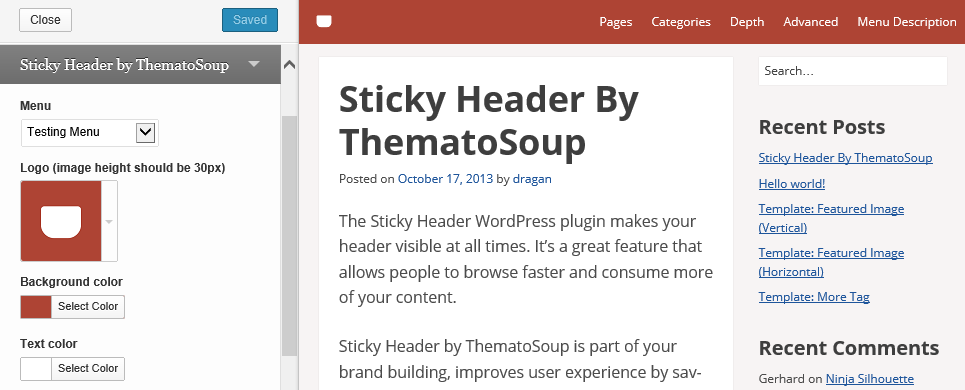
Sticky Header by ThematoSoup has just few options, which you can find in your Theme Customizer. This makes it incredibly easy to configure and use.
- Menu – You need to create at least one navigation menu before you can add it to Sticky Header. The menu in Sticky Header shows only first level items, so no submenu items will be shown.
- Logo – You can upload your sticky header logo by clicking on “Upload new” > “Select a file”. Ideally, this logo should be 30px tall or it will be resized. If a logo image is not uploaded, site title will be used.
- Background color – You can choose your custom sticky header background color.
- Text color – Choose your sticky header text color so it provides enough contrast with regards to the background color.
- Sticky Header max width – This option allows you to match interior Sticky Header width to your content area width.
- Make visible when scrolled to – This is the distance from the top of the page at which sticky header will show, in pixels.
- Hide if screen is narrower than – Sticky header will not be shown on screens narrower than this value, in pixels. When people use mobile devices, they’re used to vertical scrolling so it’s not necessary to have sticky headers.
Installation
- Download the plugin from this page and extract it
- Copy the sticky-header folder to the “/wp-content/plugins/” directory
- Activate the plugin through the “Plugins” menu in WordPress dashboard
- Setup your sticky header from Appearance > Customize
Changelog
1.2.2
- Uses wp_parse_args to ensure array keys are set. Props github.com/Shelob9.
1.2.1
- Adds compressed JS and CSS files.
1.2
- Fixes a PHP notice.
1.1
- Added Sticky Header max interior width.
1.0.1
- Fixed header’s z-index.
1.0
- First version.
Screenshots

For developers
Is this your plugin? Show off the numbers.
Add a live badge to your site, docs or GitHub README. It updates on its own — no account needed.
Best Sticky Header by ThematoSoup alternatives
All fixed header plugins →

FAQ
Sticky Header by ThematoSoup: quick answers
Straight answers, pulled from live WordPress.org data.
Live data from WordPress.org · checked Oct 13, 2026
Is Sticky Header by ThematoSoup free?
Yes. Sticky Header by ThematoSoup is free to download and use from the official WordPress.org plugin directory.
Is Sticky Header by ThematoSoup safe to use in 2026?
Sticky Header by ThematoSoup works, but test it on a staging site before relying on it in 2026. It runs on 1K+ sites, is rated 4.5/5 and was last updated 9 years ago, and scores 42/100 on our health check.
How many websites use Sticky Header by ThematoSoup?
Sticky Header by ThematoSoup is active on 1K+ WordPress websites and has been downloaded 83,088 times since it launched in October 2013. It was downloaded 249 times in the last 30 days.
Does Sticky Header by ThematoSoup work with WordPress 7.1?
Sticky Header by ThematoSoup is officially tested up to WordPress 4.2.39, while the latest release is 7.1.3. It may still work, but try it on a staging site first.
When was Sticky Header by ThematoSoup last updated?
The latest version, 1.2.2, was released on November 28, 2017 (9 years ago).
Who makes Sticky Header by ThematoSoup?
Sticky Header by ThematoSoup is developed and maintained by Slobodan Manić.
What are the best alternatives to Sticky Header by ThematoSoup?
The most popular alternatives to Sticky Header by ThematoSoup are Sticky Header Effects for E… (300K+ installs), Fixed And Sticky Header (1K+ installs) and Fixed Menu Anchor (200+ installs).
Powered by PageForge
Want thousands of pages that rank like these? Build them in an afternoon.
This directory runs on the same engine as PageForge. Turn any spreadsheet, CSV or API into thousands of fast, SEO-ready WordPress pages — with schema, internal links and AI-written copy baked in.
- CSV, Google Sheets & API data sources
- AI content, schema & internal links per page
- Works with Elementor, Gutenberg, Yoast & Rank Math
- Free on WordPress.org — no credit card


