



Stars Testimonials — Responsive Reviews & Star Ratings
Testimonials & reviews WordPress plugin for your website. Display responsive website testimonials and customer reviews with ease ⭐

Safe pick
Yes — Stars Testimonials is a safe, well-maintained plugin to use in 2026. It runs on 1K+ sites, is rated 4.8/5 and was last updated 2 months ago, and scores 86/100 on our health check.
- Loved by users — 4.8/5 from 65 reviews
- Tested with the latest WordPress (7.1)
How does it stack up?
Side-by-side on installs, updates, ratings & supportDaily downloads
Download spikes usually follow a new release — each site that auto-updates counts as a download.
Rankings
Where Stars Testimonials stands todayWordPress.org search rankings
Live position in the plugin search, top 100| Keyword | Position |
|---|---|
| collect reviews | #13 |
| collect testimonials | #3 |
| customers reviews | #21 |
| reviews | #44 |
| testimonials | #6 |
Version adoption
Share of active sites per release.
Rating breakdown
★★★★★★★★★★ 4.8 from 65 reviews
About Stars Testimonials
From the official readme · v3.3.5Description
Testimonials help consumers make purchasing decisions. If you’re not already using website testimonials for your brand, then it’s time to start! Most of your website visitors will be looking for reviews from past customers, 84% of consumers say they check for reviews before they make any purchase decision, that’s why social proof is a key part of any website.
With the Stars Testimonial plugin, you can easily add WordPress testimonials to your website and increase your social proof. Displaying testimonials on your homepage or showing reviews on any part of your website can boost your credibility, as well as your conversion rates.
Start with a Free Version of the Testimonial Grid
With Stars Testimonials WordPress testimonial plugin, you’re able to:
- Create an unlimited amount of testimonials
- Include star ratings and company name in your reviews
- Insert an image for the customer testimonial
- Elementor is 100% supported – add Stars Testimonials element to your Elementor website with ease. All you need to do is look for the Stars Testimonials element, click on it, select your reviews widget from a dropdown, and that’s it! Watch how it works in action 📽️
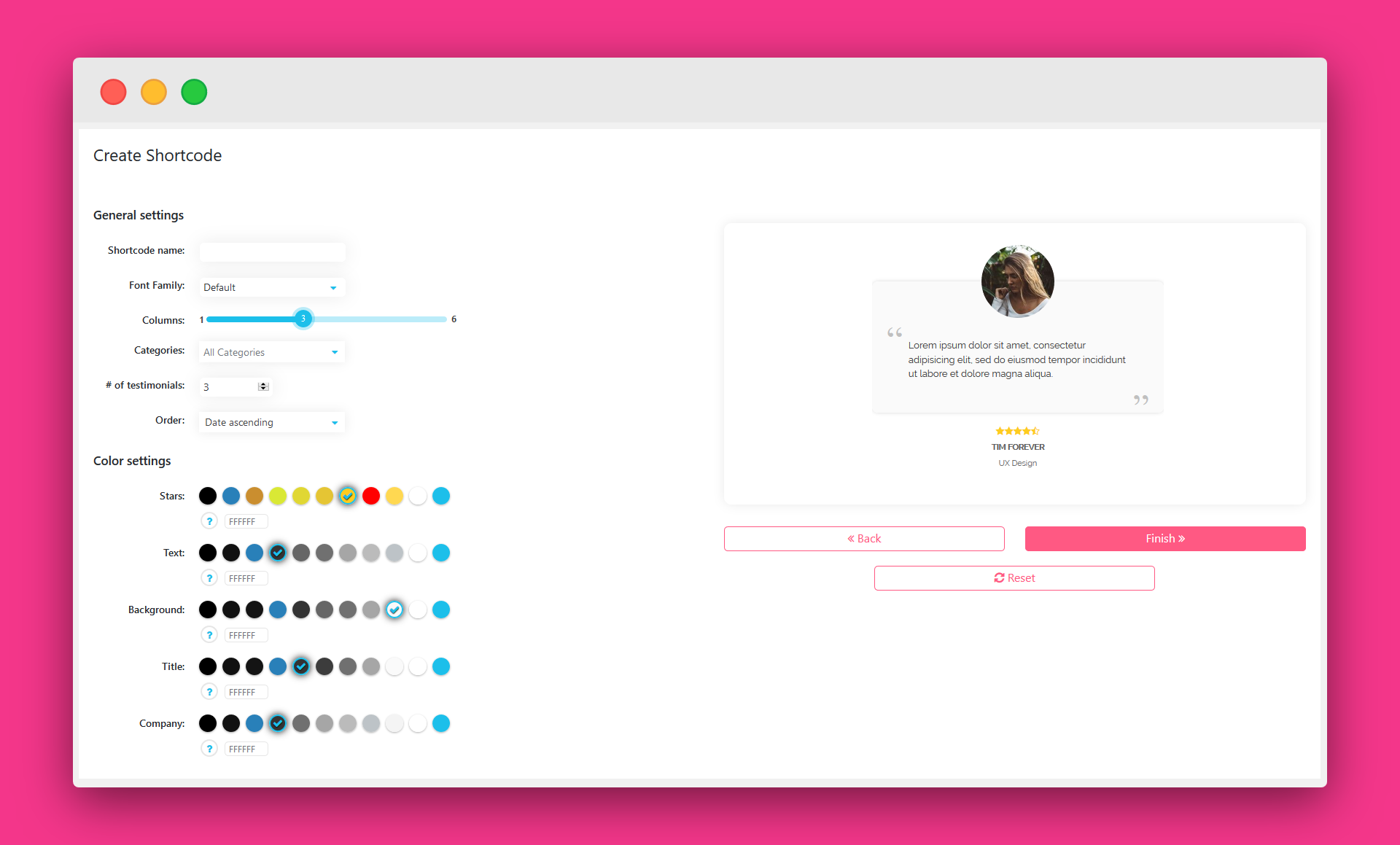
- Create a widget with grid layouts reviews
- Choose how many testimonials and columns display
- Change the colors of the reviews widget (background, text, stars, title, and company name)
- Easily preview, edit, and delete each testimonial
- Create testimonials widget with our shortcode builder (no coding needed!)
- Stars testimonials plugin works great with WordPress page builders including Elementor, Divi, Visual Composer, WPBakery, Gutenberg, and more.
Upgrade to the Paid Testimonial Review Plugin for More Features
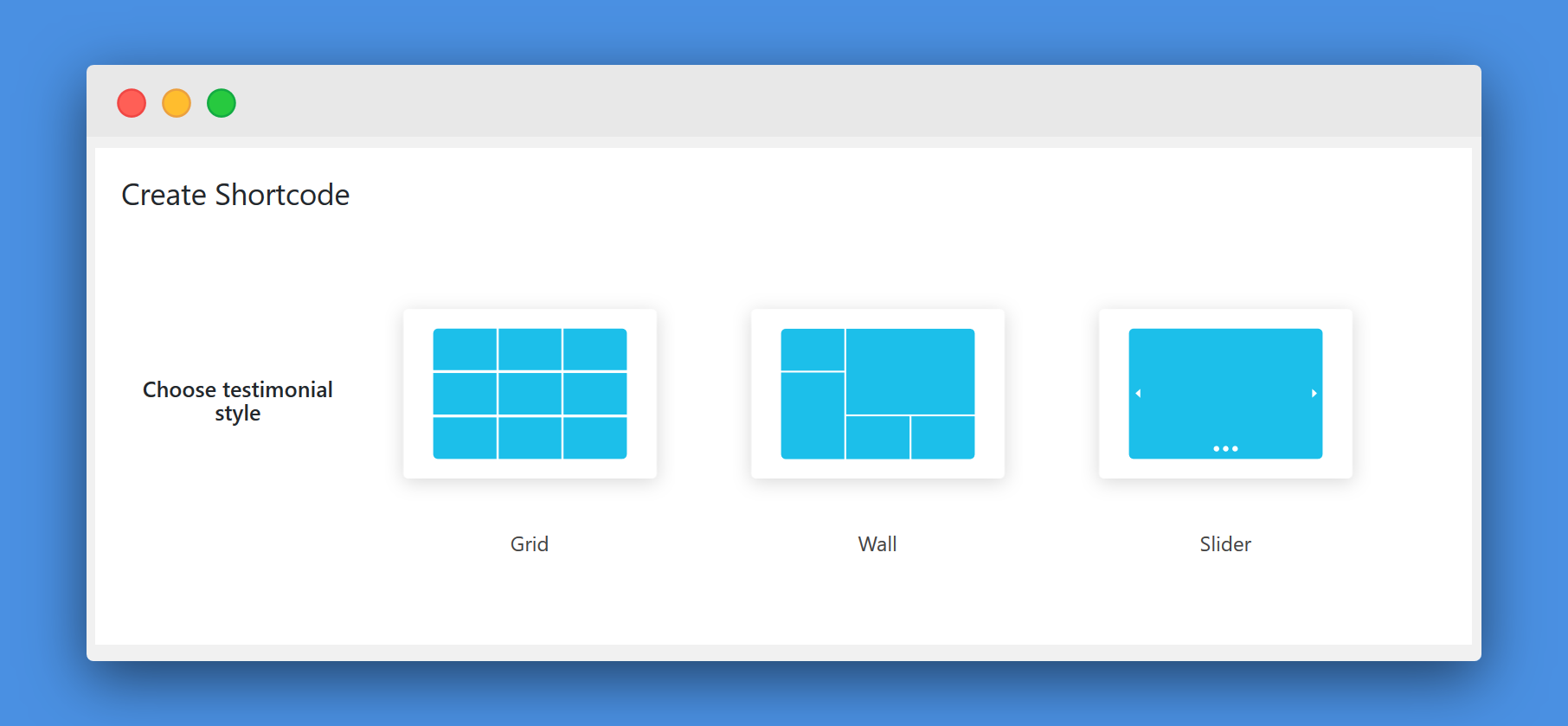
The paid version comes with testimonial slider, testimonial wall (masonry), and with everything the free version provides, and more. The additional features you get access to include:
- A larger selection of layouts – besides just grids – testimonials slider is included! You can also create a reviews wall layout
- Collect reviews – get more reviews from your visitors. Show a button under your testimonials widget and let your visitors fill out their reviews. You’ll decide which reviews will appear on your website. You can also share a direct link with your customers and ask them to leave a review.
- Read more button for your client testimonials – if you have long reviews and want to show a shorter version, you can now add a “Read More” button to each review and show the full testimonials on click. You can decide what will be the character limit for your reviews.
- Reviews rating compatibility with Google snippets – allow Google to index your clients’ testimonials ratings and show them in the search results.
- More widget styles (17 beautiful testimonial layouts)
- Additional color and design options
Collect Reviews From Your Website’s Visitors
If you’re using the Pro version, you can easily collect reviews from your website’s visitors:
- Collect testimonials with ease by showing a button under your testimonials, your visitors will be able to submit testimonials.
- Control which testimonials are shown and which aren’t. The testimonials will be added to your website only after you approve the testimonials.
- You can also create a direct link for testimonials submission. Use our direct link and send it to your clients so they can submit their testimonial
Live Demo
A live demo of Stars Testimonials plugin is available at Premio’s demo site. In the demo page you can see some of Stars Testimonials’ layouts. Need more help? Check out our Stars Testimonials user guide
Create Testimonials that Are Mobile-Friendly Using Testimonial Plugin
It’s not enough to just display testimonials on your website. If your testimonial slider or testimonial carousel shows up wonky on mobile devices, then it defeats the purpose of the testimonials.
This is why it’s critical to ensure your testimonials are mobile-friendly, especially with nearly 5 billion mobile device users across the world. With the Stars Testimonials plugin, you don’t have to worry about this.
All of your testimonials will display on mobile devices in a way that’s accessible and legible.
Why Testimonials and Reviews Are Important for Business
It doesn’t matter what industry you’re in – testimonials are an indication of the quality of your products and services.
A whopping 84% of consumers trust online reviews, which provides them with first-hand knowledge about a brand. If your company has an onslaught of negative online reviews, then your business will suffer tremendously.
This is because the majority of online users are using Google to find info about a brand before doing business with them. About 82% of smartphone users consult with the web before making a purchase in-store.
But it’s not just in-store purchases online reviews affect. Eighty-eight percent of consumers conduct online searches before making a purchase from both online and physical stores.
By taking charge of your online reputation and displaying testimonials on your website, you can help convert more visitors into paying customers.
Use Cases for Review Plugin
There are several ways businesses can use website testimonials to grow their sales. Let’s take a look at a few.
- Get More Local Clients
If you’re a local dental office, clinic, realtor, or other professional, you can use testimonials to drive more foot traffic to your business. With the testimonial slider implemented onto your homepage, you can show off customers’ reviews.
Prospects see it and decide to schedule an appointment with your office.
- Increase Your Subscriptions
Trying to grow your email subscriber list? Then you can use a testimonial carousel on your landing page to drive more visitors to sign up.
You can display the testimonial rotator at the bottom of your blog posts or on a specific landing page designed to convince visitors to sign up for your newsletter. Your email list is a key component in a marketing strategy, as it can help boost your conversions.
- Boost Your Online Sales
Selling products and services online? Then you can bet your visitors are going to look for peer reviews before buying from your brand.
You can help steer them towards purchase by showcasing your testimonials on multiple areas of your site. For example, on the home page, products or services page, and about us page.
When prospects see images, star ratings, and reviews from happy customers, they’re more inclined to make the purchase.
These are just some of the use cases for implementing WordPress review plugins to grow your business.
Create a Testimonials Page
If you want to gain more trust and social proof, you can easily create a testimonials page with all of your customers’ reviews. All you need to do is to create a new page and embed a shortcode that includes all your testimonials.
Works Great With The New Gutenberg Editor
Stars Testimonials plugin was tested with the new Gutenberg editor on WordPress 5 version and also on previous WordPress versions with Gutenberg.
GDPR and Privacy
Stars Testimonials plugin is GDPR compliant:
- We don’t store any visitor or user data
- We don’t send any data to remote servers
- Our plugin is only used to showcase testimonials on your website
Start Using Stars Testimonials Today!
Ready to start converting more visitors into customers? Then it’s time to show off how great your products and services are using our testimonial plugin.
Download the Stars Testimonial plugin today and get started designing your testimonial widget!
The plugin uses 3rd party API that allows users to submit feedback directly. The data is sent if you decide to deactivate the plugin and it includes your only data your agree to share like your email and reason for deactivation (both are optional fields). Your email will also be added to our email marketing platform with your consent (with the option to unsubscribe at any point). You can review the Terms of service
and Privacy policy.
Testimonials
“It’s really helpfull – recommendable!
This plugin is used in my website, it is perfect in the All. Support is great, very fast answer & action! Recommendable!”Biljana Bili Wechsler, Bilifotos
Installation
- Go to plugins in your dashboard and select ‘add new’
- Search for ‘Stars Testimonials’ and install it
- Go to Dashboard > Stars Testimonials Menu, and add testimonials here
- Go to ‘All Shortcodes’ to create your first shortcode customize your testimonial widget
Frequently asked questions
What’s included in the free plan?
You can create an unlimited amount of testimonials, customize it with different colors and fonts, change the appearance order, number of columns, and choose from 5 different testimonial templates in a grid layout.
Is there a time limit for the free plan?
No. you can use the free plan as long as you want.
Is there a way I can collect reviews from my website’s visitors?
If you’re using the Pro feature, you can use collect reviews by showing a button under your testimonials widget and letting your visitors fill out their reviews. You’ll decide which reviews will appear on your website. You can also share a direct link with your customers and ask them to leave a review.
Do I need any coding skills to use the Stars Testimonials plugin?
No! The only code you’ll need is the shortcode (don’t worry, we got you covered with our shortcode builder)
Is there a live demo for Stars Testimonials
A live demo of Stars Testimonials plugin is available at Premio’s demo site.
Can I use the Stars Testimonials plugin on more than 1 domain?
There 2 ways to do it: 1. You can install the free Stars Testimonials plugin on any website you want 2. You can buy the Pro plan that includes licenses for 5 domains, or the Agency plan that includes licenses for 20 domains. Check out our plans page.
How long is my paid Stars Testimonials plugin license valid for?
Once you purchase any paid plan of Stars Testimonials, you can use it forever. Support and updates are available for 1 year. You can renew your license each year to get another year of support and updates.
Will Stars Testimonials stop working if I don’t renew my license?
Of course NOT! 🙂 Your Stars Testimonials plugin and all your settings will continue to work as before; however, you will no longer receive plugin updates including feature additions, improvements, and support.
How do I activate my pro plan?
Just follow our pro installation guide.
Changelog
3.3.5
Removed disallowed files, documented external services, corrected internationalization, strengthened nonces, sanitization, escaping, and other bug fixes
3.3.4
Display bug fixed
3.3.3
Authentication bug fixed (reported by Peter Thaleikis 🙏)
3.3.2
JavaScript bug fixed
3.3.1
Added plugin recommendations
3.3
WordPress 6.5 compatibility
Screenshots


For developers
Is this your plugin? Show off the numbers.
Add a live badge to your site, docs or GitHub README. It updates on its own — no account needed.
Best Stars Testimonials alternatives
All collect reviews plugins →| Rank | Plugin | Active installs |
|---|---|---|
| 2 |
 Wiremo – Customer reviews for WordPress
Customer review platform for WordPress. Automatically gather, control and display your best…
Wiremo – Customer reviews for WordPress
Customer review platform for WordPress. Automatically gather, control and display your best…
|
30+ |
FAQ
Stars Testimonials: quick answers
Straight answers, pulled from live WordPress.org data.
Live data from WordPress.org · checked Oct 9, 2026
Is Stars Testimonials free?
Yes. Stars Testimonials is free to download and use from the official WordPress.org plugin directory.
Is Stars Testimonials safe to use in 2026?
Yes — Stars Testimonials is a safe, well-maintained plugin to use in 2026. It runs on 1K+ sites, is rated 4.8/5 and was last updated 2 months ago, and scores 86/100 on our health check.
How many websites use Stars Testimonials?
Stars Testimonials is active on 1K+ WordPress websites and has been downloaded 65,185 times since it launched in August 2017. It was downloaded 453 times in the last 30 days.
Does Stars Testimonials work with WordPress 7.1?
Yes. The developer has tested Stars Testimonials up to WordPress 7.1.3, the latest release. It requires WordPress 4.7 or newer.
When was Stars Testimonials last updated?
The latest version, 3.3.5, was released on August 13, 2026 (2 months ago).
Who makes Stars Testimonials?
Stars Testimonials is developed and maintained by Premio.
What are the best alternatives to Stars Testimonials?
The most popular alternatives to Stars Testimonials are Wiremo (30+ installs).
Powered by PageForge
Want thousands of pages that rank like these? Build them in an afternoon.
This directory runs on the same engine as PageForge. Turn any spreadsheet, CSV or API into thousands of fast, SEO-ready WordPress pages — with schema, internal links and AI-written copy baked in.
- CSV, Google Sheets & API data sources
- AI content, schema & internal links per page
- Works with Elementor, Gutenberg, Yoast & Rank Math
- Free on WordPress.org — no credit card


