



Squircle
Add custom corner shapes (squircle, bevel, scoop, notch) to Elementor elements directly from the editor.

Use with caution
Squircle works, but test it on a staging site before relying on it in 2026. Was last updated 1 month ago, and scores 60/100 on our health check.
- Tested with the latest WordPress (7.1)
- Small user base (<10 active installs)
- Very few reviews so far
Daily downloads
Download spikes usually follow a new release — each site that auto-updates counts as a download.
Rankings
Where Squircle stands todayWordPress.org search rankings
Live position in the plugin search, top 100| Keyword | Position |
|---|---|
| border radius | >100 |
| corners | >100 |
| design | >100 |
| elementor | >100 |
| squircle | #3 |
About Squircle
From the official readme · v1.0.0Description
Squircle is a lightweight extension for Elementor that adds CSS corner-shape support to your designs — including squircle, bevel, scoop, and notch shapes.
Instead of writing custom CSS, Squircle seamlessly integrates with Elementor’s existing Border controls. Simply select a corner shape, use Elementor’s native Border Radius control, and immediately see the effect applied in both the editor and the frontend.
Squircle leverages the modern CSS corner-shape property to create true superellipse corners, beveled edges, scooped curves, and notched cuts — ensuring optimal performance with zero frontend JavaScript dependencies.
Features
- Multiple Corner Shapes: Choose from Squircle, Bevel, Scoop, and Notch — all native CSS, no SVG hacks.
- Seamless Integration: Native-looking controls injected directly into Elementor’s Style > Border section.
- Progressive Enhancement: Fully compatible with modern Chromium browsers (Chrome, Edge 139+). Gracefully falls back to standard border-radius in unsupported browsers.
- Zero Bloat: No external CSS files, no JavaScript libraries, and no database tables. Everything is handled via Elementor’s core architecture.
- Responsive Design: Inherits Elementor’s responsive border-radius settings automatically.
- Universal Support: Works natively with Containers, Images, Buttons, and most third-party Elementor widgets that use standard border controls.
Installation
- Upload the plugin files to the
/wp-content/plugins/squircledirectory, or install the plugin through the WordPress plugins screen directly. - Activate the plugin through the ‘Plugins’ screen in WordPress.
- Ensure Elementor is installed and activated.
- Open any page in the Elementor Editor.
- Select an element (e.g., Container, Image, Button).
- Navigate to Style > Border.
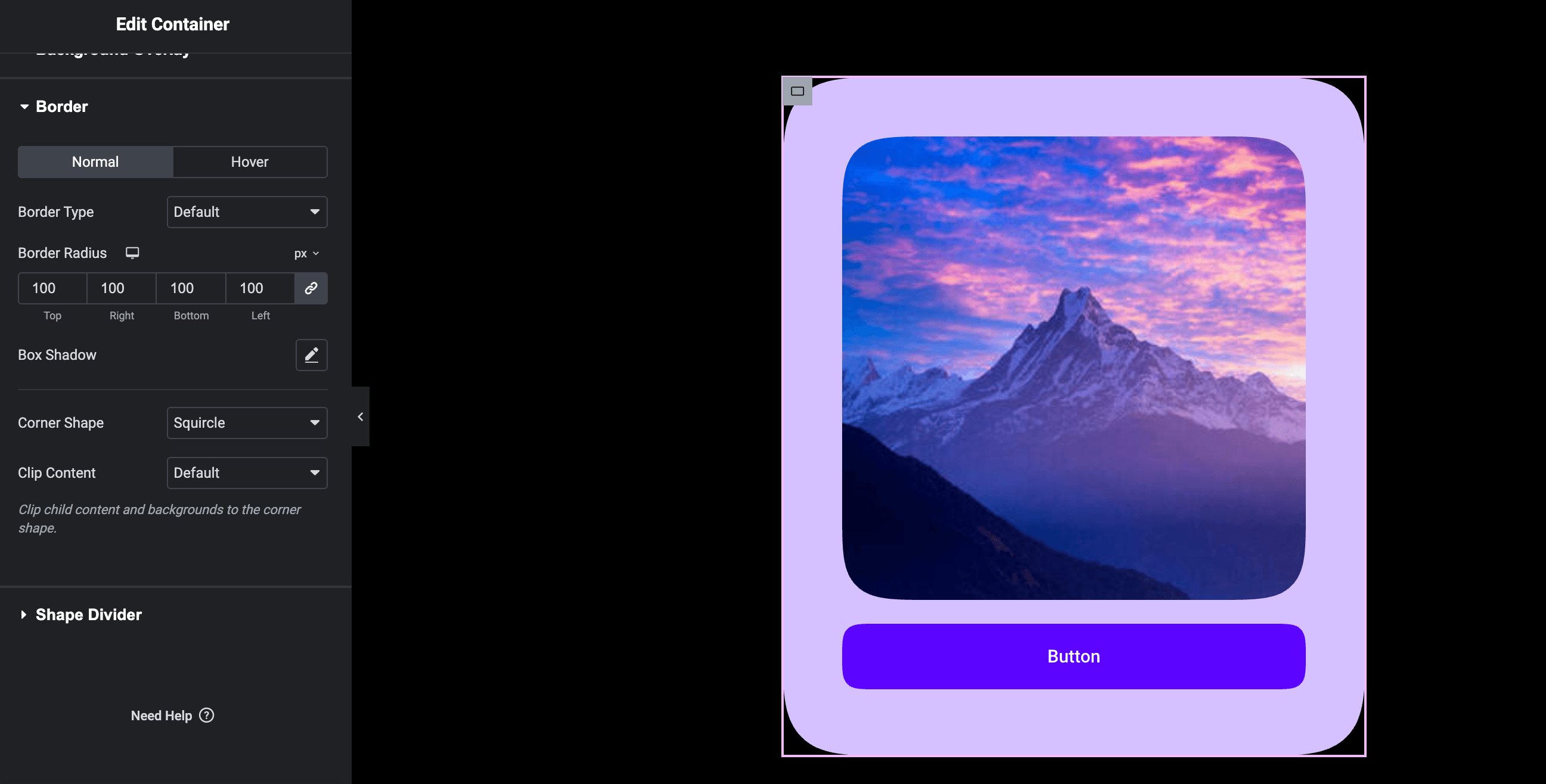
- Change the Corner Shape control from “Default” to your preferred shape (Squircle, Bevel, Scoop, or Notch).
- Adjust the standard Border Radius control to see the effect. There is no cap — use any value you need.
Frequently asked questions
Does this require Elementor Pro?
No, Squircle works entirely with the free version of Elementor. It is also fully compatible with Elementor Pro if you have it installed.
Does this work on all browsers?
Squircle uses the modern CSS property corner-shape. Currently, this is supported in Chromium-based browsers (such as Google Chrome and Microsoft Edge versions 139+).
What happens in unsupported browsers like Safari or Firefox?
Squircle embraces progressive enhancement. In browsers that do not yet support corner-shape, the element will gracefully fall back to the standard border-radius defined by your Elementor settings. The layout remains fully usable and attractive in all scenarios.
Will this slow down my site?
Absolutely not. Squircle does not enqueue any external stylesheets, JavaScript libraries, or complex SVG masks. It simply injects a single native CSS property into Elementor’s existing stylesheet generation pipeline.
Changelog
Initial release.
1.0.0
- Initial public release.
- Added Corner Shape control to Elementor elements.
- Added Clip Content control for overflow handling.
Screenshots
For developers
Is this your plugin? Show off the numbers.
Add a live badge to your site, docs or GitHub README. It updates on its own — no account needed.
FAQ
Squircle: quick answers
Straight answers, pulled from live WordPress.org data.
Live data from WordPress.org · checked Oct 1, 2026
Is Squircle free?
Yes. Squircle is free to download and use from the official WordPress.org plugin directory.
Is Squircle safe to use in 2026?
Squircle works, but test it on a staging site before relying on it in 2026. Was last updated 1 month ago, and scores 60/100 on our health check.
How many websites use Squircle?
Squircle is active on <10 WordPress websites and has been downloaded 141 times since it launched in August 2026. It was downloaded 68 times in the last 30 days.
Does Squircle work with WordPress 7.1?
Yes. The developer has tested Squircle up to WordPress 7.1.2, the latest release. It requires WordPress 5.8 or newer.
What PHP version does Squircle need?
Squircle requires PHP 8.0 or higher. Most hosts run PHP 8.x today, so it works on any modern WordPress hosting.
When was Squircle last updated?
The latest version, 1.0.0, was released on August 22, 2026 (1 month ago).
Who makes Squircle?
Squircle is developed and maintained by theadidev.
Powered by PageForge
Want thousands of pages that rank like these? Build them in an afternoon.
This directory runs on the same engine as PageForge. Turn any spreadsheet, CSV or API into thousands of fast, SEO-ready WordPress pages — with schema, internal links and AI-written copy baked in.
- CSV, Google Sheets & API data sources
- AI content, schema & internal links per page
- Works with Elementor, Gutenberg, Yoast & Rank Math
- Free on WordPress.org — no credit card


