



SQLite Object Cache
A fast persistent object cache backend for the rest of us, powered by SQLite and accelerated by APCu

Safe pick
Yes — SQLite Object Cache is a safe, well-maintained plugin to use in 2026. It runs on 10K+ sites, is rated 5/5 and was last updated 1 month ago, and scores 90/100 on our health check.
- Proven at scale on 10K+ active sites
- Loved by users — 5/5 from 50 reviews
- Tested with the latest WordPress (7.1)
How does it stack up?
Side-by-side on installs, updates, ratings & support



Daily downloads
Download spikes usually follow a new release — each site that auto-updates counts as a download.
Rankings
Where SQLite Object Cache stands todayWordPress.org search rankings
Live position in the plugin search, top 100| Keyword | Position |
|---|---|
| apcu | #3 |
| cache | #9 |
| object cache | #3 |
| performance | #87 |
| SQLite | #1 |
Version adoption
Share of active sites per release.
Rating breakdown
★★★★★★★★★★ 5 from 50 reviews
About SQLite Object Cache
From the official readme · v1.6.5Description
A persistent object cache helps your site perform well. This one uses the widely available SQLite3 extension, and optionally the igbinary and APCu extensions to php. Many hosting services offer those extensions, and they are easy to install on a server you control.
What is this about?
It’s about making your site’s web server perform better. An object cache does that by reducing the workload on your MariaDB or MySQL database. This is not a page cache; these persistent objects go into a different kind of cache. These objects aren’t chunks of web pages ready for people to view in their browsers, they are data objects for use by the WordPress software.
Caches are ubiquitous in computing, and WordPress has its own caching subsystem. Caches contain short-term copies of the results of expensive database lookups or computations, and allow software to use the copy rather than repeating the expensive operation. This plugin (like other object-caching plugins) extends WordPress’s caching subsystem to save those short-term copies from page view to page view. WordPress’s cache happens to be a memoization cache.
Without a persistent object cache, every WordPress page view must use your MariaDB or MySQL database server to retrieve everything about your site. When a user requests a page, WordPress starts from scratch and loads everything it needs from your database server. Only then can it deliver content to your user. With a persistent object cache, WordPress immediately loads much of the information it needs. This lightens the load on your database server and delivers content to your users faster.
Who should use this?
If your site runs on a single web server machine, and that server provides the SQLite3 and igbinary extensions to php, this plugin will almost certainly make your site work faster. And if that server provides the APCu extension, this plugin uses it too.
Some hosting providers offer redis cache servers. If your provider offers redis, it may be a good choice. You can use it via the Redis Object Cache plugin. Sites using redis have one SQL database and another non-SQL storage server: redis. Other hosting providers offer memcached, which has the Memcached Object Cache plugin. And some large multipurpose cache plugins, such as the LiteSpeed Cache, also offer object caching based on one of those cache server software packages.
The cache-server approach to object caching comes into its own when you have multiple load-balanced web server machines handling your site. SQLite doesn’t work correctly in a multiple-web-server environment.
But, for single-server site configurations, SQLite, possibly assisted by APCu, performs well. And the vast majority of sites are single-server.
APCu
APCu is an in-memory storage medium. It lets php programs, like WordPress, store data in shared memory so it’s very fast to retrieve when needed. If APCu is available on your host server, you can configure this plugin to use it. It reduces the typical cache lookup time to one-fifth or less of the SQLite lookup time, which is itself a few tens of microseconds. Performance counts, especially on busy web sites.
Please look at Installation to learn how to configure this plugin to use APCu. The plugin works fast without it, and faster with it.
WP-CLI: Even if APCu is in use, caching with SQLite is necessary when your web site uses WP-CLI, because WP-CLI programs do not have access to the APCu cache. This plugin writes all cached data both to APCu and to SQLite and makes sure the two are synchronized.
WP-CLI
You can control this plugin via WP-CLI once you activate it. Please type this command into your shell for details.
wp help sqlite-object-cache
Credits
Thanks to Till Krüss. His Redis Object Cache plugin serves as a model for this one. And thanks to Ari Stathopoulos and Jonny Harris for reviewing this. Props to Matt Jones for finding and fixing a bug that appeared on a heavily loaded system. Thanks to Massimo Villa for testing help, and to nickchomey for a comprehensive code review. All defects are, of course, entirely the author’s responsibility.
And thanks to Jetbrains for the use of their software development tools, especially PhpStorm. It’s hard to imagine how a plugin like this one could be developed without PhpStorm’s tools for exploring epic code bases like WordPress’s.
How can I learn more about making my WordPress site more efficient?
We offer several plugins to help with your site’s database efficiency. You can read about them here.
Installation
For this plugin to work for you, your server must have the SQLite3 extension to php installed.
If you have the igbinary and APCu extensions, this plugin uses them to work more efficiently. But it works without them.
Installing “SQLite Object Cache” can be done either by searching for “SQLite Object Cache” via the “Plugins > Add New” screen in your WordPress dashboard, or by using the following steps:
- Download the plugin via WordPress.org
- Upload the ZIP file through the ‘Plugins > Add New > Upload’ screen in your WordPress dashboard
- Activate the plugin through the ‘Plugins’ menu in WordPress
Or, use these WP-CLI commands to install the plugin, secure it, activate it, and set the cache size to 32MiB.
wp plugin install sqlite-object-cache
wp config set WP_CACHE_KEY_SALT $(openssl rand -base64 12)
wp plugin activate sqlite-object-cache
wp sqlite-object-cache size 32
The plugin offers a few optional settings for your wp-config.php file. Do not change them while the plugin is activated. If you change them, deactivate the plugin first, then change them, then reactivate the plugin.
- WP_SQLITE_OBJECT_CACHE_SERIALIZE. When true, this forces the plugin to use ‘s serialize() scheme to store cached data in SQLite. If this is not set, the plugin uses the more efficient igbinary scheme if it is available.
- WP_SQLITE_OBJECT_CACHE_DB_FILE. This is the SQLite file pathname. The default is
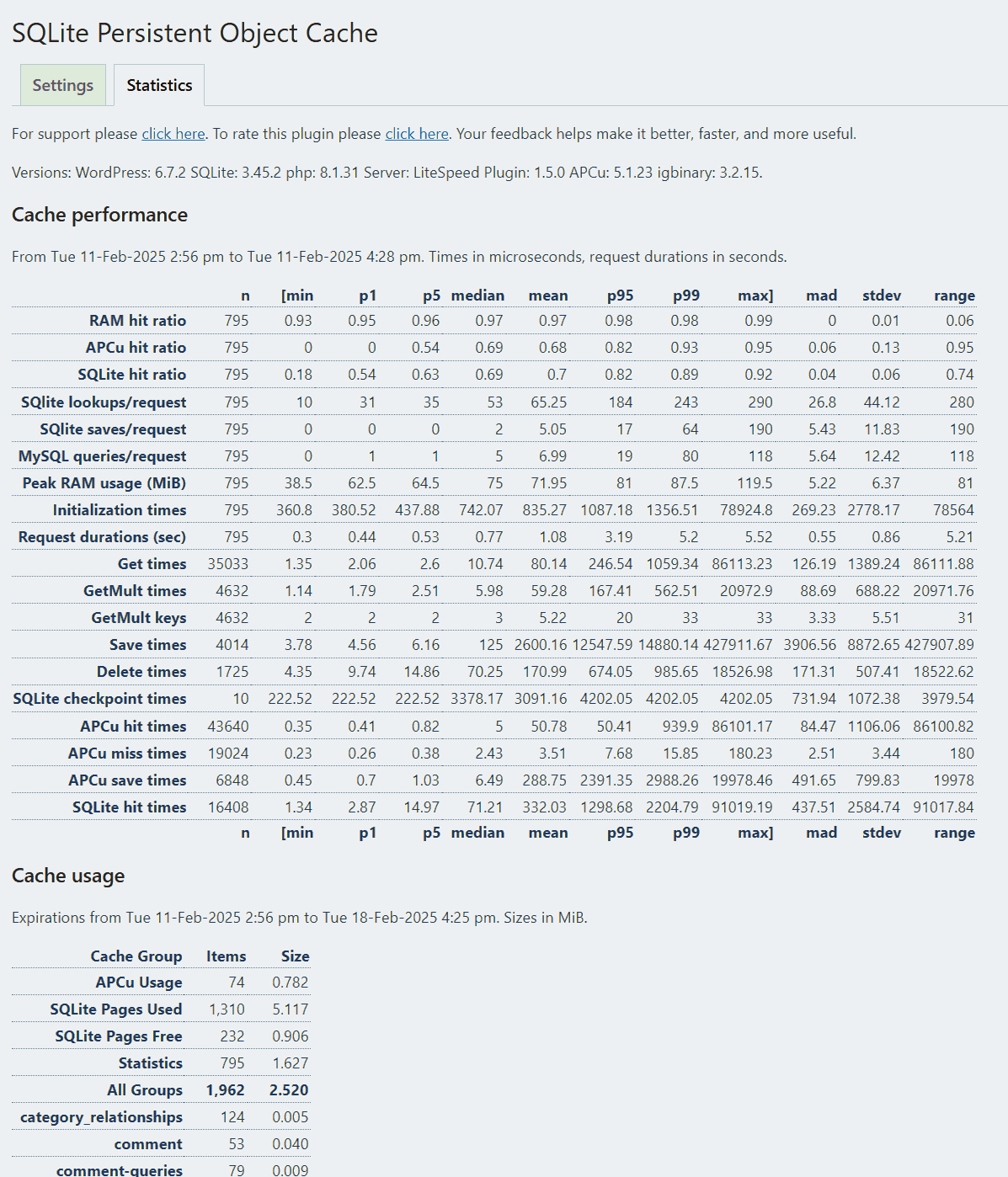
…/wp-content/.ht.object_cache.sqlite. Use this if you want to place the SQLite cache file outside your document root. - WP_SQLITE_OBJECT_CACHE_TIMEOUT. This is the SQLite timeout in milliseconds. Default: 5000. (Notice that the times shown in the Statistics tab are in microseconds if you compare them to this timeout setting.)
- WP_SQLITE_OBJECT_CACHE_JOURNAL_MODE. This is the SQLite journal mode. Default: ‘WAL’. Possible values DELETE | TRUNCATE | PERSIST | MEMORY | WAL | WAL2 | NONE. (Not all SQLite3 implementations handle WAL2.)
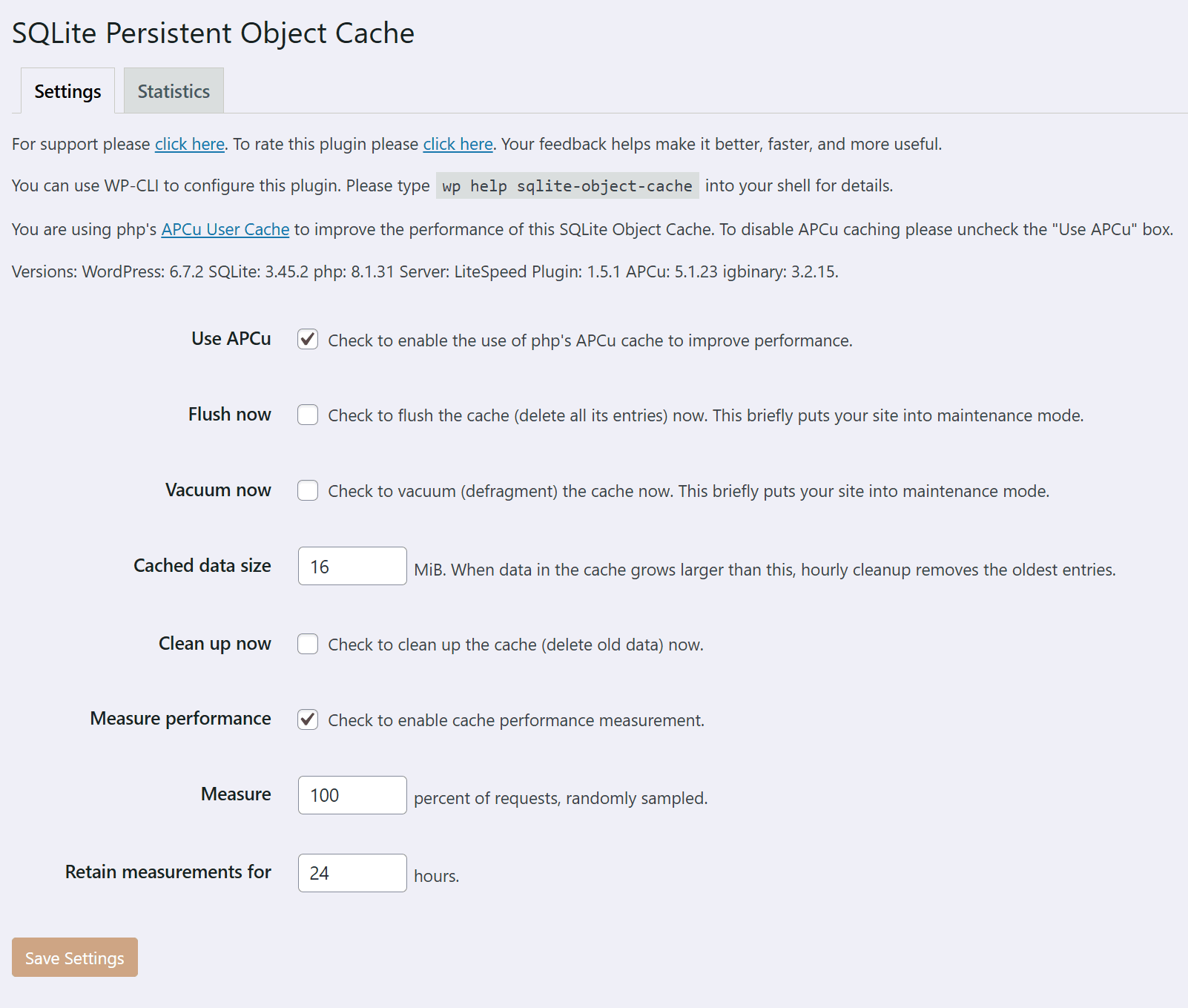
- WP_SQLITE_OBJECT_CACHE_APCU. If true enables cache acceleration with APCu RAM. This setting can be updated from the plugin’s Settings page.
- WP_SQLITE_OBJECT_CACHE_CHECKPOINT_FREQ. How often, probabilistically, to force checkpointing SQLite3. Make this number smaller on busy sites if your WAL file gets too long. Default 2000.
- WP_CACHE_KEY_SALT. Set this to a hard-to-guess random value to make your cache keys harder to guess. This setting works for other cache plugins as well.
Configuring the cache key salt
When multiple sites share the same server hardware and software, they can sometimes share the same cache data. Setting WP_CACHE_KEY_SALT to a hard-to-guess random value for each site makes it much harder for one site to get another site’s data. This works for other cache plugins too. Notice that this WP_CACHE_KEY_SALT value must be set, in your site’s wp-config.php file, before activating any cache plugin, including page caches and persistent object caches.
To set the value put a line like this in wp-config.php.
define( 'WP_CACHE_KEY_SALT', 'Random_t6xJix' );
Of course, use your own random value, not the one in this example. You can get one from your Linux command line shell with the openssl rand -base64 12. Or, if you use WP-CLI you can set the value directly with
wp config set WP_CACHE_KEY_SALT $(openssl rand -base64 12)
Configuring and Using APCu
APCu is an in-memory storage medium. If APCu is available on your host server, you can configure this plugin to use it. There is an option to enable it on the plugin’s Settings page. Or you can do it manually. Put a WP_SQLITE_OBJECT_CACHE_APCU value of true into your wp-config.php file. You can use this WP-CLI command to do that.
wp config set --raw WP_SQLITE_OBJECT_CACHE_APCU true
Or, you can edit your wp-config.php file to add this line.
define( 'WP_SQLITE_OBJECT_CACHE_APCU', true );
Frequently asked questions
Does this work with a multisite WordPress installation?
Yes. To see the Settings page, choose Settings > Object Cache from the first site, or any site, in the multisite installation.
How much faster will this make my site?
Exactly predicting each site’s speedup is not possible. Still, benchmarking results comparing it to other object caching schemes are promising. Please see this. If you run a benchmark, please let the author know by leaving a comment on that page or using the support forum.
What Cached Data Size should I use for my site?
The default setting for Cached Data Size is 16 megabytes (MiB). This plugin allows the actual cached data size to grow larger than that, and occasionally removes old — the least recently updated — data to trim back the size to the setting. Take a look at the Statistics page. If your actual cached data usage under All Groups is consistently larger than the setting, double the setting. If you operate a large and busy site, try an initial setting of 32 MiB, then adjust it based on the growth of the actual size. Notice that this setting controls the size of the data in the cache. That is the size…
What is SQLite?
SQLite is fast and efficient database software. It doesn’t require a separate server. Instead, it is built into php using the SQLite3 extension. SQLite programs don’t need to open network connections to send requests and wait for replies.
What is igbinary?
igbinary is a php extension that provides an efficient way to serialize and compress the kinds of data objects stored in caches. It, in some cases, uses less than half the storage space of the built-in php data serializer. If igbinary is available in your php configuration, this plugin uses it, unless you force it not to by setting WP_SQLITE_OBJECT_CACHE_SERIALIZE to true in wp-config.php.
What is APCu?
APCu is php extension offering an in-memory storage medium. You can configure this plugin to use it to speed up cache lookups.
On my server the APCu shared memory cache is too small. How can I make it bigger?
On most operating systems the size of the APCu cache is, as installed, 32MiB. If you need to increase this size you can add a line to your php.ini file mentioning the apc.shm_size configuration option. For example, the line apc.shm_size = 64M sets the size to 64MiB. Please consult your operating system or hosting provider documetation for information on how to do this. Notice that sometimes multiple WordPress installations that run on the same server share the same APCu cache, so provide enough space for them all. And keep in mind that this plugin only uses APCu to accelerate its operations…
Does this plugin replace MariaDB or MySQL with SQLite?
No. Your MariaDB or MySQL database sql server still holds all your content. All your site’s imports, exports, backups and other database operations continue to function normally. This plugin uses SQLite simply to hold named values. For example, a value named “post|3” will hold a temporary, easy-to-retrieve cached copy of post number 3. When it needs that post, WordPress can fetch it quickly from SQLite.
Wait, what? Do I really need two different kinds of SQL database?
No, you don’t. This plugin doesn’t use SQLite as a full-fledged database server. A persistent object cache needs some kind of storage mechanism. SQLite serves this plugin as a fast and simple key / value storage mechanism. Some hosting providers offer the scalable high-performance redis cache server. You can use it via Redis Object Cache plugin. Sites using redis have one SQL database and another non-SQL storage scheme: redis. Some other hosting providers offer memcached, which has the Memcached Object Cache. But many hosting providers don’t offer either redis or memcached, while they do…
Is this plugin compatible with my page-caching plugin?
Probably. Page caching and persistent object caching are completely separate functions in WordPress. But, some multi-feature caching plugins support optional object caching using redis or memcached. If that feature is enabled in your page cache plugin, you should not use this plugin. You can find out whether your page-cache plugin also enables persistent object caching. Look at the Drop-in section of the Plugins -> Installed Plugins page. If it mentions the drop-in called “object-cache.php” then your page cache plugin is handling persistent object caching. You should disable that feature…
Can I disable object caching for my backend dashboard or other pages or REST API operations I choose?
No. That’s not how object caching works. It’s different from page caching. It works at the level of individual database operations in the WordPress code, not at the level of whole pages. The object cache contents are organized by group. For example, it caches data from your wp_postmeta table in the cache group called 'post_meta'. You can disable caching for particular groups with wp_cache_add_non_persistent_groups(). Some plugins need to use this feature.
Is this plugin compatible with my version of MySQL or MariaDB?
Yes. It does not require any specific database server version.
Is this persistent object cache faster than Redis or memcached?
Yes. Those cache servers require WordPress to make round-trip network requests, while this one does not. Many users have found this caching methodology to be fast.
This cache uses a file on my server HDD/SSD, while redis and memcached use RAM. Isn’t RAM faster?
RAM is indeed faster. Modern server operating systems offer extensive page caching in RAM for files, and SQLite is designed to take advantage of that, so the data needed may already be in RAM. Using a separate cache server require the web server to issue network requests and wait for responses, whereas using SQLite does not.
Why not use the site’s main MariaDB or MySql database server for the object cache?
In WordPress, as in many web frameworks, your database server is a performance bottleneck. Using some other mechanism for the object cache avoids adding to your database workload. Web servers serve pages using multiple php processes, and each process handles its own SQLite workload while updating a shared database file. That spreads the object-cache workload out over many processes rather than centralizing it.
Do I have to back up the data in SQLite?
No. It’s a cache, and everything in it is ephemeral. When WordPress cannot find what it needs in the cache, it simply recomputes it or refetches it from the database. To avoid backing up SQLite files, tell your backup plugin to skip the files named *.sqlite, *.sqlite-wal, *.sqlite-wal2, and *.sqlite-shm. This plugin automatically suppresses backing up your SQLite data when you use the Updraft Plus, BackWPUp, or WP STAGING plugins. The Duplicator plugin does not offer an automated way to suppress copying those files. If you use some other backup or cloning plugin, please let the author know by…
If I already have another persistent object cache plugin, can I use this one?
No. You only need one persistent object cache plugin, and WordPress only supports one at a time.
If I operate a scaled-up load-balanced installation, can I use this?
No. If you have more than one web server this doesn’t work correctly. If you operate at that scale, use redis or some other cache server. (If you aren’t sure whether you have a load-balanced installation, you almost certainly do not.)
If my WordPress files are on a shared network drive, can I use this?
No, probably not. SQLite does not work correctly if you put its files on a shared network drive (via CIFS, SMB, NFS, or some other drive sharing protocol). Please read this for a more complete explanation. If your host operating system provides a local directly-connected drive for a temporary file system, you can try to put your .sqlite files there. Please read this.
Can I use this with the Performance Lab plugin?
Yes, but you must activate this plugin first before you activate Performance Lab. And, you must deactivate Performance Lab before deactivating this plugin last. The Performance Lab plugin offers some advanced and experimental ways of making your site faster. One of its features uses object-cache initialization code to start tracking performance. So there’s a required order of activation if you want both to work.
Changelog
Support plugins that use transients in their destructors.
1.6.5
- Support plugins that use set_transient or other cache operations in their destructors.
1.6.4
- Set the permissions of SQLite’s files (including the -wal and -shm files) to group-writeable to make WL-CLI more convenient.
- Handle incrementing and decrementing expiring cache entries correctly, and handle expiration around runtime flush correctly.
- Selectively flush the APCu cache upon wp_flush_cache_group.
- Improve the cache key display on the statistics tab.
1.6.3
A race condition caused expired cache entries to be copied to APCu incorrectly sometimes. This is corrected. Props to @pobrehablador for finding this defect.
1.6.2
- Use PRAGMA wal_checkpoint(TRUNCATE) sometimes to avoid excessively large re-used WAL files.
- Checkpoint more frequently.
- Health check for OPcache (not APCu) saturation.
1.6.1
- Add an optional Flush Object Cache button to the admin bar. Props to Nick Chomey.
- Fix a defect in testing for writability of the .sqlite files. Props to @powerkiki: Adrien Crivelli.
1.6.0
- Multisite: put the settings and statistics panels on the main site only.
Screenshots
For developers
Is this your plugin? Show off the numbers.
Add a live badge to your site, docs or GitHub README. It updates on its own — no account needed.
Best SQLite Object Cache alternatives
All apcu plugins →
FAQ
SQLite Object Cache: quick answers
Straight answers, pulled from live WordPress.org data.
Live data from WordPress.org · checked Sep 26, 2026
Is SQLite Object Cache free?
Yes. SQLite Object Cache is free to download and use from the official WordPress.org plugin directory.
Is SQLite Object Cache safe to use in 2026?
Yes — SQLite Object Cache is a safe, well-maintained plugin to use in 2026. It runs on 10K+ sites, is rated 5/5 and was last updated 1 month ago, and scores 90/100 on our health check.
How many websites use SQLite Object Cache?
SQLite Object Cache is active on 10K+ WordPress websites and has been downloaded 176,590 times since it launched in December 2022. It was downloaded 9,213 times in the last 30 days.
Does SQLite Object Cache work with WordPress 7.1?
Yes. The developer has tested SQLite Object Cache up to WordPress 7.1.2, the latest release. It requires WordPress 5.9 or newer.
What PHP version does SQLite Object Cache need?
SQLite Object Cache requires PHP 5.6 or higher. Most hosts run PHP 8.x today, so it works on any modern WordPress hosting.
When was SQLite Object Cache last updated?
The latest version, 1.6.5, was released on August 17, 2026 (1 month ago).
Who makes SQLite Object Cache?
SQLite Object Cache is developed and maintained by OllieJones.
What are the best alternatives to SQLite Object Cache?
The most popular alternatives to SQLite Object Cache are APCu Manager (10K+ installs), atec Cache APCu (3K+ installs) and atec Cache Info (1K+ installs).
Powered by PageForge
Want thousands of pages that rank like these? Build them in an afternoon.
This directory runs on the same engine as PageForge. Turn any spreadsheet, CSV or API into thousands of fast, SEO-ready WordPress pages — with schema, internal links and AI-written copy baked in.
- CSV, Google Sheets & API data sources
- AI content, schema & internal links per page
- Works with Elementor, Gutenberg, Yoast & Rank Math
- Free on WordPress.org — no credit card


