



Spreebie Transcoder – Resize, Compress and Store Video
SPREEBIE TRANSCODER is a WordPress plugin that resizes, compresses and stores MP4 video via FFmpeg and Google Cloud Storage.

Consider an alternative
Spreebie Transcoder shows warning signs in 2026 — compare the alternatives below before installing. It runs on 30+ sites, is rated 5/5 and was last updated 8 years ago, and scores 31/100 on our health check.
- Small user base (30+ active installs)
- Very few reviews so far
- No update in 7 years
- Only tested up to WordPress 5.1 (latest is 7.1)
How does it stack up?
Side-by-side on installs, updates, ratings & support



Daily downloads
Download spikes usually follow a new release — each site that auto-updates counts as a download.
Rankings
Where Spreebie Transcoder stands todayWordPress.org search rankings
Live position in the plugin search, top 100| Keyword | Position |
|---|---|
| compression | >100 |
| ffmpeg | #48 |
| google cloud storage | >100 |
| resizing | >100 |
| video | >100 |
Version adoption
Share of active sites per release.
Rating breakdown
★★★★★★★★★★ 5 from 1 reviews
About Spreebie Transcoder
From the official readme · v1.0.1Description
The role of video as the premier mode of communication and information transmission in the year 2019 has now become uncontested. Video informs all aspects of our lives, from how we communicate with our loved ones to how radio stations stream content to their ‘listeners’. The monumental task for content providers today is to provide video in a manner in which it is accessible to everyone – not providing video is totally out of the question.
A large part of this is of course driven by the all internet-based media distribution platforms that have sprouted up since 2005. Video has become so instrumental and so effective that it has even triggered the biggest learning cycle in human history. So, the important test for content providers is fundamentally related to access – global access. Pertaining to internet infrastructure, different places in the world are at different stages of development – all those people have to have access to the same content. Providing video at resolutions that deal with these scenarios can be what separates a content providers from their competition.
The MP4 video format and FFmpeg have matured tremendously over the past 15 years. MP4 has become the de facto video format on the web and FFmpeg is the goto transcoding tool for some of the biggest video distribution platforms in the world. Just because of the lay of the land in 2019, it is important to use video on your site to interact with your visitors in ways that they can relate to and understand. Communicating in a standard way using the MP4 video format and making sure those videos can be provided in sizes and rates that respond to individual users’ needs and circumstances is imperative.
WordPress is now running on 30% of all websites – in a way, it has become a kind of web operating system. This means that it has become unavoidable and thinking about creating new products and dedicated implementations of existing products for WordPress is imperative.
The combination of better video transcoding technology, standard (popular) video containers, cloud storage services and a web dominated by a very powerful WordPress was fertile soil to create Spreebie Transcoder.
Features
- Resizing – Spreebie Transcoder resizes video to lesser resolutions. For example, a 360p video will get 240p and 144p copies.
- Compression – Spreebie Transcoder has adjustable settings to determine the quality of video and the speed at which transcoding happens. This results in compression to varying degrees depending on what settings have been chosen.
- Google Cloud Storage – If you choose to, transcoded video can be stored on Google Cloud Storage as a backup.
- Folders – Spreebie Transcoder supports WP Real Media Library that brings folder functionality to WordPress media.
- Support and Manual – Spreebie Transcoder provides a support tab through which users can request support from Spreebie representatives. A comprehensive manual is also provided to help users with most of the questions they may have.
This plugin requires FFmpeg to work.
THIRD PARTY PRODUCT AND SERVICE NOTE: When storing already transcoded video on the cloud with this plugin, a third party service called Google Cloud Storage (https://cloud.google.com/storage/) is used for storage. A number of open-source PHP libraries from various sources are packaged within Spreebie Transcoder in the folder “vendor” in order to facilitate Google Cloud Storage functionality. Google Cloud Storage in this plugin ONLY works for cloud storage – the rest of the plugin can function without it.
Another third party product which is not included with this plugin but is its centre is FFmpeg is (https://www.ffmpeg.org/) – this is used to perform all the video analysis and transcoding. Without FFmpeg, this plugin cannot function.
The last third party product that can be used in tandem with this plugin but is not included with it is WP Real Media Library (https://matthias-web.com/wordpress/real-media-library/). This can be used to organise your transcoded media into folders. Spreebie Transcoder does not need WP Real Media Library to function.
Installation
Minimum Requirements
- PHP version 5.5 or greater (PHP 5.6 or greater is recommended)
- MySQL version 5.0 or greater (MySQL 5.6 or greater is recommended)
- Spreebie Transcoder 1.0.1 requires WordPress 4.1+
-
Install the plugin like it is commonly done, either by uploading it via FTP or by using the
“Add Plugin” function of WordPress. -
Activate the plugin on the plugin administration page.
-
Go to the “Spreebie Transcoder” and click the “Settings” tab.
-
Enter the FFmpeg and FFprobe paths.
-
You can then go to the “Transcode” tab to start transcoding.
Usage
-
Go to the “Spreebie Transcoder” menu and click it. Click on the “Settings” tab. Enter the paths to you FFmpeg and FFprobe installations. If you would like to use Google Cloud Storage as secondary storage, enter all the Google Cloud Storage details.
-
A comprehensive manual has also been provided to guide you through this process. Click the “Support” tab and a link to the manual will be visible. You can also reach us by sending out a support request if you are still having trouble.
-
To transcode a MP4 file, go to the “Transcode” tab. Choose the file, pick its category and write a short caption that describes the video. Click the “Transcode Video” button. This plugin works best for videos with 720p resolution and less.
-
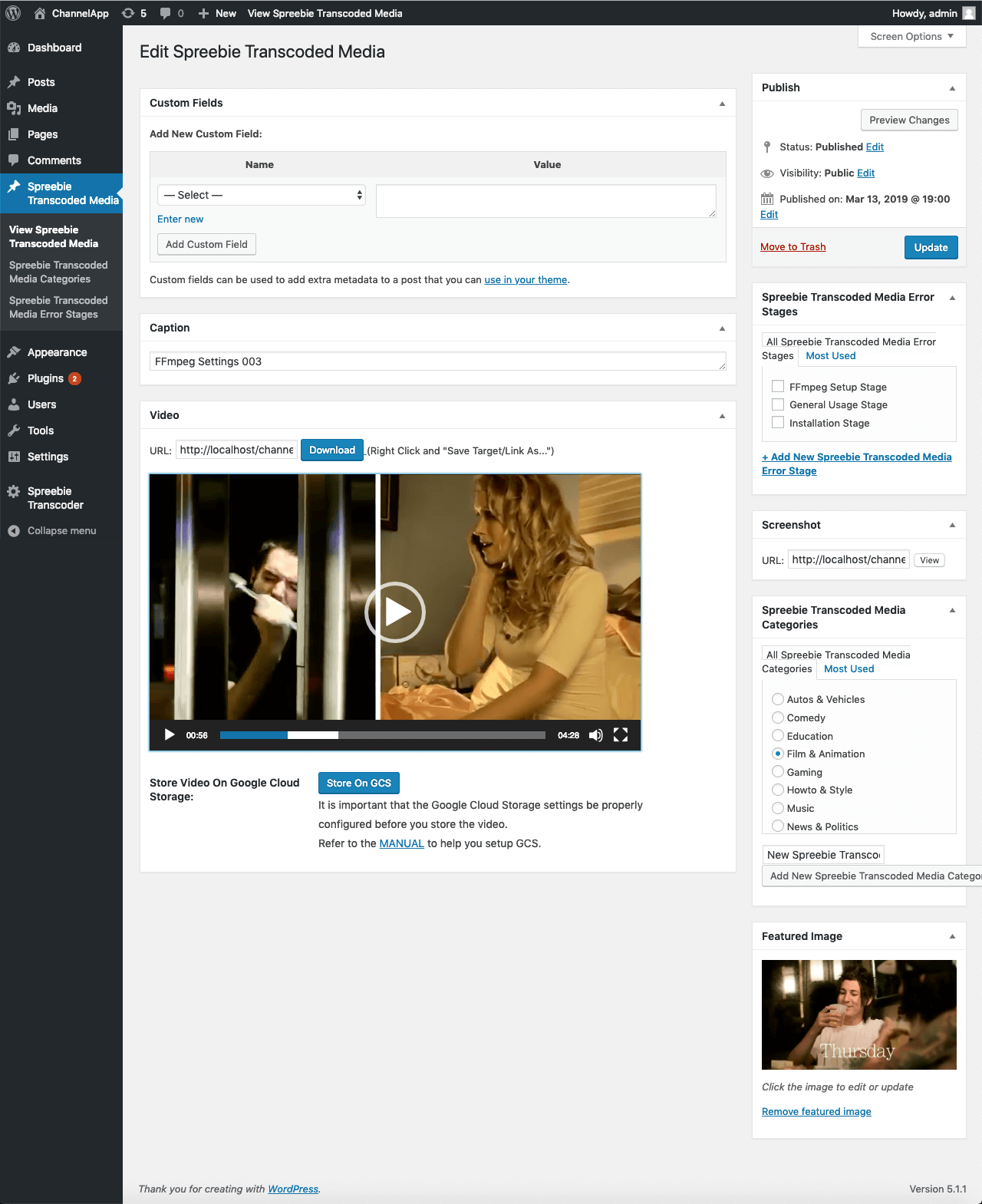
After the video has been transcoded, go to “Spreebie Transcoded Media -> View Spreebie Transcoded Media”. Click on the video you’ve just transcoded. You can play the video to see if it plays to your liking. If you have enabled Google Cloud Storage, a “Store on GCS” button will be available – you can store your file on the Google Cloud by clicking it.
-
To view all the transcoded media and their screenshots, click the “Media” menu. All the transcoded videos will be available in there.
Screenshots


For developers
Is this your plugin? Show off the numbers.
Add a live badge to your site, docs or GitHub README. It updates on its own — no account needed.
Best Spreebie Transcoder alternatives
All compression plugins →





FAQ
Spreebie Transcoder: quick answers
Straight answers, pulled from live WordPress.org data.
Live data from WordPress.org · checked Oct 17, 2026
Is Spreebie Transcoder free?
Yes. Spreebie Transcoder is free to download and use from the official WordPress.org plugin directory.
Is Spreebie Transcoder safe to use in 2026?
Spreebie Transcoder shows warning signs in 2026 — compare the alternatives below before installing. It runs on 30+ sites, is rated 5/5 and was last updated 8 years ago, and scores 31/100 on our health check.
How many websites use Spreebie Transcoder?
Spreebie Transcoder is active on 30+ WordPress websites and has been downloaded 3,485 times since it launched in March 2019. It was downloaded 92 times in the last 30 days.
Does Spreebie Transcoder work with WordPress 7.1?
Spreebie Transcoder is officially tested up to WordPress 5.1.27, while the latest release is 7.1.3. It may still work, but try it on a staging site first.
What PHP version does Spreebie Transcoder need?
Spreebie Transcoder requires PHP 5.5 or higher. Most hosts run PHP 8.x today, so it works on any modern WordPress hosting.
When was Spreebie Transcoder last updated?
The latest version, 1.0.1, was released on March 26, 2019 (8 years ago).
Who makes Spreebie Transcoder?
Spreebie Transcoder is developed and maintained by Thabo David Klass.
What are the best alternatives to Spreebie Transcoder?
The most popular alternatives to Spreebie Transcoder are TinyPNG Image Optimization (100K+ installs), Disable JPEG Compression (1K+ installs) and WP Resized Image Quality (800+ installs).
Powered by PageForge
Want thousands of pages that rank like these? Build them in an afternoon.
This directory runs on the same engine as PageForge. Turn any spreadsheet, CSV or API into thousands of fast, SEO-ready WordPress pages — with schema, internal links and AI-written copy baked in.
- CSV, Google Sheets & API data sources
- AI content, schema & internal links per page
- Works with Elementor, Gutenberg, Yoast & Rank Math
- Free on WordPress.org — no credit card


