


Split Order by category for Woocommerce
"Split order by Category for Woocommerce" allows splitting an order into separate orders based on category.

Solid choice
Split Order by category for Woo… is a solid plugin choice in 2026, with a few things worth checking first. It runs on 10+ sites, is rated 5/5 and was last updated 2 weeks ago, and scores 73/100 on our health check.
- Actively developed — last update 2 weeks ago
- Tested with the latest WordPress (7.1)
- Small user base (10+ active installs)
- Very few reviews so far
How does it stack up?
Side-by-side on installs, updates, ratings & support



Daily downloads
Download spikes usually follow a new release — each site that auto-updates counts as a download.
Rankings
Where Split Order by category for… stands todayWordPress.org search rankings
Live position in the plugin search, top 100| Keyword | Position |
|---|---|
| orders | >100 |
| split | #16 |
| Split Order By Category | #2 |
| woocommerce | >100 |
Version adoption
Share of active sites per release.
Rating breakdown
★★★★★★★★★★ 5 from 1 reviews
About Split Order by category for Woocommerce
From the official readme · v1.1.6Description
“Split order by Category for Woocommerce” allows splitting an order into separate orders based on category. This Plugin can be used to split an order automatically into multiple orders based on the category of the products in the cart. The customer will receive different order ids for their ordered cart.
Note: This is a free variant of Split order by category for woocommerce.
Features of Plugin
Helps to manage the order as per the selected category
As this plugin splits the order as per the selected category it makes the management of the order for admin much quicker and easy.
The customer also receives different order Ids according to the selected category existing in the order
When buyers place an order with multiple items in the cart then, separate order ids will be generated.
Separate order ids will be generated at the back-end as per the category selected
Separate order ids will be generated in the back-end as well when a buyer places an order with having multiple products in the cart.
A brief Markdown Example
This product is designed for various industrial solutions such as Fashion, FMCG-retail, automotive, health & beauty, Gems, and jewelry, Engineering and capital goods, Consumer durables, Agriculture and allied industries, Manufacturing sector, Media and Entertainment Industry, and Textile industry.
This covers all SMBs’ (Small and medium business houses solution) to uncover the future face spaced growth with a seamless customer order journey experience.
Use Cases of Split order by category for woocommerce
- This plugin helps store owners to order split as per the different categories of the website products
- This plugin helps better order management, customer experience, and service.
Installation
- Upload the plugin files to the /wp-content/plugins/’ directory, or install the plugin through the WordPress plugins screen directly.
- Activate the plugin through the /Plugins/ screen in WordPress Split by Category
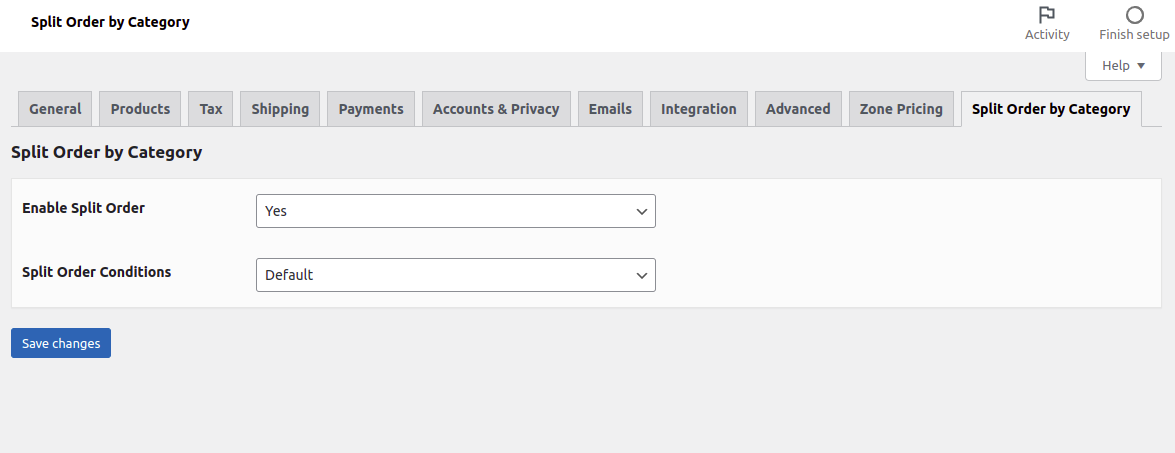
2.1. Select Default setting:
A) Default Condition
When the condition is Default then the order is split irrespective of any attribute. Example: If an order has 4 products then the order is split into 4 different orders no matter what attribute is chosen.
Frequently asked questions
Will the customer pay multiple times?
Payment will be made only once for a complete order amount, later the order splits as per the items in cart.
How is the payment handled when we connect with a Payment Service Provider.
The payment is being taken before the order is split so the complete order amount is taken from the pay.
What is the difference between Paid plugin Split Order On Checkout Pro, Advanced Split Order On Checkout, and split order by category?
Split Order On Checkout Pro Plugin splits the order into different ID’s according to conditions set as per the assigned attribute at the backend. Advanced Split Order On Checkout Plugin splits the order into different ID’s according to assigned attribute as per different conditions. This Plugin also enables to create various admin users with restricted roles. Split Order Based on Category to split the order into different orders based on the categories of products in that particular order.
Is it compatible with all payment gateways? Like offline and online payment methods
Yes, Our Plugin is compatible with offline and online payment gateway. But Currently, this is supported by only the PayPal payment gateway.
Does the user make a one-time payment or is it multiple payments for the different orders created?
There is only one payment taken for all the items in the cart, once the order is placed it split into different IDs.
Does this Plugin support WordPress latest version?
Ans. Yes, it supports WordPress version 5.6 (Latest version)
Is this a free plugin for Split order by category for woocommerce ?
Yes, this product is a free variant of Split order by category. This plugin contains only default features. Default Features means When the condition is Default then the order is split irrespective of any attribute. Example- If a customer adds four products into the cart, then four orders will be created as per the default attribute.
What are the paid plugin features for Split order by category for woocommerce?
The paid plugin available at Our store website Suncart store and this paid feature contain: A) Default Condition When the condition is Default then the order is split irrespective of any attribute. Example: If an order has 4 products then the order is split into 4 different orders no matter what attribute is chosen. B) Split Order by category: When we enable this option, allows splitting an order into separate orders based on category. This Plugin can be used to split an order automatically into multiple orders based on the category of the products in the cart. The customer will receive…
Changelog
MISC Updates.
1.1.6
- Updates – Compatibility check with latest version of wordpress 7.1
1.1.5
- Updates – Compatibility check with latest version of wordpress 6.7.2
1.1.4
- Updates – Compatibility check with latest version of wordpress 6.4.3
1.1.3
- Updates – Compatibility check with latest version of wordpress 6.2
1.1.2
- Updates – Compatibility check with latest version of wordpress 6.1
1.1.1
- Split orders displayed on thank-you page after paypal payment.
Screenshots
For developers
Is this your plugin? Show off the numbers.
Add a live badge to your site, docs or GitHub README. It updates on its own — no account needed.
Best Split Order by category for W… alternatives
All orders plugins →





FAQ
Split Order by category for Woocomm…: quick answers
Straight answers, pulled from live WordPress.org data.
Live data from WordPress.org · checked Oct 4, 2026
Is Split Order by category for Woo… free?
Yes. Split Order by category for Woo… is free to download and use from the official WordPress.org plugin directory.
Is Split Order by category for Woo… safe to use in 2026?
Split Order by category for Woo… is a solid plugin choice in 2026, with a few things worth checking first. It runs on 10+ sites, is rated 5/5 and was last updated 2 weeks ago, and scores 73/100 on our health check.
How many websites use Split Order by category for Woo…?
Split Order by category for Woo… is active on 10+ WordPress websites and has been downloaded 3,630 times since it launched in June 2020. It was downloaded 119 times in the last 30 days.
Does Split Order by category for Woo… work with WordPress 7.1?
Yes. The developer has tested Split Order by category for Woo… up to WordPress 7.1.2, the latest release. It requires WordPress 6.0 or newer.
What PHP version does Split Order by category for Woo… need?
Split Order by category for Woo… requires PHP 7.4 or higher. Most hosts run PHP 8.x today, so it works on any modern WordPress hosting.
When was Split Order by category for Woo… last updated?
The latest version, 1.1.6, was released on September 21, 2026 (2 weeks ago).
Who makes Split Order by category for Woo…?
Split Order by category for Woo… is developed and maintained by SunCart.
What are the best alternatives to Split Order by category for Woo…?
The most popular alternatives to Split Order by category for Woo… are Up2pay e-Transactions WooCo… (4K+ installs), Moloni (2K+ installs) and Block Specific Spam Woo Ord… (1K+ installs).
Powered by PageForge
Want thousands of pages that rank like these? Build them in an afternoon.
This directory runs on the same engine as PageForge. Turn any spreadsheet, CSV or API into thousands of fast, SEO-ready WordPress pages — with schema, internal links and AI-written copy baked in.
- CSV, Google Sheets & API data sources
- AI content, schema & internal links per page
- Works with Elementor, Gutenberg, Yoast & Rank Math
- Free on WordPress.org — no credit card


