


Spending Limits for WooCommerce
Spending Limits for WooCommerce is an extension for Woocommerce which enables you to limit spending for customer.

Solid choice
Spending Limits for WooCommerce is a solid plugin choice in 2026, with a few things worth checking first. It runs on 30+ sites, is rated 5/5 and was last updated 11 hours ago, and scores 78/100 on our health check.
- Actively developed — last update 11 hours ago
- Tested with the latest WordPress (7.1)
- Small user base (30+ active installs)
- Very few reviews so far
How does it stack up?
Side-by-side on installs, updates, ratings & support



Daily downloads
Download spikes usually follow a new release — each site that auto-updates counts as a download.
Rankings
Where Spending Limits for WooComm… stands todayWordPress.org search rankings
Live position in the plugin search, top 100| Keyword | Position |
|---|---|
| budget | #30 |
| customer protection | #79 |
| responsible gambling | #1 |
| spending limit | #1 |
| woocommerce | >100 |
Version adoption
Share of active sites per release.
Rating breakdown
★★★★★★★★★★ 5 from 1 reviews
About Spending Limits for WooCommerce
From the official readme · v1.1.12Description
Spending Limits for WooCommerce enables customers to set personal spending limits and purchase restrictions on their accounts, promoting responsible practices.
This plugin allows customers to configure spending limits for specific time periods (daily, weekly, monthly, or yearly) directly from their account dashboard. Once a limit is set, customers can only reduce it — increases or removals require administrator intervention. Additionally, site admin can set global spending limit and customers can voluntarily lock their accounts from making purchases for predefined periods, with only administrators able to lift these restrictions early.
Features
- Customer-controlled spending limits: Set maximum spending amounts per day, week, month, or year
- Self-imposed purchase locks: Temporarily lock account from purchases for 1, 4, 12 weeks, 1 year, or permanently
- One-way limit adjustments: Customers can reduce limits but cannot increase or remove them without admin approval
- Administrator controls: Edit or remove customer limits and purchase locks from wp-admin
- User management dashboard: View lists of users on break and their current spending limits
- Audit log: Searchable history of all limit and lock changes
- CSV export: Export user lists and audit logs for record-keeping
Use Cases
- Supporting responsible gambling and gaming commerce
- Age-restricted product stores with spending controls
- Subscription services with voluntary budget management
- Any WooCommerce store promoting responsible purchasing
PRO Features
All features of the free version, plus:
- Global spending limit for all site customers
- Custom limit periods: Configure limits by custom number of weeks or days beyond standard intervals
- Comprehensive reporting dashboard: Dedicated pages for users with active limits and locked accounts
- Advanced audit logging: Full audit log page with detailed history
- Date range filtering: Filter all reports by specific date ranges
- Enhanced CSV exports: Export capabilities across all report pages
- Premium support: Direct access to our ticket support system at https://wpgenie.org/support/
Support
You can contact us at our website wpgenie.org if you have problems or questions.
Installation
Minimum Requirements
- WordPress 5.0 or greater
- WooCommerce 5.0 or greater
Setup
This section describes how to install OnSale Page for WooCommerce plugin and get it working.
- Upload the plugin files to the /wp-content/plugins/ directory, or install the plugin through the WordPress plugins screen directly.
- Activate the plugin through the ‘Plugins’ screen in WordPress.
- Users will now have new entry in My Account called Spending Limits
- User can set limits on lock out of checkout in My Account > Spending Limits
- Administrators can see User Spending Limit and Lock Settings on User Profile page
- Administrators can modify limits and lock period on Edit User Profile page
- PRO version has option for custom limit period (weeks or days)
- PRO version has reporting page where you can see locked out users and limits set and CSV export
- PRO version has audit log page with CSV export
- PRO version has option enable / disable requests for early unlock and limit removal
If you have any problems contact us at http://wpgenie.org/
Frequently asked questions
Can user change limit to higher one?
No, user can only change limit to lower amount. Administrators can edit limit to higher amount. Users need to contact administrator in order to get help with this.
Can user unlock account by himself?
No, that is not possible, only Administrators can do that. Users need to contact administrator in order to get help with this.
What is in PRO version?
Option for global spending limit, custom limit period (weeks or days), reports pages where you can see list of users with their limits and locked out users. Along these reports there is audit log page. All pages have option to export data to CSV and date range filter. PRO version also comes with premium support.
Have a question?
If you want answer here please send us your questions to info@wpgenie.org
Changelog
1.1.12
Freemius SDK update
1.1.11
New PRO Feature: Display remaining spend amount in My Account spending limit notice
1.1.10
Unable to lock account again after previous lock has expired
1.1.9
Fatal error after activation
1.1.8
Option to enable / disable requests for early unlock and limit removal
WordPress 7.0 compatibility check
1.1.7
Problem with Google Pay and Apple Pay checkout
Audit log date selection bug
Code cleanup
Warnings
Screenshots


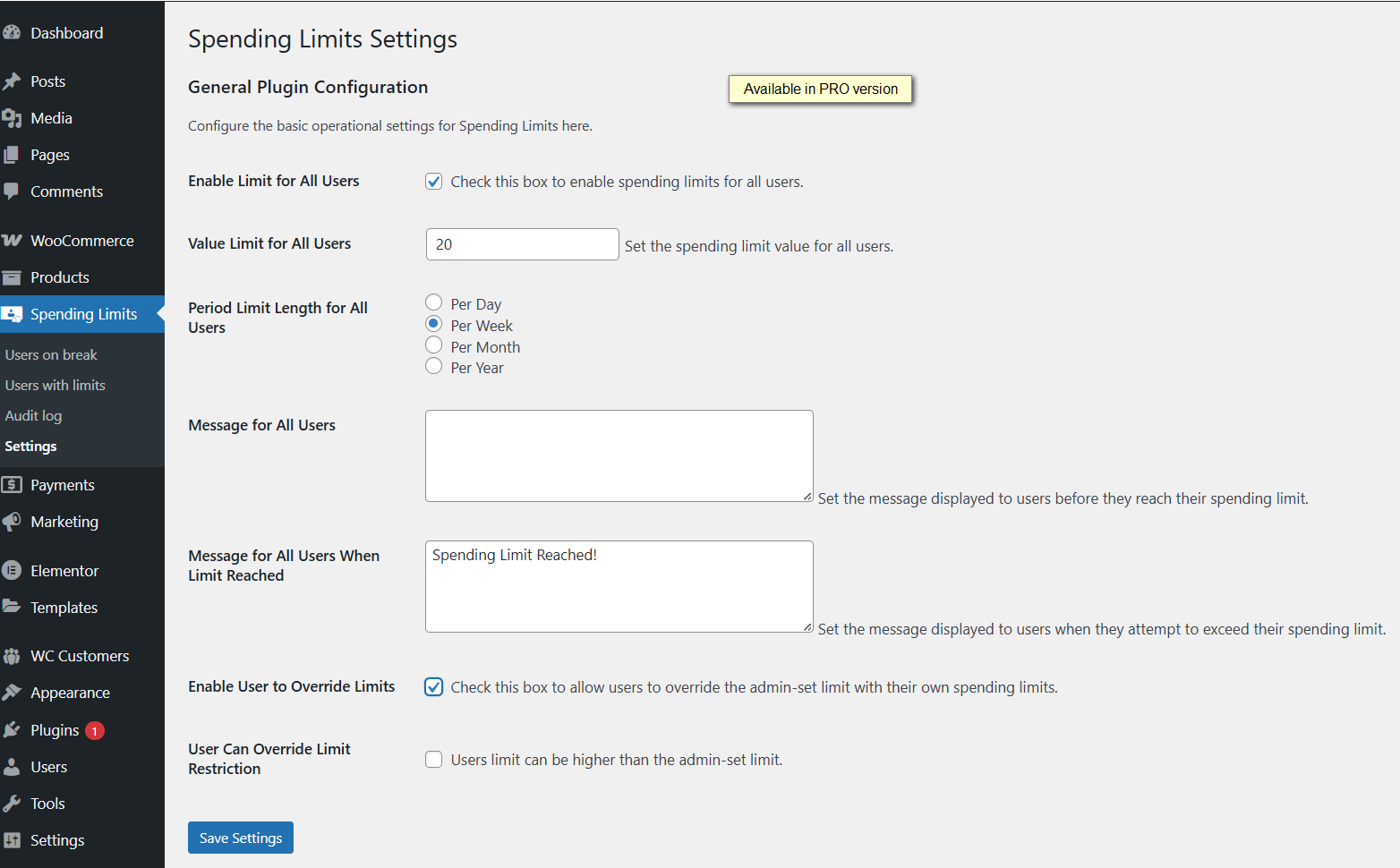
For developers
Is this your plugin? Show off the numbers.
Add a live badge to your site, docs or GitHub README. It updates on its own — no account needed.
Best Spending Limits for WooCommer… alternatives
All budget plugins →
FAQ
Spending Limits for WooCommerce: quick answers
Straight answers, pulled from live WordPress.org data.
Live data from WordPress.org · checked Oct 13, 2026
Is Spending Limits for WooCommerce free?
Yes. Spending Limits for WooCommerce is free to download and use from the official WordPress.org plugin directory.
Is Spending Limits for WooCommerce safe to use in 2026?
Spending Limits for WooCommerce is a solid plugin choice in 2026, with a few things worth checking first. It runs on 30+ sites, is rated 5/5 and was last updated 11 hours ago, and scores 78/100 on our health check.
How many websites use Spending Limits for WooCommerce?
Spending Limits for WooCommerce is active on 30+ WordPress websites and has been downloaded 2,921 times since it launched in January 2025. It was downloaded 165 times in the last 30 days.
Does Spending Limits for WooCommerce work with WordPress 7.1?
Yes. The developer has tested Spending Limits for WooCommerce up to WordPress 7.1.3, the latest release. It requires WordPress 5.0 or newer.
What PHP version does Spending Limits for WooCommerce need?
Spending Limits for WooCommerce requires PHP 7.4 or higher. Most hosts run PHP 8.x today, so it works on any modern WordPress hosting.
When was Spending Limits for WooCommerce last updated?
The latest version, 1.1.12, was released on October 12, 2026 (11 hours ago).
Who makes Spending Limits for WooCommerce?
Spending Limits for WooCommerce is developed and maintained by wpgenie2.
What are the best alternatives to Spending Limits for WooCommerce?
The most popular alternatives to Spending Limits for WooCommerce are Akaunting for WooCommerce (50+ installs), OBOHITO Finance Notebook (<10 installs) and Edel Budget Book (<10 installs).
Powered by PageForge
Want thousands of pages that rank like these? Build them in an afternoon.
This directory runs on the same engine as PageForge. Turn any spreadsheet, CSV or API into thousands of fast, SEO-ready WordPress pages — with schema, internal links and AI-written copy baked in.
- CSV, Google Sheets & API data sources
- AI content, schema & internal links per page
- Works with Elementor, Gutenberg, Yoast & Rank Math
- Free on WordPress.org — no credit card


