


Pinyin Slugs
Transforms Simplified or Traditional Chinese character titles into Pinyin to create a permalink friendly slug.

Solid choice
Pinyin Slugs is a solid plugin choice in 2026, with a few things worth checking first. It runs on 3K+ sites, is rated 5/5 and was last updated 3 months ago, and scores 73/100 on our health check.
- Tested with the latest WordPress (7.1)
- Momentum — downloads up 16.6% vs the previous 30 days
How does it stack up?
Side-by-side on installs, updates, ratings & support


Daily downloads
Download spikes usually follow a new release — each site that auto-updates counts as a download.
Rankings
Where Pinyin Slugs stands todayWordPress.org search rankings
Live position in the plugin search, top 100| Keyword | Position |
|---|---|
| chinese | #14 |
| mandarin | #1 |
| permalinks | #37 |
| pinyin | #1 |
| slugs | #1 |
Version adoption
Share of active sites per release.
Rating breakdown
★★★★★★★★★★ 5 from 8 reviews
About Pinyin Slugs
From the official readme · v2.3.9Description
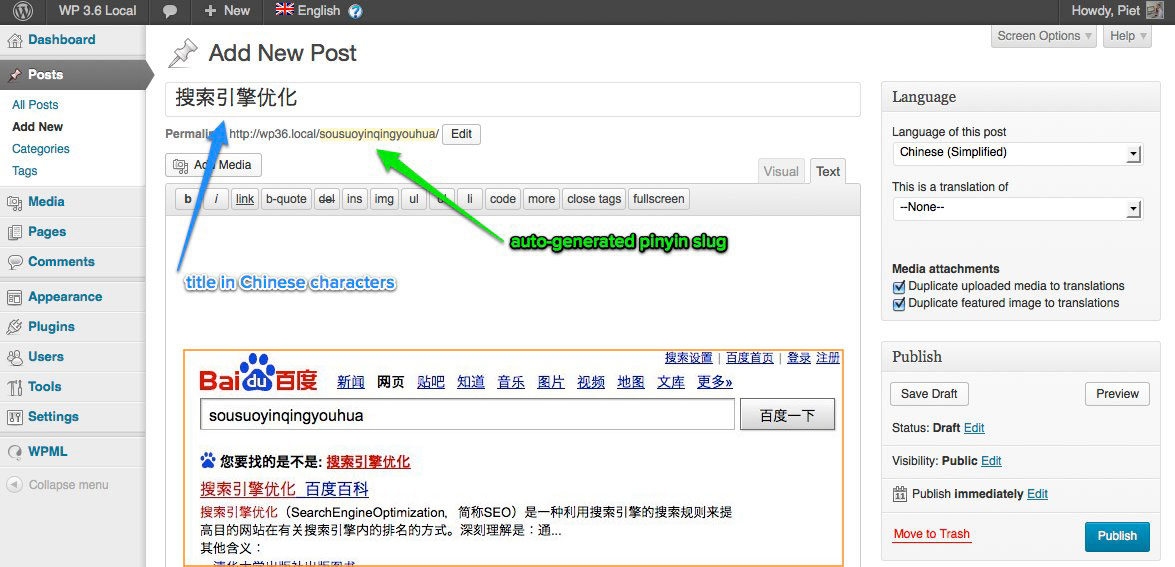
Chinese characters don’t come out good in permalinks. Without the Pinyin Slugs plugin activated, the example post I made for the screenshot will get a slug like this: %e6%90%9c%e7%b4%a2%e5%bc%95%e6%93%8e%e4%bc%98%e5%8c%96. With the plugin the slug automatically becomes sousuoyinqingyouhua.
Search engines such as Baidu cannot make much of the first slug, but they can handle pinyin perfectly, especially when it is written as one long string without hyphens or underscores.
It is possible to limit the amount of characters in the slug. The default is 100, which should be plenty for most.
The Pinyin Slugs plugin was forked from the Pinyin Permalinks plugin by user xiaole_tao as that project seemed abandoned. There have been many improvements since; read the changelog for details.
I have decided to only support this plugin through Github. Therefore, if you have any questions, need help and/or want to make a feature request, please open an issue over at Github. You can also browse through open and closed issues to find what you are looking for and perhaps even help others.
PLEASE DO NOT POST YOUR ISSUES VIA THE WORDPRESS FORUMS
Thanks for your understanding and cooperation.
WPML Compatible
The Pinyin Slugs plugin has received the WPML Certification of Compatibility and is featured on the WPML website with the article How to Build a WordPress Website in China and Reach an International Audience.
Installation
WordPress
Search for “Pinyin Slugs” and install with the Plugins > Add New back-end page.
… OR …
Follow these steps:
- Download zip file.
- Upload the zip file via the Plugins > Add New > Upload page … OR … unpack and upload with your favorite FTP client to the /plugins/ folder.
- Activate the plugin on the Plugins page.
Done!
Changelog
The settings page URL has changed from ?page=so-pinyin-slugs/so-pinyin-slugs.php to ?page=so-pinyin-slugs. Please update any bookmarks. Your settings are unaffected.
2.3.9
- date: August 18, 2026
- Fixed: Settings link on the Plugins page was conflicting with other plugins
2.3.8
- date: August 16, 2026
- Fixed: replaced
__FILE__with a plain text slug (so-pinyin-slugs) for the settings page, as using__FILE__for menu slugs risks exposing the filesystem structure (Plugin Check warning) - Fixed: updated the Settings link on the Plugins page to match the new page slug
- Improved: the Settings link now hooks into
plugin_action_links_{plugin_file}instead of the globalplugin_action_linksfilter, so the callback no longer runs for every other plugin row - Improved: internationalised the page title and menu title of the settings page
- Improved: removed obsolete hidden
actionandpage_optionsform fields, which are already handled bysettings_fields() - Improved: added a fallback value for the slug length field to prevent a PHP notice when the option is missing
- Fixed: corrected the
forattribute of the Slug Length label so it matches the input’sid - tested up to WP 7.1
2.3.7
- date: January 23, 2026
- fix PHP 8+ warning by aligning pinyin dictionary global variable name issue 31
2.3.6
- date: January 12, 2026
- add escaping functions to output
- tested up to WP 6.9
2.3.5
- date: April 27, 2025
- removed redundant
load_plugin_textdomain()function and increased min required WP version - tested up to WP 6.8
2.3.4
- date: March 11, 2025
- fix issue27 thanks for the PR @yabwee
- tested up to WP 6.7
Screenshots


For developers
Is this your plugin? Show off the numbers.
Add a live badge to your site, docs or GitHub README. It updates on its own — no account needed.
Best Pinyin Slugs alternatives
All chinese plugins →


FAQ
Pinyin Slugs: quick answers
Straight answers, pulled from live WordPress.org data.
Source: WordPress.org
Is Pinyin Slugs free?
Yes. Pinyin Slugs is free to download and use from the official WordPress.org plugin directory.
Is Pinyin Slugs safe to use in 2026?
Pinyin Slugs is a solid plugin choice in 2026, with a few things worth checking first. It runs on 3K+ sites, is rated 5/5 and was last updated 3 months ago, and scores 73/100 on our health check.
How many websites use Pinyin Slugs?
Pinyin Slugs is active on 3K+ WordPress websites and has been downloaded 61,721 times since it launched in August 2013. It was downloaded 746 times in the last 30 days.
Does Pinyin Slugs work with WordPress 7.1?
Yes. The developer has tested Pinyin Slugs up to WordPress 7.1.5, the latest release. It requires WordPress 4.6 or newer.
When was Pinyin Slugs last updated?
The latest version, 2.3.9, was released on August 18, 2026 (3 months ago).
Who makes Pinyin Slugs?
Pinyin Slugs is developed and maintained by Pieter Bos.
What are the best alternatives to Pinyin Slugs?
The most popular alternatives to Pinyin Slugs are AutoHan (200+ installs), TinyMCE Chinese Convert (100+ installs) and WC Checkout For Chinese (100+ installs).
Powered by PageForge
One template and a spreadsheet. A real page for every search.
PageForge turns each row of a CSV into a WordPress page with its own title, URL, SEO fields and schema, built on the layout you already designed. Free on WordPress.org.
- CSV and XLSX, plus Google Sheets on Professional and Enterprise
- Its own title, URL, SEO fields and schema for every page
- Works with the block editor, Elementor, Divi and Avada
- Free on WordPress.org, no credit card