



Order Notifications from Your Phone – SMSMobileAPI
SMS Mobile API – Personalized SMS and Gateway Notifications for Your WooCommerce Store

Consider an alternative
Order Notifications from Your P… shows warning signs in 2026 — compare the alternatives below before installing. It runs on 20+ sites, is rated 3/5 and was last updated 7 months ago, and scores 40/100 on our health check.
- Small user base (20+ active installs)
- Very few reviews so far
- Only tested up to WordPress 6.8 (latest is 7.1)
How does it stack up?
Side-by-side on installs, updates, ratings & support



Daily downloads
Download spikes usually follow a new release — each site that auto-updates counts as a download.
Rankings
Where Order Notifications from Yo… stands todayWordPress.org search rankings
Live position in the plugin search, top 100| Keyword | Position |
|---|---|
| gateway | >100 |
| mobile api | #65 |
| order notifications | >100 |
| sms | >100 |
Version adoption
Share of active sites per release.
Rating breakdown
★★★★★★★★★★ 3 from 2 reviews
About Order Notifications from Your Phone
From the official readme · v2.0.17Description
SMS Mobile API – Personalized SMS and Gateway Notifications for Your WooCommerce Store
Boost your WooCommerce store’s customer communication by sending personalized updates straight from your mobile number or Gateway account. SMS Mobile API enables direct, two-way messaging, keeping your customers informed and engaged through a seamless, interactive experience.
Key Features:
📲 SMS and Gateway from Your Personal Account
Send notifications directly from your personal mobile number or Gateway account. Customers can reply to your messages, enabling real-time, direct communication.
📡 More Ways to Send SMS — Total Flexibility
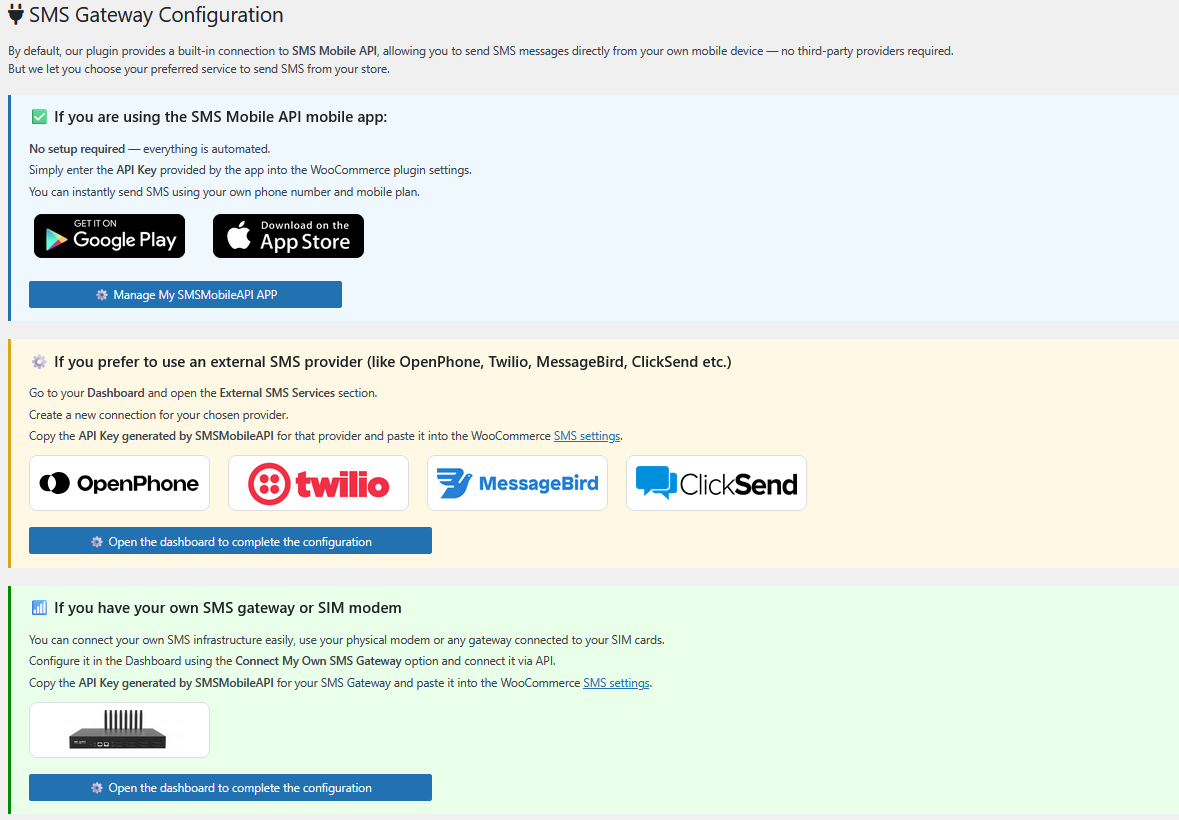
In addition to using your mobile device, you can connect external SMS services like Twilio, MessageBird, ClickSend, and more — or even link your own SMS Gateway using a SIM modem.
Choose the method that best fits your needs and take full control of your SMS delivery.
Use either our mobile-based SMS sending service (SMSMobileAPI) or connect your preferred provider or SMS gateway.
⏳ Real-Time Notifications
Automatically notify your customers via SMS or Gateway when they place an order, when their order status changes, or upon completion of their purchase.
🎯 Personalized Messages
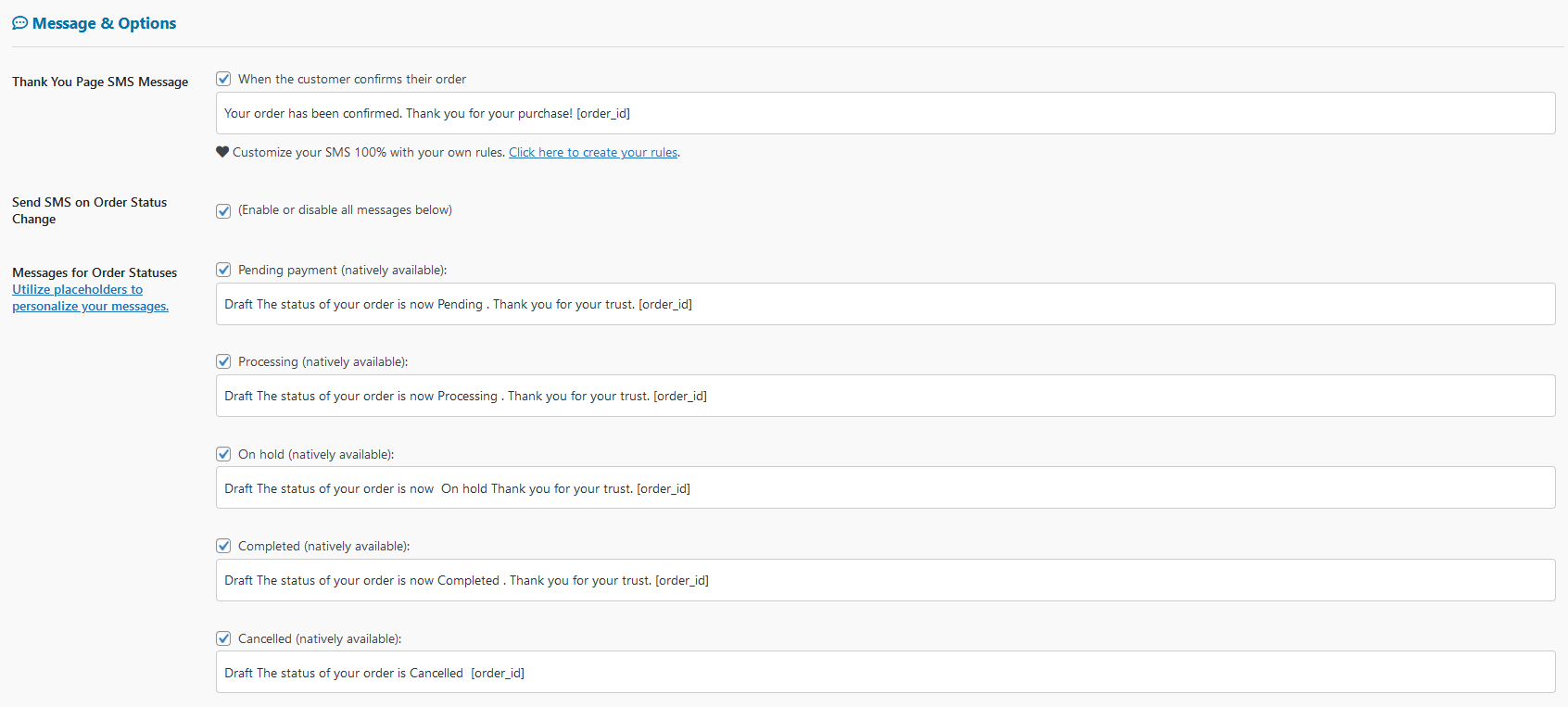
Customize SMS and Gateway templates with order details and other relevant information, ensuring your customers receive tailored and timely updates.
📦 Flexible Delivery Options
Choose to send an SMS, a Gateway message, or both simultaneously for maximum reach and engagement.
💬 Direct Customer Interaction
Because messages are sent from your personal accounts, customers can respond directly to you, creating a seamless and interactive communication channel.
🛠️ Easy Integration
Simple setup and configuration with WooCommerce, with no need for complex coding or third-party services.
📊 Comprehensive Logging
Track all SMS and Gateway activities with detailed logs, helping you monitor successful deliveries and troubleshoot any issues.
🔒 Secure and Private
Your data and customer information remain secure, with all messages sent directly from your phone or Gateway account, ensuring full control and privacy.
✨ Advanced Custom Rules & Conditions for SMS & Gateway
💡 100% Personalized SMS & Gateway Notifications!
Take full control of your messaging by defining custom rules based on your WooCommerce order details. No more generic notifications – send the right message at the right time with conditions tailored to each order!
✔ Rule-Based Messaging System – Create unlimited rules with flexible conditions.
✔ Trigger on Order Status Changes – Customize notifications for processing, completed, refunded orders, and more!
✔ Dynamic Conditions – Use customer email, order total, shipping method, and other order details to trigger messages.
✔ Multiple Conditions Per Rule – Example: “Order Total > $100” AND “Shipping Method = Express”.
✔ Automated Message Sending – Messages are only sent when all defined conditions are met.
✔ Real-Time Execution – Your custom rules apply instantly when an order status is updated.
✔ Smart Logging – Keep track of rule execution and message delivery in detailed logs.
🎯 With this feature, your SMS notifications are not just automated – they are fully tailored to each customer’s order!
📌 Additional Features:
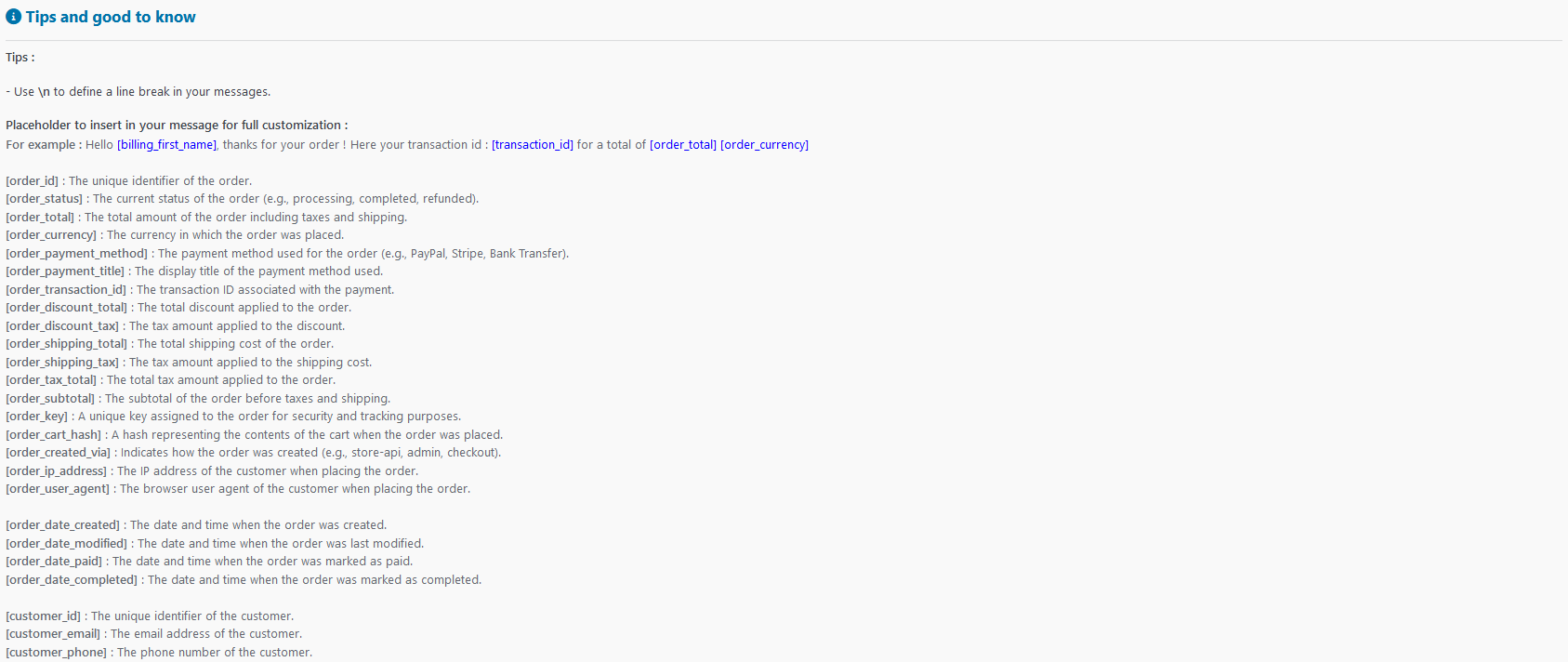
✅ Over 50 Placeholders for Maximum Personalization
Insert dynamic data like order ID, customer name, total price, shipping details, and more to craft fully customized SMS messages.
✅ 🛎️ Dedicated Online Support
Access direct support via the plugin for seamless assistance whenever you need help.
✅ 🔍 Order Analysis for Better Rule Creation
Use the Check Order feature to analyze any existing order and understand its data structure, making it easier to set up precise rules.
Why Choose SMS Mobile API?
In today’s digital world, building strong relationships with your customers requires timely and personalized communication. SMS Mobile API allows you to engage your customers instantly by sending SMS and Gateway notifications directly from your personal accounts. Whether it’s order confirmations, status updates, or personalized thank-you messages, this plugin ensures your communication is not only effective but also direct and personal, with the added benefit of allowing your customers to reply to you instantly.
How It Works:
- Install and Activate: Download the plugin and activate it through the WordPress admin dashboard.
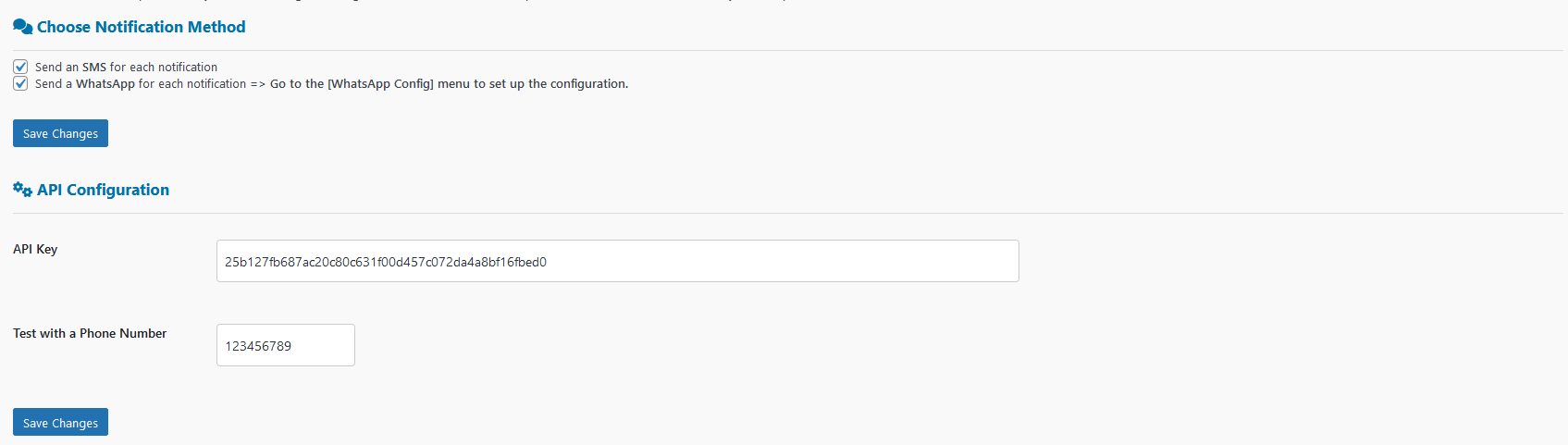
- Configure Your Settings: Enter your API key, set up your mobile number, and customize your SMS templates.
- Start Sending: With everything configured, SMS Mobile API will automatically send notifications based on your settings, directly to your customers’ phones from your personal mobile number.
Get Started Today!
Transform your WooCommerce store’s customer communication with SMS Mobile API. Keep your customers informed, engage with them directly, and build stronger, more personal relationships—all through the power of SMS sent from your own mobile phone.
Third-Party Services and Data Disclosure
This plugin relies on the external service SMSMobileAPI to send SMS notifications. The plugin connects to the SMSMobileAPI platform to deliver SMS messages to the phone numbers provided by the user via WooCommerce.
What data is sent to SMSMobileAPI?
- Phone numbers: The phone number associated with the order (either billing or shipping phone number).
- Order details: The message template includes the order ID, and in some cases, details related to the order status.
- API key: The API key provided by the user during the plugin setup.
The data sent to SMSMobileAPI is required for the SMS delivery process. No additional data is sent beyond what is necessary for sending the SMS.
Purpose of the connection:
The connection to SMSMobileAPI is established for the purpose of sending SMS notifications related to WooCommerce orders. This may include, but is not limited to, SMS messages confirming order receipt, notifying customers of changes in order status, and sending test SMS messages to verify API connectivity.
External Service Links:
- Service: SMSMobileAPI
- Gateway Service: SMSMobileAPI Gateway
- Terms of Service: SMSMobileAPI Terms of Use
- Privacy Policy: SMSMobileAPI Privacy Policy
Please be aware that by using this plugin, data (including phone numbers and order details) will be transmitted to the SMSMobileAPI service for the purpose of delivering SMS notifications. Ensure that this is in compliance with your local data protection laws.
How to Disable Notification :
If you do not wish to send SMS notifications or connect with SMSMobileAPI, you can disable the SMS features in the plugin settings by not entering an API key or unchecking the “Send SMS on Order Confirmation” and “Send SMS on Order Status Change” options.
Installation
Installation Process
Getting started with SMS Mobile API is quick and easy. Follow these steps to integrate and start sending SMS notifications from your personal mobile number:
-
Download and Install the Plugin:
- Download the SMS Mobile API plugin and install it through the WordPress admin dashboard.
- Activate the plugin to begin configuring your settings.
-
Download the Official Mobile App:
- Head over to Google Play or Apple Store and download the official Sms Mobile API mobile app.
- Install the app on your mobile phone.
-
Generate Your API Key:
- Once the mobile app is installed, open it, and follow the prompts to generate your unique API key.
- This key is essential for linking your WooCommerce store with your mobile phone.
-
Enter the API Key in the Plugin:
- Return to your WordPress dashboard and navigate to the SMS Mobile API settings page.
- Enter the API key provided by the mobile app into the designated field in the plugin settings.
- Save your settings to complete the integration.
-
Start Sending SMS:
- With the plugin and mobile app linked, your WooCommerce store is now ready to send SMS notifications directly from your mobile phone.
- Every time a customer places an order or when their order status changes, a personalized SMS will be sent from your mobile number, allowing them to reply directly to you.
-
Start Sending Gateway:
- To enable Gateway notifications, log in to the SMSMobileAPI dashboard and confirm the authentication of your Gateway account.
- Simply scan the visible QR code in the dashboard to securely link your Gateway account with SMSMobileAPI.
- This is a one-time operation designed to ensure secure communication between Gateway and SMSMobileAPI.
- Once authenticated, your WooCommerce store can start sending personalized Gateway messages directly to your customers.
By following these steps, you can quickly and easily set up SMS Mobile API, ensuring seamless and direct communication with your customers through your personal mobile device.
Changelog
2.0.17 – 2026-03-17
- File updates were made following internal testing.
2.0.16 – 2025-07-09
- Strengthened data handling across the entire plugin to prevent potential injection vulnerabilities.
2.0.15 – 2025-07-08
- Updated plugin codebase to ensure all function, class, constant, namespace, and option names use unique and consistent prefixes, avoiding common or reserved prefixes to prevent conflicts with other plugins and WordPress core.
- Refactored all AJAX hooks, functions, and class names to include the custom plugin prefix for improved compatibility and maintainability.
- Revised plugin metadata and readme to reduce keyword stuffing by shortening plugin name and removing excessive keyword repetition, in compliance with WordPress.org guidelines.
2.0.14 – 2025-07-08
- Plugin updated and fully compliant with WordPress guidelines following the official plugin review process.
- Improved security by adding nonce verification and proper sanitization/escaping across all inputs and outputs.
- Fixed multiple code quality warnings reported by WordPress Plugin Check to ensure better stability and security.
- Enhanced codebase to meet WordPress.org plugin repository requirements and best practices.
2.0.13 – 2025-07-07
- Removal of brand, logo and other elements at the company’s request.
2.0.12 – 2025-07-03
- QuickWizard: Debug for users running older versions of PHP.
- QuickWizard: Simplified the process for testing TEST messages for SMS and Gateway; now two separate buttons are available to independently test each sending channel (SMS or Gateway).
- QuickWizard: The log of test messages is now available in the sending history.
- Rules: Debugged and stabilized the module; it is now stable according to the plugin version you are using.
- Rules management : debug for users of user using older version of PHP
Screenshots


For developers
Is this your plugin? Show off the numbers.
Add a live badge to your site, docs or GitHub README. It updates on its own — no account needed.
Best Order Notifications from Your… alternatives
All gateway plugins →





FAQ
Order Notifications from Your Phone: quick answers
Straight answers, pulled from live WordPress.org data.
Live data from WordPress.org · checked Oct 4, 2026
Is Order Notifications from Your P… free?
Yes. Order Notifications from Your P… is free to download and use from the official WordPress.org plugin directory.
Is Order Notifications from Your P… safe to use in 2026?
Order Notifications from Your P… shows warning signs in 2026 — compare the alternatives below before installing. It runs on 20+ sites, is rated 3/5 and was last updated 7 months ago, and scores 40/100 on our health check.
How many websites use Order Notifications from Your P…?
Order Notifications from Your P… is active on 20+ WordPress websites and has been downloaded 17,908 times since it launched in September 2024. It was downloaded 199 times in the last 30 days.
Does Order Notifications from Your P… work with WordPress 7.1?
Order Notifications from Your P… is officially tested up to WordPress 6.8.10, while the latest release is 7.1.2. It may still work, but try it on a staging site first.
What PHP version does Order Notifications from Your P… need?
Order Notifications from Your P… requires PHP 5.4 or higher. Most hosts run PHP 8.x today, so it works on any modern WordPress hosting.
When was Order Notifications from Your P… last updated?
The latest version, 2.0.17, was released on March 17, 2026 (7 months ago).
Who makes Order Notifications from Your P…?
Order Notifications from Your P… is developed and maintained by smsmobileapi.
What are the best alternatives to Order Notifications from Your P…?
The most popular alternatives to Order Notifications from Your P… are Payment Gateway Based Fees… (30K+ installs), Easy PayPal & Stripe Buy No… (10K+ installs) and ЮKassa для WooCommerce (9K+ installs).
Powered by PageForge
Want thousands of pages that rank like these? Build them in an afternoon.
This directory runs on the same engine as PageForge. Turn any spreadsheet, CSV or API into thousands of fast, SEO-ready WordPress pages — with schema, internal links and AI-written copy baked in.
- CSV, Google Sheets & API data sources
- AI content, schema & internal links per page
- Works with Elementor, Gutenberg, Yoast & Rank Math
- Free on WordPress.org — no credit card


