



Arts Smooth Scrolling for Elementor
Smooth Scrolling adds Lenis-powered momentum scrolling to your Elementor site: the page glides to a stop instead of snapping, in-page anchor links animate to their target, and GSAP’s ScrollTrigger stays in sync…

Solid choice
Arts Smooth Scrolling for Eleme… is a solid plugin choice in 2026, with a few things worth checking first. It runs on 40+ sites and was last updated 5 days ago, and scores 67/100 on our health check.
- Actively developed — last update 5 days ago
- Tested with the latest WordPress (7.1)
- Small user base (40+ active installs)
- Very few reviews so far
How does it stack up?
Side-by-side on installs, updates, ratings & support



Daily downloads
Download spikes usually follow a new release — each site that auto-updates counts as a download.
Rankings
Where Arts Smooth Scrolling for E… stands todayWordPress.org search rankings
Live position in the plugin search, top 100| Keyword | Position |
|---|---|
| elementor | >100 |
| lenis | #4 |
| momentum scrolling | #1 |
| scrolling | #52 |
| smooth scroll | #42 |
Version adoption
Share of active sites per release.
About Arts Smooth Scrolling for Elementor
From the official readme · v1.0.4Description
Smooth Scrolling adds Lenis-powered momentum scrolling to your Elementor site: the page glides to a stop instead of snapping, in-page anchor links animate to their target, and GSAP’s ScrollTrigger stays in sync automatically when it’s on the page.
It works the moment you activate it — there’s nothing to switch on. Tune the duration and easing to taste, and the rest of the site keeps working as before — Elementor Sticky, dynamic content, everything.
Scrolling is powered by Lenis (MIT) by darkroom.engineering, compiled into the plugin’s own bundle.
What it does
- Momentum scrolling. The page scrolls through Lenis instead of the browser’s native scroll, with a duration and easing curve set from Site Settings.
- Anchor links. Clicking a same-page
#anchorlink (or a bare#) scrolls smoothly to the target, using a slightly snappier easing than the main scroll. - GSAP ScrollTrigger sync. If GSAP and ScrollTrigger are already on the page, the engine detects them, drives its render loop off GSAP’s ticker instead of a separate animation-frame loop, and keeps ScrollTrigger’s cached scroll position current on every frame.
- Disable on touch devices. On by default: phones and tablets never download the engine, since there’s no pointer-driven scrolling to smooth there.
Configuration
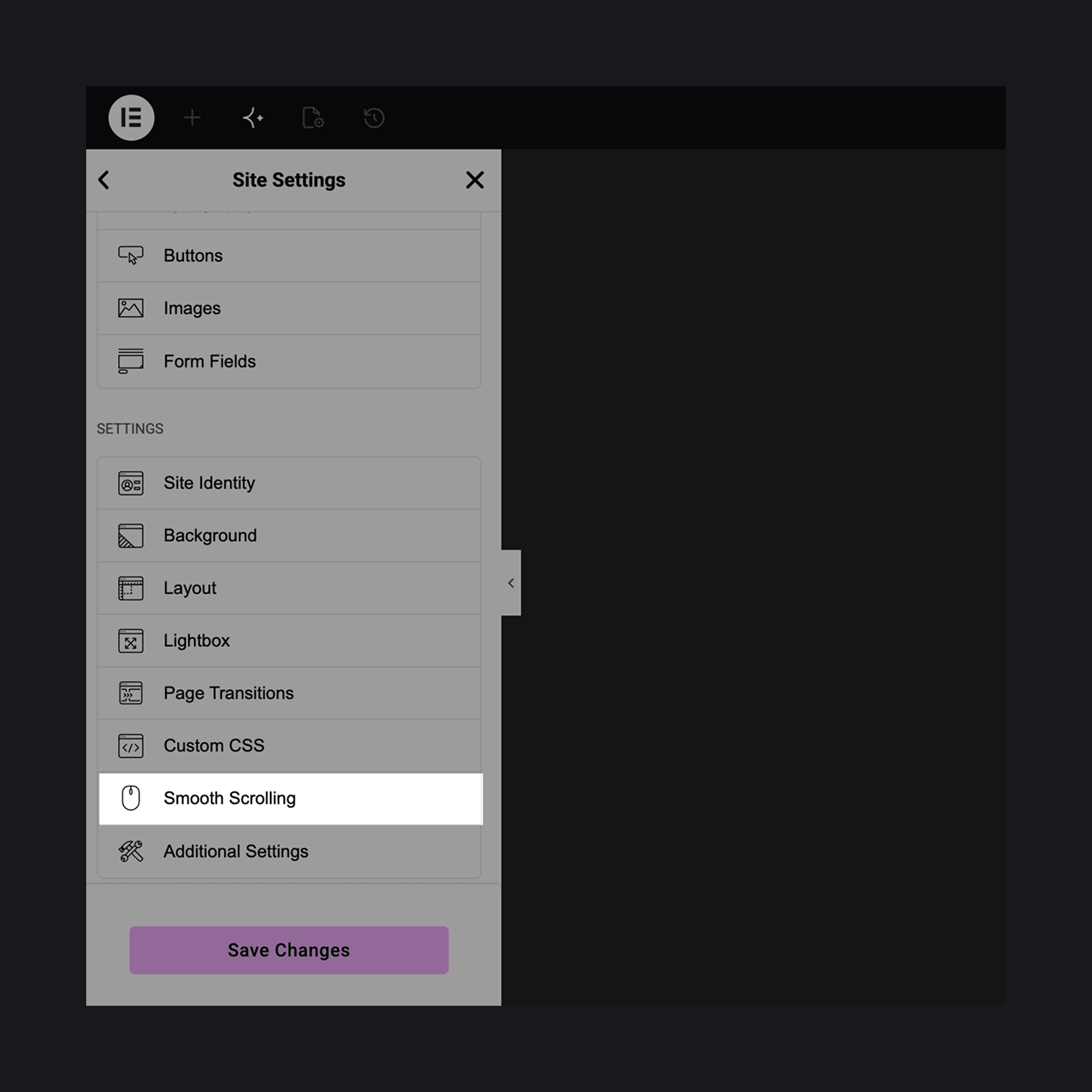
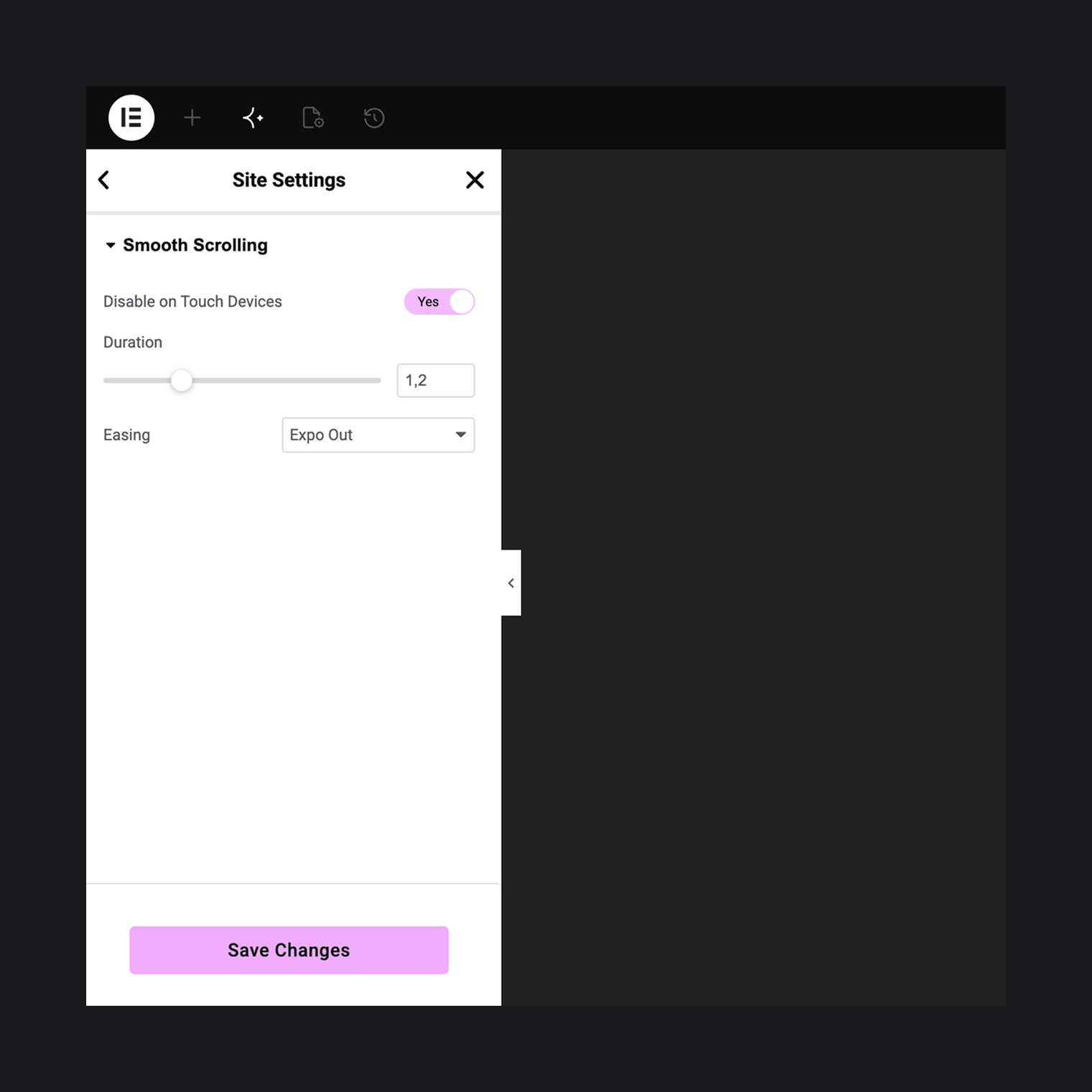
Everything lives in one tab: Elementor → Site Settings → Smooth Scrolling. Duration, easing (Expo Out or Linear), and the disable-on-touch switch. Changes apply live in the editor preview.
Footprint
A small inline loader sets the page’s scroll state synchronously and fetches the engine bundle itself — nothing is enqueued. On a device where Disable on Touch Devices applies, that fetch never happens.
Installation
- Install and activate Elementor (the free version is fine).
- Install and activate Arts Smooth Scrolling for Elementor.
- Browse your site. Smooth scrolling is already running. To tune duration and easing, open Elementor’s Site Settings and find the Smooth Scrolling tab.
Frequently asked questions
How do I access the Lenis instance from JavaScript?
window.artsSmoothScrolling.ready is a promise that resolves once the engine has started. window.artsSmoothScrolling.lenis is a getter for the live Lenis instance, null while the engine isn’t running.
Does it work with GSAP and ScrollTrigger?
Yes, automatically. If window.gsap is present, the engine drives Lenis off GSAP’s ticker (added with priority, so it runs ahead of GSAP’s own tweens) instead of its own animation-frame loop, and calls gsap.ticker.lagSmoothing(0) once — the standard recipe for pairing GSAP with a smooth-scroll library. That call changes a global GSAP setting and is not reverted if smooth scrolling is later disabled.
What happens when I click a link like /#pricing on a page that isn’t the homepage?
It navigates to the homepage and then scrolls to the pricing anchor there — the same thing that link does in any browser without this plugin. There’s no trailing-slash normalization in the same-page check, so a link is only treated as pointing at the current page when its URL matches exactly.
Does it affect Elementor’s Sticky elements?
Elementor’s Sticky effect has its own “Anchor Offset” (sticky_anchor_link_offset) setting for compensating anchor-link scroll targets under a sticky header. That offset isn’t applied while smooth scrolling is active, since anchor scrolling then goes through Lenis rather than Elementor’s native scroll handling.
Does it load anything on touch devices?
Not when Disable on Touch Devices is on, which is the default. The inline loader checks a media query before ever requesting the engine bundle, so phones and tablets download nothing.
How do I turn it off?
Deactivate the plugin, or for conditional control use the arts_smooth_scrolling/enabled PHP filter.
Does it work with AJAX page-transition plugins (Barba.js-based themes, etc.)?
Not certified yet with 1.0.0. The engine is designed to persist across such transitions rather than re-initialize on every page swap, but this hasn’t been tested against specific transitions plugins. If you run into issues, please report them.
Changelog
1.0.4
- fixed: links to panels inside Arts Horizontal Scroll sections keep working after that plugin’s update.
1.0.3
- fixed: anchor links that tabs, menus or other scripts have already handled are no longer scrolled a second time.
- fixed: links to panels inside Arts Horizontal Scroll sections now scroll to the right panel.
1.0.2
- improved: updated the Lenis smooth-scrolling engine.
1.0.1
- improved: confirmed compatibility with WordPress 7.1.
1.0.0
Initial release.
Screenshots
For developers
Is this your plugin? Show off the numbers.
Add a live badge to your site, docs or GitHub README. It updates on its own — no account needed.
Best Arts Smooth Scrolling for Ele… alternatives
All elementor plugins →





FAQ
Arts Smooth Scrolling for Elementor: quick answers
Straight answers, pulled from live WordPress.org data.
Live data from WordPress.org · checked Oct 17, 2026
Is Arts Smooth Scrolling for Eleme… free?
Yes. Arts Smooth Scrolling for Eleme… is free to download and use from the official WordPress.org plugin directory.
Is Arts Smooth Scrolling for Eleme… safe to use in 2026?
Arts Smooth Scrolling for Eleme… is a solid plugin choice in 2026, with a few things worth checking first. It runs on 40+ sites and was last updated 5 days ago, and scores 67/100 on our health check.
How many websites use Arts Smooth Scrolling for Eleme…?
Arts Smooth Scrolling for Eleme… is active on 40+ WordPress websites and has been downloaded 562 times since it launched in August 2026. It was downloaded 347 times in the last 30 days.
Does Arts Smooth Scrolling for Eleme… work with WordPress 7.1?
Yes. The developer has tested Arts Smooth Scrolling for Eleme… up to WordPress 7.1.3, the latest release. It requires WordPress 6.2 or newer.
What PHP version does Arts Smooth Scrolling for Eleme… need?
Arts Smooth Scrolling for Eleme… requires PHP 8.0 or higher. Most hosts run PHP 8.x today, so it works on any modern WordPress hosting.
When was Arts Smooth Scrolling for Eleme… last updated?
The latest version, 1.0.4, was released on October 13, 2026 (5 days ago).
Who makes Arts Smooth Scrolling for Eleme…?
Arts Smooth Scrolling for Eleme… is developed and maintained by Artem Semkin.
What are the best alternatives to Arts Smooth Scrolling for Eleme…?
The most popular alternatives to Arts Smooth Scrolling for Eleme… are Ultimate Addons for Element… (2M+ installs), Essential Addons for Elemen… (1M+ installs) and Royal Addons for Elementor (600K+ installs).
Powered by PageForge
Want thousands of pages that rank like these? Build them in an afternoon.
This directory runs on the same engine as PageForge. Turn any spreadsheet, CSV or API into thousands of fast, SEO-ready WordPress pages — with schema, internal links and AI-written copy baked in.
- CSV, Google Sheets & API data sources
- AI content, schema & internal links per page
- Works with Elementor, Gutenberg, Yoast & Rank Math
- Free on WordPress.org — no credit card


