



SmallPict – Next-Gen Image Optimization, Cloud Storage Offload & Global Edge CDN
Automate WebP & AVIF compression, liberate hosting disk space with cloud offload, and accelerate Core Web Vitals via Global Anycast Edge CDN.

Use with caution
SmallPict works, but test it on a staging site before relying on it in 2026. Was last updated 21 hours ago, and scores 52/100 on our health check.
- Actively developed — last update 21 hours ago
- Small user base (<10 active installs)
- Very few reviews so far
- Only tested up to WordPress 6.9 (latest is 7.1)
How does it stack up?
Side-by-side on installs, updates, ratings & support



Daily downloads
Download spikes usually follow a new release — each site that auto-updates counts as a download.
Rankings
Where SmallPict stands todayWordPress.org search rankings
Live position in the plugin search, top 100| Keyword | Position |
|---|---|
| AVIF | >100 |
| compress images | >100 |
| image optimizer | >100 |
| offload media | #93 |
| webp | >100 |
About SmallPict
From the official readme · v1.2.5Description
🚀 The Complete Media Performance Platform for High-Growth WordPress Sites
Page speed is directly tied to revenue, conversion rates, and SEO visibility. According to Google, over 60% of average web page weight comes from images, making unoptimized media the single biggest contributor to failing Core Web Vitals (Largest Contentful Paint – LCP), sluggish mobile experiences, and ballooning hosting storage costs.
SmallPict is an enterprise-grade, 100% managed Cloud Media Acceleration suite engineered specifically for modern WordPress sites, WooCommerce stores, digital agencies, and high-traffic publishers.
Unlike traditional image optimizer plugins that consume your server’s CPU and memory, SmallPict processes every heavy task in a dedicated, high-speed cloud infrastructure. We unify next-generation compression (WebP & AVIF), automated cloud storage offload (freeing up hosting disk space), and Global Anycast Edge CDN delivery into one seamless, zero-maintenance workflow.
Official Website | Documentation & API | Pricing & Plans
⚡ Why High-Growth Sites & Agencies Choose SmallPict
- Zero Server Overhead: Image processing, format conversions, and animation transcoding run entirely on high-speed cloud infrastructure. No server CPU spikes, no memory exhaustion, and no hosting slowdowns.
- Next-Gen Formats (WebP & AVIF): Automatically transcode heavy JPEGs and PNGs to ultra-efficient WebP and cutting-edge AVIF formats, achieving up to 85-90% file size reduction while preserving crisp visual quality.
- Hosting Disk Space Liberation: Running low on expensive server storage? SmallPict safely offloads your media library (originals and thumbnails) to cloud storage and frees up valuable server disk space.
- Zero-Configuration Global Edge CDN: Deliver your media worldwide through a high-performance Anycast Edge Network with HTTP/3, Brotli, and smart edge caching for sub-second load times globally.
- Multi-Format Animation Transcoding: Heavy GIFs slow down websites. SmallPict automatically converts animated GIFs and other animated sequences into ultra-lightweight animated WebP files with dramatic weight savings.
- Frictionless Onboarding: Connect your website in seconds using simple, secure email verification. No complex third-party configurations or manual API setup needed.
- Rock-Solid Safety: Built with strict fail-safe mechanisms so your local files remain completely safe and uploads are never disrupted.
💼 Key Performance Pillars
1. Intelligent Cloud Compression (WebP & AVIF)
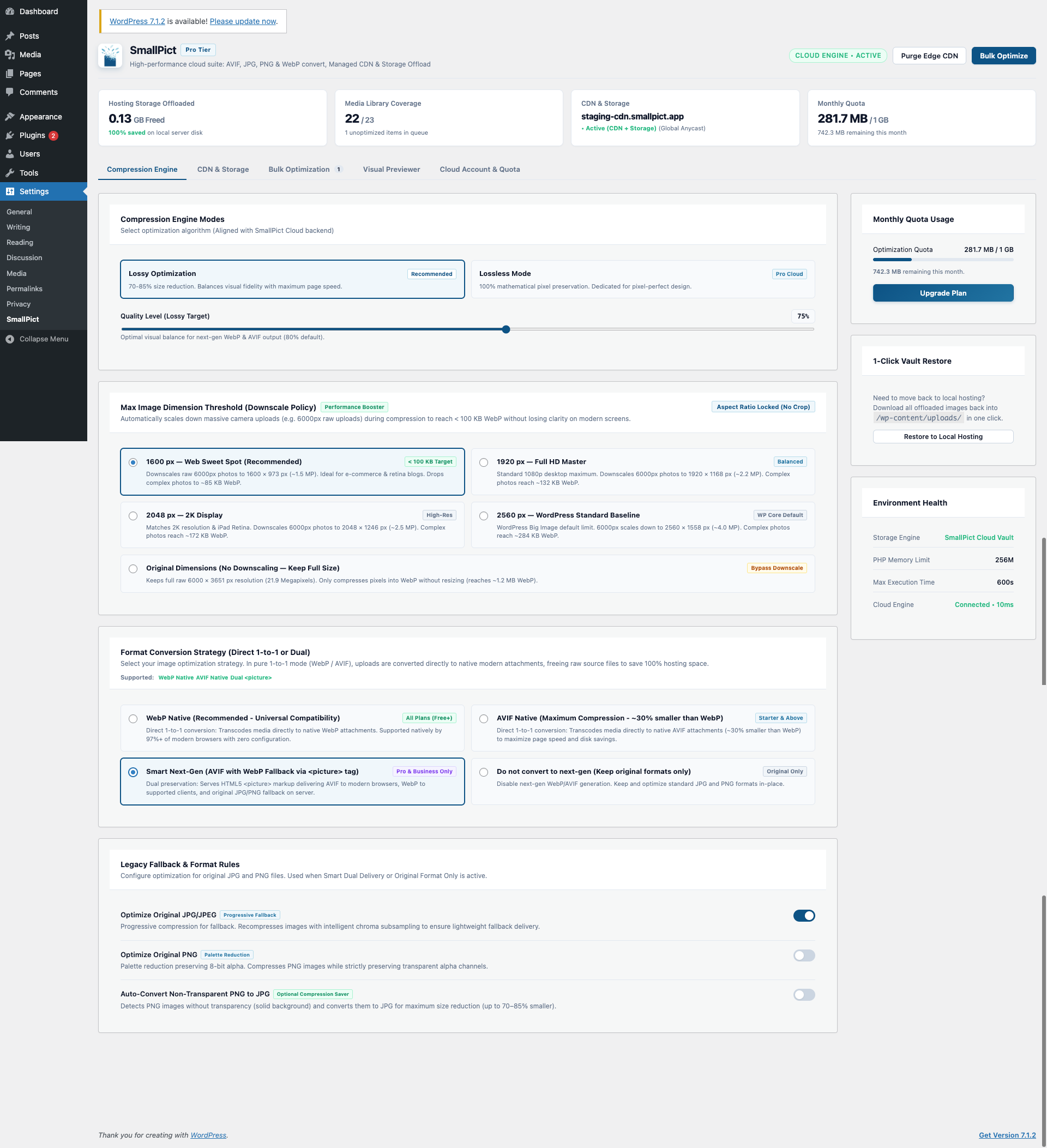
SmallPict delivers maximum file size reduction while preserving visual fidelity. Choose between high-efficiency Lossy compression for maximum speed or pixel-perfect Lossless mode for photography and high-end portfolios. Compatible browsers automatically receive modern WebP or AVIF formats with automatic fallback for older browsers.
2. Cloud Storage Offload & Server Disk Recovery
Media libraries can quickly expand to tens of gigabytes, overwhelming hosting backups and triggering costly storage upgrades. SmallPict offloads your media assets into secure cloud storage and reclaims your local disk space, while ensuring your WordPress Media Library, cropping tools, and thumbnails continue functioning smoothly.
3. Global Anycast Edge CDN
Every millisecond counts. SmallPict serves offloaded assets from a global edge network spanning hundreds of worldwide locations, bringing media closer to your visitors for lightning-fast First Contentful Paint (FCP) and smooth browsing experiences.
4. Animation Optimization
Animated GIFs are often tens of megabytes in size. SmallPict automatically detects and optimizes animated media into modern, lightweight animated WebP, delivering silky-smooth motion at a fraction of the bandwidth.
5. Measurable SEO & Core Web Vitals Impact
By drastically reducing page payload and serving assets from edge locations, SmallPict helps your site improve its Largest Contentful Paint (LCP) and Cumulative Layout Shift (CLS), unlocking higher Google PageSpeed scores and better search rankings.
🌟 Free vs. Pro: Choose What Fits Your Growth
SmallPict is designed to give every WordPress website an instant speed boost right out of the box, with flexible upgrades available as your traffic and media library expand.
-
SmallPict Free — Fast & Lightweight (Forever Free):
- Automatic image compression for all newly uploaded images
- Next-gen WebP conversion for faster page loads and better Google PageSpeed scores
- 100% cloud-powered processing with zero CPU or memory load on your web hosting
- Perfect for personal blogs, portfolios, and growing websites
-
SmallPict Pro & Higher Plans — Advanced Performance & Storage Freedom:
- Unlimited Connected Websites: Share your plan quota across all your client and personal websites
- Next-Gen AVIF & WebP Delivery: Deliver the most modern, lightweight formats for maximum bandwidth savings
- Free Up Hosting Disk Space: Safely offload media to cloud storage and reclaim local server disk capacity
- Global Anycast Edge CDN: Serve images lightning-fast from edge servers closest to your visitors worldwide
- Animated Media Optimization: Convert heavy animated GIFs into smooth, lightweight animated WebP
- Priority Cloud Processing: Fast-track your optimizations through dedicated high-speed cloud queues
👉 View Full Plan Comparison & Pricing on SmallPict.app
🔒 Privacy & Security
- Secure Cloud Processing: Media files are transferred over encrypted connections and processed in secure cloud infrastructure. In standard mode, files are returned immediately to your WordPress site and wiped from processing memory.
- Protected Storage: For users utilizing Cloud Storage Offload, assets are stored in isolated, encrypted cloud storage environments.
- No Content Monetization: We never track, inspect, sell, or monetize your media content.
External services
SmallPict connects securely to the SmallPict Cloud Platform to perform cloud-based image processing, account quota management, and global edge delivery.
- API Endpoints:
https://api.smallpict.app/v1(Service communication, authentication, and job processing) - CDN Endpoint:
https://cdn.smallpict.app(Global Anycast Edge CDN delivery for offloaded media assets) - Data Transmission: Media files and configuration preferences are securely transmitted over TLS-encrypted connections.
- Storage & Retention: Standard optimized images are processed in volatile memory and returned immediately. Offloaded media assets are stored securely in cloud storage.
- Terms of Service: https://smallpict.app/en/terms
- Privacy Policy: https://smallpict.app/en/privacy
Installation
Method 1: WordPress Admin Search (Recommended)
- In your WordPress admin dashboard, navigate to Plugins > Add New.
- Search for
SmallPictin the search box. - Click Install Now, then click Activate.
- Enter your email on the setup screen to receive a secure verification code.
- Enter the code to connect your site and start optimizing immediately.
Method 2: Manual Zip Upload
- Download the latest
smallpict.zippackage from SmallPict.app or WordPress.org. - In your WordPress admin dashboard, navigate to Plugins > Add New > Upload Plugin.
- Choose the downloaded file and click Install Now.
- Activate the plugin and follow the quick setup screen.
Method 3: WP-CLI
- Run
wp plugin install smallpict --activate - Navigate to Settings > SmallPict in your WordPress dashboard to connect your workspace.
Frequently asked questions
How does SmallPict protect my web server from high load?
Traditional plugins process images on your hosting server, consuming CPU and RAM that should be reserved for your visitors. SmallPict handles conversions on high-speed cloud infrastructure, keeping your server fast and responsive.
How does Cloud Storage Offload free my server disk space?
SmallPict securely stores your media assets in high-performance cloud storage and safely frees up local upload space on your hosting server once cloud storage is confirmed. This keeps your server lean and avoids expensive hosting storage upgrades.
What prevents broken images if a cloud transfer fails?
SmallPict includes built-in safety controls. If an upload cannot be fully completed, the process stops immediately and your local files remain completely intact, eliminating the risk of missing images or broken links.
Do I need a third-party cloud storage account or custom DNS records?
No. SmallPict provides a fully managed service. You do not need to register separate cloud accounts, manage access credentials, or configure custom DNS records. Cloud storage and global edge delivery work out of the box with 1 click.
How are animated images handled on the Free plan?
On the Free plan, animated images are safely preserved in their original format in your Media Library without errors or interrupted uploads.
Can I use one subscription across multiple WordPress sites?
Yes! Starter, Pro, and Business plans feature Unlimited Connected Websites with Shared Quota Pooling, allowing you to connect client websites or a network of sites to one account.
What happens if I reach my monthly quota?
If your site reaches its monthly optimization quota, subsequent uploads simply save as standard WordPress media without optimization. All previously optimized images and cloud assets continue serving normally without interruption. Quotas reset automatically at the start of your billing cycle.
Is SmallPict compatible with WooCommerce and page builders?
Yes! SmallPict integrates directly into standard WordPress media handling, making it fully compatible with WooCommerce product galleries, Elementor, Divi, Gutenberg, Bricks, and all custom themes.
Changelog
1.2.5
- New: HEIC/HEIF photo support — iPhone and Android camera photos are now converted through SmallPict into web-ready formats (WebP, AVIF, or JPEG) based on your format strategy.
- New: Clear HEIC upload guidance — replaced the generic WordPress HEIC warning with a message explaining the actual cause (WordPress older than 6.7 or the hosting server’s Imagick lacking HEIC support).
- Improvement: Real image format detection from file contents, so HEIC photos already converted to JPEG by WordPress 6.7+ are no longer skipped.
- Improvement: A JPEG fallback is always generated for HEIC photos in Dual and Disabled modes, since browsers cannot display HEIC.
- Fix: HEIC photos are no longer misidentified as animations.
- Reliability: Failed HEIC conversions are reported clearly and left unprocessed so they can be retried.
- Improvement: Leaner WordPress.org release package — tests, development tools, and internal documentation are excluded.
1.2.4
- New: Organic Referral Attribution — added lightweight HTML comment attribution in footer (
<!-- Images optimized by SmallPict (https://smallpict.app) -->) to support organic word-of-mouth adoption. - New: Privacy & Admin Control — added administrative opt-out setting (
smallpict_enable_attribution) allowing site owners to easily enable or disable frontend footer comments. - Improvement: Modernized Free vs. Pro comparison in documentation with value-driven, accessible language and direct pricing links.
- Reliability: Enhanced HTML delivery engine guardrails to safely bypass RSS feeds, AMP pages, and administrative interfaces.
1.2.3
- New: Pure 1-to-1 Deterministic Format Strategy — WebP and AVIF modes transcode media directly to native modern attachments, freeing raw uncompressed source files from local hosting disk space.
- New: Max Image Dimension Threshold — automated downscaling of ultra-high-resolution raw uploads (e.g. 1600px, 1920px, 2048px, 2560px) integrated with WordPress big_image_size_threshold to prevent server bloat.
- Improvement: Modernized settings UI with clean single-choice format strategy selector and interactive fallback rule controls.
- Performance: Optimized cloud conversion dispatch plan capping requests to exactly 1 in native modern format mode.
- Security: Strengthened cloud storage transport protocols and network communication safeguards.
- Security: Enhanced filesystem path validation and boundary containment checks during local media cleanup.
- Security: Upgraded credential storage to authenticated encryption (AES-256-GCM) with secure salt resolution.
- Improvement: Ensured seamless backward compatibility with existing encrypted keys and connected accounts.
1.2.2
- New: Direct “Connect with API Key” support in onboarding and reconnection modal with automatic splitting of 1-click credentials (
apiKey:secretKey). - New: Multi-Site Deployment (Option B) — paid WordPress accounts can deploy their dashboard API keys across unlimited WordPress sites sharing the plan’s quota.
- Security: Hardened HMAC-SHA256 request signing with replay protection (5-minute timestamp drift window) and AES-256-CBC encryption at rest for secret keys in WordPress options.
1.2.1
- New: In-Plugin Reconnect Flow — added interactive Reconnect button & OTP modal under Cloud Account & Quota tab.
- New: Dynamic Cloud Engine Health Check — live roundtrip latency measurement and status reporting (Connected • ms, Disconnected / Invalid Key, Unreachable).
- Improvement: Enhanced Re-sync Status to proactively detect revoked or invalid keys and guide administrators to reconnect.
- Fix: Streamlined reconnection flow to regenerate and restore active WordPress API keys without manual database intervention.
1.2.0
- New: CDN & Storage Workbench — dedicated management for global edge delivery and cloud storage offload.
- New: Cloud Storage Offload — safely offload media to cloud storage and reclaim local hosting disk space.
- New: Multi-format animation optimization — automatically optimize animated GIFs, APNGs, and animated WebPs.
- New: Tiered animation support and graceful bypass for Free plan uploads.
- Improvement: Upgraded cloud processing engine for faster, more reliable conversions.
- Improvement: Enhanced subscription lifecycle management and account dashboard.
- Improvement: Fully compliant with WordPress Coding Standards.
Screenshots


For developers
Is this your plugin? Show off the numbers.
Add a live badge to your site, docs or GitHub README. It updates on its own — no account needed.
Best SmallPict alternatives
All AVIF plugins →





FAQ
SmallPict: quick answers
Straight answers, pulled from live WordPress.org data.
Live data from WordPress.org · checked Oct 9, 2026
Is SmallPict free?
Yes. SmallPict is free to download and use from the official WordPress.org plugin directory.
Is SmallPict safe to use in 2026?
SmallPict works, but test it on a staging site before relying on it in 2026. Was last updated 21 hours ago, and scores 52/100 on our health check.
How many websites use SmallPict?
SmallPict is active on <10 WordPress websites and has been downloaded 791 times since it launched in March 2026. It was downloaded 289 times in the last 30 days.
Does SmallPict work with WordPress 7.1?
SmallPict is officially tested up to WordPress 6.9.10, while the latest release is 7.1.3. It may still work, but try it on a staging site first.
What PHP version does SmallPict need?
SmallPict requires PHP 7.4 or higher. Most hosts run PHP 8.x today, so it works on any modern WordPress hosting.
When was SmallPict last updated?
The latest version, 1.2.5, was released on October 8, 2026 (21 hours ago).
Who makes SmallPict?
SmallPict is developed and maintained by c0redump.
What are the best alternatives to SmallPict?
The most popular alternatives to SmallPict are Optimole (200K+ installs), Modern Image Formats (100K+ installs) and Robin Image Optimizer (100K+ installs).
Powered by PageForge
Want thousands of pages that rank like these? Build them in an afternoon.
This directory runs on the same engine as PageForge. Turn any spreadsheet, CSV or API into thousands of fast, SEO-ready WordPress pages — with schema, internal links and AI-written copy baked in.
- CSV, Google Sheets & API data sources
- AI content, schema & internal links per page
- Works with Elementor, Gutenberg, Yoast & Rank Math
- Free on WordPress.org — no credit card


