


SiteStats Analytics – Google Analytics, Bing Webmaster & Search Console
Drag-and-drop WordPress analytics dashboard that combines data from Google Analytics, Search Console, Bing Webmaster, WordPress, WooCommerce & others.

Use with caution
SiteStats Analytics works, but test it on a staging site before relying on it in 2026. It runs on 30+ sites, is rated 5/5 and was last updated 4 months ago, and scores 59/100 on our health check.
- Small user base (30+ active installs)
- Very few reviews so far
How does it stack up?
Side-by-side on installs, updates, ratings & supportDaily downloads
Download spikes usually follow a new release — each site that auto-updates counts as a download.
Rankings
Where SiteStats Analytics stands todayWordPress.org search rankings
Live position in the plugin search, top 100| Keyword | Position |
|---|---|
| bing webmaster | #8 |
| bing webmaster tools | #9 |
| google analytics | #93 |
| Search Console | #32 |
| WordPress analytics | #87 |
Version adoption
Share of active sites per release.
Rating breakdown
★★★★★★★★★★ 5 from 1 reviews
About SiteStats Analytics
From the official readme · v1.5.3Description
WordPress Analytics Plugin with GA4, Search Console & Bing
Drag-and-drop WordPress analytics dashboard that combines data from Google Analytics, Search Console, Bing, WordPress, WooCommerce & others.
SiteStats Analytics provides a unified analytics dashboard directly in your WordPress admin.
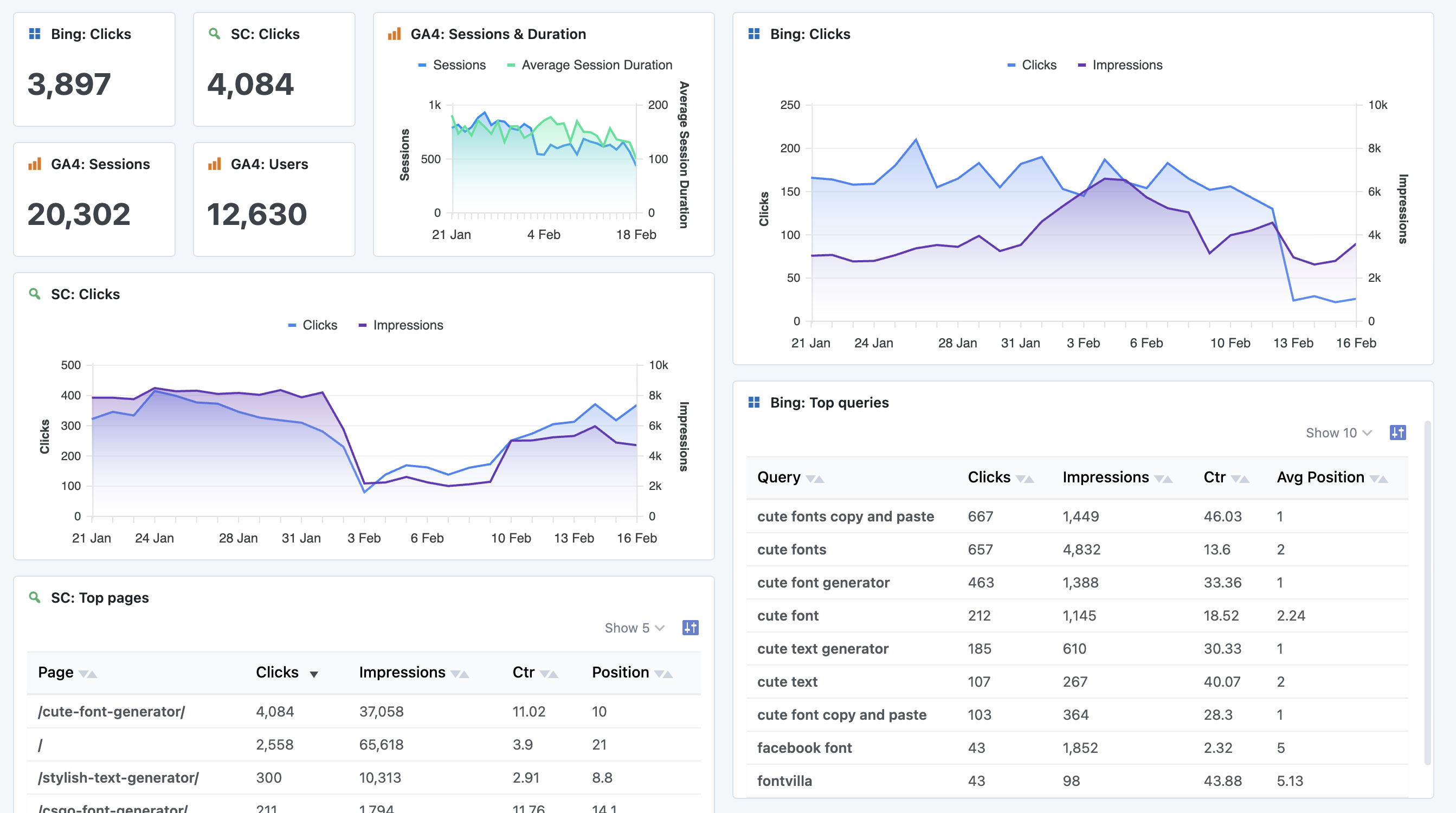
Instead of jumping between multiple external tools, SiteStats lets you view key metrics from Google Analytics, Google Search Console, Bing Webmaster Tools, WooCommerce & WordPress itself in one place with flexible charts, KPIs and tables.
Built for site owners, developers and agencies who want fast insights without unnecessary complexity.
Analytics Dashboard Key Features
- Customizable dashboard
- Drag-and-drop modules
- Line charts, bar charts, tables and KPI cards
- Google Analytics (GA4) integration
- Sessions, users, traffic sources and more
- Google Search Console integration
- Search queries, clicks, impressions and CTR
- Bing Webmaster Tools integration
- Search queries, clicks, impressions and CTR
- WordPress analytics
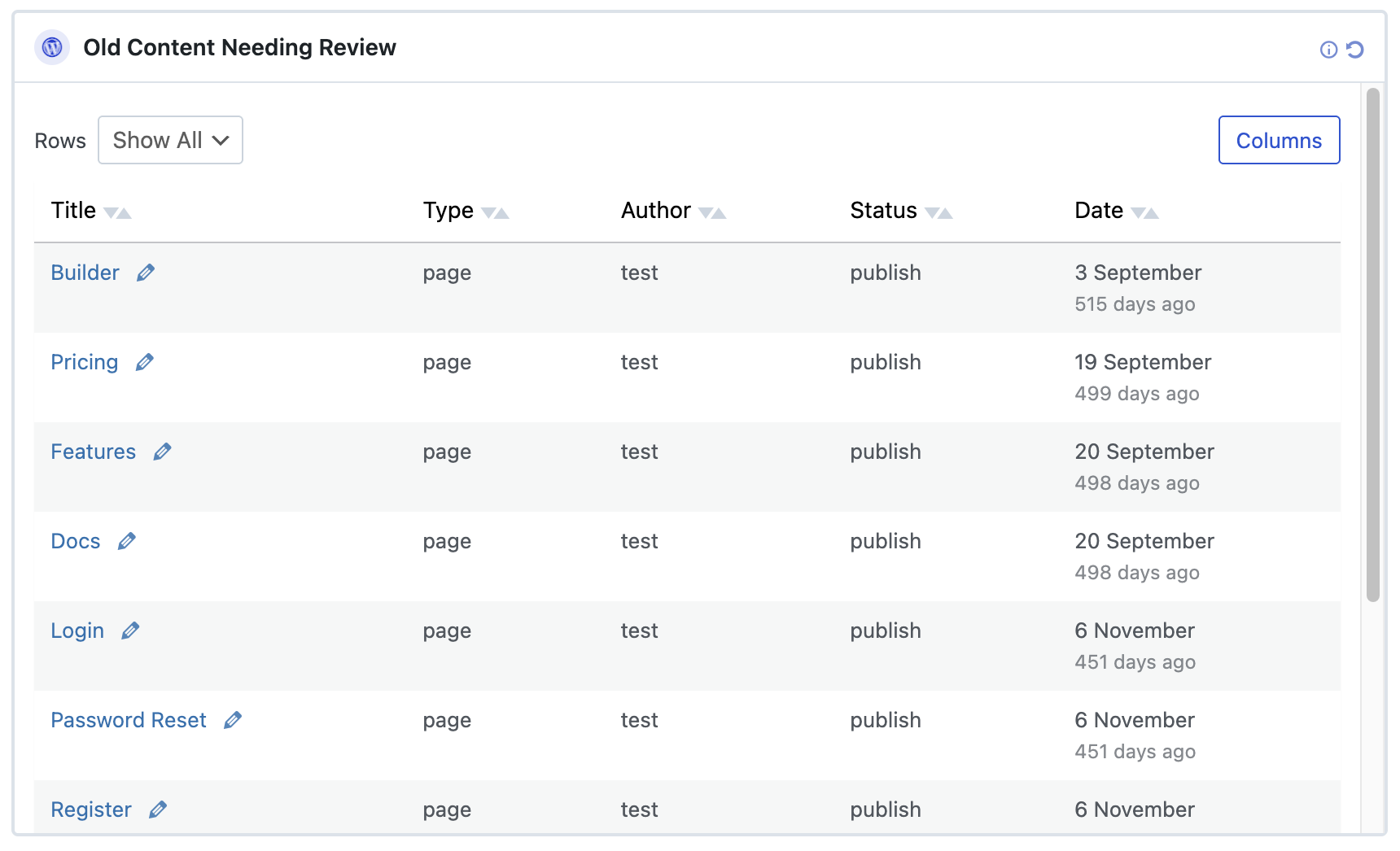
- New posts, new users, comments and publishing activity
- WooCommerce analytics
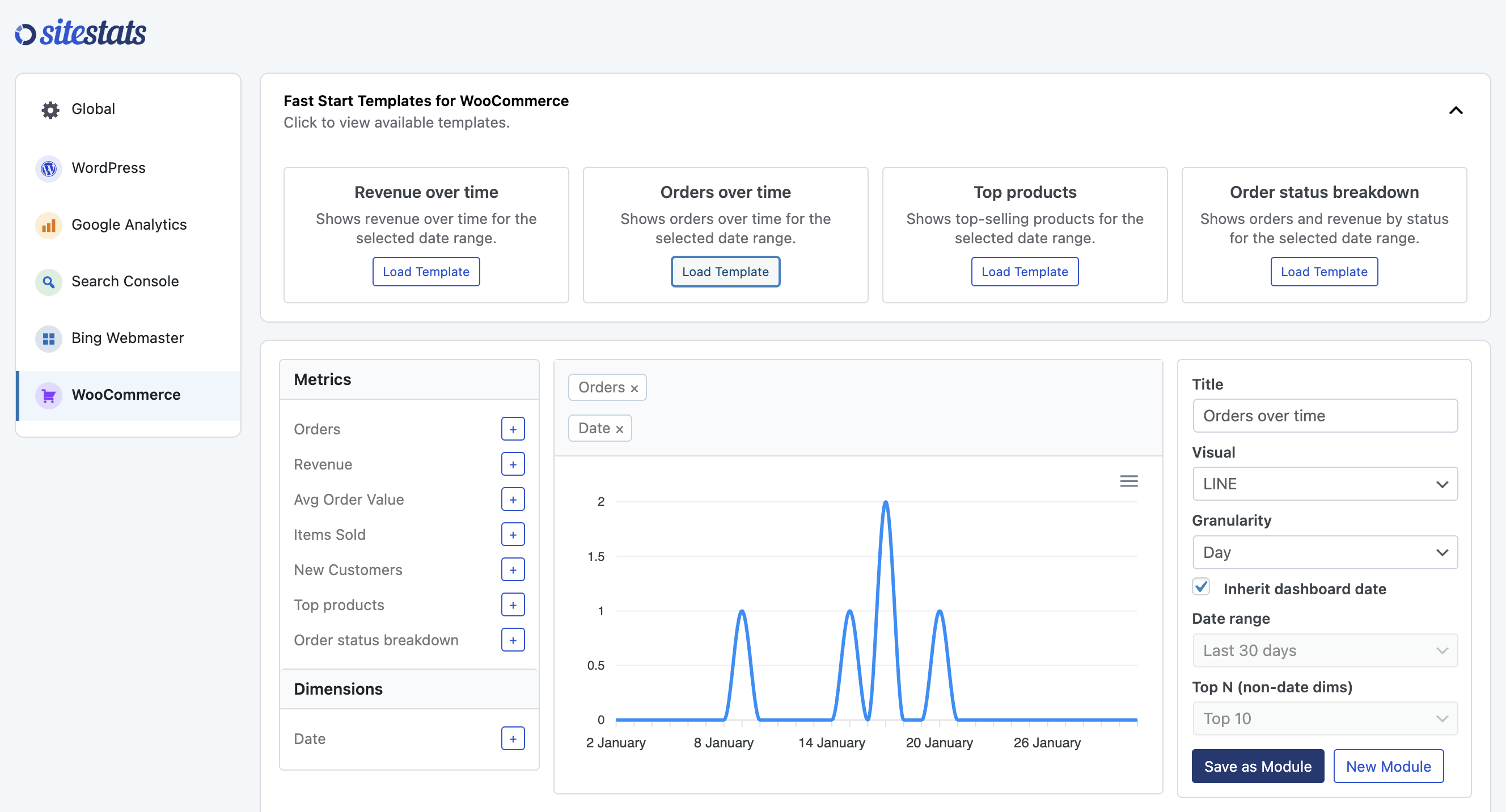
- Revenue, orders, top products, order status & more
- Flexible date ranges
- Presets like last 7/30/90 days
- Custom date selection
- Role-based access
- Control who can view dashboards and manage settings
- Performance-conscious
- Server-side query limiting
- Built-in caching for analytics queries
Bing Webmaster Tools WordPress Dashboard
SiteStats Analytics includes a built-in Bing Webmaster Tools connector, allowing you to view Bing search performance data directly inside your WordPress dashboard.
Instead of logging into Bing Webmaster separately, you can monitor:
- Bing search queries
- Clicks from Bing search
- Impressions in Bing
- Click-through rate (CTR)
- Average position in Bing results
If you are looking for a Bing analytics WordPress plugin or a way to display Bing Webmaster data inside WordPress, SiteStats provides a simple dashboard-based solution.
This is especially useful for site owners who want visibility into both Google and Bing search performance without switching platforms.
Google Search Console WordPress Dashboard
SiteStats connects to Google Search Console and displays search performance data inside WordPress.
You can view:
- Search queries
- Total clicks
- Impressions
- Average position
- Click-through rate (CTR)
If you are searching for a Search Console WordPress plugin or a way to show Google Search Console data in the WordPress admin area, SiteStats provides a flexible dashboard builder for creating custom Search Console reports.
You can combine Search Console data with Google Analytics, Bing, WooCommerce and WordPress metrics in one unified dashboard.
Multi-Source Analytics for WordPress
Most analytics plugins focus on a single platform. SiteStats is designed as a multi-source analytics plugin for WordPress.
You can combine data from:
- Google Analytics (GA4)
- Google Search Console
- Bing Webmaster Tools
- WordPress core activity
- WooCommerce
- Additional connectors (Pro)
This makes SiteStats suitable for developers, agencies and site owners who want a unified analytics dashboard inside WordPress rather than relying on multiple separate plugins.
Free vs Pro
The free version includes core analytics and WordPress data sources.
A Pro add-on is available which unlocks additional connectors and advanced features.
Learn more about SiteStats Pro:
https://sitestatswp.com/pricing
Getting Started
- Activate the plugin
- Open SiteStats → Settings
- Configure global settings such as:
- Default date range
- User roles with access
- Connect Google services if required
- Add, remove or rearrange dashboard modules
Each module can be customized to show specific metrics and visuals.
External services
This plugin connects to external services to authenticate with Google and to retrieve analytics data for display inside WordPress. These connections are only used if you choose to enable the relevant features.
To connect a Google account, the plugin uses a SiteStats-hosted authentication service. When you click “Connect Google”, your site is redirected to this service to complete the Google OAuth 2.0 login. During this process, your site URL, a return URL, and a temporary state value are sent to securely complete the authentication. After a successful login, a temporary authorization code is returned to your WordPress site to establish the connection.
This service is operated by the plugin author.
Terms of Service | Privacy Policy
Once connected, the plugin communicates directly with Google APIs to retrieve Google Analytics 4 and Google Search Console data. When dashboards or widgets are loaded, the plugin sends requests to Google that include the selected property or site, the requested date range and report configuration, and an access token authorizing the request. Google returns aggregated analytics and search performance data for display inside WordPress.
Google APIs are provided by Google LLC.
Google APIs Terms of Service | Google Privacy Policy
Installation
Using the WordPress Dashboard
- Navigate to “Add New” in the Plugins dashboard
- Search for “SiteStats Analytics”
- Click “Install Now”
- Activate the plugin from the Plugins dashboard
- Go to SiteStats > Settings to begin setup
Uploading in WordPress Dashboard
- Download “sitestats-analytics.zip” to your computer
- Navigate to “Add New” in the Plugins dashboard
- Click “Upload Plugin”
- Select “sitestats-analytics.zip” from your computer
- Click “Install Now”
- Activate the plugin from the Plugins dashboard
- Go to SiteStats > Settings to begin setup
Using FTP
- Download the SiteStats Analytics ZIP file
- Extract the ZIP file to your computer
- Upload the “sitestats-analytics” directory to the
/wp-content/plugins/directory - Activate the plugin from the Plugins dashboard
- Go to SiteStats > Settings to begin setup
Frequently asked questions
Does this plugin track visitors?
No. SiteStats does not add any tracking scripts to your site. It only reads data from services you already use, such as Google Analytics.
Do I need Google Analytics to use this plugin?
No. The plugin works with WordPress data alone. Google Analytics and Search Console are optional.
Is my data stored externally?
No analytics data is sent to third-party servers. Data is fetched directly from Google APIs and cached locally in WordPress.
Can I limit access to certain users?
Yes. You can choose which WordPress roles can view dashboards or manage settings.
Does this support multisite?
Multisite is supported. Each site maintains its own analytics configuration.
Changelog
Initial release.
1.5.3
- Add extra text descriptions to analytics templates
1.5.2
- Fix issue with KPIs only showing value from first date
1.5.1
- Fix new menu links not going to correct page
- Properly label templates with connector name at start
- Add new Google Analytics sessions v duration starter module
1.5.0
- More UI updates
- Add templates for Search Console, Bing Webmaster Tools and Google Analytics
- Add active connectors to WordPress menu
- Style Search Console & Bing Webmaster Tools line charts with SC colors
1.4.1
- Adjust default sizing on analytics dashboard
- Fix issue with legend breaking into columns when comparing dates
1.4.0
- Add onboarding wizard
- Minor UI updates
Screenshots
For developers
Is this your plugin? Show off the numbers.
Add a live badge to your site, docs or GitHub README. It updates on its own — no account needed.
Best SiteStats Analytics alternatives
All bing webmaster plugins →| Rank | Plugin | Active installs |
|---|---|---|
| 1 |
 Simple Site Verify
Simple method of verifying your site via Pinterest, Google, Bing, Yandex, and Google…
Simple Site Verify
Simple method of verifying your site via Pinterest, Google, Bing, Yandex, and Google…
|
1K+ |
FAQ
SiteStats Analytics: quick answers
Straight answers, pulled from live WordPress.org data.
Live data from WordPress.org · checked Oct 12, 2026
Is SiteStats Analytics free?
Yes. SiteStats Analytics is free to download and use from the official WordPress.org plugin directory.
Is SiteStats Analytics safe to use in 2026?
SiteStats Analytics works, but test it on a staging site before relying on it in 2026. It runs on 30+ sites, is rated 5/5 and was last updated 4 months ago, and scores 59/100 on our health check.
How many websites use SiteStats Analytics?
SiteStats Analytics is active on 30+ WordPress websites and has been downloaded 1,030 times since it launched in January 2026. It was downloaded 88 times in the last 30 days.
Does SiteStats Analytics work with WordPress 7.1?
SiteStats Analytics is officially tested up to WordPress 7.0.7, while the latest release is 7.1.3. It may still work, but try it on a staging site first.
What PHP version does SiteStats Analytics need?
SiteStats Analytics requires PHP 7.0 or higher. Most hosts run PHP 8.x today, so it works on any modern WordPress hosting.
When was SiteStats Analytics last updated?
The latest version, 1.5.3, was released on June 26, 2026 (4 months ago).
Who makes SiteStats Analytics?
SiteStats Analytics is developed and maintained by Quicksnail Plugins.
What are the best alternatives to SiteStats Analytics?
The most popular alternatives to SiteStats Analytics are Simple Site Verify (1K+ installs).
Powered by PageForge
Want thousands of pages that rank like these? Build them in an afternoon.
This directory runs on the same engine as PageForge. Turn any spreadsheet, CSV or API into thousands of fast, SEO-ready WordPress pages — with schema, internal links and AI-written copy baked in.
- CSV, Google Sheets & API data sources
- AI content, schema & internal links per page
- Works with Elementor, Gutenberg, Yoast & Rank Math
- Free on WordPress.org — no credit card


