



Site Updates Report
Site Updates Report is a powerful WordPress maintenance plugin designed for agencies, developers, and website maintenance professionals who need to generate client reports.

Consider an alternative
Site Updates Report shows warning signs in 2026 — compare the alternatives below before installing. It runs on 70+ sites and was last updated 8 months ago, and scores 29/100 on our health check.
- Small user base (70+ active installs)
- Very few reviews so far
- Only tested up to WordPress 6.9 (latest is 7.1)
How does it stack up?
Side-by-side on installs, updates, ratings & supportDaily downloads
Download spikes usually follow a new release — each site that auto-updates counts as a download.
Rankings
Where Site Updates Report stands todayWordPress.org search rankings
Live position in the plugin search, top 100| Keyword | Position |
|---|---|
| agency tools | >100 |
| client reports | >100 |
| site updates report | #29 |
| wordpress maintenance | >100 |
| Wordpress updates | >100 |
Version adoption
Share of active sites per release.
About Site Updates Report
From the official readme · v1.1.0Description
Site Updates Report is a powerful WordPress maintenance plugin designed for agencies, developers, and website maintenance professionals who need to generate client reports.
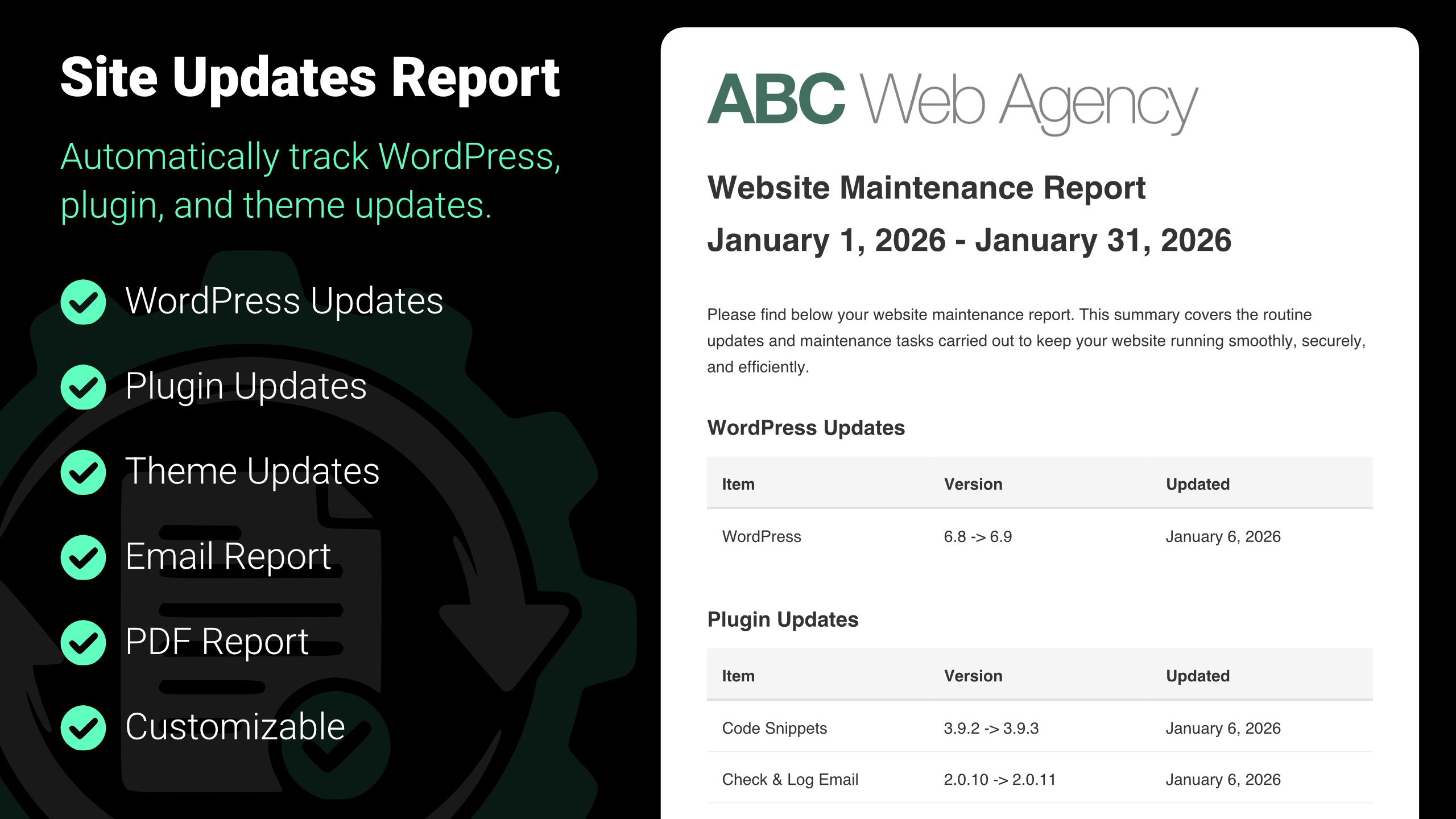
It tracks all WordPress updates, plugin updates, and theme updates on your clients’ websites, then generates beautifully formatted reports that demonstrate the value of your maintenance services.
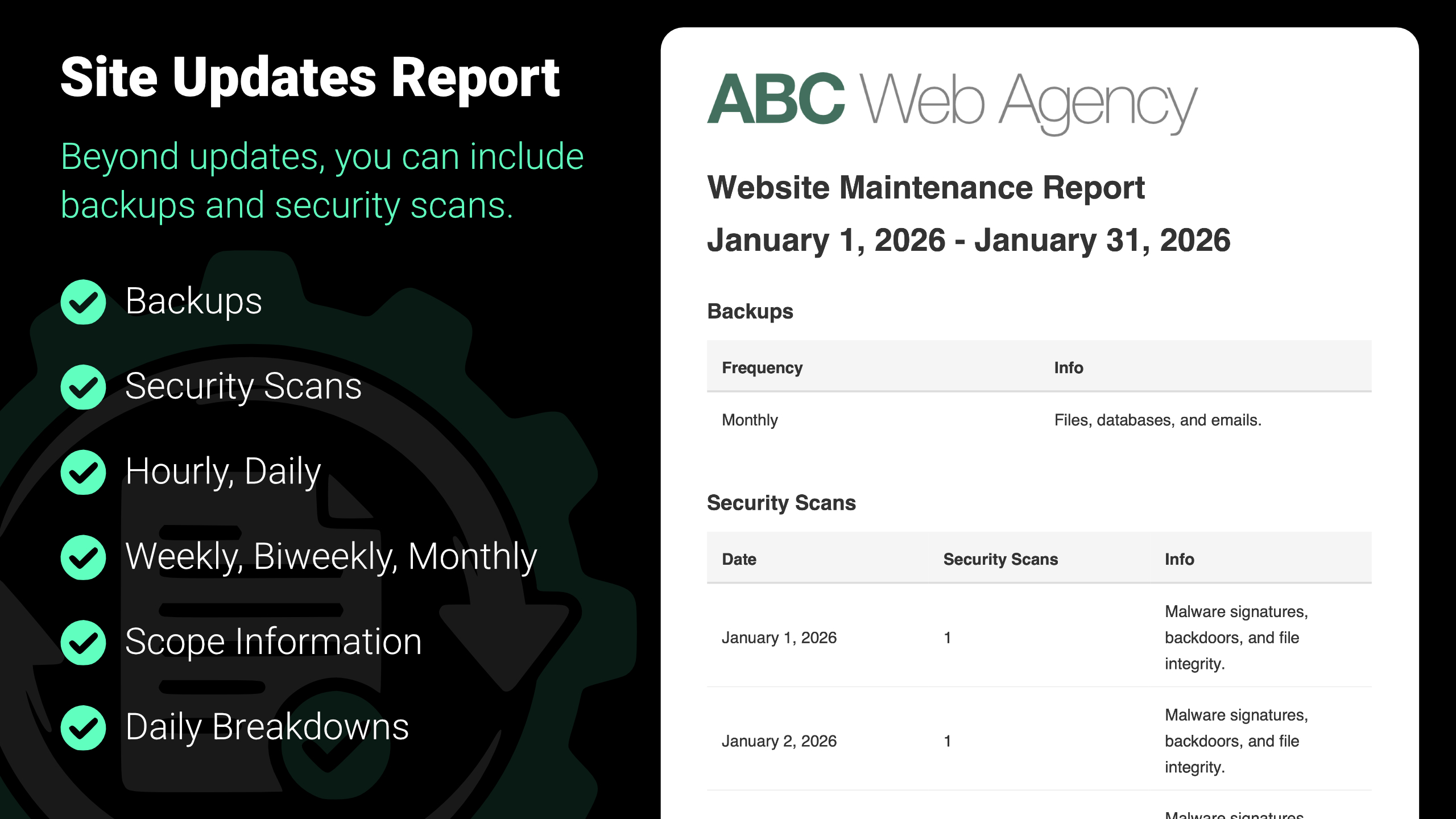
In addition to updates, Site Updates Report can also include backups and security scans in your maintenance reporting, giving clients a more complete picture of ongoing site care.
⚙️ Perfect for WordPress Maintenance Services
If you’re running a WordPress maintenance business or providing ongoing website support to clients, Site Updates Report eliminates the tedious manual work of compiling update logs.
The plugin automatically tracks every update made to WordPress, plugins, and themes from the moment it’s installed, creating a detailed audit trail that you can present to clients via email or PDF.
Beyond updates, you can also report on backups and security scans, helping clients understand the full scope of the maintenance work you provide.
✨ Key Benefits for Agencies & Developers
-
Save Time & Increase Efficiency: Stop manually documenting updates. The plugin automatically tracks all WordPress updates, plugin updates, and theme updates, saving hours of administrative work each month.
-
Professional Client Communication: Generate polished, branded reports with your logo and custom header/footer content. Show clients exactly what maintenance work has been performed, building trust and demonstrating value.
-
Email Reports: Send maintenance reports directly to clients via email in HTML or plain text format. Keep clients informed without extra effort.
-
PDF Export: Download professional PDF reports that can be saved, printed, or attached to invoices. Perfect for record-keeping and client documentation.
-
Flexible Reporting Periods: Generate reports for calendar (past week, month, or 3 months), rolling (past 7, 30, or 90 days), or custom date ranges. Perfect for monthly maintenance reports, quarterly reviews, or ad hoc client requests.
-
Complete Update History: Track version changes for WordPress, plugins, and themes. Reports show what was updated, when it was updated, and version changes (before and after).
-
Customizable Branding: Add your agency logo, custom header content, and footer text to make reports match your brand identity and professional standards.
-
More Than Just Updates: Include backups and security scans alongside update logs to showcase comprehensive website maintenance.
💎 Why Choose Site Updates Report?
WordPress maintenance is essential for website security, performance, and stability. However, many clients don’t understand the technical work involved in keeping their sites updated. Site Updates Report bridges this communication gap by automatically documenting all maintenance activities.
Whether you’re a freelance WordPress developer managing multiple client sites, a digital agency offering maintenance packages, or an in-house developer responsible for website upkeep, this plugin transforms your update tracking from a time-consuming chore into a professional client communication tool.
By including backups and security scans alongside update reporting, Site Updates Report helps you clearly communicate the preventative work that protects your clients’ websites – not just the visible changes.
💼 Example Use Case: ABC Agency
ABC Agency manages maintenance for 50+ client WordPress websites. Before using Site Updates Report, their team spent time each month manually documenting updates across all client sites, often missing updates or struggling to recall what work was performed weeks earlier. This manual process was error-prone and didn’t scale as their client base grew.
After installing Site Updates Report, the updates were automatically tracked for WordPress, plugin, and theme updates in the background. At the end of each month, ABC Agency sends a report showing exactly what updates were performed, when they occurred, and version changes – helping clients clearly understand the work completed and reinforcing the ongoing value of proactive website maintenance.
▶️ Usage
After installation, access the settings under Settings > Site Updates Report.
🧑💻 Developer
Created by David Allsop. Additional details are available on the project page.
Frequently asked questions
Does the plugin track updates that happened before installation?
No. Site Updates Report only tracks updates from the time it’s installed. Updates made to WordPress, plugins, or themes before the plugin was installed will not appear in your reports. This is because the plugin needs to be active to monitor and record update events as they happen.
Does it track plugin and theme installations?
Yes. Plugin and theme installations are tracked. They’re treated as updates where no previous version existed.
Why is the version column showing N/A?
This means there’s no earlier tracked version to compare against. In these cases, you’ll see something like “N/A -> 1.0.0.” Version-to-version tracking begins after the initial installation/update of a plugin or theme.
Why aren’t my email reports sending?
If email reports aren’t being sent, this is typically a WordPress mail configuration issue rather than a problem with the plugin itself. Here are the most common causes and solutions: Check your email settings: Ensure the “To” email address is correctly entered in the plugin settings. Verify the “From” email address matches your domain to avoid spam filters. WordPress mail function: WordPress uses PHP’s mail() function by default, which may not work on all hosting environments. Many shared hosting providers disable this function for security reasons. Use an SMTP plugin: The most reliable…
How can I customize the report appearance?
You can customize your reports in several ways through the plugin settings: Title: Customize the report title with placeholders like {site_title}, {report_period}, and {date}. Logo: Upload your agency or company logo to appear at the top of reports. Updates: Choose which updates to include (WordPress updates, plugin updates, theme updates). Header Content: Add custom HTML content that appears at the top of the report body. Footer Content: Add custom HTML content that appears at the bottom of the report body. All customizations are applied to both email reports and PDF downloads.
How can I change the required user capability?
By default, the required user capability is manage_options. You can change this by hooking into the site_updates_report_required_capability filter and returning a different capability.
Changelog
1.1.0 – 2026-02-06
- Add: Backups reporting and settings
- Add: Security scans reporting and settings
1.0.0 – 2026-01-10
- New: Plugin released
Screenshots
For developers
Is this your plugin? Show off the numbers.
Add a live badge to your site, docs or GitHub README. It updates on its own — no account needed.
Best Site Updates Report alternatives
All agency tools plugins →| Rank | Plugin | Active installs |
|---|---|---|
| 2 |
 SEOV Agency Storefront
Displays an agency product storefront on a WordPress site using an embedded external…
SEOV Agency Storefront
Displays an agency product storefront on a WordPress site using an embedded external…
|
<10 |
FAQ
Site Updates Report: quick answers
Straight answers, pulled from live WordPress.org data.
Live data from WordPress.org · checked Oct 6, 2026
Is Site Updates Report free?
Yes. Site Updates Report is free to download and use from the official WordPress.org plugin directory.
Is Site Updates Report safe to use in 2026?
Site Updates Report shows warning signs in 2026 — compare the alternatives below before installing. It runs on 70+ sites and was last updated 8 months ago, and scores 29/100 on our health check.
How many websites use Site Updates Report?
Site Updates Report is active on 70+ WordPress websites and has been downloaded 789 times since it launched in January 2026. It was downloaded 110 times in the last 30 days.
Does Site Updates Report work with WordPress 7.1?
Site Updates Report is officially tested up to WordPress 6.9.9, while the latest release is 7.1.2. It may still work, but try it on a staging site first.
What PHP version does Site Updates Report need?
Site Updates Report requires PHP 7.4 or higher. Most hosts run PHP 8.x today, so it works on any modern WordPress hosting.
When was Site Updates Report last updated?
The latest version, 1.1.0, was released on February 6, 2026 (8 months ago).
Who makes Site Updates Report?
Site Updates Report is developed and maintained by David Allsop.
What are the best alternatives to Site Updates Report?
The most popular alternatives to Site Updates Report are SEOV Agency Storefront (<10 installs).
Powered by PageForge
Want thousands of pages that rank like these? Build them in an afternoon.
This directory runs on the same engine as PageForge. Turn any spreadsheet, CSV or API into thousands of fast, SEO-ready WordPress pages — with schema, internal links and AI-written copy baked in.
- CSV, Google Sheets & API data sources
- AI content, schema & internal links per page
- Works with Elementor, Gutenberg, Yoast & Rank Math
- Free on WordPress.org — no credit card


