


Simple X Buttons – Share, Follow, Mention & Hashtag for WordPress
Simple X Buttons adds X (Twitter) buttons to your WordPress posts and pages — the right way.

Use with caution
Simple X Buttons works, but test it on a staging site before relying on it in 2026. It runs on 80+ sites, is rated 5/5 and was last updated 5 months ago, and scores 53/100 on our health check.
- Small user base (80+ active installs)
- Very few reviews so far
- Only tested up to WordPress 6.9 (latest is 7.1)
How does it stack up?
Side-by-side on installs, updates, ratings & support



Daily downloads
Download spikes usually follow a new release — each site that auto-updates counts as a download.
Rankings
Where Simple X Buttons stands todayWordPress.org search rankings
Live position in the plugin search, top 100| Keyword | Position |
|---|---|
| follow | #21 |
| share | >100 |
| social | >100 |
| #70 | |
| x | #71 |
Version adoption
Share of active sites per release.
Rating breakdown
★★★★★★★★★★ 5 from 1 reviews
About Simple X Buttons
From the official readme · v2.0.0Description
Simple X Buttons adds X (Twitter) buttons to your WordPress posts and pages — the right way.
Why not use X’s official embed buttons?
X’s embed infrastructure (platform.twitter.com/widgets.js) has been unreliable since 2023, hitting HTTP 429 rate limits at scale and causing embeds to fail silently or load slowly. X has not committed to fixing this.
This plugin takes a different approach entirely.
What are X Web Intents?
Web Intents are plain URLs provided by X for sharing, following, mentioning, and more. They open a lightweight native X popup — no JavaScript SDK, no third-party cookies, no external scripts loaded on page load. You click, a popup opens, done.
That means:
- No API key required — zero setup friction
- No external scripts — nothing loads until the user clicks
- No rate limits — static URLs, no API calls
- GDPR-friendly — no cookies or tracking on page load
- Fast — the plugin CSS is ~1 KB, loaded only when a button is on the page
Four button types
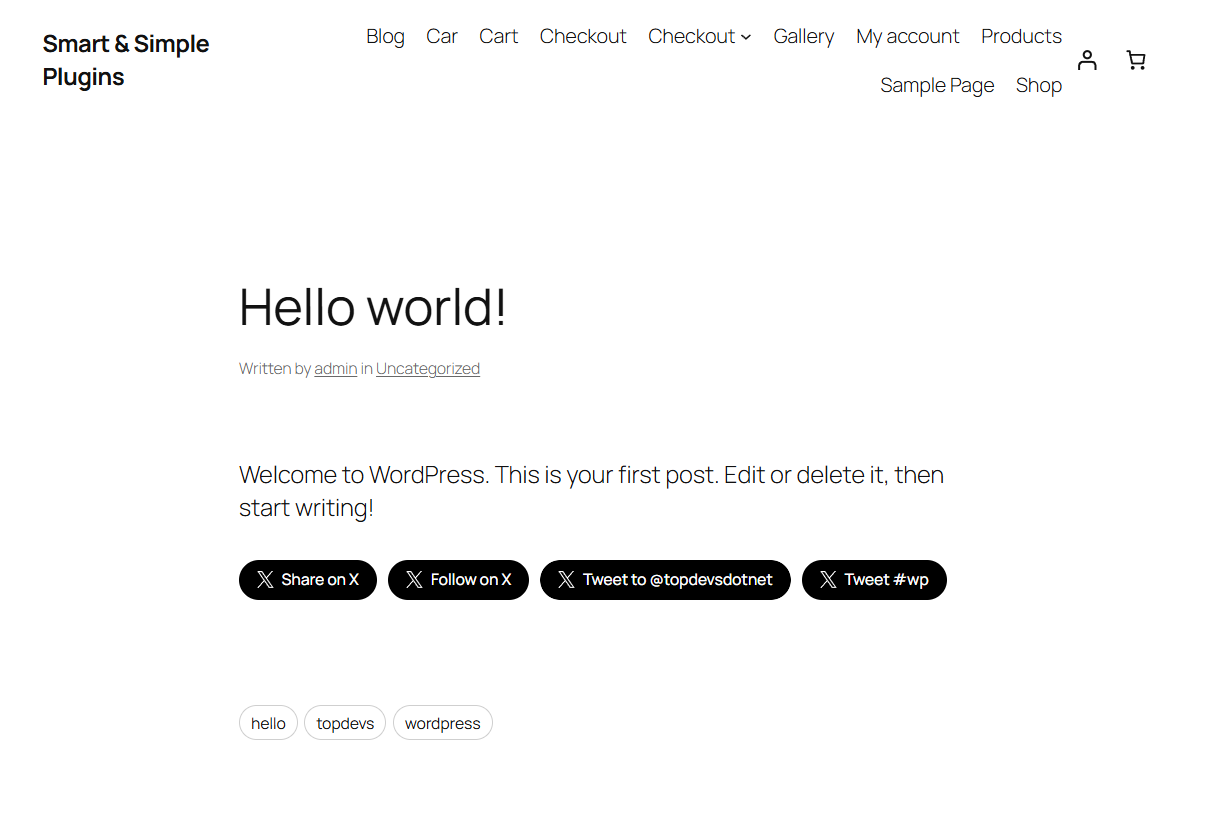
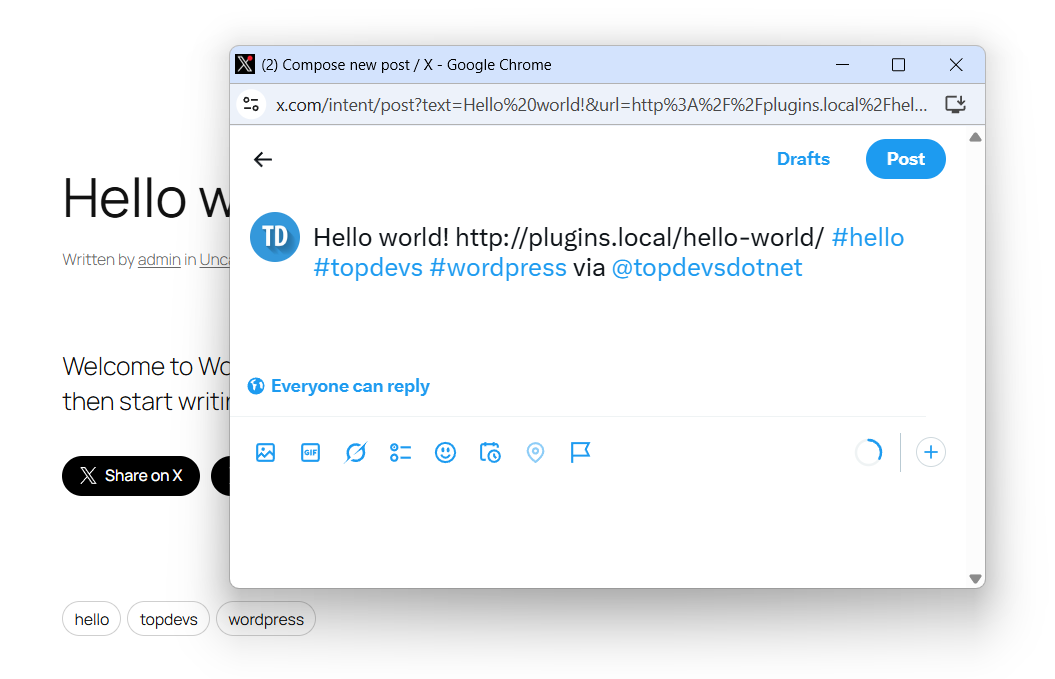
- Share — opens X compose pre-filled with the post title, permalink, hashtags, and via handle
- Follow — opens X’s native follow dialog for your account
- Mention — opens X compose pre-filled with @yourhandle so visitors can tweet at you
- Hashtag — opens X compose pre-filled with #yourtag; optionally pulls in the post’s own tags automatically
Features
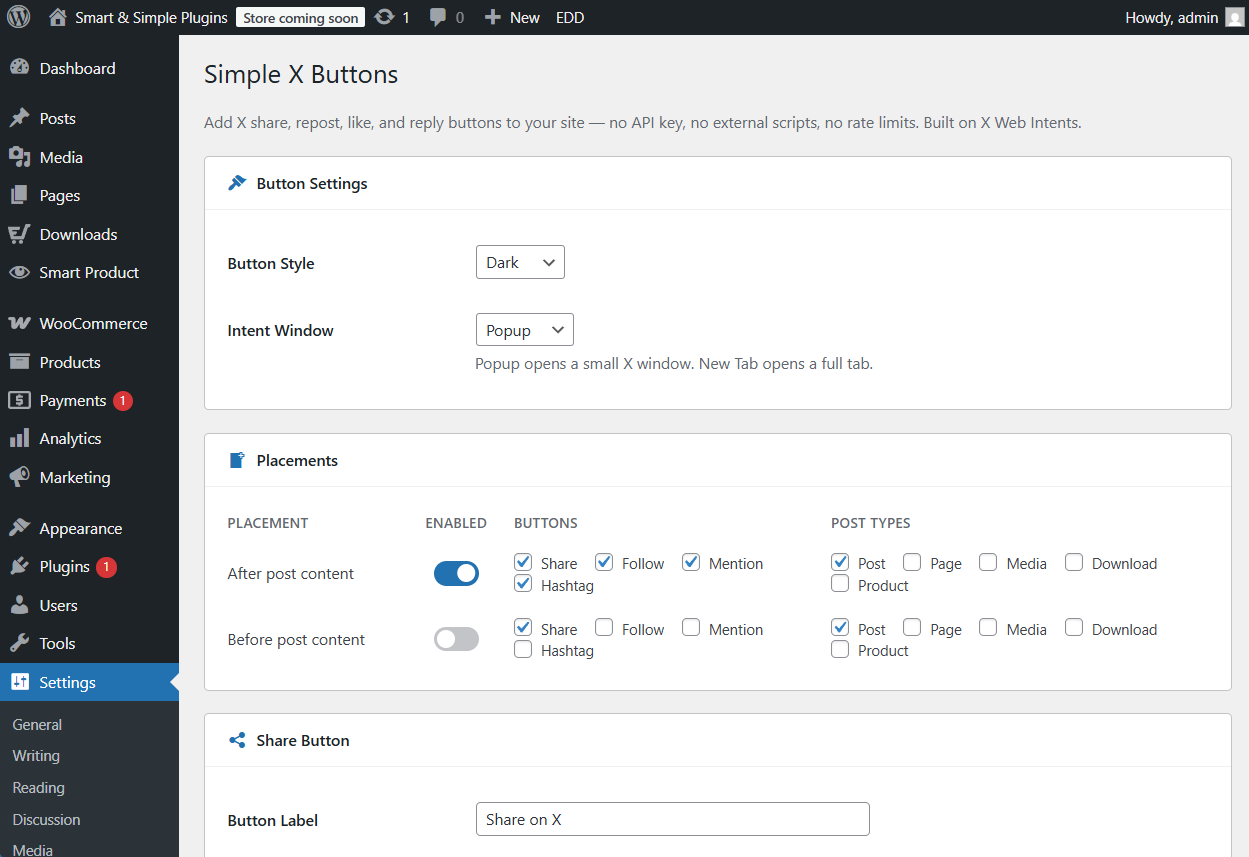
- Auto-insert before and/or after post content — choose which buttons and which post types per placement
- Per-placement button control — show Share on all posts, Follow only on certain post types, etc.
- Post tags as hashtags — Share and Hashtag buttons can automatically pull the post’s tags (capped at 5 to keep tweets writable)
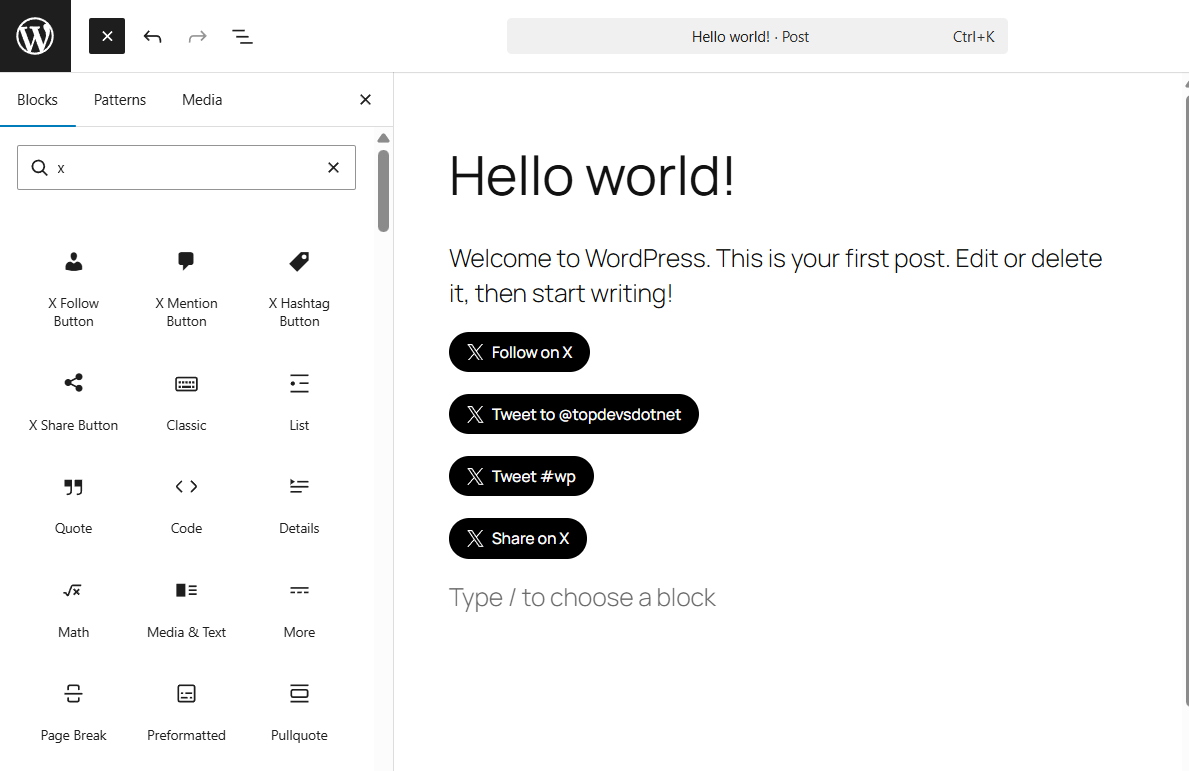
- 4 Gutenberg blocks — X Share, Follow, Mention, and Hashtag blocks with live editor previews
- 4 Shortcodes —
[sxb-share],[sxb-follow],[sxb-mention],[sxb-hashtag] - Template tags —
sxb_share_button()andsxb_button_bar()for theme developers - Three button styles — Dark, Outline, Ghost
- Popup or new-tab intent window
Integration
Four ways to add buttons to your site:
- Auto-insert (recommended): Enable a placement in Settings → Simple X Buttons. Buttons appear automatically on every matching post type.
- Shortcode:
[sxb-share],[sxb-follow handle="yourhandle"],[sxb-mention handle="yourhandle"],[sxb-hashtag tag="travel"]anywhere in content. - Block: Search for “X Share Button”, “X Follow Button”, “X Mention Button”, or “X Hashtag Button” in the Gutenberg block inserter.
- Template tag:
<?php sxb_share_button(); ?>or<?php sxb_button_bar(); ?>in theme templates.
Compatibility
- WordPress 5.8 or higher
- PHP 7.2 or higher
- No API key required
- No external JavaScript loaded on page load
- Works with any theme
Installation
- Upload the
simple-x-buttonsfolder to/wp-content/plugins/ - Activate the plugin in Plugins → Installed Plugins
- Go to Settings → Simple X Buttons
- Enable a placement and choose which buttons to show
- Configure each button type (handle, hashtag, label) in the sections below
- That’s it
Frequently asked questions
Does this load Twitter/X scripts on my pages?
No. The plugin loads only its own ~1 KB stylesheet, and only on pages where a button appears. No external scripts are loaded at any point unless a user clicks a button and the intent popup opens.
Does this need an API key?
No. X Web Intents are plain URLs — no authentication, no app registration required.
Why not use X’s official follow/share buttons?
X’s widgets.js SDK has been intermittently rate-limited since 2023, causing buttons to fail to render or show HTTP 429 errors. Web Intents are unaffected because they are static URLs, not API calls.
Is this GDPR-friendly?
Yes. No external scripts, cookies, or tracking occur on page load. X’s servers are only contacted when a user actively clicks a button and the intent popup opens — the same as clicking any external link.
What is the difference between “Popup” and “New Tab” intent window?
Popup opens a small 600×360 window centered on the screen — the standard X intent experience. New Tab opens the intent URL in a new browser tab. If JavaScript is disabled, popup falls back gracefully to a new tab.
Can I add buttons to custom post types?
Yes. In the Placements section you can enable any public post type registered on your site, per placement.
Why is the Hashtag button label just “Tweet” when post tags are enabled?
When multiple tags are merged (e.g. #travel, #wordpress, #seo), displaying all of them in the button label would look cluttered. The label falls back to “Tweet” so the button stays clean regardless of how many tags the post has.
Does this work with page builders?
Shortcodes work in any context that processes WordPress shortcodes. The Gutenberg blocks work in the block editor. For Elementor, Bricks, or other builders, use the shortcode widget.
Can I change the hashtag limit?
Yes. The default cap is 5 post tags. Developers can adjust it with: add_filter( ‘sxb_hashtag_limit’, fn() => 3 );
Changelog
Complete rewrite. The old Twitter Timeline widget and API-based buttons are gone. Install fresh — no migration from v1.x settings.
2.0.0
- Complete rewrite — X Web Intents architecture, no API dependencies
- Four button types: Share, Follow, Mention, Hashtag
- Four Gutenberg blocks with live editor previews
- Four shortcodes: [sxb-share], [sxb-follow], [sxb-mention], [sxb-hashtag]
- Per-placement button selection (choose which buttons appear before/after content)
- Post tags as hashtags for Share and Hashtag buttons (capped at 5)
- Three button styles: Dark, Outline, Ghost
- Popup or new-tab intent window
- GDPR-friendly: zero cookies or external scripts on page load
Screenshots
For developers
Is this your plugin? Show off the numbers.
Add a live badge to your site, docs or GitHub README. It updates on its own — no account needed.
Best Simple X Buttons alternatives
All follow plugins →


FAQ
Simple X Buttons: quick answers
Straight answers, pulled from live WordPress.org data.
Live data from WordPress.org · checked Oct 1, 2026
Is Simple X Buttons free?
Yes. Simple X Buttons is free to download and use from the official WordPress.org plugin directory.
Is Simple X Buttons safe to use in 2026?
Simple X Buttons works, but test it on a staging site before relying on it in 2026. It runs on 80+ sites, is rated 5/5 and was last updated 5 months ago, and scores 53/100 on our health check.
How many websites use Simple X Buttons?
Simple X Buttons is active on 80+ WordPress websites and has been downloaded 11,376 times since it launched in September 2011. It was downloaded 243 times in the last 30 days.
Does Simple X Buttons work with WordPress 7.1?
Simple X Buttons is officially tested up to WordPress 6.9.9, while the latest release is 7.1.2. It may still work, but try it on a staging site first.
What PHP version does Simple X Buttons need?
Simple X Buttons requires PHP 7.2 or higher. Most hosts run PHP 8.x today, so it works on any modern WordPress hosting.
When was Simple X Buttons last updated?
The latest version, 2.0.0, was released on May 2, 2026 (5 months ago).
Who makes Simple X Buttons?
Simple X Buttons is developed and maintained by topdevs.net.
What are the best alternatives to Simple X Buttons?
The most popular alternatives to Simple X Buttons are Superb Social Media Share B… (6K+ installs), Twitter Follow Button (100+ installs) and AP Twitter Follow Button (70+ installs).
Powered by PageForge
Want thousands of pages that rank like these? Build them in an afternoon.
This directory runs on the same engine as PageForge. Turn any spreadsheet, CSV or API into thousands of fast, SEO-ready WordPress pages — with schema, internal links and AI-written copy baked in.
- CSV, Google Sheets & API data sources
- AI content, schema & internal links per page
- Works with Elementor, Gutenberg, Yoast & Rank Math
- Free on WordPress.org — no credit card


