



Simple Tour Guide
Easily add an interactive step-by-step user guide (intro tour) for your visitors. Based on Shepherd.js (https://shepherdjs.dev/).

Solid choice
Simple Tour Guide is a solid plugin choice in 2026, with a few things worth checking first. It runs on 200+ sites, is rated 4.8/5 and was last updated 3 months ago, and scores 65/100 on our health check.
- Small user base (200+ active installs)
How does it stack up?
Side-by-side on installs, updates, ratings & support



Daily downloads
Download spikes usually follow a new release — each site that auto-updates counts as a download.
Rankings
Where Simple Tour Guide stands todayWordPress.org search rankings
Live position in the plugin search, top 100| Keyword | Position |
|---|---|
| introduction | #12 |
| shepherd | #1 |
| tour | #6 |
| user onboarding | #6 |
| walkthrough | #12 |
Version adoption
Share of active sites per release.
Rating breakdown
★★★★★★★★★★ 4.8 from 14 reviews
About Simple Tour Guide
From the official readme · v1.2.0Description
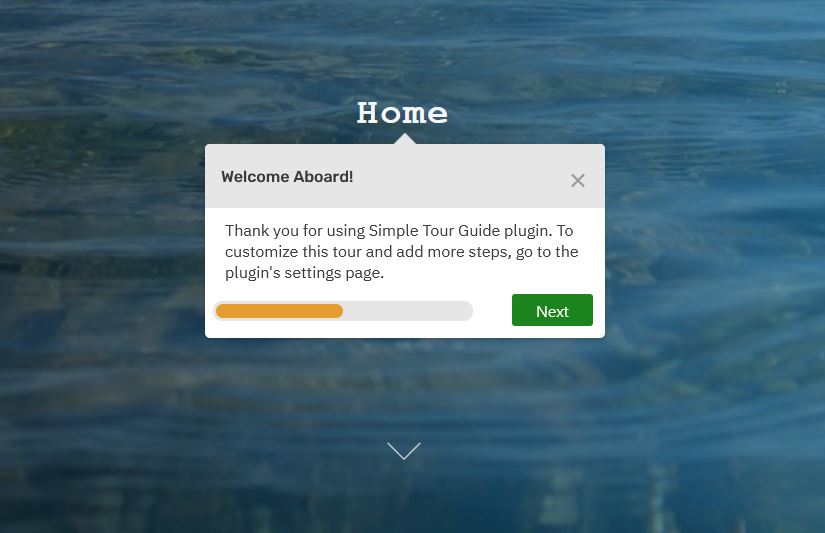
Simple Tour Guide is an easy to use step-by-step onboarding user guide that lets you create an interactive guided tour for your visitors.
The plugin provides a great, neat and fast way to indroduce users to your product or service – by guiding them visually to different elements on your website.
An interactive user walkthrough is a powerful way to increase user experience and customer satisfaction. This plugin is based on Shepherd.js – an open-source lightweight vanilla js library for guided tours.
Customize the text, the number of popups (steps) and link to any DOM element through a friendly user admin interface.
Plugin Options
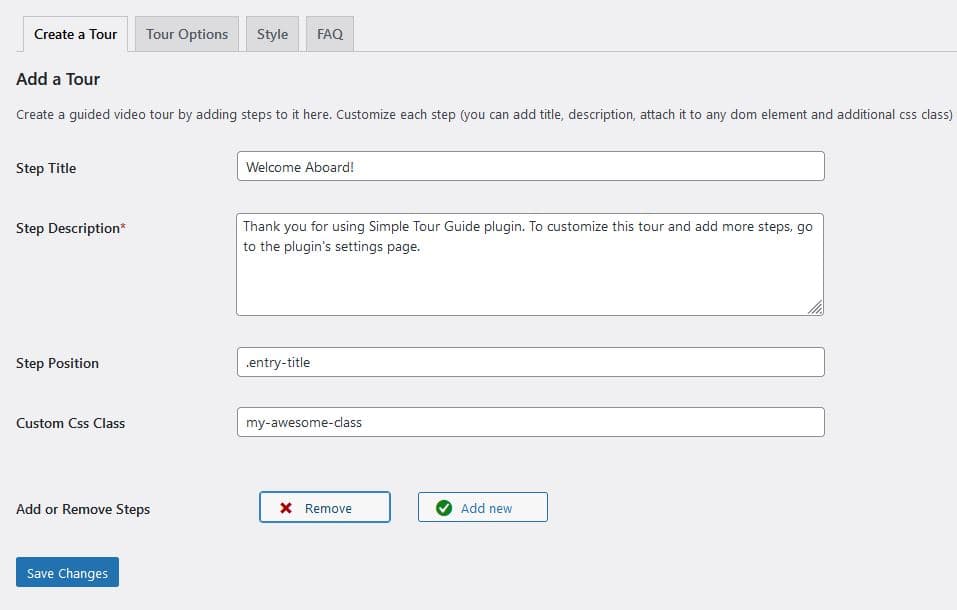
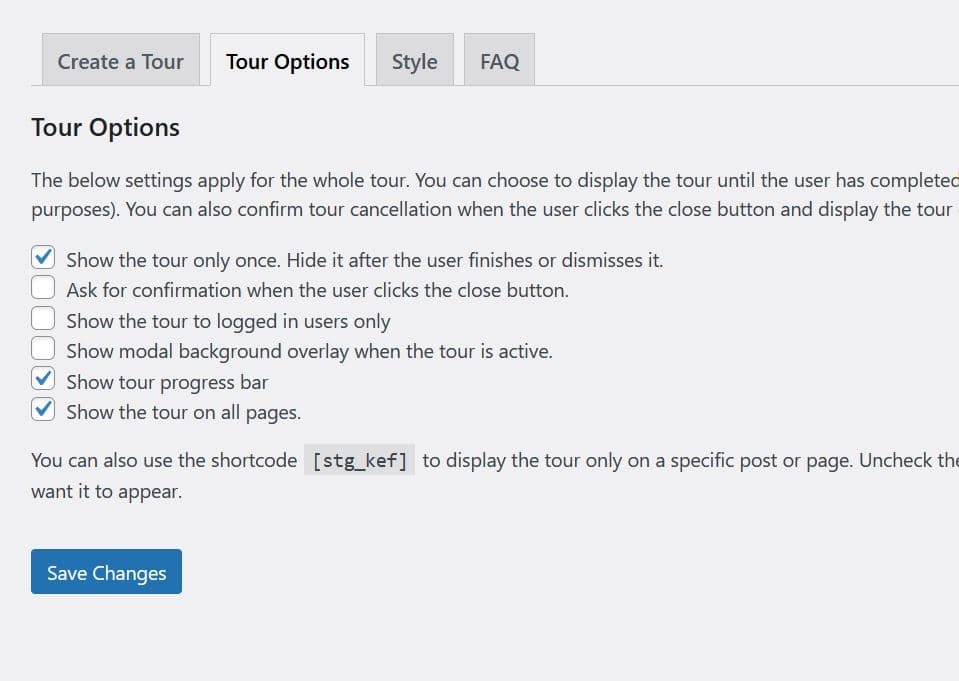
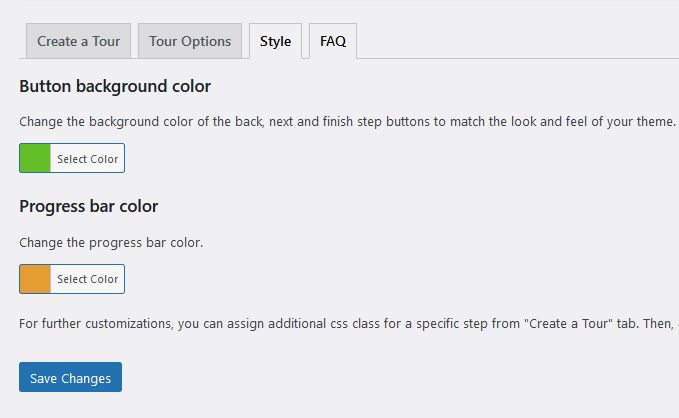
You can create a tour and add as many steps to it as you want from “Create a Tour” tab. You can add step title, step description, link the step to a specific dom element and add a custom class to it. You can also choose to display the tour only once or show it everytime you reload a page (test mode) and ask for confirmation when the close button is clicked. Another cool feature is the ability to choose on which pages to display the tour. If you want, you can also choose to display the tour to logged in users only and disable the rest of the site while the tour is active. You can also add a progress bar to show the users how many steps remain until the end of the tour and customize the colors of the step buttons and the progress bar via the “Style” tab.
Installation
- Take the easy route and install through the WordPress plugin installer or download the .zip file and upload the unzipped folder to the
/wp-content/plugins/directory - Activate the plugin through the ‘Plugins’ menu in WordPress
Frequently asked questions
How to add, edit or delete steps?
From the WordPress admin, go to Settings => Simple Tour Guide and add as many steps as you want.
Can I link a step to a page element?
Sure, you can! Inspect a page element with the browser dev tool (right click with the mouse => inspect element) and then add its selector in the “Step Position” field from “Create a Tour” tab. You can add class, id or tag selector like so: .class, #id, tag. If you do not assign a selector, that is also fine, the step will appear exactly in the middle of the screen.
Can I show the tour only once?
Absolutely! In fact, by default the plugin hides the tour when the user finishes or dismisses it. However, you can also choose to display the steps on every page reload (test mode) from the “Tour Options” tab.
How to show the tour guide only on one page?
Go to “Tour Options” tab, uncheck “Show the tour on all pages” box and copy the plugin shortcode [stg_kef]. Then, navigate to a page or post you want, click "edit" and paste the shortcode on the top of the post content.
How to customize the style of the steps?
Go to “Style” tab and customize accordingly. For additional customizations, you can use the .stg classname or add a custom class to each step from the “Create a Tour” tab. Go to Аppearance => Customize => Additional css and add your own custom styles there.
Can I create more than one tour?
In the pro version of the plugin, you can create unlimited tours. The free version supports only one tour.
Can I add a background overlay to disable the rest of the site while the tour is active?
Yes, this feature is available since version 1.03. All you need to do is check the option “Show modal background overlay when the tour is active” in the Tour options tab. This will disable any site interaction until the user has finished or dismissed the tour.
The tour stops when I link a step to an element that is not visible. What can I do?
This may happen when you link a step to a page element that is hidden with css on specific screen sizes. For example, a menu item on mobile that is hidden until the user opens the menu. If the user has not opened the menu yet, the tour might stop in the middle. Luckily, there are a few ways to handle this. The easiest way to fix this is not to attach the step to the element and the step will appear in the middle of the screen. Since version 1.04, you can skip a step if the element which is attached to it appears off-screen. All you need to do is go to “Tour Options” and add a tick to “Skip a…
I have selected the skip a step option, yet the step still shows up. What is going on?
The skip a step option works only for elements that are hidden or off-screen but not for non-existent elements. If the element is missing from the DOM, the step should still appear in the middle of the screen and this is the standard behavior. However, you can still hide it with custom css. A valid use case for this is if you have extra content for logged in users and you want to hide the step that is linked to it for non-logged in users. To do that, you need to go to plugin settings page => create a tour tab => custom css class and add a custom class name to the step you want to hide, lets…
Can I show the tour to logged in users only?
Since version 1.02 you can! You can check the option “Show the tour to logged in users only” in the Tour Options tab.
Can I open a tour with a custom button?
Yes, in the pro version of the plugin, you can use a button with classname stg-start-tour
Can I run the tour inside the WP Admin?
No, the scope of this plugin is the site frontend only. To display a tour in the CMS, you can try the Custom Welcome Guide plugin.
Are there more options?
Check the premium version of the plugin. By upgrading, you will get additional options, as well as access to priority support and updates.
Changelog
1.2.0 – June 2026
- Make confirmCancel translatable.
1.1.9 – December 2025
- Update docs.
1.1.8 – November 2025
- Update docs.
1.1.7 – November 2025
- Enable [stg_kef] shortcode to work inside php templates.
1.1.6 – March 2025
- Update Docs.
1.1.5 – February 2025
- Update logo and faq section.
Screenshots
For developers
Is this your plugin? Show off the numbers.
Add a live badge to your site, docs or GitHub README. It updates on its own — no account needed.
Best Simple Tour Guide alternatives
All introduction plugins →
FAQ
Simple Tour Guide: quick answers
Straight answers, pulled from live WordPress.org data.
Live data from WordPress.org · checked Sep 29, 2026
Is Simple Tour Guide free?
Yes. Simple Tour Guide is free to download and use from the official WordPress.org plugin directory.
Is Simple Tour Guide safe to use in 2026?
Simple Tour Guide is a solid plugin choice in 2026, with a few things worth checking first. It runs on 200+ sites, is rated 4.8/5 and was last updated 3 months ago, and scores 65/100 on our health check.
How many websites use Simple Tour Guide?
Simple Tour Guide is active on 200+ WordPress websites and has been downloaded 12,214 times since it launched in April 2021. It was downloaded 258 times in the last 30 days.
Does Simple Tour Guide work with WordPress 7.1?
Simple Tour Guide is officially tested up to WordPress 7.0.6, while the latest release is 7.1.2. It may still work, but try it on a staging site first.
What PHP version does Simple Tour Guide need?
Simple Tour Guide requires PHP 5.2.4 or higher. Most hosts run PHP 8.x today, so it works on any modern WordPress hosting.
When was Simple Tour Guide last updated?
The latest version, 1.2.0, was released on June 24, 2026 (3 months ago).
Who makes Simple Tour Guide?
Simple Tour Guide is developed and maintained by Atanas Yonkov.
What are the best alternatives to Simple Tour Guide?
The most popular alternatives to Simple Tour Guide are Intro Tour Tutorial DeepPre… (200+ installs), Blog Introduction (80+ installs) and Admin Tour (20+ installs).
Powered by PageForge
Want thousands of pages that rank like these? Build them in an afternoon.
This directory runs on the same engine as PageForge. Turn any spreadsheet, CSV or API into thousands of fast, SEO-ready WordPress pages — with schema, internal links and AI-written copy baked in.
- CSV, Google Sheets & API data sources
- AI content, schema & internal links per page
- Works with Elementor, Gutenberg, Yoast & Rank Math
- Free on WordPress.org — no credit card


