


Simple Pull Quote
The Simple Pull Quote WordPress Plugin provides an easy way for you to insert pull quotes into your posts and pages.

Use with caution
Simple Pull Quote works, but test it on a staging site before relying on it in 2026. It runs on 1K+ sites, is rated 4.2/5 and was last updated 10 months ago, and scores 45/100 on our health check.
- Momentum — downloads up 16.3% vs the previous 30 days
- Only tested up to WordPress 6.6 (latest is 7.1)
How does it stack up?
Side-by-side on installs, updates, ratings & support


Daily downloads
Download spikes usually follow a new release — each site that auto-updates counts as a download.
Rankings
Where Simple Pull Quote stands todayWordPress.org search rankings
Live position in the plugin search, top 100| Keyword | Position |
|---|---|
| pull-quote | #1 |
| pullquote | #3 |
| quotation | #26 |
| quotes | #65 |
Version adoption
Share of active sites per release.
Rating breakdown
★★★★★★★★★★ 4.2 from 10 reviews
About Simple Pull Quote
From the official readme · v1.6.4Description
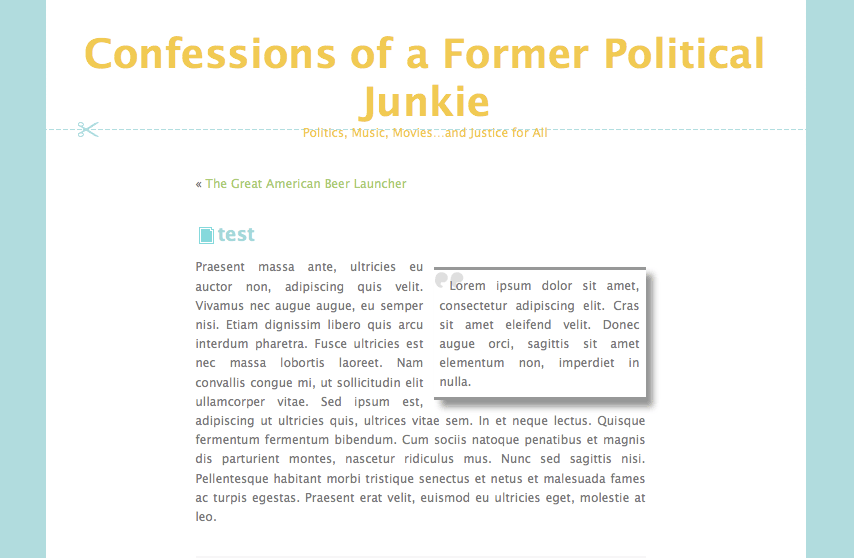
Simple Pull Quote WordPress Plugin provides an easy way for you to insert pull quotes into your posts and pages. It adds an easy-to-use “Pullquote” button to both the HTML and TinyMCE editors.
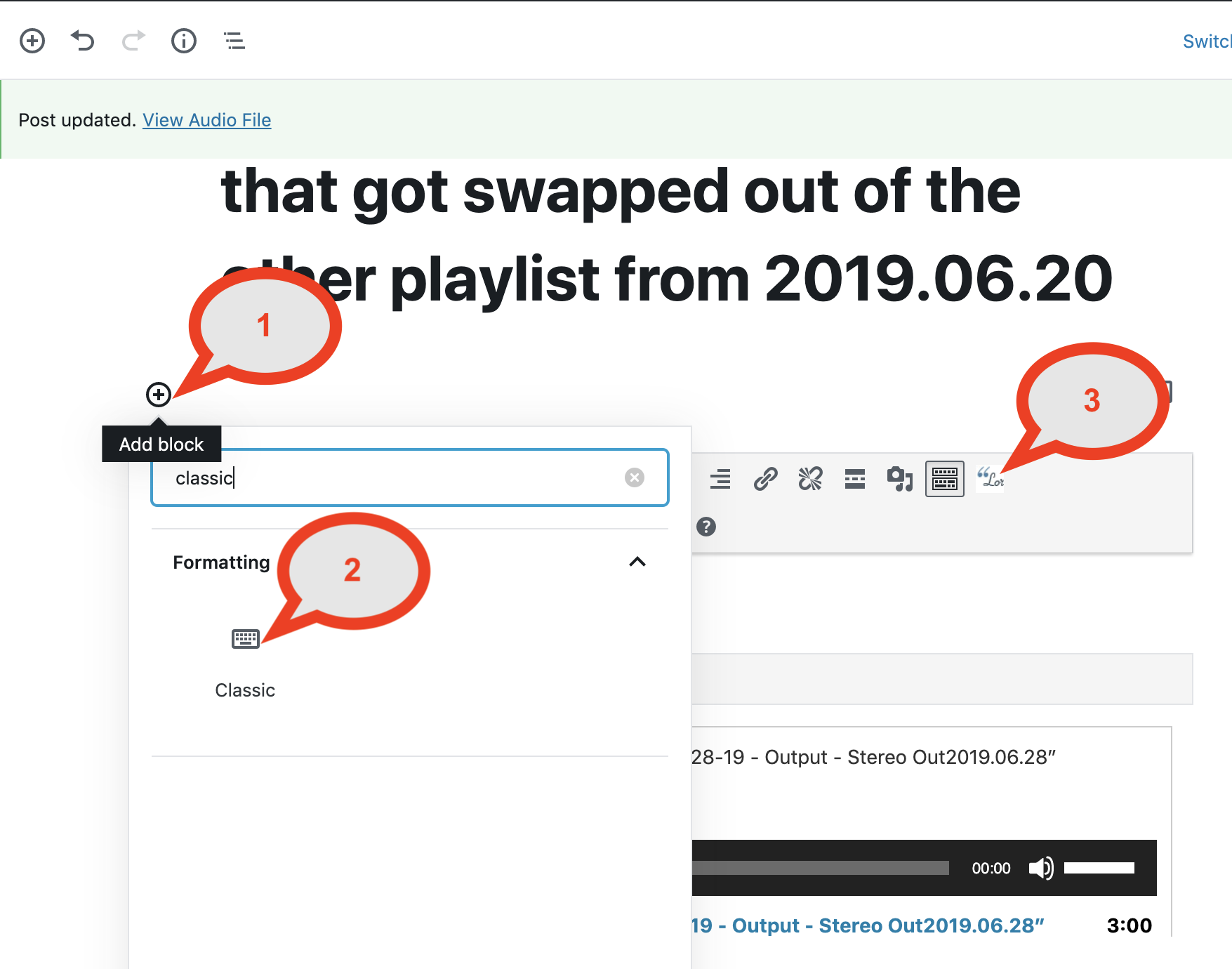
IMPORTANT: To use in the new WordPress (Gutenberg) editor, you can either:
1. use the “Classic” block.
2. Use shortcodes such as [pullquote class="left”]TEXT HERE[/pullquote]
See the plugin in action as well as how to use it:
http://youtu.be/JGudI9gr9iE
Usage
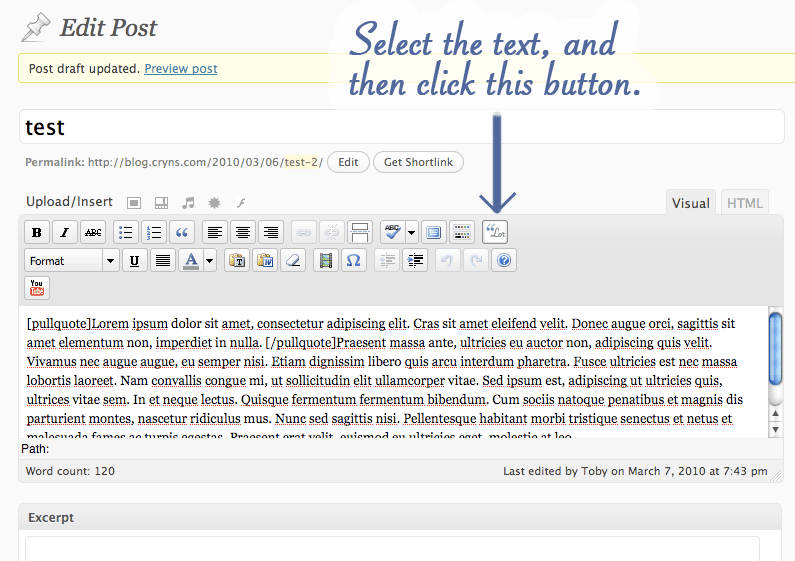
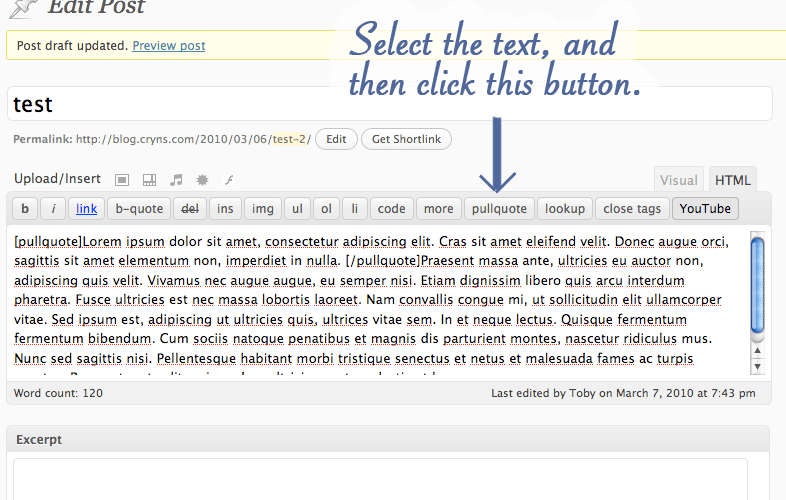
- Select the text that you want to use as your pull quote.
- Click on the “Pullquote” button in either the Visual or HTML editor.
For more help on usage, visit the Simple Pull Quote Homepage for a visual guide.
How do I update the look of the pull quotes?
To change the look of your pull quotes, open your theme’s “style.css” file and create a CSS class called “simplePullQuotes”. Edit this class according to your tastes. IMPORTANT: Make sure your theme’s “wp_head()” function comes before your theme’s stylesheet or else this won’t work.
How do I use more than one pull quote in a single post or page?
Simply select the text that you want to use as a pull quote and click the “Pullquote” button in either the visual or html editor.
Installation
- Either use the built-in WordPress plugin installer to grab the plugin from the WordPress plugin repository, or upload the entire contents of the
simple-pull-quote.zipfolder to the/wp-content/plugins/directory. - Activate the plugin through the ‘Plugins’ menu in WordPress.
Frequently asked questions
Questions, Comments, Pizza Recipes?
Look me up on Twitter or contact me here.
Changelog
Version 1.0 of Simple Pull Quote is backwards compatible with previous versions. Upgrade freely!
1.6
- Fixed “lang/en.js” bug
- Fixed “left”/”right” css bug
1.4
Maintenance: Added icons for new plugin search ui
1.4
- Cleaned up readme.txt’s changelog
- Added “quicktags” dependency to javascript load per https://wordpress.org/support/topic/wp_enqueue_script-missing-dependency?replies=2#post-3451836 (Thanks Aaron Campbell)
- Enqueue the simple-pull-quote.js on specific pages rather than on every admin page per https://wordpress.org/support/topic/wp_enqueue_script-missing-dependency?replies=2#post-3451836 (Thanks Aaron Campbell)
- Removed white space at the bottom of simple-pull-quote.php and simple-pull-quote-tinymce.php
1.3
1.2
- Fixed the file path reference to the stylesheet to use “plugins_url” rather than “wpurl”
- Thanks to John LeBlanc for this fix: https://wordpress.org/support/profile/johnleblanc
1.1
- Removed inadvertent line breaks caused by wptexturize()
- Thanks to http://sww.co.nz/solution-to-wordpress-adding-br-and-p-tags-around-shortcodes/ for this fix
Screenshots
For developers
Is this your plugin? Show off the numbers.
Add a live badge to your site, docs or GitHub README. It updates on its own — no account needed.
Best Simple Pull Quote alternatives
All pull-quote plugins →FAQ
Simple Pull Quote: quick answers
Straight answers, pulled from live WordPress.org data.
Live data from WordPress.org · checked Sep 30, 2026
Is Simple Pull Quote free?
Yes. Simple Pull Quote is free to download and use from the official WordPress.org plugin directory.
Is Simple Pull Quote safe to use in 2026?
Simple Pull Quote works, but test it on a staging site before relying on it in 2026. It runs on 1K+ sites, is rated 4.2/5 and was last updated 10 months ago, and scores 45/100 on our health check.
How many websites use Simple Pull Quote?
Simple Pull Quote is active on 1K+ WordPress websites and has been downloaded 84,604 times since it launched in April 2009. It was downloaded 528 times in the last 30 days.
Does Simple Pull Quote work with WordPress 7.1?
Simple Pull Quote is officially tested up to WordPress 6.6.9, while the latest release is 7.1.2. It may still work, but try it on a staging site first.
What PHP version does Simple Pull Quote need?
Simple Pull Quote requires PHP 7.2.5 or higher. Most hosts run PHP 8.x today, so it works on any modern WordPress hosting.
When was Simple Pull Quote last updated?
The latest version, 1.6.4, was released on November 24, 2025 (10 months ago).
Who makes Simple Pull Quote?
Simple Pull Quote is developed and maintained by llamaman.
What are the best alternatives to Simple Pull Quote?
The most popular alternatives to Simple Pull Quote are Easy Pull Quotes (100+ installs), Insert Callout (30+ installs) and Pull Quotes (10+ installs).
Powered by PageForge
Want thousands of pages that rank like these? Build them in an afternoon.
This directory runs on the same engine as PageForge. Turn any spreadsheet, CSV or API into thousands of fast, SEO-ready WordPress pages — with schema, internal links and AI-written copy baked in.
- CSV, Google Sheets & API data sources
- AI content, schema & internal links per page
- Works with Elementor, Gutenberg, Yoast & Rank Math
- Free on WordPress.org — no credit card


