


Simple Disable XML-RPC | Reduce Brute Force & DDOS Attacks
Simply disable XML-RPC on your WordPress site with a simple toggle switch. Protect your site from XML-RPC attacks and improve security.

Use with caution
Simple Disable XML-RPC works, but test it on a staging site before relying on it in 2026. It runs on 1K+ sites, is rated 5/5 and was last updated 11 months ago, and scores 43/100 on our health check.
- Only tested up to WordPress 6.8 (latest is 7.1)
Daily downloads
Download spikes usually follow a new release — each site that auto-updates counts as a download.
Rankings
Where Simple Disable XML-RPC stands todayWordPress.org search rankings
Live position in the plugin search, top 100| Keyword | Position |
|---|---|
| disable xml | #16 |
| disable xml-rpc | #10 |
| wordpress security | >100 |
| xml | #44 |
| xmlrpc | #18 |
Version adoption
Share of active sites per release.
Rating breakdown
★★★★★★★★★★ 5 from 5 reviews
About Simple Disable XML-RPC
From the official readme · v1.4.0Description
Simple Disable XML-RPC is a lightweight, powerful WordPress plugin that gives you complete control over your site’s XML-RPC functionality. Protect your WordPress site from brute force attacks, DDoS attempts, and other XML-RPC security vulnerabilities with just one click.
🔒 Why Disable XML-RPC?
XML-RPC is a remote communication protocol that allows external applications to interact with your WordPress site. While useful for some services, it’s frequently exploited by attackers for:
- Brute Force Attacks – Automated password guessing attempts
- DDoS Attacks – Overwhelming your server with requests
- Resource Exhaustion – Slowing down your website
- Pingback Vulnerabilities – Exploiting pingback features
✨ Key Features
- 🎯 One-Click Control – Modern toggle switch interface (NEW in v1.4.0)
- 🔐 Enhanced Security – Block XML-RPC attacks instantly
- ⚡ Improved Performance – Reduce server load and resource usage
- 🎨 Beautiful Admin Interface – Clean, modern card-based design (NEW in v1.4.0)
- 🌐 Translation Ready – Fully internationalized and translation-ready
- 📱 Mobile Responsive – Settings page works perfectly on all devices
- 🧹 Clean Uninstall – Removes all data when uninstalled
- ⚙️ Developer Friendly – Well-coded, follows WordPress standards
- 🔄 Regular Updates – Actively maintained and tested with latest WordPress versions
- 💯 Lightweight – No bloat, minimal impact on your site
🆕 What’s New in Version 1.4.0
- ✅ Modern toggle switch replaces old checkbox
- ✅ Beautiful card-based admin interface
- ✅ Enhanced security with proper sanitization
- ✅ Better code organization (OOP approach)
- ✅ Improved accessibility and UX
- ✅ Removes X-Pingback header when disabled
- ✅ Fixed activation redirect for bulk installations
- ✅ Better mobile responsive design
🎯 Perfect For
- Security-focused website owners
- Sites that don’t use mobile apps or remote publishing
- Sites experiencing XML-RPC attacks
- Performance-conscious administrators
- Anyone wanting better control over WordPress features
🔧 How It Works
This plugin uses the native WordPress xmlrpc_enabled filter to safely disable XML-RPC without modifying core files. Simply activate the plugin, toggle the switch on the settings page, and you’re protected!
⚠️ Important Note
Disabling XML-RPC may affect:
* WordPress mobile apps
* Jetpack (some features)
* Remote publishing tools
* Pingbacks and trackbacks
* Third-party services that rely on XML-RPC
Only disable XML-RPC if you don’t use these features.
🤝 Contributing & Bug Reports
Bug reports and pull requests are welcome on GitHub. Help us make this plugin better!
💝 Support the Development
If you find this plugin helpful, please consider:
* ⭐ Rating it 5 stars
* 🐛 Reporting bugs
* 💬 Suggesting features
* ☕ Buying us a coffee
Privacy Policy
Simple Disable XML-RPC does not:
- Collect any user data
- Store any personal information
- Make external API calls
- Use cookies or tracking
- Send data to third parties
The plugin only stores one setting in your WordPress database: whether XML-RPC is enabled or disabled.
Support
Need help? We’re here for you!
Credits
Developed with ❤️ by WordPress Satkhira Community
Contributors:
* wpdelower
* monarchwp23
Special thanks to all our users and contributors who help make this plugin better!
Installation
Automatic Installation (Recommended)
- Log in to your WordPress admin panel
- Navigate to Plugins > Add New
- Search for “Simple Disable XML-RPC”
- Click “Install Now” button
- Click “Activate” button
- You’ll be redirected to Settings > Disable XML-RPC
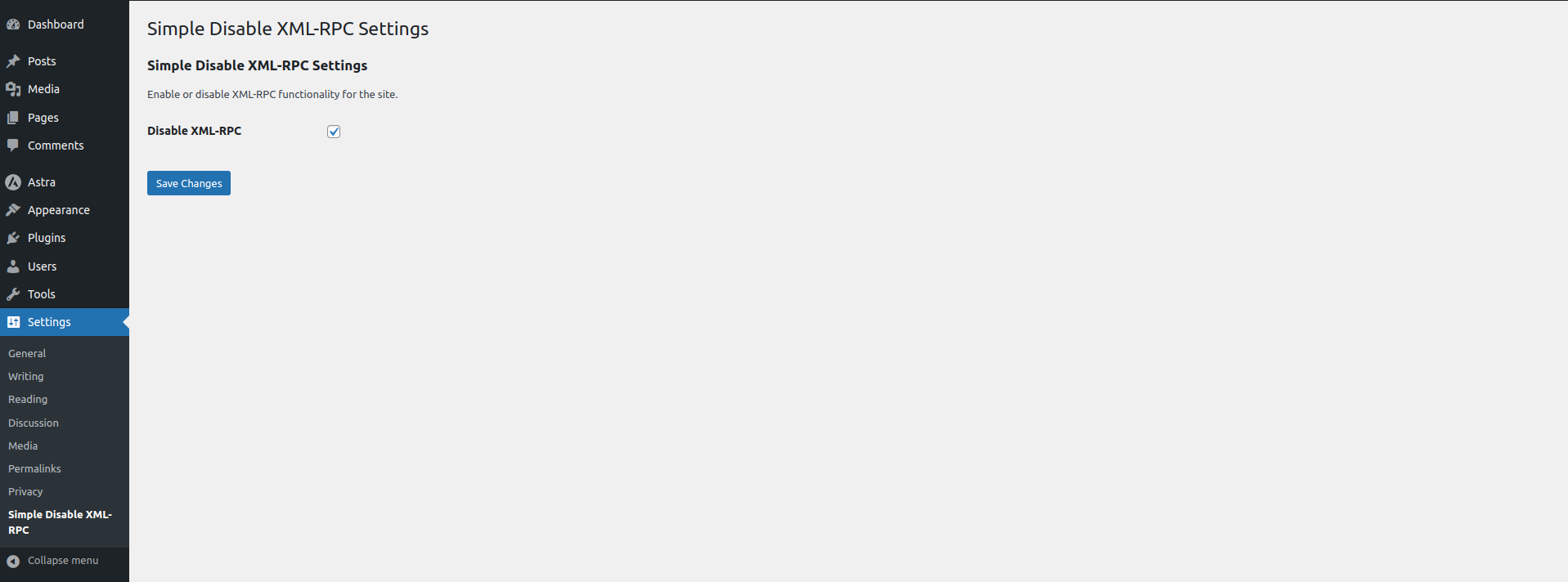
- Toggle the switch to enable/disable XML-RPC
Manual Installation
- Download the plugin zip file
- Log in to your WordPress admin panel
- Navigate to Plugins > Add New > Upload Plugin
- Choose the downloaded zip file and click “Install Now”
- Click “Activate Plugin”
- Go to Settings > Disable XML-RPC
- Toggle the switch to your preference
FTP Installation
- Download and extract the plugin zip file
- Upload the
simple-disable-xml-rpcfolder to/wp-content/plugins/directory - Activate the plugin through the Plugins menu in WordPress
- Configure settings at Settings > Disable XML-RPC
Frequently asked questions
What is XML-RPC and why should I disable it?
XML-RPC is a remote procedure call protocol that allows external applications to communicate with your WordPress site. While it enables features like mobile apps and remote publishing, it’s also a common target for: Brute force attacks DDoS attacks Server resource exhaustion Security vulnerabilities If you don’t use WordPress mobile apps, Jetpack, or remote publishing tools, it’s recommended to disable XML-RPC for better security.
Will this plugin break my site?
No, this plugin safely disables XML-RPC using WordPress’s native filter. However, it may affect: WordPress mobile apps Jetpack functionality Pingbacks and trackbacks Third-party services using XML-RPC API Test after activation to ensure your required features still work.
How do I know if XML-RPC is successfully disabled?
There are several ways to verify: Method 1: WordPress Mobile App Try connecting with the official WordPress mobile app. You should see: “XML-RPC services are disabled on this site” Method 2: Online Validator Use the XML-RPC Validator tool. When properly disabled, it will show an error message. You should receive a response indicating XML-RPC is disabled.
Does this plugin improve website performance?
Yes! When XML-RPC is disabled, your server doesn’t need to process XML-RPC requests, which can: Reduce server load Prevent resource exhaustion Speed up response times Save bandwidth
Is this plugin compatible with other security plugins?
Yes! Simple Disable XML-RPC works seamlessly with other security plugins like: Wordfence Security Sucuri Security iThemes Security All In One WP Security And more!
What’s the difference between disabling via .htaccess vs this plugin?
Plugin Method (Recommended): * Uses WordPress native filters * Easier to manage * No server configuration needed * Can be toggled on/off easily * Won’t cause server errors .htaccess Method: * Requires manual file editing * Can break if edited incorrectly * Harder to reverse * May cause conflicts
Can I re-enable XML-RPC if needed?
Absolutely! Just go to Settings > Disable XML-RPC and toggle the switch off. Changes take effect immediately.
Does this work on WordPress multisite?
Yes, the plugin works on both single WordPress installations and multisite networks. On multisite, it must be configured per-site.
Will this plugin be updated regularly?
Yes! We actively maintain this plugin and test it with every new WordPress release. Updates are pushed regularly to ensure compatibility and security.
Where can I get support?
WordPress.org Support Forum GitHub Issues Plugin Documentation
How can I contribute to this plugin?
We welcome contributions! You can: Submit bug reports on GitHub Create pull requests with improvements Translate the plugin into your language Leave a review and rating Suggest new features
Changelog
Major update! New modern toggle switch interface, enhanced security, better code organization, and improved user experience. Highly recommended upgrade!
1.4.0 (2025-11-09)
Major Update – UI Overhaul & Security Enhancements
- 🎨 NEW: Modern toggle switch interface replacing checkboxes
- 🎨 NEW: Beautiful card-based admin design
- 🔒 IMPROVED: Enhanced security with proper sanitization callbacks
- 🔒 IMPROVED: Added X-Pingback header removal
- ⚡ IMPROVED: Better code organization with OOP structure
- ⚡ IMPROVED: Separated files for better maintainability
- 🐛 FIXED: Activation redirect issue with bulk plugin activation
- 🐛 FIXED: Consistent function prefixing
- ♿ IMPROVED: Better accessibility and mobile responsive design
- 🧹 NEW: Proper uninstall cleanup script
- 📚 IMPROVED: Better documentation and inline comments
- 🌐 IMPROVED: Enhanced translation support
1.3.5 (2025-04-20)
- 🐛 Bug fixes
- ⚡ Performance improvements
- ✅ WordPress 6.8 compatibility tested
1.3.4 (2024-11-17)
- 🐛 Bug fixes
- ⚡ Performance improvements
- ✅ WordPress 6.7 compatibility tested
1.3.3 (2024-07-17)
- 🐛 Bug fixes
- ⚡ Performance improvements
- ✅ WordPress 6.6 compatibility tested
1.3.2 (2024-04-02)
- 🐛 Bug fixes
- ⚡ Performance improvements
- ✅ WordPress 6.5 compatibility tested
1.3.1 (2024-03-23)
- 🔒 Important security update
- 🐛 Bug fixes
- 🎨 Plugin live preview added
Screenshots

For developers
Is this your plugin? Show off the numbers.
Add a live badge to your site, docs or GitHub README. It updates on its own — no account needed.
FAQ
Simple Disable XML-RPC: quick answers
Straight answers, pulled from live WordPress.org data.
Live data from WordPress.org · checked Oct 4, 2026
Is Simple Disable XML-RPC free?
Yes. Simple Disable XML-RPC is free to download and use from the official WordPress.org plugin directory.
Is Simple Disable XML-RPC safe to use in 2026?
Simple Disable XML-RPC works, but test it on a staging site before relying on it in 2026. It runs on 1K+ sites, is rated 5/5 and was last updated 11 months ago, and scores 43/100 on our health check.
How many websites use Simple Disable XML-RPC?
Simple Disable XML-RPC is active on 1K+ WordPress websites and has been downloaded 9,997 times since it launched in December 2023. It was downloaded 227 times in the last 30 days.
Does Simple Disable XML-RPC work with WordPress 7.1?
Simple Disable XML-RPC is officially tested up to WordPress 6.8.10, while the latest release is 7.1.2. It may still work, but try it on a staging site first.
What PHP version does Simple Disable XML-RPC need?
Simple Disable XML-RPC requires PHP 7.4 or higher. Most hosts run PHP 8.x today, so it works on any modern WordPress hosting.
When was Simple Disable XML-RPC last updated?
The latest version, 1.4.0, was released on November 9, 2025 (11 months ago).
Who makes Simple Disable XML-RPC?
Simple Disable XML-RPC is developed and maintained by Delower Hossain.
Powered by PageForge
Want thousands of pages that rank like these? Build them in an afternoon.
This directory runs on the same engine as PageForge. Turn any spreadsheet, CSV or API into thousands of fast, SEO-ready WordPress pages — with schema, internal links and AI-written copy baked in.
- CSV, Google Sheets & API data sources
- AI content, schema & internal links per page
- Works with Elementor, Gutenberg, Yoast & Rank Math
- Free on WordPress.org — no credit card


