



Simple Ajax Chat – Add a Fast, Secure Chat Box
Display an Ajax-powered chat box anywhere. Lightweight, flexible, fast, and secure. Fully customizable with many options.

Safe pick
Yes — Simple Ajax Chat is a safe, well-maintained plugin to use in 2026. It runs on 2K+ sites, is rated 4.9/5 and was last updated 1 month ago, and scores 88/100 on our health check.
- Loved by users — 4.9/5 from 215 reviews
- Actively developed — last update 1 month ago
- Tested with the latest WordPress (7.1)
How does it stack up?
Side-by-side on installs, updates, ratings & support



Daily downloads
Download spikes usually follow a new release — each site that auto-updates counts as a download.
Rankings
Where Simple Ajax Chat stands todayWordPress.org search rankings
Live position in the plugin search, top 100| Keyword | Position |
|---|---|
| ajax | #17 |
| chat | #24 |
| chat box | #4 |
| forum | #69 |
| instant message | #6 |
Version adoption
Share of active sites per release.
Rating breakdown
★★★★★★★★★★ 4.9 from 215 reviews
About Simple Ajax Chat
From the official readme · v20260827Description
⭐ Lightweight and fast, persistent chat solution!
⭐ Fully self-hosted: No 3rd-party account required 🙂
Simple Ajax Chat makes it easy for your visitors to chat with each other on your website. Simply add a shortcode to any post or page and done! Instant chat forum anywhere. The chat form is fully customizable with many options, so you can create the perfect chat box for your visitors.
👉 Check out a Live Demo of Simple Ajax Chat at WP-Mix »
👉 Pro version supports unlimited chat forms!
Simple Ajax Chat is fully self-hosted with NO 3rd-party service required. Many (if not all) of the other free chat plugins require registration and monthly service from a 3rd-party provider. With Simple Ajax Chat, there is no 3rd-party: WordPress is all that’s required. Own your chats!
Difference between SAC free and SAC Pro
The main difference between SAC free and SAC Pro? Easy:
- SAC free supports 1 chat form
- SAC Pro supports unlimited chat forms
Pro can do everything free can do and SO much more. Customize each chat form with unique features. SAC Pro is an all new plugin written with smarter, faster code and all the latest techniques. Get SAC Pro »
SAC Features
- The simplest possible persistent chat
- Fully self-hosted: No 3rd-party account required
- Ajax goodness loads new chats without page refresh
- Smart chat processing optimizes for performance
- Works with all browsers (Chrome, Firefox, Safari, etc.)
- Works with all mobile devices (iPhone, Android, etc.)
- Display easily via shortcode or template tag
- Display chat box in multiple locations
- Regularly updated & “future proof”
- Supports custom CSS styles
- Strong anti-spam security
- Clean HTML markup
More Features
- Plug-&-play: no configuration required
- Built-in control panel to edit and delete chats
- Define your own list of banned words and phrases
- Display chat messages in ascending or descending order
- Display custom content before/after the chat form
- Option to play sound alert for chat messages
- Option to restrict chat to logged-in users
- Option to restore default plugin settings
- Option to enable browser notifications
- Export all chat messages via CSV file
- Supports emoticons and emojis 🙂
Customize Everything
- Limit maximum number of chat messages
- Limit maximum length of each chat message
- Advanced customization via filter hooks
- Option to use textarea for larger input field
- Option to use logged-in username as the chat name
- Option to enable/disable URL field for chat names
- Load JavaScript only when chat box is displayed
- Customize the update interval for Ajax requests
- Customize the fade-in colors for new chats
- Customize the fade-duration for new chats
- Plus much more!
👉 That’s a LOT of features, but the Pro version has WAY more. Compare features (free vs. pro) »
Exclusive Pro Features
- Enable Google reCaptcha (invisible) for all chat forms
- Choose from six form styles, or use custom styles
- Advanced chat management tools and user statistics
- Mute any user so they are not allowed to chat
- Ban any non-admin users from any chat session
- Enable customizable emoji picker for any chat form
- Display user avatars next to chat messages
- Display the user role next to chat messages
- Define your own Bang (!bang) shortcuts
- Email notifications for new chat messages
- Limit number of users for any chat form
- Create private chat boxes between users
- Banned phrases in text messages and user names
- Fine-grain control over allowed chat content
- Built with vanilla JavaScript (jQuery not required)
- Optionally display inline images in chat messages
- Automatically clear chat messages and send email alert
- Display a “current online users” widget for any form
- Displays a max-character counter for messages
- Display a role-based chat box on the WP Dashboard
- Choose from six sound alerts for new chat messages
- Option to include your own CSS and JavaScript
👉 Learn more and get SAC Pro »
Privacy
This plugin collects voluntary user chat data (i.e., Name, Chat Message, and optional URL field). It also gives the administrator the option to collect or not collect user IP information. Aside from those two things, this plugin does not collect or store any user data. This plugin uses a few cookies for the chat functionality. It does not connect to any third-party locations. Minimal impact on privacy.
Translations
This plugin supports translation into any language »
Developer
Simple Ajax Chat is developed and maintained by Jeff Starr, 15-year WordPress developer and book author.
Support development
I develop and maintain this free plugin with love for the WordPress community. To show support, you can make a donation or purchase one of my books:
- The Tao of WordPress
- Digging into WordPress
- .htaccess made easy
- WordPress Themes In Depth
- Wizard’s SQL Recipes for WordPress
And/or purchase one of my premium WordPress plugins:
- BBQ Pro – Blazing fast WordPress firewall
- Blackhole Pro – Automatically block bad bots
- Banhammer Pro – Monitor traffic and ban the bad guys
- GA Google Analytics Pro – Connect WordPress to Google Analytics
- Head Meta Pro – Ultimate Meta Tags for WordPress
- REST Pro Tools – Awesome tools for managing the WP REST API
- Simple Ajax Chat Pro – Unlimited chat rooms
- USP Pro – Unlimited front-end forms
Links, tweets and likes also appreciated. Thank you! 🙂
Installation
Installation
- Upload the plugin to your blog and activate
- Visit the settings to configure your options
More info on installing WP plugins
Usage
Once the settings are configured, you can display the form anywhere using the shortcode or template tag.
Shortcode
Use this shortcode to display the chat box on a post or page:
[sac_happens]
Template Tag
Use this template tag to display the chat box anywhere in your theme template:
<?php if (function_exists('simple_ajax_chat')) simple_ajax_chat(); ?>
More chat forms and features
The free version of SAC supports one chat form that can be displayed anywhere. The Pro version supports unlimited chat forms and great features like Google reCaptcha, private chats, mute/ban users, and much more.
Stopping spam
This plugin works in two modes:
- “Open Air” mode – anyone can chat
- “Private” mode – only logged-in users can chat
“Private” mode stops all automated spam, but registered users may still send “spammy” chat messages. Likewise, the “Open Air” mode is super effective at blocking automated spam, but some manual spam may get through. As a general rule, the longer your chat forum is online, the more of a target it will be for spam.
Alternately/additionally you can use .htaccess to block spammers. It’s an easy, super-effective method for controlling access to your site. Also note that the Pro version provides built-in support for Google reCaptcha, which is very effective at stopping spam.
Browser Notifications
SAC provides optional browser notifications. When enabled in the plugin settings, all of the notification stuff happens automatically, depending on your browser settings. For example, if your browser is set to deny all site notifications, then you won’t see any SAC notifications. Likewise, if your browser is configured to allow notifications (and they are enabled in the settings), then you will see the notifications display whenever you are visiting the chat box and someone leaves a message. For more infos, check out the documentation for your specific browser.
Other Notes
Some additional notes just FYI:
- The chat markup includes
sac-onlineclass for online users - Includes template of all CSS hooks (located @
/resources/sac.css) - Timestamp for each chat message included in chat markup
Like the plugin?
If you like Simple Ajax Chat, please take a moment to give a 5-star rating. It helps to keep development and support going strong. Thank you!
Upgrades
Visit the WordPress Plugins screen, locate the plugin, and click “Update” 🙂
Restore Default Options
To restore default plugin options, either uninstall/reinstall the plugin, or visit the plugin settings > Restore Default Options.
Uninstalling
This plugin cleans up after itself. All plugin settings and chat messages will be removed from the WordPress database when the plugin is deleted via the WP Plugins screen. Note: if you want to keep a copy of your chat messages, visit the plugin settings and export them as a CSV file.
Frequently asked questions
How do I change the alert sound?
Open the directory /resources/audio/ and replace the files msg.mp3 and msg.ogg with your desired audio files. You will notice lots of alternate sound files included in that same directory. Simply rename any pair of files to replace the defaults.
Where can I find a complete list of CSS selectors?
Check out sac.css located in the resources directory.
Can we auto-delete chat messages on a set time interval?
Yes, please see this post at WP-Mix.com: Auto-Clear Chats.
Does it work with mobile devices?
Yep, the chat plugin works great on iPhones, Android devices, and just about anything that supports JavaScript.. the functionality is achieved using Ajax.
Is it possible to whitelist SAC plugin files?
Yes, check out Simple Ajax Chat .htaccess whitelist and/or Whitelist POST access with .htaccess
How do I hide “Latest Message: X minutes ago”?
Add this CSS: #sac-latest-message { display: none; } You can add that to the plugin setting, “Custom CSS styles” or your theme styles, wherever. If adding via the plugin setting, make sure that the associated setting, “Enable custom styles” also is enabled.
How do I hide the Name, URL, etc. labels on the form?
Add this CSS: #sac-form label { display: none; } You can add that to the plugin setting, “Custom CSS styles” or your theme styles, wherever. If adding via the plugin setting, make sure that the associated setting, “Enable custom styles” also is enabled.
How to remove the “say it” button?
You can hide the “say it” submit button, so the user must press enter to submit chats. Add this CSS: #sac-user-submit { display: none; } You can add that to the plugin setting, “Custom CSS styles” or your theme styles, wherever. If adding via the plugin setting, make sure that the associated setting, “Enable custom styles” also is enabled.
The form is not displaying correctly, looks all messed up?
Simple Ajax Chat is designed to look great on any of the default WP themes and most other themes as well. Even so, every theme is different, and it’s impossible to test on the hundreds of thousands of themes that are available. So if the chat form is not looking awesome on your theme, it’s because your theme for whatever reason is applying its own particular styles. If this is the case, you can try disabling the plugin setting to “Enable custom styles”. If that doesn’t help, you can include your own custom CSS, or customize the plugin’s default styles. Alternately, you may include custom CSS…
The chat form is visible but new chats are not displayed?
If this is happening, and/or if you are receiving a “Failed opening required” error message, most likely your site’s wp-load.php file is not located in the usual default location (i.e., it has been moved to a custom location). If this is the case, you will need to edit the paths in /simple-ajax-chat-core.php (line 4) and /resources/sac.php (line 10). At some point I will be revamping the plugin so that this modification won’t be necessary.
How do I fix weird characters displayed in the chat box?
If you are seeing question marks or other weird characters or symbols in chat messages, you can try one of the following solutions: Uninstall (delete) the plugin, and then re-install. Note that this technique resets all settings and deletes all chat messages. Or, if you don’t want to lose any settings or chat messages, you can run the following SQL command: ALTER TABLE wp_ajax_chat CONVERT TO CHARACTER SET utf8 COLLATE utf8_general_ci; Either of these techniques should resolve any weird character issues. Note that the SQL command assumes you are using the default database prefix, wp_. So make…
How do I customize the login-required message?
By default, the login-required message is “You must be a registered user to participate in this chat.” To customize this message, check out this forum post.
Chat Box not working in certain browsers (e.g., Chrome)?
Certain plugins (e.g., Shield Security) may implement security headers that prevent SAC from working properly. To resolve this issue, visit the “HTTP Headers” tab and go to “Security Headers tab” (or similar depending on which plugin you are using). There you can set the “Referrer Policy” to “Same Origin” and then save changes. SAC immediately should start working properly, but you also may need to clear the browser cache and hard reload the page.
How to translate form inputs?
If the form inputs like “Submit” button are not showing translation. You can work around by adding the following jQuery snippet: That needs to be included in your theme after jQuery is loaded. Then change #submitchat to the ID of the form input. Change Whatever to whatever you want to display for the text.
How to show the date/time of each chat?
Add the following CSS to the plugin setting, “Custom CSS styles”: ul#sac-messages li.sac-chat-message::before { content: "[ 'attr(data-time)' ]"; color: #777; } After saving changes, that CSS will display the chat date/time next to each message, for example: [ 2021-08-30,08:35:57 ] Chat User: Hello this is a chat message left in August of 2021.
How to display chat box and form in vertical fashion?
By default, the chat box and form are displayed side by side. Here is a quick tutorial to display them vertically, so the chat form is below the chat box. This is useful for optimizing SAC for limited space on the page.
Got a question?
Send any questions or feedback via my contact form
Changelog
Visit the WordPress Plugins screen, locate the plugin, and click "Update" :)
If you like Simple Ajax Chat, please take a moment to give a 5-star rating. It helps to keep development and support going strong. Thank you!
👉 Pro version supports unlimited chats, user blocking/muting, advanced chat management, emojis, and much more!
20260827
- Improves sanitization of user link and text input
- Tests on WordPress 7.1
20260811
- Updates plugin settings page
- Tests on WordPress 7.1
20260717
- Improves sanitization for URL display
- Tests on WordPress 7.1
20260422
- Fixes bug with reset options
- Updates plugin settings page
- Improves readme.txt documentation
- Tests on WordPress 7.0
Full changelog @ https://plugin-planet.com/wp/changelog/simple-ajax-chat.txt
Screenshots
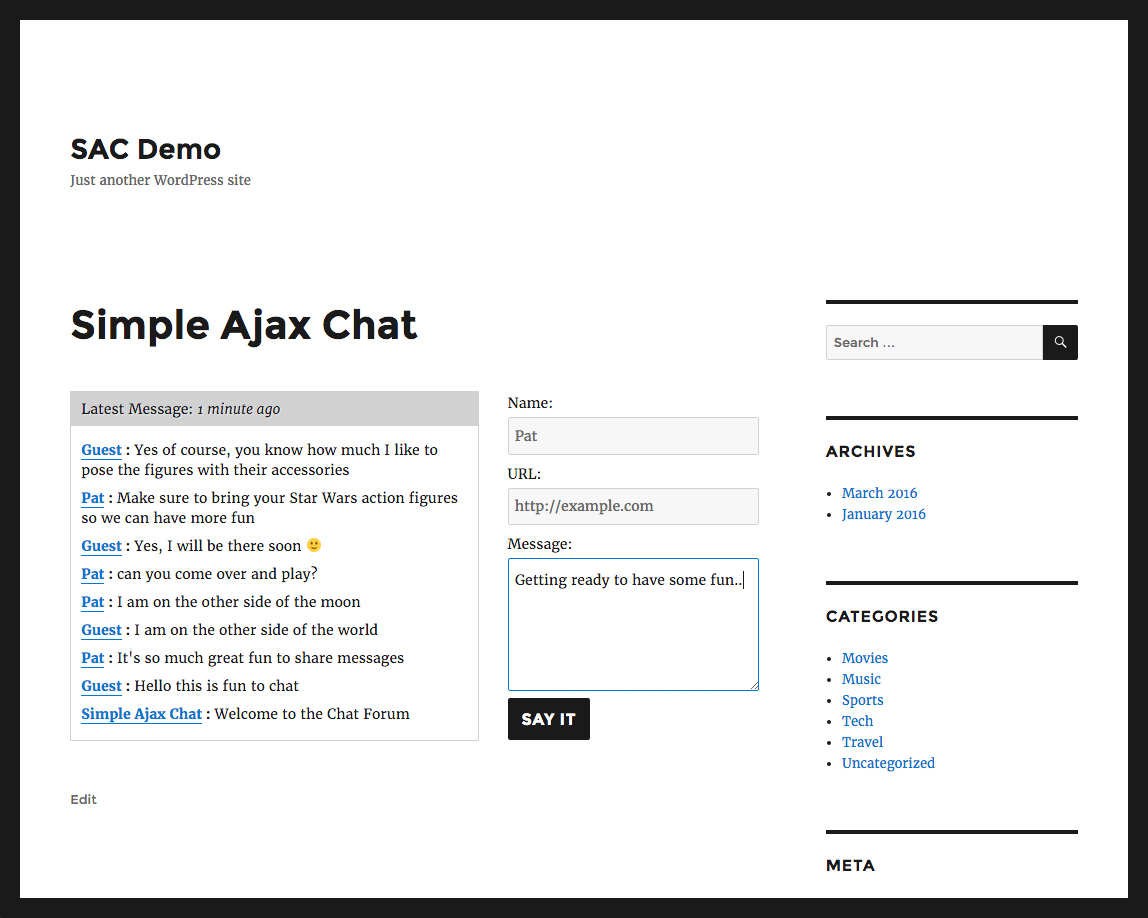

For developers
Is this your plugin? Show off the numbers.
Add a live badge to your site, docs or GitHub README. It updates on its own — no account needed.
Best Simple Ajax Chat alternatives
All ajax plugins →





FAQ
Simple Ajax Chat: quick answers
Straight answers, pulled from live WordPress.org data.
Live data from WordPress.org · checked Sep 27, 2026
Is Simple Ajax Chat free?
Yes. Simple Ajax Chat is free to download and use from the official WordPress.org plugin directory.
Is Simple Ajax Chat safe to use in 2026?
Yes — Simple Ajax Chat is a safe, well-maintained plugin to use in 2026. It runs on 2K+ sites, is rated 4.9/5 and was last updated 1 month ago, and scores 88/100 on our health check.
How many websites use Simple Ajax Chat?
Simple Ajax Chat is active on 2K+ WordPress websites and has been downloaded 183,397 times since it launched in November 2012. It was downloaded 1,956 times in the last 30 days.
Does Simple Ajax Chat work with WordPress 7.1?
Yes. The developer has tested Simple Ajax Chat up to WordPress 7.1.2, the latest release. It requires WordPress 4.7 or newer.
What PHP version does Simple Ajax Chat need?
Simple Ajax Chat requires PHP 5.6.20 or higher. Most hosts run PHP 8.x today, so it works on any modern WordPress hosting.
When was Simple Ajax Chat last updated?
The latest version, 20260827, was released on August 27, 2026 (1 month ago).
Who makes Simple Ajax Chat?
Simple Ajax Chat is developed and maintained by Jeff Starr.
What are the best alternatives to Simple Ajax Chat?
The most popular alternatives to Simple Ajax Chat are zipaddr-jp (50K+ installs), SearchWP Live Ajax Search (50K+ installs) and WP-Polls (40K+ installs).
Powered by PageForge
Want thousands of pages that rank like these? Build them in an afternoon.
This directory runs on the same engine as PageForge. Turn any spreadsheet, CSV or API into thousands of fast, SEO-ready WordPress pages — with schema, internal links and AI-written copy baked in.
- CSV, Google Sheets & API data sources
- AI content, schema & internal links per page
- Works with Elementor, Gutenberg, Yoast & Rank Math
- Free on WordPress.org — no credit card


