



Silent Publish
This plugin gives you the ability to publish a post without triggering pingbacks, trackbacks, or notifying update services.

Consider an alternative
Silent Publish shows warning signs in 2026 — compare the alternatives below before installing. It runs on 60+ sites, is rated 4/5 and was last updated 7 years ago, and scores 29/100 on our health check.
- Small user base (60+ active installs)
- Very few reviews so far
- No update in 6 years
- Only tested up to WordPress 5.3 (latest is 7.1)
Daily downloads
Download spikes usually follow a new release — each site that auto-updates counts as a download.
Rankings
Where Silent Publish stands todayWordPress.org search rankings
Live position in the plugin search, top 100| Keyword | Position |
|---|---|
| no ping | >100 |
| ping | >100 |
| publish | >100 |
| trackback | >100 |
| update services | >100 |
Version adoption
Share of active sites per release.
Rating breakdown
★★★★★★★★★★ 4 from 1 reviews
About Silent Publish
From the official readme · v2.8Description
This plugin gives you the ability to publish a post without triggering pingbacks, trackbacks, or notifying update services.
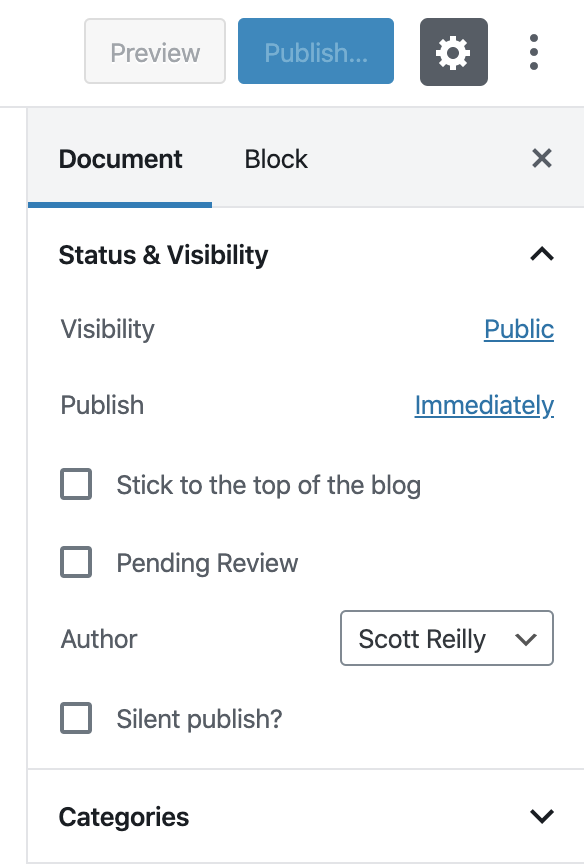
A “Publish silently?” checkbox is added to the “Add New Post” and “Edit Post” admin pages (the latter only for unpublished posts). If checked when the post is published, that post will not trigger the pingbacks, trackbacks, and update service notifications that would typically occur.
In every other manner, the post is published as usual: it’ll appear on the front page, archives, and feeds as expected, and no other aspect of the post is affected.
While trackbacks and pingsbacks can already be disabled from the Add New Post/Page page, this plugin makes things easier by allowing a single checkbox to disable those things, in addition to disabling notification of update services which otherwise could only be disabled by clearing the value of the global setting, which would then affect all authors and any subsequently published posts.
If a post is silently published, a custom field ‘_silent-publish’ for the post is set to a value of 1 as a means of recording the action. However, this value is not used after publish for any purpose as of yet. Nor is the custom field unset or changed if the post is later re-published.
Also see my Stealth Publish plugin if you want to make a new post but prevent it from appearing on the front page of your blog and in feeds. (That plugin incorporates this plugin’s functionality, so you won’t need both.)
Links: Plugin Homepage | Plugin Directory Page | GitHub | Author Homepage
Hooks
The plugin is further customizable via three filters. Code using these filters should ideally be put into a mu-plugin or site-specific plugin (which is beyond the scope of this readme to explain). Less ideally, you could put them in your active theme’s functions.php file.
c2c_silent_publish_meta_key (filter)
The ‘c2c_silent_publish_meta_key’ filter allows you to override the name of the custom field key used by the plugin to store a post’s silent publish status. This isn’t a common need.
Arguments:
- $custom_field_key (string): The custom field key to be used by the plugin. By default this is ‘_silent-publish’.
Example:
/**
 * Defines a custom meta key to be used by Silent Publish.
 *
 * @param string $custom_field_key The default custom field key name.
 * @return string
 */
function override_silent_publish_key( $custom_field_key ) {
    return '_my_custom_silent-publish';
}
add_filter( 'c2c_silent_publish_meta_key', 'override_silent_publish_key' );
c2c_silent_publish_default (filter)
The ‘c2c_silent_publish_default’ filter allows you to override the default state of the ‘Silent Publish?’ checkbox.
Arguments:
- $state (boolean): The default state of the checkbox. By default this is false.
- $post (WP_Post): The post currently being created/edited.
Example:
// Have the Silent Publish? checkbox checked by default.
add_filter( 'c2c_silent_publish_default', '__return_true' );
c2c_silent_publish_post_types (filter)
The ‘c2c_silent_publish_post_types’ filter allows you to override the post types that can be silently published.
Arguments:
- $post_types (array): Array of post type names.
Example:
/**
 * Disable Silent Publish for a custom public post type 'book'.
 *
 * @param array $post_types Array of post type names.
 * @return array
 */
function my_c2c_silent_publish_post_types( $post_types ) {
    $post_types = array_flip( $post_types );
    unset( $post_types[ 'book' ] );
    return array_keys( $post_types ).
}
add_filter( 'c2c_silent_publish_post_types', 'my_c2c_silent_publish_post_types' );
Installation
- Whether installing or updating, whether this plugin or any other, it is always advisable to back-up your data before starting
- Install via the built-in WordPress plugin installer. Or download and unzip
silent-publish.zipinside the plugins directory for your site (typicallywp-content/plugins/) - Activate the plugin through the ‘Plugins’ admin menu in WordPress
- Click the ‘Publish silently?’ checkbox when publishing a post to prevent triggering of pingbacks, trackbacks, or notifications to update services.
Changelog
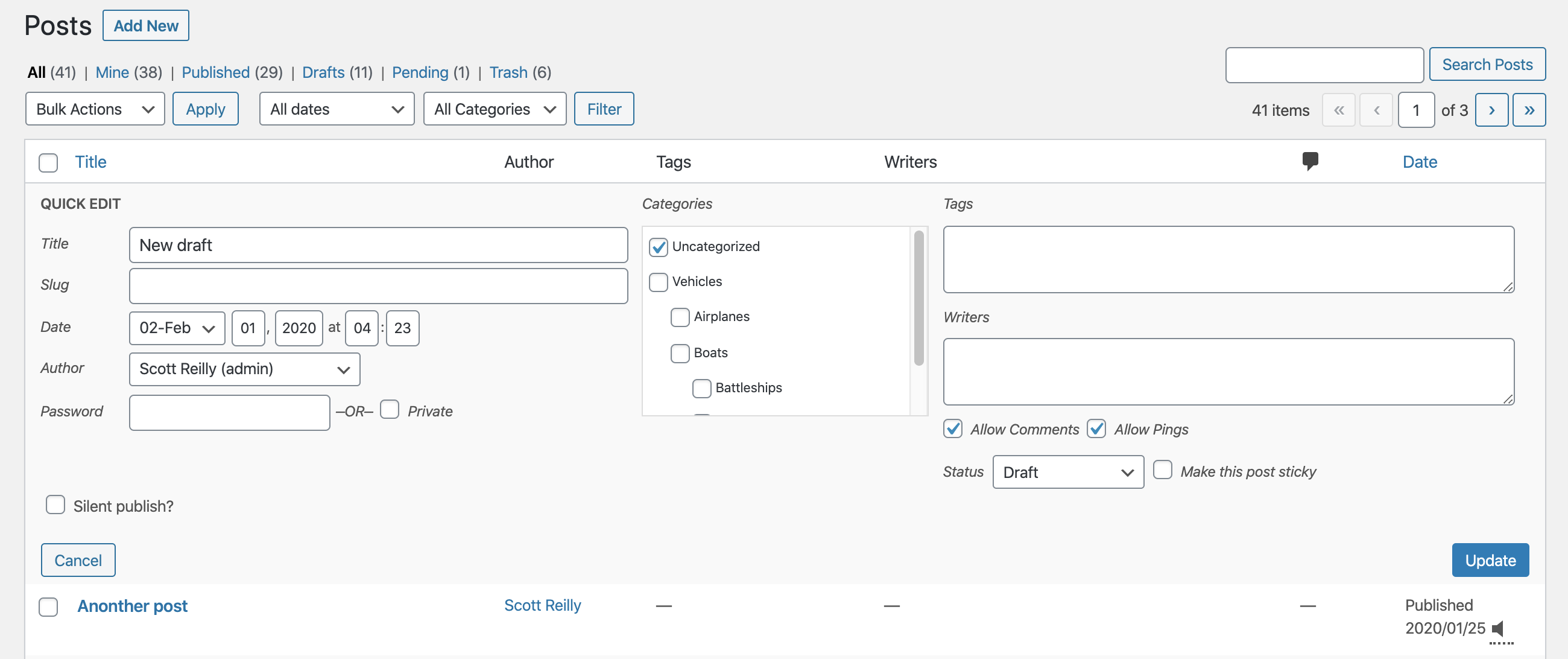
Feature update: added controls for silent publish in quick edit panel, added icon to post listing for posts set as silent published, showed message instead of disabled checkbox when editing silently published post, now support all public post types, noted compatibility through WP 5.3+, and more.
2.8 (2020-02-09)
Highlights:
- This feature-packed release adds support for setting and viewing the silent publish status in the quick edit panel, adds an icon indicator in the post listing for posts that were (or will be) silent published, shows a message instead of a disabled checkbox when editing a silently published post, adds support for all public post types, notes compatibility through WP 5.3+, and much more internally.
Details:
- New: Add icon to ‘Date’ column of post listing to indicate posts that were or will be silently published
- New: Allow the “Silent Publish?” value to be set and seen in the quick edit pane
- New: Add
add_to_quick_edit() - New: Add
admin_enqueue_scripts()
- New: Add
- New: Add
is_silent_published()to determine if silent publish is activated for a post - Change: Alter
is_silent_publish_on_by_default()to solely reflect the default state of silent publish for new posts - Fix: Don’t output field as if post was silently published if it wasn’t but the field default was filtered to be true
- New: Add TODO.md and move existing TODO list from top of main plugin file into it (and add more items to the list)
- Change: Show message instead of disabled checkbox when editing silently published post and show nothing for published posts that weren’t silently published
- Change: Enable plugin functionality for all public post types by default
- New: Add
get_post_types()for retrieving post types - New: Add filter
c2c_silent_publish_post_typesto filter post types
- New: Add
- Change: Don’t do anything for posts of a post type that is not public
- Change: Extract markup handling from
add_ui()into newoutput_field() - Change: Update JavaScript dependencies and rebuild JS code
- Change: Include ‘c2c-silent-published’ class for label when field is diabled
- Change: Remove unnecessary inline CSS that lowered opacity for disabled field
- Unit tests:
- New: Add helper function
create_post() - Change: Explicitly test priority value of hooks instead of simply that they’re set
- Change: Refactor some unit tests
- New: Add helper function
- Change: Note compatibility through WP 5.3+
- Change: Use full URL for readme.txt link to full changelog
- Change: Split paragraph in README.md’s “Support” section into two
- Change: Add link to CHANGELOG.md in README.md
- Change: Update copyright date (2020)
- New: Add 4 new screenshots (including for block editor UI) and update existing 2 screenshots
2.7 (2019-03-12)
- New: Add support for new block editor (aka Gutenberg)
- New: Add
is_silent_publish_on_by_default()to determine if silent publish should be enabled for posts by default - New: Add
register_meta()and properly register the existence of the post meta field - New: Add CHANGELOG.md and move all but most recent changelog entries into it
- New: Add inline documentation for hooks
- New: Add .gitignore file
- Fix: Check if there is actually a global post in
is_silent_publish_on_by_default()before attempting to use it - Fix: Use proper variable name when obtaining default meta key name
- Change: Initialize plugin on ‘plugins_loaded’ action instead of on load
- Change: Merge
do_init()intoinit() - Change: Update unit test install script and bootstrap to use latest WP unit test repo
- Change: Use
apply_filters_deprecated()to formally deprecate the ‘silent_publish_meta_key’ filter - Fix: Correct typo in GitHub URL
- Change: Note compatibility through WP 5.1+
- Change: Update copyright date (2019)
- Change: Update License URI to be HTTPS
2.6.1 (2018-07-12)
- New: Add README.md
- New: Add GitHub link to readme
- Bugfix: Fix a pair of unit tests by correctly applying
do_action()instead ofapply_filters() - Change: Minor whitespace tweaks to unit test bootstrap
- Change: Note compatibility through WP 4.9+
- Change: Rename readme.txt section from ‘Filters’ to ‘Hooks’
- Change: Modify formatting of hook name in readme to prevent being uppercased when shown in the Plugin Directory
- Change: Update copyright date (2018)
Full changelog is available in CHANGELOG.md.
Screenshots



For developers
Is this your plugin? Show off the numbers.
Add a live badge to your site, docs or GitHub README. It updates on its own — no account needed.
FAQ
Silent Publish: quick answers
Straight answers, pulled from live WordPress.org data.
Live data from WordPress.org · checked Sep 29, 2026
Is Silent Publish free?
Yes. Silent Publish is free to download and use from the official WordPress.org plugin directory.
Is Silent Publish safe to use in 2026?
Silent Publish shows warning signs in 2026 — compare the alternatives below before installing. It runs on 60+ sites, is rated 4/5 and was last updated 7 years ago, and scores 29/100 on our health check.
How many websites use Silent Publish?
Silent Publish is active on 60+ WordPress websites and has been downloaded 6,912 times since it launched in September 2010. It was downloaded 75 times in the last 30 days.
Does Silent Publish work with WordPress 7.1?
Silent Publish is officially tested up to WordPress 5.3.25, while the latest release is 7.1.2. It may still work, but try it on a staging site first.
When was Silent Publish last updated?
The latest version, 2.8, was released on February 14, 2020 (7 years ago).
Who makes Silent Publish?
Silent Publish is developed and maintained by Scott Reilly.
Powered by PageForge
Want thousands of pages that rank like these? Build them in an afternoon.
This directory runs on the same engine as PageForge. Turn any spreadsheet, CSV or API into thousands of fast, SEO-ready WordPress pages — with schema, internal links and AI-written copy baked in.
- CSV, Google Sheets & API data sources
- AI content, schema & internal links per page
- Works with Elementor, Gutenberg, Yoast & Rank Math
- Free on WordPress.org — no credit card


