



ShutterPress Gallery – Masonry, justified and grid galleries, lightbox and infinite scroll
WordPress gallery plugin for photographers. Create fast, responsive image galleries with Masonry, Justified, Grid, Lightbox, and Infinite Scroll.

Solid choice
ShutterPress Gallery is a solid plugin choice in 2026, with a few things worth checking first. It runs on 100+ sites, is rated 5/5 and was last updated 5 months ago, and scores 65/100 on our health check.
- Small user base (100+ active installs)
How does it stack up?
Side-by-side on installs, updates, ratings & support



Daily downloads
Download spikes usually follow a new release — each site that auto-updates counts as a download.
Rankings
Where ShutterPress Gallery stands todayWordPress.org search rankings
Live position in the plugin search, top 100| Keyword | Position |
|---|---|
| gallery | >100 |
| infinite scroll | #11 |
| lightbox | #86 |
| masonry | #30 |
| photography | #52 |
Version adoption
Share of active sites per release.
Rating breakdown
★★★★★★★★★★ 5 from 6 reviews
About ShutterPress Gallery
From the official readme · v1.8.2Description
WordPress Gallery Plugin
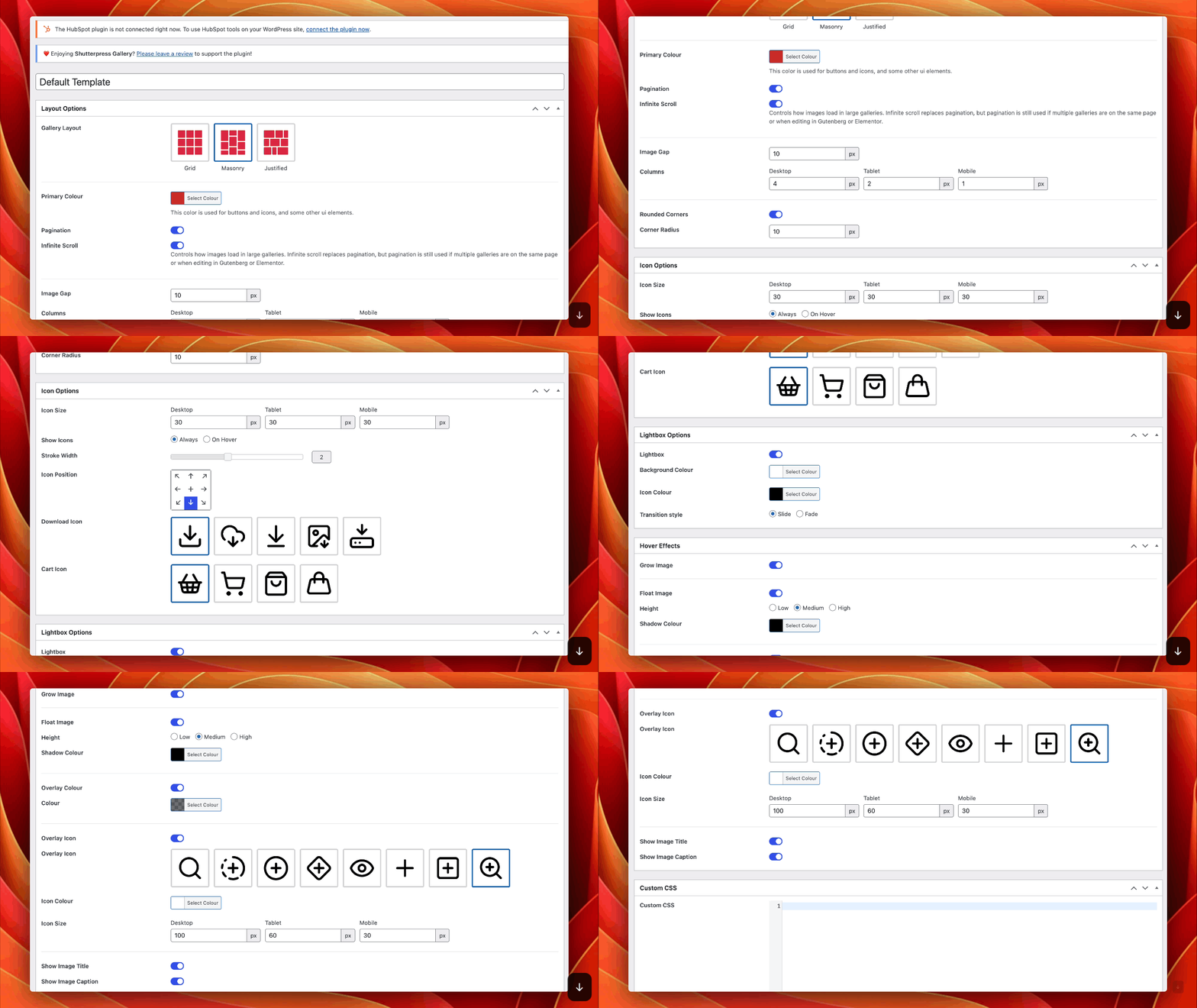
ShutterPress Gallery is a flexible, WordPress gallery plugin designed for photgraphers or artisits who need to share and deliver images online. Build stunning, responsive galleries with reusable Gallery Templates and fine-grained styling options that let you control colors, icons, and hover effects — all from an easy-to-use admin panel.
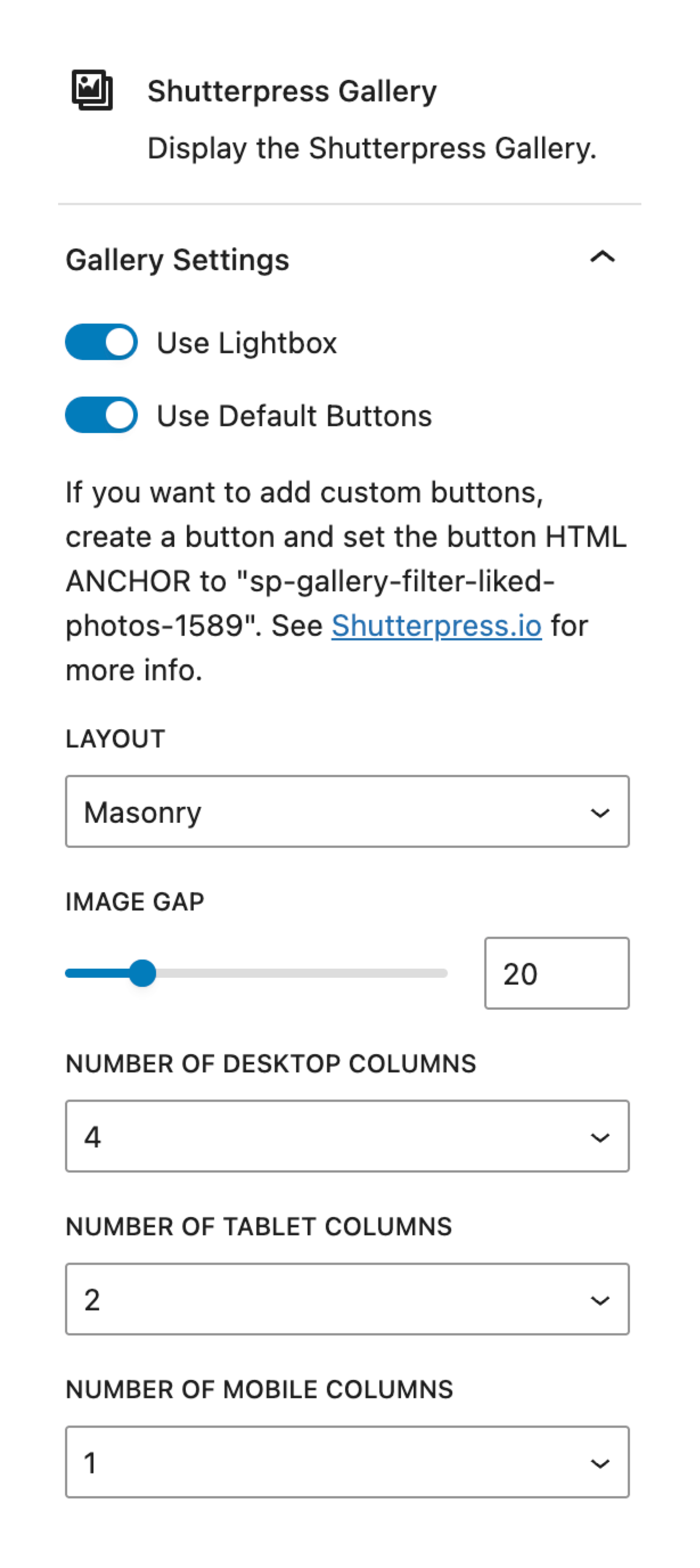
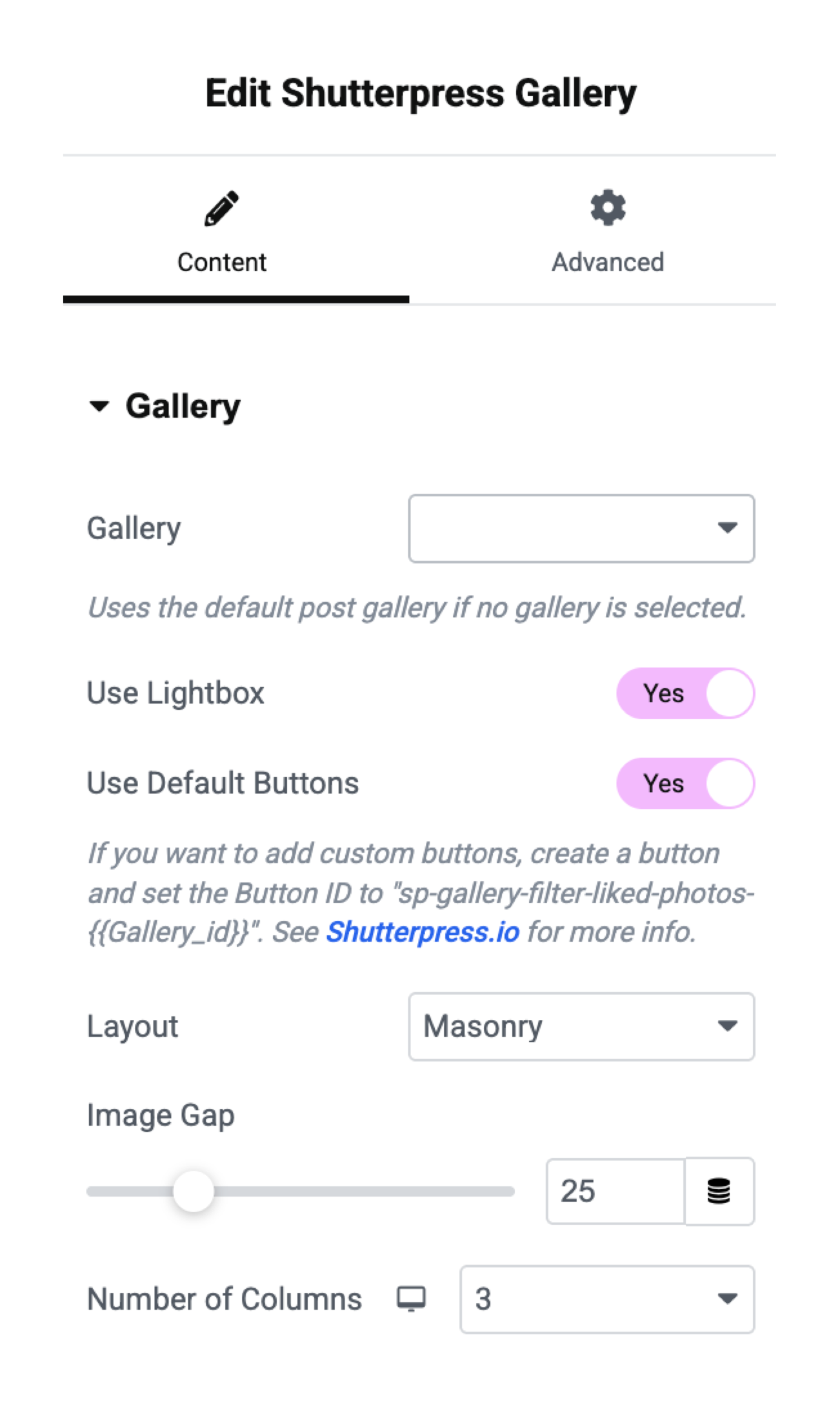
With built-in support for Gutenberg and Elementor, you can display each gallery on its own dedicated page, or embed it anywhere on your site using Gutenberg blocks, Elementor widgets, or shortcodes. Each gallery can be customized with templates, layout settings, and feature toggles, including optional favorites, downloads, and lightbox.
Key Features:
* Create unlimited photo galleries.
* Save time with reusable Gallery Templates.
* Choose from Grid, Masonry, or Justified layouts.
* Customize colors, icons, and hover effects with styling options.
* Enable Infinite Scroll for seamless browsing.
* Let users mark favorite images.
* Optional image download support.
* Display galleries via shortcode, Gutenberg block, or Elementor widget.
* Mobile-friendly and fully responsive.
* Lightweight and fast.
Perfect for:
* Wedding & event photographers.
* Studio galleries.
* Client delivery and proofing.
* Portfolio presentations.
Demos
Grid Gallery
Masonry Gallery
Justified Gallery
ShutterPress Gallery Pro
Take your galleries to the next level with ShutterPress Gallery Pro, a powerful extension of the ShutterPress Gallery plugin. Designed for professional photographers and advanced users, the Pro version unlocks a suite of features that enhance security, customisation, and client workflows. Whether you’re showcasing work for clients or managing large-scale projects, ShutterPress Pro offers tools to streamline your process and deliver a premium experience.
Pro Features:
- WooCommerce Integration: Sell your photos or prints directly from your gallery using WooCommerce integration.
- Watermarking: Automatically add customisable text or image watermarks to your photos to protect your intellectual property.
- Password Protection: Secure galleries with passwords, ensuring only authorised clients or viewers can access them.
- User Access Controls: Restrict access to galleries based on user roles or individual user permissions.
- Download Management: Enable clients to download the full gallery as a ZIP file.
- PDF Licensing: Include a downloadable PDF license agreement in gallery ZIP files for professional projects.
- Client Interaction Stats: Gain insights into gallery views, downloads, and client preferences with advanced statistics.
- Email Notifications: Notify clients automatically when their gallery is ready to view.
- Email Clients from Gallery: Quickly send emails to clients using reusable email templates linked to each gallery.
Why Upgrade to Pro?
ShutterPress Gallery Pro provides the tools you need to protect, manage, and monetize your galleries with ease. It’s the perfect solution for photographers looking to offer a seamless, professional experience to their clients while maintaining full control over their images.
Upgrade now and start leveraging these powerful features to enhance your workflow and client satisfaction.
Visit shutterpress.io for more information.
Whether you’re a professional photographer or an enthusiast, ShutterPress Gallery is the perfect tool for transforming your WordPress site into a visual gallery that showcases your unique creative vision.
Liking images and filtering in action
Usage
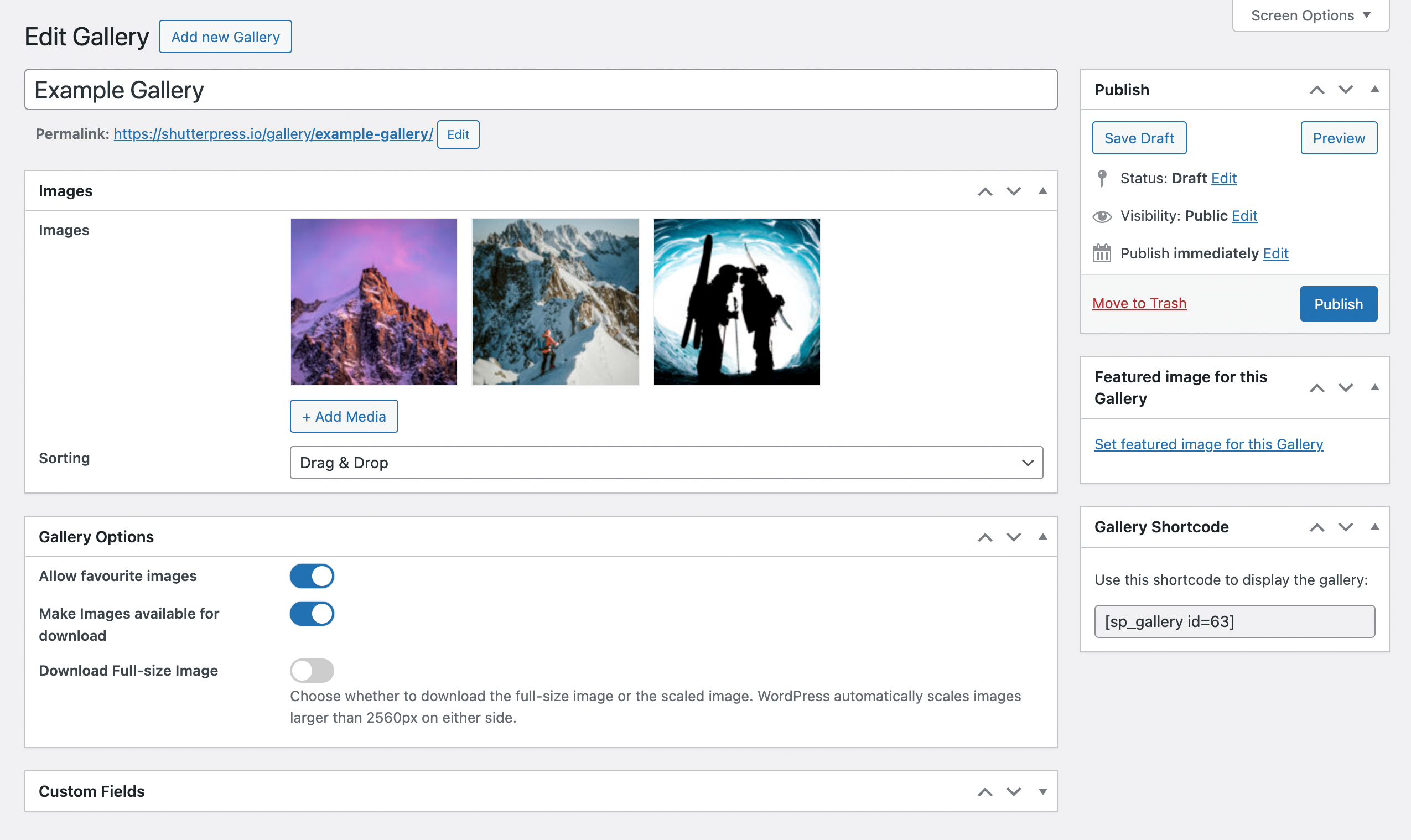
- Manage your galleries through the ShutterPress menu option. Create a new gallery, upload your photos, and customize the layout.
- View the gallery on your site at it’s own URL, your-website.com/gallery/your-gallery-name.
- Shortcode: Use the shortcode
[shutterpress_gallery id="your-gallery-id"]to display a gallery on any page or post. - Gutenberg Block: Alternatively, use the ShutterPress Gallery block in the Gutenberg editor to add a gallery directly to your post or page.
- Elementor Widget: If you’re using Elementor, you can add a gallery widget to any page or post.
License
This plugin is licensed under the GPLv2 or later. You can modify and redistribute it under the terms of the GNU General Public License.
This plugin includes a modified version of LightGallery, copyright © Sachin N. (https://www.lightgalleryjs.com/), distributed under the GNU General Public License v3.
• The original LightGallery source is available from the official project repository.
• This plugin may include modifications to LightGallery for integration with ShutterPress Gallery. These modifications are ©Rock Solid Communictions Ltd, 2025, and are likewise released under GPLv3.
Both the original and modified versions are free software. You may redistribute them and/or modify them under the terms of the GNU General Public License as published by the Free Software Foundation, either version 3 of the License, or (at your option) any later version.
Installation
- Upload the
shutterpress-galleryfolder to the/wp-content/plugins/directory, or install the plugin through the WordPress plugins screen directly. - Activate the plugin through the ‘Plugins’ screen in WordPress.
- Start creating stunning galleries with the SP Galleries menu option in the admin area.
Frequently asked questions
How do I create a gallery?
You can create galleries through the SP Galleries menu option in the WordPress admin dashboard. Once created, you can display them directly at their own URL or by using a shortcode or the Gutenberg block.
Can I choose different layouts for my galleries?
Yes, you can select between a masonry layout for a more artistic and free-flowing feel or a grid layout for a more structured display.
Can users download the images?
Yes, viewers can download images making it easy to access high-quality versions of your photos.
How do I display a gallery on a page or post?
Use the shortcode [shutterpress_gallery id="your-gallery-id"] or the ShutterPress Gallery Gutenberg block to embed your gallery anywhere.
What does the “favorite image” feature do?
The favorite image feature allows users to select and store their favorite image. Logged-in users’ preferences are saved in the database, while guests’ preferences are stored in cookies.
Can I password protect client galleries?
This can be done with the upcoming Shutterpress Pro Plugin or by using other wordpress plugins.
Changelog
Important - Add galley templates
1.8.2
- Fix – Update CSS to ensure that Elementor doesn’t override ShutterPress CSS
1.8.1
- New – Organize galleries with categories and tags, including columns in the gallery admin list
- Update – Add a Performance settings tab for controlling large-gallery loading behavior
- Update – Improve how gallery buttons are displayed so they appear once in blocks, shortcodes, and Elementor widgets
- Update – Refine gallery button styling and layout for a more consistent frontend display
- Fix – Make sure image virtualization stays off when it is disabled in the settings
- Fix – Improve debug setting handling so saved options are read more reliably
1.8.0
- Update – Add lightbox plugin and icon filter hooks for extending LightGallery integrations
- Update – Add gallery container and lightbox item data attribute filters for custom integrations
- Update – Add hooks to output custom content above and below gallery images, with dedicated wrapper containers and IDs
- Update – Add gallery data attributes for likes support and improve dynamic styles coverage for gallery companion containers
- Update – Add likes support to the LightGallery toolbar with synced state between gallery items and the lightbox
- Fix – Improve justified layout image sizing
- Fix – Virtualised image loading for appended gallery items
- Fix – Improve LightGallery likes state syncing on slide change and toolbar interactions
- Fix – Scope lightbox like handling to the active gallery instance to prevent cross-gallery state conflicts
- Fix – Restore vertical centering for table content in gallery before/after content areas
- Fix – Prevent block editor assets from loading on normal frontend requests and improve shortcode/content handling compatibility
1.7.12
- Fix – Adds compatibility with Avada/Fusion page builder
1.7.11
- Fix – RWMB_Custom_Image_Select_Field now allows for multiple fields
1.7.10
- Fix – Add Isotope layout mode registration guard to prevent conflict with other Isotope instances
Screenshots




For developers
Is this your plugin? Show off the numbers.
Add a live badge to your site, docs or GitHub README. It updates on its own — no account needed.
Best ShutterPress Gallery alternatives
All gallery plugins →



FAQ
ShutterPress Gallery: quick answers
Straight answers, pulled from live WordPress.org data.
Live data from WordPress.org · checked Oct 3, 2026
Is ShutterPress Gallery free?
Yes. ShutterPress Gallery is free to download and use from the official WordPress.org plugin directory. The developer also sells premium add-ons or a Pro version with extra features.
Is ShutterPress Gallery safe to use in 2026?
ShutterPress Gallery is a solid plugin choice in 2026, with a few things worth checking first. It runs on 100+ sites, is rated 5/5 and was last updated 5 months ago, and scores 65/100 on our health check.
How many websites use ShutterPress Gallery?
ShutterPress Gallery is active on 100+ WordPress websites and has been downloaded 5,826 times since it launched in October 2024. It was downloaded 384 times in the last 30 days.
Does ShutterPress Gallery work with WordPress 7.1?
ShutterPress Gallery is officially tested up to WordPress 7.0.6, while the latest release is 7.1.2. It may still work, but try it on a staging site first.
What PHP version does ShutterPress Gallery need?
ShutterPress Gallery requires PHP 7.4 or higher. Most hosts run PHP 8.x today, so it works on any modern WordPress hosting.
When was ShutterPress Gallery last updated?
The latest version, 1.8.2, was released on May 21, 2026 (5 months ago).
Who makes ShutterPress Gallery?
ShutterPress Gallery is developed and maintained by ShutterPress.
What are the best alternatives to ShutterPress Gallery?
The most popular alternatives to ShutterPress Gallery are Smart Slider 3 (800K+ installs), Slider, Gallery, and Carous… (500K+ installs) and Photo Gallery, Sliders, Pro… (300K+ installs).
Powered by PageForge
Want thousands of pages that rank like these? Build them in an afternoon.
This directory runs on the same engine as PageForge. Turn any spreadsheet, CSV or API into thousands of fast, SEO-ready WordPress pages — with schema, internal links and AI-written copy baked in.
- CSV, Google Sheets & API data sources
- AI content, schema & internal links per page
- Works with Elementor, Gutenberg, Yoast & Rank Math
- Free on WordPress.org — no credit card


