


Shogun Product Update Notifier for WooCommerce
Notify past buyers when a digital product is updated.

Use with caution
Shogun Product Update Notifier… works, but test it on a staging site before relying on it in 2026. Was last updated 3 months ago, and scores 49/100 on our health check.
- Small user base (<10 active installs)
- Very few reviews so far
How does it stack up?
Side-by-side on installs, updates, ratings & support



Daily downloads
Download spikes usually follow a new release — each site that auto-updates counts as a download.
Rankings
Where Shogun Product Update Notif… stands todayWordPress.org search rankings
Live position in the plugin search, top 100| Keyword | Position |
|---|---|
| digital products | >100 |
| email notification | >100 |
| product updates | >100 |
| woocommerce | >100 |
About Shogun Product Update Notifier for WooC…
From the official readme · v1.0Description
By default, WooCommerce does not notify your customers when you update a downloadable file or digital product. The Digital Product Update Notifier for WooCommerce solves this by letting you safely queue and broadcast update emails to past buyers with a single click.
Whether you have 10 past buyers or 10,000, this plugin is built for performance. Instead of crashing your server by sending emails sequentially on page save, it uses WooCommerce’s built-in Action Scheduler to process emails efficiently in the background.
Key Features
- Safe Background Processing: Uses Action Scheduler to queue emails, preventing server timeouts and crashes on large stores.
- Native WooCommerce Emails: Emails are sent using your store’s global WooCommerce sender details and inherit your native store styling (header, logo, footer).
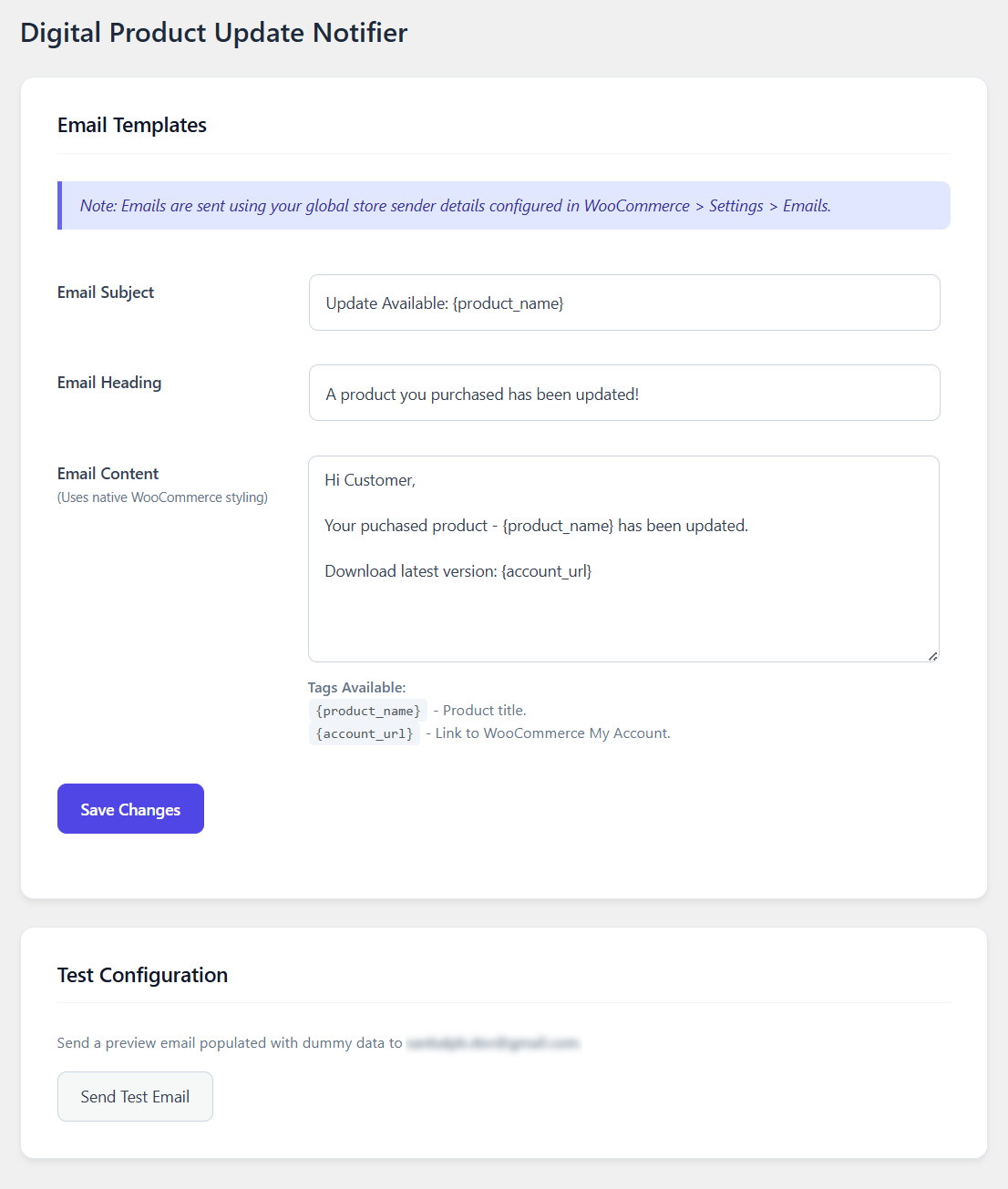
- Customizable Templates: Edit the email subject, heading, and body content directly from the WordPress admin area.
- Dynamic Tags: Personalize emails using
{product_name}and{account_url}variables. - Test Email Tool: Send a preview email to yourself before blasting your customer list.
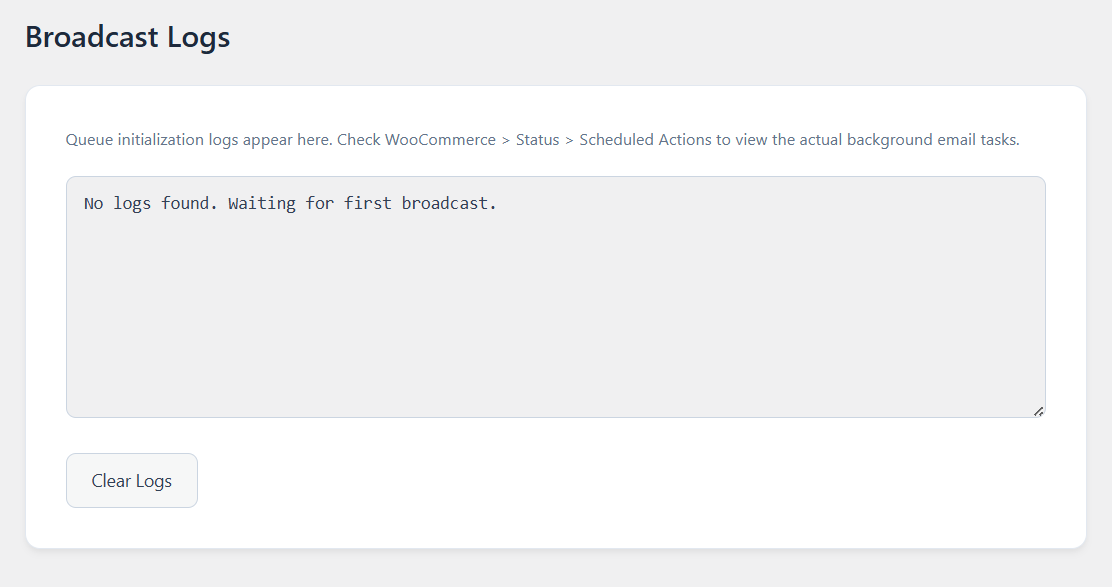
- Secure Broadcast Logs: Keep track of queue initializations right from your dashboard.
Installation
- Upload the
shogun-product-update-notifierfolder to the/wp-content/plugins/directory, or install it directly through the WordPress plugins screen via the.zipfile. - Activate the plugin through the ‘Plugins’ screen in WordPress.
- Go to WooCommerce > Update Notifier to configure your email template.
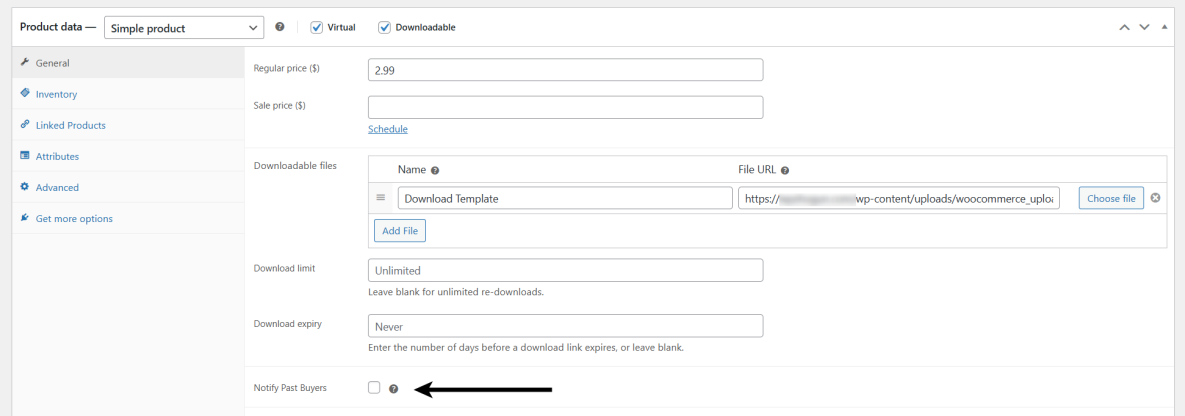
- When editing any Downloadable WooCommerce product, check the “Notify Past Buyers” box before clicking “Update” to trigger the broadcast.
Frequently asked questions
How do I know if the emails are sending?
When you trigger an update, the plugin logs the queue initialization in WooCommerce > Update Logs. Because it uses background processing, the actual emails are processed by WooCommerce over the next few minutes. You can monitor the real-time progress by going to WooCommerce > Status > Scheduled Actions and looking for the shogun_pun_process_single_email hook.
Where do the “From Name” and “From Email” come from?
To ensure maximum compatibility and brand consistency, the plugin automatically uses the global sender settings you have configured under WooCommerce > Settings > Emails.
Which tags are available?
Currently, you can use {product_name} to output the title of the updated product, and {account_url} to output the link to your store’s “My Account” page so users can log in and download their new files.
Does this work for physical products?
No. For safety and logic reasons, the “Notify Past Buyers” checkbox will only appear on products that have the “Downloadable” checkbox enabled.
Screenshots
For developers
Is this your plugin? Show off the numbers.
Add a live badge to your site, docs or GitHub README. It updates on its own — no account needed.
Best Shogun Product Update Notifie… alternatives
All digital products plugins →




FAQ
Shogun Product Update Notifier for…: quick answers
Straight answers, pulled from live WordPress.org data.
Live data from WordPress.org · checked Sep 30, 2026
Is Shogun Product Update Notifier… free?
Yes. Shogun Product Update Notifier… is free to download and use from the official WordPress.org plugin directory.
Is Shogun Product Update Notifier… safe to use in 2026?
Shogun Product Update Notifier… works, but test it on a staging site before relying on it in 2026. Was last updated 3 months ago, and scores 49/100 on our health check.
How many websites use Shogun Product Update Notifier…?
Shogun Product Update Notifier… is active on <10 WordPress websites and has been downloaded 513 times since it launched in April 2026. It was downloaded 81 times in the last 30 days.
Does Shogun Product Update Notifier… work with WordPress 7.1?
Shogun Product Update Notifier… is officially tested up to WordPress 7.0.6, while the latest release is 7.1.2. It may still work, but try it on a staging site first.
What PHP version does Shogun Product Update Notifier… need?
Shogun Product Update Notifier… requires PHP 7.4 or higher. Most hosts run PHP 8.x today, so it works on any modern WordPress hosting.
When was Shogun Product Update Notifier… last updated?
The latest version, 1.0, was released on June 29, 2026 (3 months ago).
Who makes Shogun Product Update Notifier…?
Shogun Product Update Notifier… is developed and maintained by Sankalp Bhagat (WP Shogun).
What are the best alternatives to Shogun Product Update Notifier…?
The most popular alternatives to Shogun Product Update Notifier… are Lemon Squeezy (500+ installs), Payhip – Sell Downloads (200+ installs) and SDP EU Withdrawal for WooCo… (50+ installs).
Powered by PageForge
Want thousands of pages that rank like these? Build them in an afternoon.
This directory runs on the same engine as PageForge. Turn any spreadsheet, CSV or API into thousands of fast, SEO-ready WordPress pages — with schema, internal links and AI-written copy baked in.
- CSV, Google Sheets & API data sources
- AI content, schema & internal links per page
- Works with Elementor, Gutenberg, Yoast & Rank Math
- Free on WordPress.org — no credit card


