


ShipWorks Connector for Woocommerce
Our plugin ShipWorks Connector allows Woocommerce to synchronize with Shipworks.

Safe pick
Yes — ShipWorks Connector for Woocomm… is a safe, well-maintained plugin to use in 2026. It runs on 200+ sites, is rated 4.8/5 and was last updated 3 weeks ago, and scores 80/100 on our health check.
- Actively developed — last update 3 weeks ago
- Tested with the latest WordPress (7.1)
- Momentum — downloads up 162.4% vs the previous 30 days
- Small user base (200+ active installs)
How does it stack up?
Side-by-side on installs, updates, ratings & support


Daily downloads
Download spikes usually follow a new release — each site that auto-updates counts as a download.
Rankings
Where ShipWorks Connector for Woo… stands todayWordPress.org search rankings
Live position in the plugin search, top 100| Keyword | Position |
|---|---|
| order manager | >100 |
| shipping manager | #52 |
| shipworks | #1 |
| woocommerce | >100 |
| woocommerce shipping | >100 |
Version adoption
Share of active sites per release.
Rating breakdown
★★★★★★★★★★ 4.8 from 10 reviews
About ShipWorks Connector for Woocommerce
From the official readme · v5.4.3Description
Our plugin ShipWorks Connector allows Woocommerce to synchronize with Shipworks.
Your orders in Woocommerce will be download in Shipworks with all information from your customer for the shipping and manage fully your orders in Shipworks.
Once you ship it from Shipworks, orders status will be modified in Woocommerce along with the tracking number.
Our plugin is free for any website then have less than 30 orders per month, after that, you will need to take a subscription on our website.
Subscribe for Unlimited Orders
Links
Installation Guide
Subscribe for Unlimited Orders
Compatible E-Commmerce software
- Woocommerce ( Minimum version 2.0, tested up to 11.0.1 )
Minimum Requires:
- WordPress 3.0 ( Minimum version 3.0, tested up to 7.1.0)
- Shipworks
Plugins Compatible With
- Woocommerce Composite Products (By SomewhereWarm)
- Woocommerce Sequential Order Numbers (By SkyVerge)
- Woocommerce Sequential Order Numbers Pro (By SkyVerge)
- Woocommerce Sequential Order Numbers (By WebToffee)
- Woocommerce Shipment Tracking (By WooCommerce)
- Woocommerce Checkout Field Editor (By WooCommerce)
- Woocommerce Product Add-ons (By WooCommerce)
- TM Extra Product Options plugin (By themecomplete)
- Woocommerce Bulk Discount (By Rene Puchinger)
- WooCommerce Dynamic Pricing (By Lucas Stark)
- Woocommerce Shipping Multiple Addresses (By WooCommerce)
- WooCommerce Cost of Goods (By SkyVerge)
- Woocommerce Order Status Manager (By SkyVerge)
- Twilio SMS notifications (By SkyVerge)
- AfterShip – WooCommerce Tracking (By AfterShip)
- Woocommerce Smart Coupons (By StoreApps)
- Advanced Shipment Tracking for WooCommerce (By Zorem)
Do you need another plugin to be compatible with Shipworks Connector for Woocommerce? Contact us on our website, via the live chat or the form.
Ship faster with integrated shipping tools
With the most complete shipping integrations available, your shipments get done faster so you can focus
your time on other aspects of your business.
Save time and enhance your customer service
ShipWorks includes support for viewing rates and transit times and printing live shipping labels from within ShipWorks. With direct integrations to Endicia, Express1, Fedex, Stamps.com, UPS, and USPS, ShipWorks is your one-stop solution for generating shipping labels for your orders with any of the major carriers. And since tracking numbers are automatically imported and saved, sending tracking emails and responding to customer calls is a snap.
Reduce costs by simplifying order processing
ShipWorks has proven itself to save hours per day in real world order fulfillment tasks. From the moment you begin using ShipWorks you will notice an intuitive interface that reduces order management to point and click. With its low learning curve and multi-computer networking support, you and your employees will be able to start taking advantage of ShipWorks right away. Every element of ShipWorks has been designed with an emphasis on time savings and usability, which ultimately translates into reduced costs for your business.
Work smarter with tools designed to make your life easier
ShipWorks offers unparalleled support for your computer peripherals. ShipWorks supports all standard inkjet and laser printers, as well as Eltron thermal printers. ShipWorks allows you to specify which printer and tray each print job should go to, greatly simplifying your printing process. And with zero-configuration support for most
scales, weighing your packages is always fast and accurate.
External services
This plugin connects to an API operated by Advanced Creation LLC at https://adv.design
to check the subscription status of your ShipWorks Connector licence. This check is
what allows the free version (up to 30 orders per month) and paid subscriptions to be
told apart.
What is sent: the domain name of your website only (the HTTP host of the request).
No order data, no customer data and no personal information are transmitted.
When it is sent: at most once every 24 hours when a site administrator loads a page in
the WordPress admin area, and when ShipWorks requests your orders.
This service is provided by Advanced Creation LLC (ADV Web Design).
Terms and refund policy: https://adv.design/terms-and-refund-policy/
Privacy policy: https://adv.design/privacy-policy/
Installation
- Go in your WordPress Plugins -> Search for Shipworks Connector
- Install + Activate it (Same plugin with the subscription)
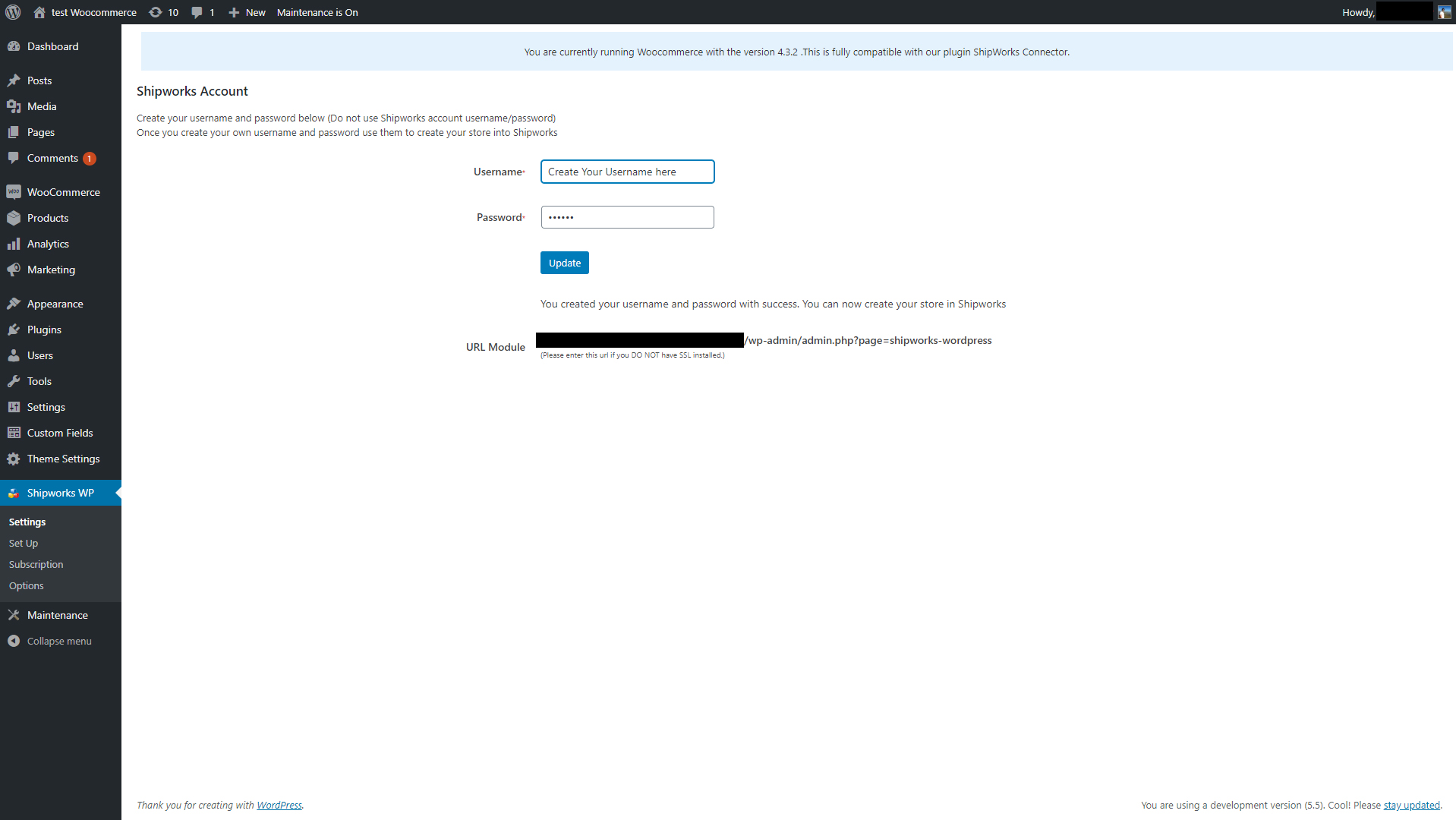
- Go in Shipworks Connector Tab -> Settings
- Create your own Username and Password
- Go in Shipworks Software on your computer
- Add a Store -> Add Username and password you just created
And you are all set!
Changelog
Removes support for Shopp, WP eCommerce, Cart66, Jigoshop and ShopperPress. Requires WordPress 5.5 or later. WooCommerce users are unaffected.
5.4.3
Download fix. Updating is recommended if your host runs PHP 8.
* Fixed a fault that could stop ShipWorks downloading orders on PHP 8. When a product had a blank cost, weight, dimension or option price, the plugin stopped partway through writing the order file and ShipWorks rejected the download. Blank numbers are now sent as 0.00, and every price, total, weight and dimension is sent with two decimal places and no thousands separator.
5.4.2
Maintenance and clean-up release.
* Support for five long-discontinued shopping carts has been removed: Shopp, WP eCommerce, Cart66, Jigoshop and ShopperPress. The plugin now targets WooCommerce only, which is what every current installation uses. If you still run one of those carts, stay on 5.4.1.
* The minimum WordPress version is now 5.5.
* A large internal security clean-up: every value the plugin prints is now escaped through the WordPress functions intended for it, and the remaining database queries were tightened. No change to the information sent to ShipWorks.
* Fixed several faults found while testing on PHP 8: a crash during shipment upload, order dates written as 1970 when a partner add-on was active, and a status update that silently failed on stores using WooCommerce’s high-performance order storage.
5.4.1
Maintenance release with one download fix. Updating is recommended if your host runs PHP 8.1 or newer.
* The plugin’s internal translation identifier now matches its name in the WordPress plugin directory. This is required for WordPress.org to deliver translations, and it clears the errors reported by the WordPress Plugin Check tool.
* The bundled French and Spanish translations were renamed to match. If you added a translation file of your own, rename it from shipworks-connector-XX_XX to shipworks-e-commerce-bridge-XX_XX so it keeps loading.
* The stated minimum WordPress and PHP versions now reflect what the plugin actually needs: WordPress 4.7 and PHP 7.4. The old figure of WordPress 3.0.1 was long out of date.
* Fixed a fault that could stop ShipWorks downloading orders on PHP 8.1 and newer. An order with an empty field, such as a blank second address line, produced a harmless PHP notice; on a site with debugging switched on that notice was written into the order file itself, so ShipWorks refused the whole download with “There are multiple root elements”. Empty fields are now handled properly, and the order file is protected so that no notice of this kind can corrupt it again.
5.4.0
Security and reliability update for the link between your store and our licence server.
* Your site now identifies itself using the website address saved in WordPress rather than the address supplied with each incoming request, so a visitor can no longer influence which site is checked.
* Licence requests are now signed and can only be used once, so a copied request cannot be replayed by someone else.
* The answer from our server is verified before it is trusted. A temporary network or server problem can no longer place a paying site on the free version by mistake.
* Repeated failed connection attempts from the same address are slowed down, which protects your store against password guessing on the ShipWorks connection.
* The plugin’s admin pages now confirm you are an administrator before they load.
5.3.3
Security release. Updating is recommended for all sites.
* Stronger protection of the connection between your store and ShipWorks: the connection is now refused when the plugin username and password have not been set up yet, and the password check is stricter.
* The order information sent by ShipWorks (order number, status, dates, tracking number, carrier) is now verified and cleaned before it is used, which better protects your store database.
* Removed a file included with the plugin that could weaken the security protections of your web server.
* The plugin Options page now confirms that a change was really made by a logged-in administrator from that page, so settings cannot be altered by an outside request.
* Errors are no longer hidden from your server log, so your host can diagnose a problem more easily.
Nothing changes in the way you use the plugin: your settings and your existing ShipWorks connection are kept as they are.
5.3.2
- Fixed issue with plugin WooCommerce Sequential Order Numbers Pro from SkyVerge
Screenshots


For developers
Is this your plugin? Show off the numbers.
Add a live badge to your site, docs or GitHub README. It updates on its own — no account needed.
Best ShipWorks Connector for Wooco… alternatives
All order manager plugins →FAQ
ShipWorks Connector for Woocommerce: quick answers
Straight answers, pulled from live WordPress.org data.
Source: WordPress.org
Is ShipWorks Connector for Woocomm… free?
Yes. ShipWorks Connector for Woocomm… is free to download and use from the official WordPress.org plugin directory.
Is ShipWorks Connector for Woocomm… safe to use in 2026?
Yes — ShipWorks Connector for Woocomm… is a safe, well-maintained plugin to use in 2026. It runs on 200+ sites, is rated 4.8/5 and was last updated 3 weeks ago, and scores 80/100 on our health check.
How many websites use ShipWorks Connector for Woocomm…?
ShipWorks Connector for Woocomm… is active on 200+ WordPress websites and has been downloaded 46,752 times since it launched in August 2013. It was downloaded 622 times in the last 30 days.
Does ShipWorks Connector for Woocomm… work with WordPress 7.1?
Yes. The developer has tested ShipWorks Connector for Woocomm… up to WordPress 7.1.0, the latest release. It requires WordPress 5.5 or newer.
What PHP version does ShipWorks Connector for Woocomm… need?
ShipWorks Connector for Woocomm… requires PHP 7.4 or higher. Most hosts run PHP 8.x today, so it works on any modern WordPress hosting.
When was ShipWorks Connector for Woocomm… last updated?
The latest version, 5.4.3, was released on October 26, 2026 (3 weeks ago).
Who makes ShipWorks Connector for Woocomm…?
ShipWorks Connector for Woocomm… is developed and maintained by AdvancedCreation.
What are the best alternatives to ShipWorks Connector for Woocomm…?
The most popular alternatives to ShipWorks Connector for Woocomm… are Order Manager (40+ installs), Easy Order (<10 installs) and LIS (<10 installs).
Powered by PageForge
One template and a spreadsheet. A real page for every search.
PageForge turns each row of a CSV into a WordPress page with its own title, URL, SEO fields and schema, built on the layout you already designed. Free on WordPress.org.
- CSV and XLSX, plus Google Sheets on Professional and Enterprise
- Its own title, URL, SEO fields and schema for every page
- Works with the block editor, Elementor, Divi and Avada
- Free on WordPress.org, no credit card